Same here. Can’t start Engine 1 with the Quadrant
It’s been solved, I’ve been writing the same solution and over again in many topics. I don’t feel like writing it again.
Check here …
I may be really stubid, but I didn’t find anything of this issue.
Under general SU5 Issues … TCA (Thrustmaster) hardware - can’t start engine
thanks alot!
Do we have news about the crank/norm/ign start switch? After WU6 is it now possible to maket the switch fully functional and if yes, does anyone have a settings screenshot?
Yeah, it’s working. It was working even SU5, this is how I set it up in SU5 and it works the same way in WU6.
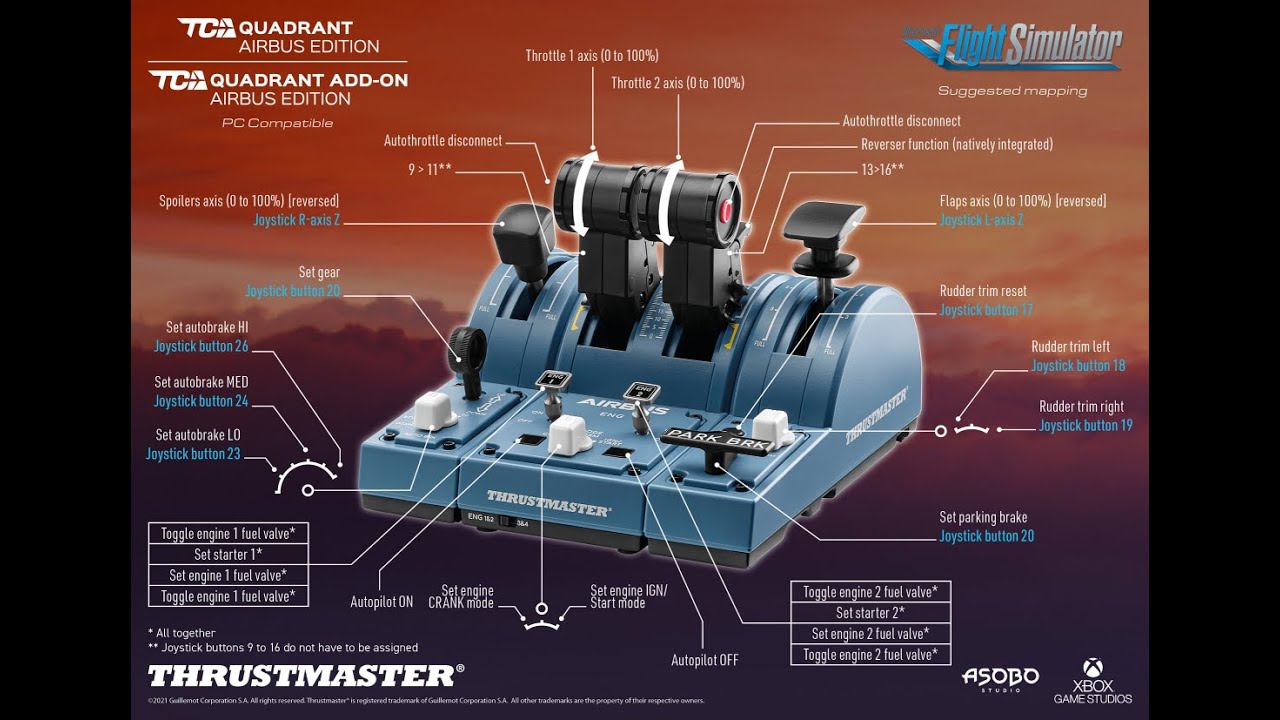
Thanks for sharing. Just did this and it all works perfectly now. After too many hours of fiddling and frustration it looks like I finally have MSFS back to the good working order I had it in, prior to Update#5. It was very late when I had a quick check to see whether everything, including customised bindings, appeared OK - I’ll be undertaking an actual VR flight in the next 24 hours to see whether, in practice, all is back to normal again. The one bugbear that definitely remains is that any spoiler adjustment on the physical TCA quadrant is not visualised in the cockpit view - I can’t quite understand why we can see the flaps lever movement in the cockpit but not the spoilers, as I imagine that it’s exactly the same programming task… Beats me! Because I only fly with a VR headset, it’s really annoying that I can’t just look down to visually check what my spoilers are set to and have to blindly feel the lever to work out what the spoilers are set to. Has anyone solved this issue?
What are your binding settings for the spoilers? I’m not using VR but mine move visually as they should when I move the TCA lever.
If you set it to use spoilers axis, it should move in the cockpit. Albeit with a slight delay.
But what I found using the spoiler axis is that it’s conflicting with any actions done to the spoilers. For example, I can’t seem to arm the spoilers because the spoilers axis is in a retracted position. And the autospoilers never deploy also because the spoilers is in the retracted position and it overrides everything else.
That’s why if you look at my video above, I unbind the spoilers from the axis, and use the virtual buttons as the digital commands for the spoilers.
I arm the spoiler by pulling the lever into the second detent. And I can fully deploy the spoilers in full position. And when I’m done I just push it back to retracted position and it’ll retract. Without axis position to override it. I can deploy both autospoilers and manual spoilers.
With the drawback of not being able to set a manual gradual position of the spoilers. (Which I never do anyway).
Since I’m using FS2Crew now, my copilot handles the flaps and spoilers so I had to remove the bindings again so that the controls isn’t fighting the copilot inputs.
I just have the spoilers on the default axis. I’m still looking into doing what Neo4316 does for the spoilers or I might goes as far as the other solution (can’t recall who had that idea) of modifying the .cfg file to get them working correctly - arm-able in some AUTO BRK rotary knob positions (along with the autobrake) but also still step-able via the spolier lever. Before I get into that I’m still battling some more fundamental “screwed-up-after-SU5-and-still-not-fixed-in-SU6” issues: (1) AUTO BRK rotary knob has no effect even though bound correctly; (2) RUD TRIM rotary knob doesn’t trim the rudder any more, even though bound correctly (oddly, though, the rotary knob moves in the cockpit view, but the digital display of the rudder trim setting doesn’t change i.e. it has not effect): (3) I had bound Button 5 to bring up the in-cockpit drop-down menu ribbon and it no longer works, even though it’s bound as before (but just to make it more interesting, I had Button 6 on the other side of the ENG START rotary know bound to ACTIVE PAUSE and it still works as before). The point to make here is that all of these buttons worked perfectly with the same bindings before SU5.
UPDATE: I just went back into the sim and - without me having done anything! - Button 6 (still bound to ACTIVE PAUSE!!!), now brings up the in-cockpit menu ribbon and Button 5 now does nothing… It must be MSFS because the TM control panel still shows the right button actions. Oh - and the RUD TRIM is working properly now without me doing anything, but that might change again, of course…
The whole thing is the proverbial dog’s breakfast of a mess…
Thanks, Neo4316.
As I said in another reply, I’m yet to get to re-mapping along the lines you did. The (minor) issue of the spoiler lever not moving in the cockpit view is not a SU5 or 6 issue - this specific animation has never worked for me. The flaps lever always moved in the cockpit view (and does again now).
I haven’t looked at this, but I wonder whether removing any keyboard (and/or mouse?) bindings for the specific functions I can’t get to work on the quadrant/add-on might make a difference?
When I go into the TM Control Panel every button does what it’s supposed to, so there is no hardware issue. I did notice that Button 27 (spoiler RET position) stays lit while in that position, which makes sense, I guess. I started a flight with the lever slightly pulled back from the RET position but it didn’t change anything.
All of this stuff is slowly driving me nuts… I had the whole set-up humming before SU5… (save for the spoiler animation - never had that working, although the spoilers work fine functionally).
UPDATE: I just tried something else with the spoiler lever: I moved it with the mouse in the cockpit view and now the lever moves in concert with the quadrant add-on lever, so I’ll need to do that at the beginning of every flight and then I’ll be fine.
Yes… A general rule is do not have the same command bound to two or more different keys/hardware. So if you have the spoilers setup in the quadrant side, make sure you unbind any spoiler commands from the sidestick, keyboard, controller, etc. Never have conflicting commands from multiple hardware.
For me, I have a clean Keyboard profile. Nothing bound to my keyboard, other than Toggle Pause bound to ESC key. And nothing else. So all my throttle controls are only bound to my Throttle Quadrant, My Flaps axis only bound to my flaps addon, the spoilers only apply to my spoilers in the quadrant. landing gear only to my landing gear switch in the quadrant.
You can bind one key to do multiple commands (eg. Engine mode switch bound to Engine Mode IGN/START and Set Beacon Lights). But do not bind multiple keys to one command. (eg. Spoiler lever from the spoilers quadrant bound to the Spoilers Axis, while also having [/] bound to extend spoilers which in conflict with one another.
For me, I have a blank Keyboard Profile with only Toggle Pause to ESC button bound.
Mouse is Default profile.
TCA Airbus Sidestick is a custom profile I configure from scratch.
TCA Throttle Quadrant+Addon is taking from Default profile which I modified by removing the Spoilers Axis to replace it with digital inputs for Retract Spoilers, and Arm Auto Spoiler. While also adding Beacon Lights to my Master Engine Switch and Engine Switch modes (so that it’s automatically turn on whenever I want to start the engine and when Engine 2 is running, which will turn off automatically as soon as I cutoff the engine.
Hi.
You confirmed what my instinct told me, so I’ll clean out the keyboard bindings, except for a couple that won’t cause any conflict – such as the one you mention and the VR view reposition.
Two things still have me puzzled: one is the AUTO BRK rotary switch, which used to work OK* but now doesn’t work at all. Even trying to “trick it” to get going as I can do with the spoilers doesn’t work.
*when it was working before it didn’t light up the switches in the cockpit at every step, but I could set the autobrake to low, medium, high with the rotary dial (some clicks just
didn’t have any effect).
The other is the rudder trim rotary switch (I note that the post SU6 hotfix supposedly fixes the rudder trim reset – I haven’t tried that yet); whereas before SU5 a twist to the left or right would increment the rudder trim by 0.2 per click with immediate effect on the aircraft yaw, I now have to hold it until it gets well into double digits and even then it barely has an effect. It’s basically ineffective – it will be interesting to see if removing the KB bindings fixes that.
I’ll have a go at the above tonight, so it’ll be interesting to see what happens.
I’m also having to do a lot of work to get the VR settings right – despite all the promises of performance increases via SU5, my VR performs more poorly and the visual quality has dropped considerably – so trying to fix that is also a big focus for me. I have not seen anything so far that suggests an in-game performance improvement – the only aspect that is noticeably faster is the game load once I have configured my flight ad am ready to fly. For me, the overall visual quality is way down on what it was prior to SU5. I’m trying to get to the bottom of that.
Really appreciate your advice! Thanks.
My Autobrake rotary switch is working when I’m using the FBW A32NX aircraft. I do remember that it doesn’t work on the default Asobo A320. But since I never fly that aircraft anymore anyway, it’s not that big of a deal to me. It’s also less relevant for me now since I’m starting to use FS2Crew app, which I have a copilot with me who’s helping me to the switches and the checklist callouts.
I do still need to setup the autobrake manually on approach, but my rotary switch still works in the FBW A32NX aircraft. Except for Max Autobrake that is not usable when you’re still in the air as designed.
As for the rudder trim, I don’t have an answer to that since I never use the rudder trim myself.
All controls of the TCA quadrant work with FBW A32NX and that’s good for me.
Also Rudder trim, Reset, Autobrake, Engine Mode IGN/Start, etc.
Rudder trim only works when autopilot is off and that’s as it should be.
The standard Asobo A320 is a lo level airliner so i never use that plane.
So here’s a new one (at least for me) and would love anyone’s expertise on what the heck is going on.
I haven’t made any new changes to any bindings in the past 3 weeks. All works great with my TCA Quadrant Officer Pack for the FBW A320 as well as the 787 and 747 (I have separate profiles created for each, since obviously Airbus vs Boeing, etc.)
So today, I spawned with FBW Dev version (latest dev) and I can’t get my engine crank/norm/ign/start to work properly. When I move the lever over to IGN/START, the button does not move.
So I went into my settings, re-verified everything, still can’t get it to work. I tried a different airplane livery thinking maybe there was something with the one I was using. Nope. I re-downloaded FBW’s dev version, nope.
However, and here’s the weird part, if I switch my controller profile from my 320 profile back to DEFAULT profile, it works fine – yet the bindings are ALL the same. I see no difference between DEFAILT and 320 profiles for Crank, Norm, IGN/START bindings.
What gives? Could my profile just be corrupted?
Yes, for the throttle quadrant, there’s probably some hidden bindings underneath the default profile to get the landing gears, and engine mode selectors to work. With SU5 and WU6 and their subsequent hotfixes, they’ve reworked the TCA quadrant default profile. So whatever profile you had before may now no longer work.
For the quadrant, the best practice is to use the default profile, and duplicate it then make your own adjustments. Leave the bindings as is for the ones that you don’t need to adjust.
3 Likes
Thanks Neo. I ended up doing exactly that and it worked. So odd as I never made a change and it worked just fine a week or two ago. Anyways, fixed.