Thrustmaster TPR Pedals not working correctly with SU 2 (braking)

Description of the issue:
Pedals are configured to work inverted. Means, when I press the pedal it breaks.
The graphical simulation is correct - Pedal goes down, when I press it and returns, when I release it.

However, when I release the parking brake and the plane moves, as soon as I start to break (even a little) with the pedals, the planes gets slower and brakes completly, even when I release the brakes.

My “fix”: I activate the parking prake and deactivate it, than the plane starts moving again. However, as soon as I start to break, the plane comes to a complete hold. Release of the brake pedals is not recognized.

I tried all possible settings in the hardware panel on msfs 2024 - no success.

I tried it also with and without the Thrustmaster TPR drivers. No change in the behaviour.

My conclusion: Must be a bug

My observation: If I don’t use the “invert option” on the hardware page (msfs 2024): the brake is working, when I don’t press the pedals and the brakes are released, when I press the pedals. So it “works”. However, it must work in the opposite way.

Rudder is working fine. It’s just the brake. And you know, how annoying it is, if you can’t use the brakes while taxing.

Using the SU2. No mods are installed

How often does this occur for you: every time

Please list clear steps you took in order to help our test team reproduce the same issue:

  1. attach Thrustmaster TPR Pedals
  2. Configure left pedal for the left brake
  3. Configure right pedal for the right brake
  4. Invert both settings, so when I press the pedals, the brake activates. When I release the pedals, the brake is not released

What peripherals are currently plugged in?
Thrustmaster Yoke Pack Boing Edition

No developer mode.
root cause and workaround

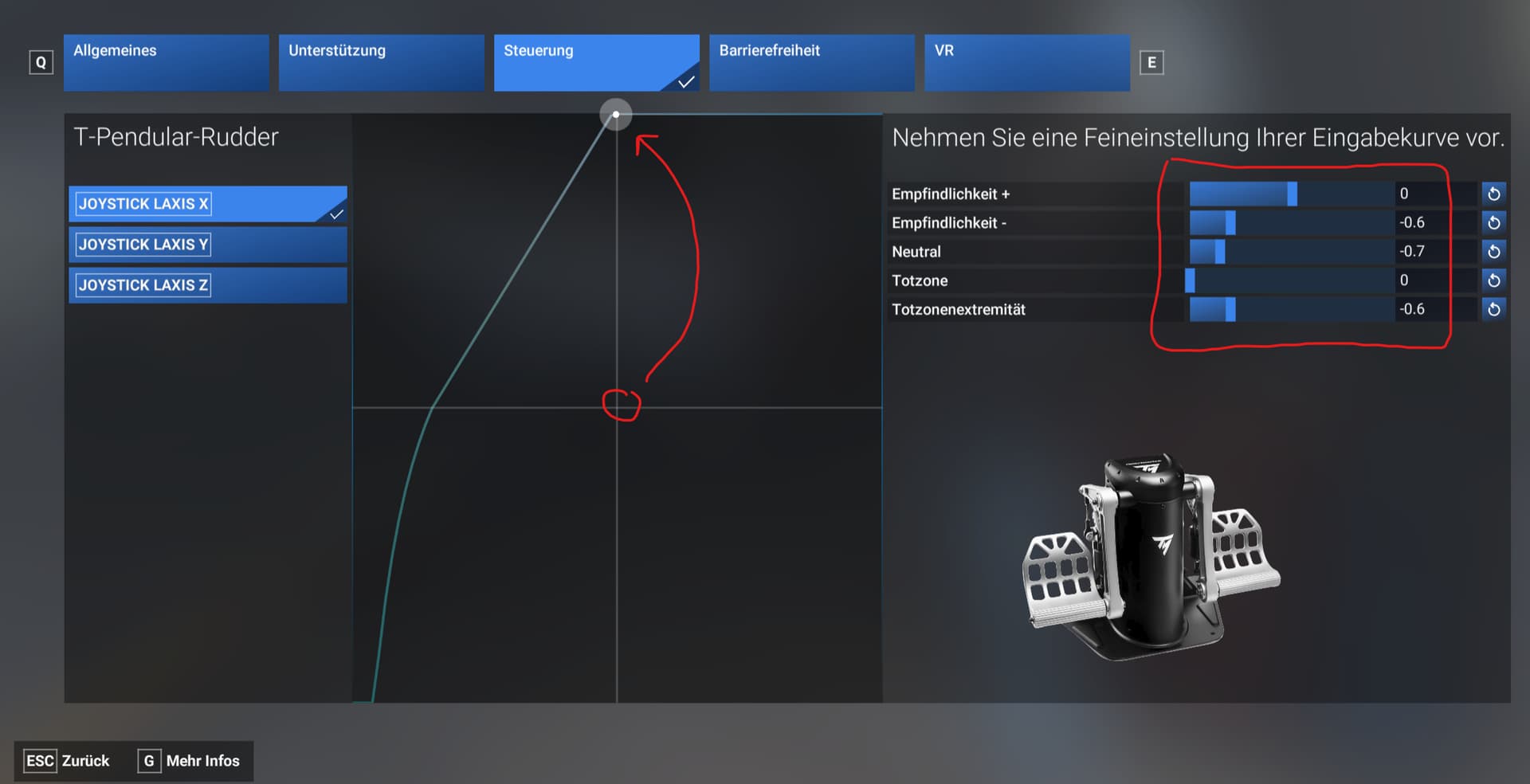
Root cause for that problem is, that the pedals only use half of the axis. Releasing the brakes only half, means they are not released.

The problem might be the thrustmaster driver. Once installed, you can see, that only half of the axis is used.

There are two workarounds I have found:

  1. Uninstall the Thrustmaster TPR Driver (Warthog-Drivers). You can use the windows driver for the Thrustmaster TPR. When you use the Windows Driver, you can do a calibration on the TPR with all extends of the pedals. After that, the whole axis can be used. I have to check how stable this workaround is or if I have to recalibrate everytime I start Windows…

  2. You can use follwing settings in the MS FS 2024 T-Pendular-Rudder Config.It enables the whole axis for braking. The settings have to be applied to both pedals and it works for me.

It would be great, if there would be more support in MS FS 2024, so we can easily shift the center point. So far I have to say it is not a bug of MS FS 2024.

Screenshot with Settings (it is in german but I guess you know where to make the changes):

This solution doesn´t work for me. The TPR works perfect on 2020. On 2024 the brakes go crazy. It seems like when they are in idle the are pushed, then you start to push them and they go up until 50% and from that point they go back to pushed. I have tried everything you have said here but no results. Any help?

Br, Rogaji

I might need to give this a go. I’ve got the TFRP pedals and what I notice is that on 2020, you feel like you have to push the toe brakes through half of their range of motion before they will start to have an effect and from there it’s nice and gradual. But on FS24, it doesn’t take much of a push for them to launch into action and bring the aircraft to a screeching halt