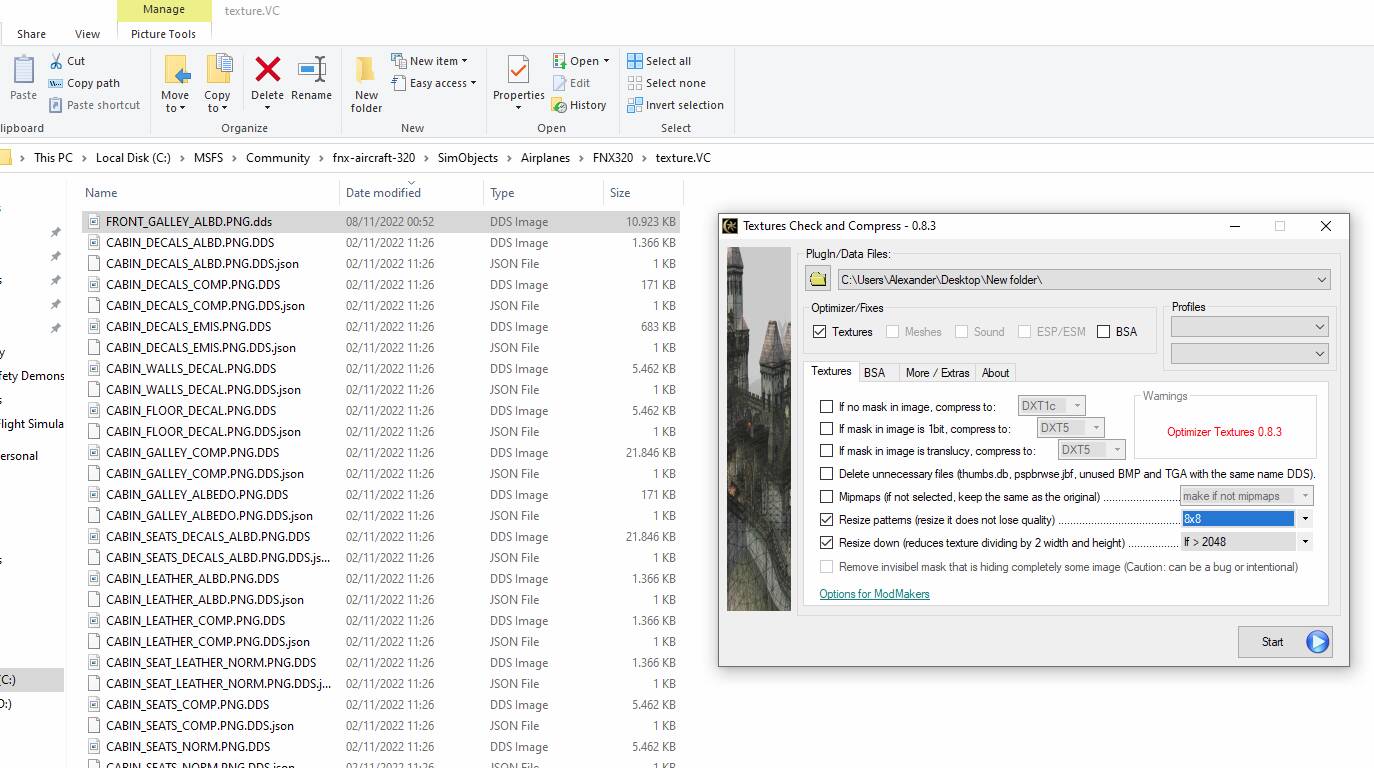
Well here’s a big tip.
For reasons beyond my comprehension the Fenix still has the Front Galley stored in the virtual cockpit. You can’t see it in the virtual cockpit, but it takes up a staggering ~40MB of texture where other panels in the VC only use up a maximum of some 21MB.
It then functions somewhat as a memory leak, applying too much memory to a panel you can’t see. It was reported to Fenix upon the first release of the A320 but they haven’t done anything with it (yet?).
So, here’s what I do upon every update of the Fenix.
- I run a free tool called Orenado
- I head to the Fenix VC texture map.
- Move the file ‘Front Galley ALBD’ to a temporary map on my desktop
- Point the Orenado program to that map
- Ask it to resize the texture (see setting on print screen)
- I move the file back to the Fenix VC texture map
- And it saves me about 8 FPS when happy flying again.
No texture files were harmed during the explanation of this Fenix tip
You won’t notice any graphical difference at all. It just seems to be an oversight or bug. Must be Dave’s microwave in that Front Galley or something.