Also having the same issue. Please fix all my airbus are broken on medium settings
LMFO, A300 is way better
I have the same issue on ALL Airbus cockpits. A320neo [inibuilds], A321, A330. I also use an RTX 2000s card (RTX 2060) and I also have issues with the white screen, where only the following loads:
PFD CPT/FO: Speedtape, Vertical Speed, Heading
STBY INDICATOR: Altimeter, Barometric setting
ND: None
UPPER ECAM: Everything but the engine thrust indicators
LOWER ECAM: All icons
Same, all inis broken.
Its getting annoying how unrealiable this piece of software works.
1 Like
Do you have the same issue if you follow the OP’s steps to reproduce it?
•
Provide extra information to complete the original description of the issue:
• I have not complete white screens but partly with the Airbus 320 neo V2
If relevant, provide additional screenshots/video:
•
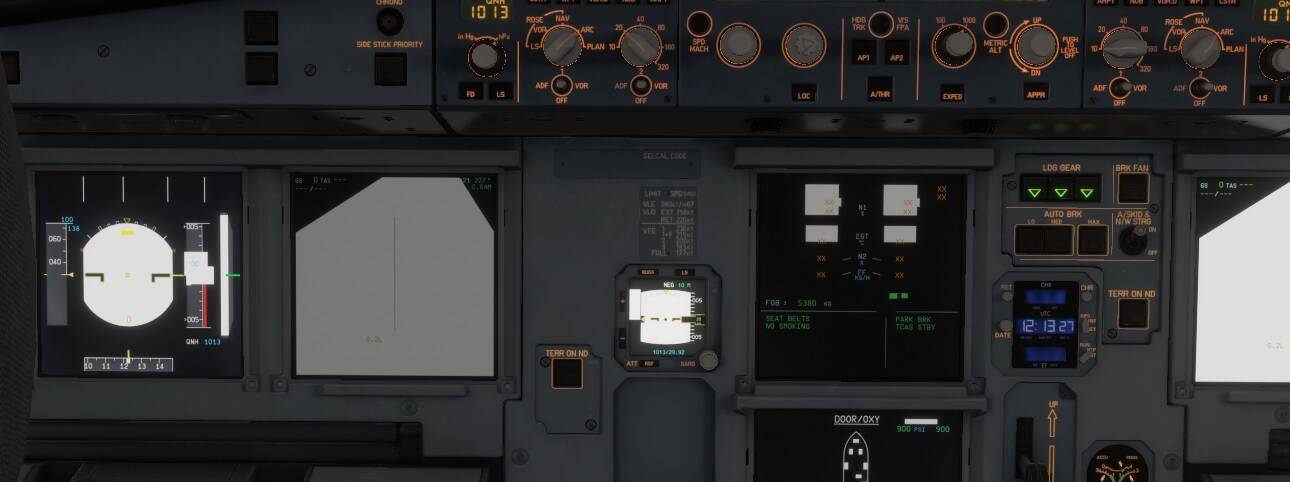
1 Like
I have the iniBuilds A300-600, but it locks up / freezes the sim every time I go back to the main menu. It’s a known bug that supposedly has been fixed, but the fix was not released in this last patch so I don’t fly it much yet. It’s not “way better” until the bug is fixed.
2 Likes
Also the A300 has the frequency bug that happens on IVAO or VATSIM (some frequencies don’t work and you can’t contact that ATC) as other Ini aircraft have (Antonov 225 p.e.)
Fenix is waaay better. It really is top 1
2 Likes
It works if I increase the resolution to high but I need it on medium otherwise I get a stuttershow.
Just tested it:
for me Low and Medium textures are broken,
High and Ultra work but I cannot use them without massive frame loss
4 Likes
The workaround mentioned above works. Start the flight with Texture Resolution on High, change it back to Medium but don’t restart the sim when prompted. Your avionics will still work but you won’t get a stutterrific experience.
Not ideal, but it will have to do until MS/Asobo fixes the issue after the holiday season. At any rate, I’ll be off tomorrow to spend Christmas and New Year’s with family, so I won’t have my rig for a couple of weeks or so. Fingers crossed the issue is sorted by the time I get back (or at least gets sorted shortly afterwards)!
3 Likes
i have the same problem sadly i only have 2070 medium is all i can do
OP here, a 2080 user. “increase your texture resolution setting to high” not possible for us!
See the above post for a workaround to get it working even on low or medium.
Do you have the same issue if you follow the OP’s steps to reproduce it?
•
Provide extra information to complete the original description of the issue:
• The displays work fine until the IRS aligns, then this happens. Every.Single. Time. In every iniBuilds Airbus
If relevant, provide additional screenshots/video:
•
1 Like
You can decrease them back to whatever works for you once the flight has begun.
Is nevers annonced is fixed, is fix with next patch/sim update 1
Its been 4 days and i still cant fly any airbus… just waiting for a new uodate again i guess
1 Like
I’m asking myself what kind of regression testing Microsoft and Asobo programmers do before releasing “improvements”. They don’t care to make mistakes continuously
1 Like
LMFO, you know Fenix still not Native 2024 build ? A300 Premium is first Study Level build with 2024 SDK
Fenix still build with 2020 SDK is only VFX is 2024 is a Add On package
as mentioned by every one else I got the same problem with medium texture resolution but i cant set it to high because my GPU VRAM will be full and load it all off to Normal ram that will make my CPU crash. Pls fix the fast before the end of the year now that we have some spare time to fly.
2 Likes
Do you have the same issue if you follow the OP’s steps to reproduce it?
•
Provide extra information to complete the original description of the issue:
•
If relevant, provide additional screenshots/video:
•
I have the same issue soon after the update. Exactly like the screenshot.