The toolbar panels selected in cockpit view remain visible when switching to external view. From the notes, this appears to have been officially added in, but it ruins my VR experience and for me a serious retrograde. Is there any way I can return to the pre-SU4 system of the panels not appearing in external view. I’ve searched all the options, cleared the cache, emptied the C/F and even reinstalled SU4.
Yes this needs reversing or at least making an option as I find it visually unappealing to see windows floating in external cams, completely ruins pictures and such a faff to close them all then reopen again when back in cockpit.
Sometimes I do wonder if they even properly play test these design choices.
Ya this is dumb. I just noticed this the other day. I turned off the hud in external view. Someone add this to the wishlist please! so dumb that we have to wish for things to change back. Did they have a poll that asked VR folks if they would want this??
Its because AI is doing the work. No real person is checking it.
I’ve submitted a ticket to Zendesk asking for it to be reversed or at least switchable. Don’t suppose it’ll get much priority, though.
Actually, I’m amazed that there hasn’t been an explosion of complaints. Surely the content providers are gong to have something to say about it?
See related wish: Remove Toolbar Panels in VR external view
Which option exactly?
We mean here the panels in external view not the HUD (the instruments).
Oh sorry, nevermind then! Misunderstanding. I agree!
I agree, spoils immersion and photos 
I have come across another annoying bug when in 3rd person or the rear view behind any aircraft any VR toolbar panels that you have open show on the outside of the aircraft in VR.
I am using the Meta Quest 3s. Its a major immersion killer especially when they get in the way of trying to see the scenery outside the aircraft. It also happens when you get out of the aircraft to walk around. They have to be closed manually It happens to any panels that are open.
The ones i have open i regularly use (namely FSKneeboard and the in game ATC Panel i have put these in as an example.
It would be awesome if these could stay inside the aircraft (like they do in MSFS 2020)
Please the screenshot below:
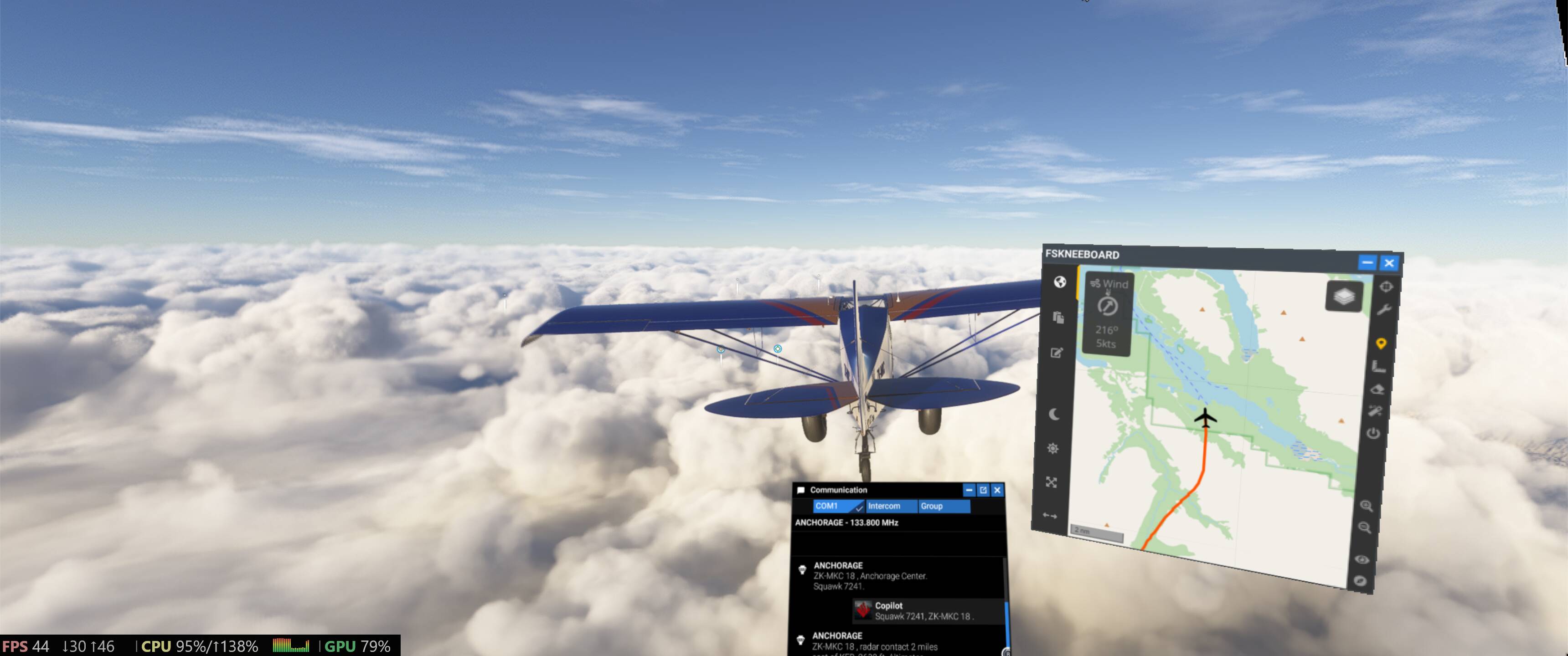
To reproduce:
-
Open MSFS 2024 and select any aircraft and destination and begin the flight in VR
-
Once the flight has loaded and you are the VR cockpit open any VR Toolbar panel
-
Exit the plane to walk around or go to the outside view like i have shown above in the screenshot
-
You will see the issue…
Computer specs etc. aren’t relevant at all as this is a software issue.
Note the toolbar in the bottom left corner doesn’t matter as that is my setting and this doesn’t cause an issue
See related wish: Remove Toolbar Panels in VR external view