Please add the msfs-2020 or msfs-2024 tag to your post, depending on which sim your post is about.
Anyone using 14 inch touchscreens for your panels? Looking to buy 2 HGFRTEE Portable Monitor Touchscreen 14", 1920x1200 monitors, like to hear what other users think, are they too small, should one stick with 1920 x 1080 instead? Thanks for any advice given.
msfs-2020
I use 2 x 15 inch 1080 touchscreens and they are fantastic to use and cheap as well. They sit underneath a 34 inch widescreen and give me on screen one, to the left of my yoke, the TDS GTN750xi and 650xi. The experience of using these is thus a real World experience and is unbelievably good. There is also room left over for other supplementary programs as well.
Screen 2 sits on the right of my FFB yoke and displays the software for this, but I run Navigraph charts on top of it and this too, works really well with touchscreen operation. Likewise with Little NavMap.
Because the main 34 inch sim monitor is full screen, I always have access to the Windows Taskbar and can see at a glance whether all of the relevant side programs like Axis and Ohs, Streamdeck, Simbrief, etc are open and instantly available.
There now some cheap 18 to 24 inch touchscreens available as well and thouhg I shouldnt, I keep looking at one of these!
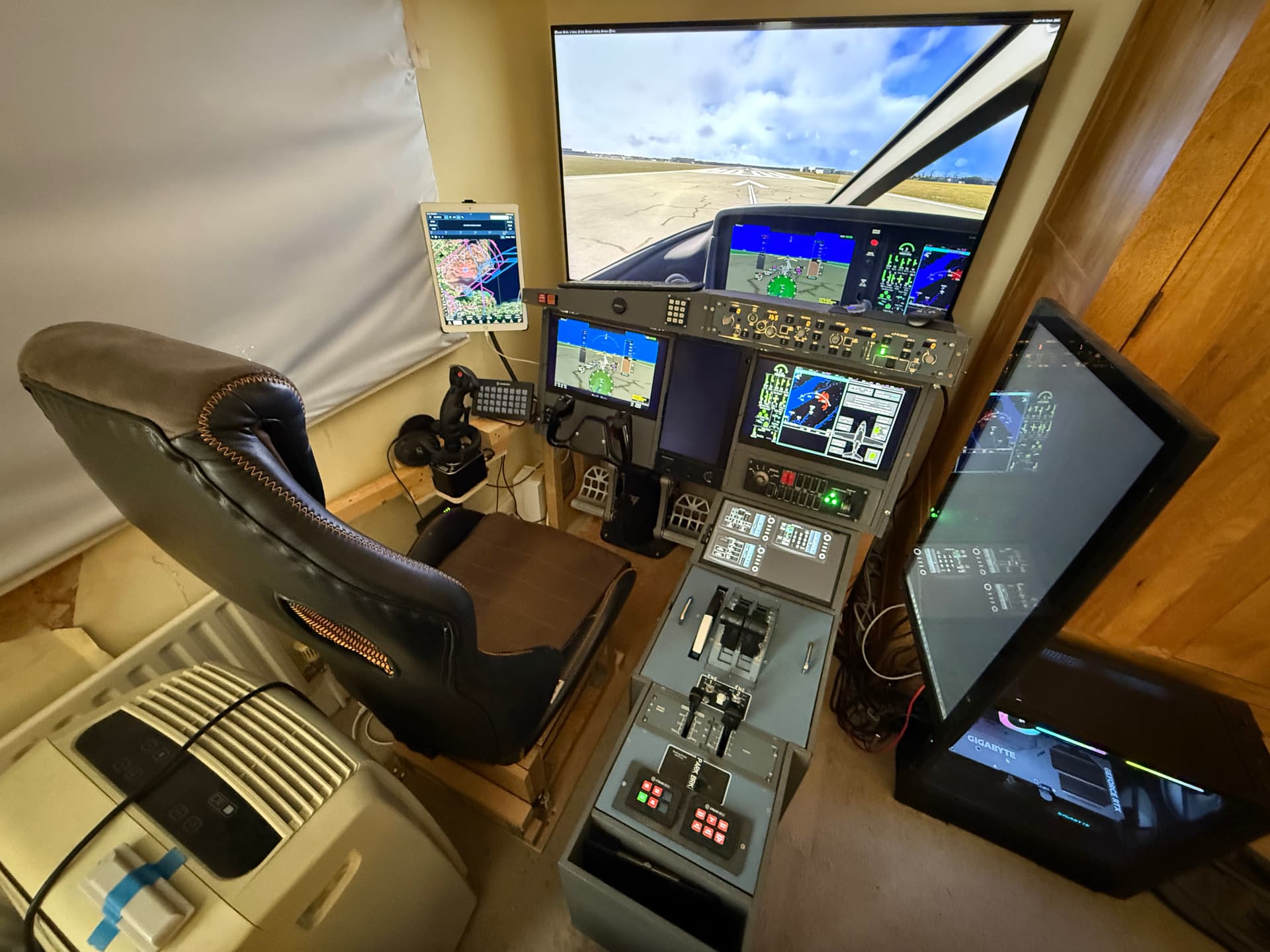
Depends on what you’re using them for and where you’re going to put them. I have a home cockpit set-up with a self-built console and main instrument panel, and in that setup I currently have:
2 x 15" touchscreen (1920 x 1080) which are for PFD / MFD
1 x 13" touchscreen (1080 x 1920 in portrait) which goes in between the above
1 x 14" touchscreen (1920 x 1080) which goes in my pedestal unit
Plus a large 24" touchscreen monitor (traditional, not gaming) off to the right on a monitor arm, this is my main Windows desktop screen and also allows me to put big Air Manager panels on it like the Longitude pedestal. And an iPad Pro off to the left, not a PC touchscreen but I can use it as such with SpaceDesk if I want.
I picked the screen sizes to fit the space available to put them in, and the resolution to be common Windows resolutions. So for example I preferred 1920 x 1080 for the 16:9 aspect ratio. But then for my next-gen home cockpit, which is a complete rebuild, I’ve bought and will use a pair of 15" 16:10 1920 x 1200 screens because that’s the resolution and ratio used by the real Garmin G3000/5000 systems that I most commonly want to use popped-out, and I’ll avoid the black bars to the sides that I have in this photo:
They have been there for years and I cant exactly remember as I am nowhere near the PC at present, but @BoboSkypark for one would soon put you right with a definitve answer on this.
I used to simply remove the GTNgauge from the comm folder in 2020 (which is all that I use) and that would let you place the GTNn wherever you liked, but he did tell me a more elegant way to do it. A very knowledgeable and helpful guy, that one.
I currently have two old 9" iPads. They are less than optimal for PFD/MFD.
First off, I can’t get Windows to recognize them as touchscreens, which was the whole point of getting them. I think I need to invest in some real 1920x1200 touchscreens. I have two available DP outputs on my GPU.
When I bought the 16:10 screens I couldn’t really find anything on Amazon in the UK, so I ordered these from AliExpress shipping from China, which took a few weeks to get here:
Now when I look on Amazon I see quite a few similar products (and one which I think is actually the same monitor under a different brand) which are quite a bit cheaper. Seems like this particular spec - 14" 1920x200 with touch - has become popular.
(I went with 14", rather than 16" which seems to be the other available size, because the real Garmin units are 14" diagonal.)
I use only 4 pop-out panels. My touch monitors are 25". This makes my panels much larger than actual. No squinting or over-touching with my fingers. I was using a 13". Moved that over to my mini-pc.
If you purchase two actual touchscreens, all you have to do is run the TDS software in standalone mode and drag to the touchscreens. You can use Spacedesk on the iPads to run the TDS GTNs and get touch functionality.
Thanks for your response, I think I will do a full scale layout of the instrument panel I want to build, and then decide on the size and placement of the monitors. One of the reasons I’m thinking 14 inch is because there is a 12.5 x 5.2 inch touchscreen I may try to work in at the top of my panel, useful for back up flight instruments as in the DA40 or even the ap/fd panels in the Airbus jets, if I use 15 inch monitors the inst panel will be too high. So many monitors; so little time!
I guess I need to try SpaceDesk again, because I couldn’t get iPad touch functionality with it in the past. That was with FS2020, so maybe it’s different now.