If it takes “a few updates” to fix it this time there will a lot simmers even more unhappy/angry than they are already.
3 Likes
I actually just noticed this as well when I did a google search. Crazy how they let an old bug return
Voted, stopped flying FS 2020 as i cant fly with TIR. Back to DCS and ED…hoping for a quick fix.
3 Likes
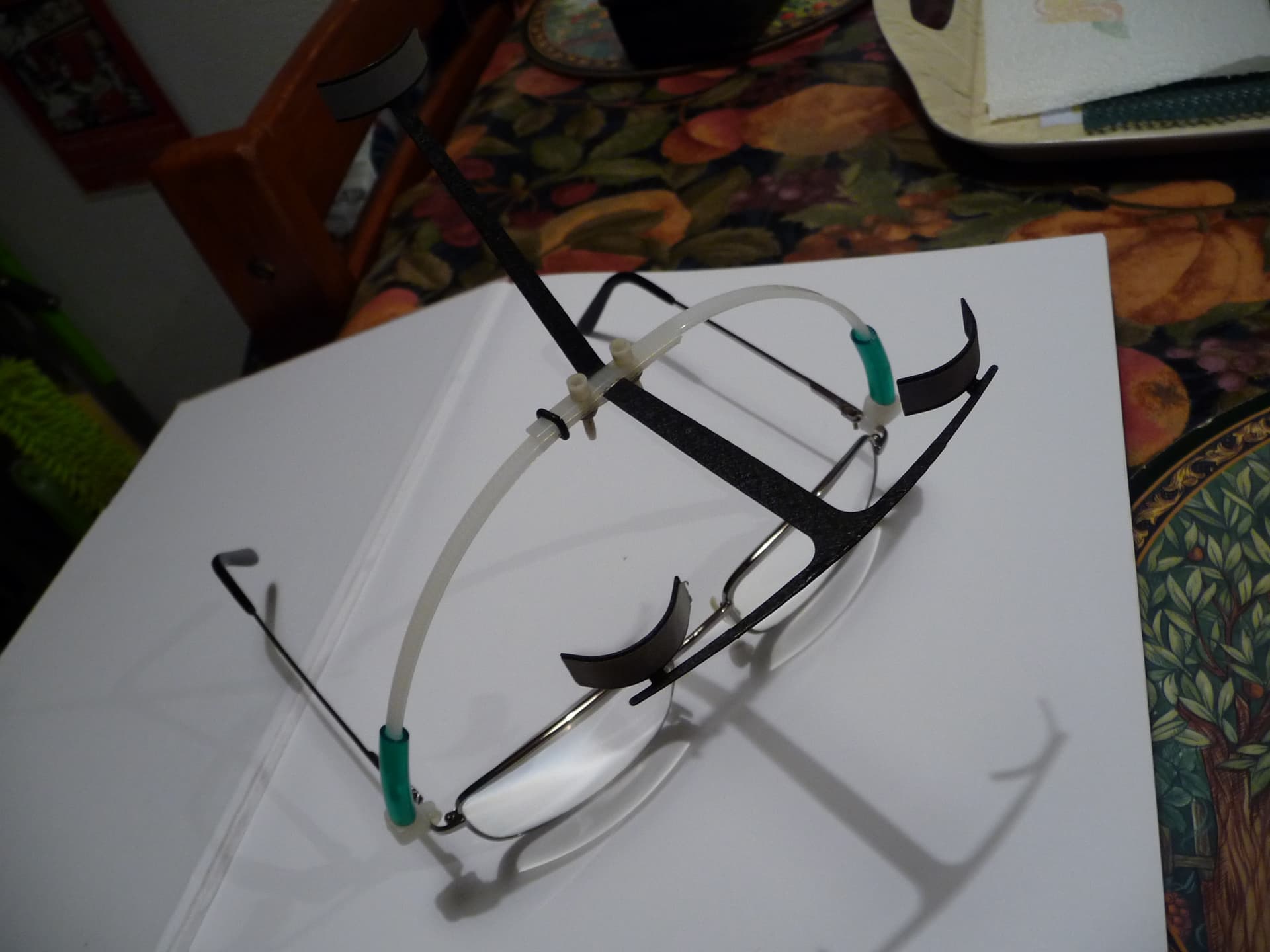
Good point - its not always ~10 mins and I did once check windows for USB resets but perhaps some update to windows has ‘helpfully’ altered that - will check when firing up the desktop. BTW its Intel/Nvidia though - but still a possibility. The bug that sometimes ‘loses’ the normal viewpoint started I think update 5 but deffo update 6. (not a fail of the 'reset view, control but an occasional non-reset-able lock onto the overhead or floor if we look there. BTW here is a pic of my mod to computer specs that lets me plug in the tI/R reflectors. 2 stubs of cable tie - one at each side then the whole top arch with tI/R reflectors plugs over them via the green plastic tubing. Saves wearing that hat.
3 Likes
With the TrackIR 5.0
I get far more disconnects with the TrackClip pro than I do with the TrackClip
The quick fix is to map a key to reconnect the head tracking. This fixes the issue in many cases.
Some folks report this does not work. If you have enabled “Home Cockpit Mode” try to disable it, then restart the sim and test a hot key for your Head Tracking
I think updates were at a quicker pace back then, I for sure would hate to wait until the next WU or SU.
1 Like
Yeah it sure does, don’t it? Like you wrote, poof, back centered. Can’t wait until they get it sorted back to how it was. In the meantime though try messing with your profile in TrackIR. Like for instance, increasing the deadzones for each axis has helped me a lot with maintaining camera/view stability for rolling dials. Like, if there is minimal to no deadzone on the curves then even holding your head still can result in the view being unstable and detecting movement that our eyes and brains don’t normally detect. lol
I don’t guess we’ll be getting a hotfix this go around either will we? Any mention of one coming?
It is not broken. You just have to make a new key bind to turn it on and off in the sim. I mapped it to the same button that I use to pause it in the TrackIR software itself. Works great for me. I was flying the F/A-18E all over the place with full head tracking. Just because you don’t understand the problem doesn’t mean the sim is bad, it’s just your understanding of the changes they made. I’ll admit it too me a few minutes to make the new binds for the F/A-18 but after I did I was right back in the virtual skies.
You have to have the buttons synced. If TIR is not paused when you set it up, and you are using the same button for both TIR and MSFS, then you press it, it TURNS OFF head tracking in MSFS and UNPAUSES TIR, effectively, doing nothing but looking straight ahead. Try mapping the Head Track Toggle in MSFS to another button on your controller or keyboard, toggle it on, then look where you want, then pause TIR, and I bet you can look at your panel all you want.
It is broken, you can’t pause the trackIR at a certain point, like when zooming in and pausing on a FMC for example. It just resets the view.
1 Like
It is BROKEN. A core feature of TrackIR no longer works. You can no longer pause it to configure your FMC or switches or knobs. “Just because you don’t understand the problem” doesn’t mean it’s not broken.
6 Likes
Are you really gaslighting the 500+ people who voted and can no longer use the trackir the way they were?
Its broken. Your method doesn’t address that it automatically turns off when it loses line-of-sight. Also, we didn’t need a switch for it in the game when it worked fine via the required trackir software
6 Likes
You obviously don’t understand or you only have a very limited understanding of the problem. Many of us here have already done some time ago what you are suggesting but pausing still causes the view to re-centre and does not stay where you want it to (read the previous posts) - IT IS BROKEN!
8 Likes
I made many different binds in TIR to test my theory and in fact no matter what bind I used and even making sure no binds were set in the sim to enable/disable head tracking, when I paused the TIR unit via binds or even bringing up the TIR window and clicking on pause (bypassing binds all together), as soon as the unit was paused MSFS would turn it off in the camera options. I wouldn’t go as far to say it is broken, I would say that the functionality seems to have changed in a drastic and frustrating way.
Would you care to provide the binds name and default binding you describe? If this is the case I am surprised you didn’t post more specific information to the community.
As a reminder of Bernard’s post 1954 you have a tested solution
It’s a great little tool, but it only fixes half the problem. Yes, you don’t need to keep turning TrackIR on yourself, but the game still resets the view every time you pause or loose connection.
2 Likes
It’s not a solution, for the many reasons around this post. It a half fix. Certainly isn’t a solution.
MODERATOR EDIT:
Since the last update in November:
- Traclk IR only works once in 2.
- On the Robin Cadet the trim no longer works and sometimes the park brake is impossible to unlock.
- When driving he sometimes refuses to turn (right or left)
I can no longer count the problems that this update brings. It’s incomprehensible! What did they do about Asobo? - FS became unplayable overnight!
And icing on the cake 2 or 3 times Microsoft asked me to enter my password to launch FS…
Depuis la dernière MAJ de novembre:
- Traclk IR ne marche plus qu’une fois sur 2 .
- Sur le Robin Cadet le trim ne marche plus et parfois le frein de park est impossible à débloqué.
- Au roulage il refuse parfois de tourner (à droite ou à gauche)
Je ne compte plus les problèmes qu’apporte cette MAJ. C’est incompréhensible ! Qu’est-ce qu’ils ont fichu chez Asobo ? - FS est devenu injouable du jour au lendemain !
Et cerise sur la gâteau 2 ou 3 fois Microsoft m’a demandé d’entrer mon mot de passe pour lancer FS…

I donwload AutoTrackIR, and doing all: A)- launch the TrackIr application. B)- launch your sim C)- when your are on you plane and your TrackIR is active juste launch autoTrackIr.exe. It don´t work for me; the TrackIR is not fix.