Trimming? I still don't get it correct after all these years

Dear Flightsim community,

I feel a bit embarassed to post here because I feel, I should have this solves long ago. But somehow I simply can’t get trimming to work.

I understand what it does and how it should ensure even flight at a certain power.

But I simply can’t get my machine to level out. I am speaking about the beginner machines like Cessna 152 here. Either I am in a constant move regulating the vertical movement either by motor power or by dragging / pushing on my joystick. But my understanding was that once I get near the desired flight level I should “counteract” the release (e. g. I have dragged my joystick towards me to climb) by trimming until the joystick is fully released. This should establish even flight and the speed should then increase.

Any tips or tricks how to get trimming right?

Thank you all so much in advance as I know this might be a bit of a stupid question.

3 Likes

First, don’t try to get the VS indicator to zero since it will always fluctuate up and down. My son is a commercial pilot and he says watch the altimeter. Our goal is to keep altitude within 100 feet of our assigned altitude. If the VS is going from +25 to -25 it’s fine. You don’t want to see it going from +125 to -125.

Don’t be embarrassed. Many pilots say it’s actually easier to trim an aircraft in real life than in a sim.

10 Likes

A primer on trim:

In most aircraft, the combination of the location of the aircraft’s center of gravity (CG) and the location of the overall lift provided by the main wing (behind the CG) makes the airplane want to perpetually rotate nose-down.

To stabilize that tendency, aircraft designers put a small wing way back behind the main wing. This horizontal stabilizer also produces lift like the main wing, but upside down, balancing the tendency to nose-down by pushing the tail down and pivoting the nose up.

If we do things to get more lift from that horizontal stabilizer, such as increasing airflow by speeding up or adding power, or increasing its angle of attack (or “bite”) by manipulating an attached control surface (such as an elevator), it further pushes the tail down and the nose up. The opposite is also true - less lift on that device and the nose will go down.

This is basic pitch control. But holding that elevator in a stable position can require a lot of force, so doing that using the yoke, or stick, or thumb controller (in your case) gets tiring after a while. This also distracts from other duties and in some extreme cases can cause the aircraft to be physically difficult (or even impossible) to control.

Enter trim.

Trim is used to remove the control forces needed to maintain stable, unaccelerated flight at a given angle of attack and airflow. Angle of attack is the difference between the mean chord line of the airfoil and the relative wind but make it easier to digest, we can use a combination of pitch, power, and airspeed as a proxy. Because we use the elevator attached to the horizontal stabilizer (or a similar device) as the primary control for pitch, the pitch trim manipulates that device, in effect setting its “neutral point,” requiring no further input on the main controls, provided everything else is stable.

The difference between real-world and the sim is that in the real world we feel the neutral point when the pressure pushing back against the control is zero’ed, which can be anywhere in its normal range of travel. In our sim controllers, the center of pressure on the controls is also the center of travel, usually set by springs (outside of force-feedback devices, which we’ll ignore for this discussion).

So you’re right that we want to trade the amount of force we have to impart (against the springs) by adding or removing trim until the aircraft is both stable and the controller is centered. The trick is doing it at the right time.

To use your example: as you level off without any power changes, your airspeed will gradually increase. This increases airflow over the horizontal stabilizer, and as we discussed above, pushes the tail down and the nose up. So you will need to add nose-down trim to counteract that. Letting your airspeed increase and stabilize at altitude is a key part of the timing of adding trim. You can continue to do so during the speed increase, but as the speed increases it is going to require more trim. So you’re not done trimming until you’re stable at the desired altitude and speed.

How do you know you’re done trimming? When the altitude and speed isn’t changing (much) and you’re not holding any more force on the primary controls. Change anything, pitch, power, etc, and you’ll need to re-trim.

A common error is to use trim as a primary control to establish level flight, climbs, or descents. Don’t do that. Instead use pitch and power to establish, then trim to reduce the forces needed for a stable regime.

Another error is to overuse the vertical speed indicator (VSI). This instrument has a several second delay in real life, which causes us to “chase” it, oscillating all over the sky. Use the altimeter as a primary and cross-check with the VSI.

We also have no “seat of the pants” feel in the sim, which in real life tells us we’re accelerating in a direction. This actually forces us to overuse our instruments in the sim, so don’t feel too bad about that. But try to look “outside” the cockpit, getting a general idea of the pitch required to remain stable, and use instruments as a cross-check for fine tuning.

The sim overplays the effect of wind, especially over terrain, which can cause the plane to be perpetually unstable. It also isn’t super precise on the normally-analog nature of the range of travel for each “increment” of trim, so it might feel like you’re never quite stable. In real life, you’re never quite stable, either, but more stable than the sim. It’s something you’ll have to work with, but again, use the altimeter as the primary, not the VSI.

Note that this discussion was primarily about pitch trim, but the same concept can be applied to yaw (rudder) and roll (ailerons) as well, if so equipped.

9 Likes

In a real airplane the goal of trimming is to maintain attitude without pressure on the yoke/stick. Most flight controllers for flight simulation self centre, so for example if you are correctly trimmed with a slight back pressure, as soon as you release the stick the aircraft will nose down. Many sim pilots will let the stick centre then use trim to tune the attitude, which can cause a kind of yoyo effect, and would be frowned upon in real life.

I try to release pressure on the stick while simultaneously moving the trim until the stick centralises (which is what you are striving for I think), it usually then needs only slight changes in trim to maintain altitude, of course if speed increases the nose will go up! This is a balancing act with each sim aircraft behaving slightly differently, dependant on how fast the trim reacts, but gets easier if you persist. Incidentally from my limited experience I agree with @ExtremePeaced that it is easier to trim a real aeroplane

1 Like

I have a whole aerodynamics demonstration that I like to teach using the sim. The most simple way to think of it is you’re trimming the tail to be neutral at a certain speed.

For example, if you’re trimmed neutral at 70 knots, doesn’t matter if you’re level, climbing or descending; the plane will want to maintain that 70 knots. Do anything to disturb that and it will eventually return to it (after oscillating due to positive static and dynamic stability).

Either way, your job as a pilot is to anticipate the control changes needed to dampen the oscillations incurred by energy changes, then re-trim until control force is no longer necessary.

Here are some exercises you can do on your own to practice:

Exercise 1: Starting point is a level cruise at 110 knots. Goal is to establish a 110 knot descent.

Reduce the power by a few hundred RPM (or a few inches manifold pressure) and the nose will drop until the airspeed re-establishes around 110 knots, assuming you have the altitude to let it do so. Dampen the oscillations and it’ll establish faster.

Exercise 2: Start in a stable descent at 110 knots, at less than full power (like at the end of exercise 1). Goal is to level off and re-establish a 110 knot cruise.

Add power back in and the nose will rise. Dampen oscillations with the yoke until it’s stable. You can play with the power a little to remain level at 110 knots, or just re-trim to until it’s level and accept the new airspeed (the latter is much easier).

Exercise 3: Start in a level cruise at 110 knots (like at the end of #2). Goal is to establish a 100 knot climb.

Increase pitch using the elevator until the speed slows to 100 knots. You should now be climbing. Use the elevator to maintain that 100 knot airspeed, then once stable, trim until controls are neutral. Accept the climb rate. For a higher climb rate, increase pitch to an even lower airspeed (note: below a certain speed (Vy) the climb rate will drop, and too slow you’ll stall). Then re-trim.

Exercise 4: Start in a stable climb at 100 knots (following #3). Goal is to level off and increase speed.

Push the nose down using the elevator and level off. The airspeed will increase, requiring more and more down elevator. Once stabilized at a faster airspeed, re-trim. Accept the new airspeed.

For a variation on exercise 4 (call it #4A), you could aim to maintain the same speed you had in the climb (100 knots), but in level flight. To do this, reduce the power slightly until it’s no longer climbing - maintain level cruise at 100 knots only by modulating the power. That’s a bit tougher exercise.

Exercise 5: If you didn’t do the level-off method in 4A, we’re going start level, at the faster speed described in #4 and slow the airplane back to 100 knots, all while remaining level.

Reduce power by a few hundred RPM. As we learned in exercise 1, the nose will want to drop. Instead, keep it fairly level and maintain altitude by increasing back pressure (nose-up) on the elevator. As it reaches 100 knots, manipulate the power a bit to maintain that speed and level altitude. You’ll likely need to change elevator pressure at the same time - it’s a combination thing. Once you find a combined power setting and pitch attitude that establishes level flight at 100 knots, re-trim.

Exercise 6: Start in a level cruise at 100 knots (from #5). Goal is to establish a descent at 120 knots.

Push the nose down using the elevator (leave the power alone). The speed will increase. Around 120 knots, use the elevator to bring the nose up a little - maintain that 120 knots using the elevator alone. Accept the rate of descent.

Exercise 7: Start in a 120 knot, stable descent (from #6). The goal is to slow the plane to 100 knots, while still descending.

Slow the airplane by using a combination of power reduction and nose-up elevator. Then when the speed reaches 100 knots, keep it there using the elevator alone. Once the speed is stable, trim the forces out. Accept the rate of descent.

Exercise 8 (advanced): Start in a 100-knot-stable descent (like at the end of exercise 7). The goal is to maintain the airspeed but change the rate of descent.

If you want to decrease the rate of descent (slow the descent), add power. The nose will want to rise. Dampen any oscillations, but it should still settle close to 100 knots, but at a lower descent rate. If you add too much power it might level off completely or even start climbing. Conversely, if you want to increase the descent rate (go down faster) at the same speed, simply reduce power. The key here is using power changes to affect descent rate and the trick is to dampen the natural oscillations using the elevator (pitch) until the speed is stable. Notice this is the only exercise in which we’re paying attention to a specific rate of climb or descent (other than during level flight).

You can do the same technique in #8 for climbs, but understand that eventually you’ll hit your absolute ceiling and no longer be able to climb. This is dependent on weight, balance, and density altitude. Can also be affected by improper leaning on a normally-aspirated piston engine.

Caveat: in any of these examples, you still might need to re-trim a little because changes in density altitude will affect your power and lift. The relationship is never perfect from our standpoint. Moreso if the sim is inducing orographic lift from wind and terrain.

If you want to see this in action with a real-time verbal explanation, I’ll do another demonstration in my stream tonight.
3 Likes

As has been stated it’s not very well implemented, in part down to the self centering nature of the joysticks. Stable level flight tends to be gauged by a couple of ques, engine rpm, airspeed and what you see outside. While there is no - fly this speed only rule, there are cruise speeds published in the Pilots Operating Handbook or POH, get a copy for the Cessna 152, plenty online.

I normally fly the 152 between 85-90 cruise so I adjust the RPM and use the joystick to get the aircraft to that speed. Once I can hold that for more than a handful of seconds, I can feel if I am pushing or pulling the joystick to achieve my goal. Then I will slowly release the pressure off the joystick with the correct trim direction until the joystick is almost centered. Then for the last few clicks I solely rely only on the trim wheel - I release the joystick completely and just use trim. It can take me up to a min to settle but once set it simplifies your flying workload. Note if your flying in real weather then both thermal activity and wind will bounce you around making the whole job much harder. I suggest practicing with the clear sky and no wind preset.

BTW, It’s much MUCH easier in a real plane, while I only have 3hours solo, I can attest setting trim in a real aeroplane is a very quick and straightforward job indeed.

HTH.

1 Like

Are you using trim up/down on buttons, or using the trim axis? I can’t stand using the trim up and down buttons in this sim, even when it’s bound to a wheel that freely spins. I can’t feel the plane being trimmed, and it’s very hard to dial it in without fiddling. I found it vastly more realistic feeling to instead bind the trim to a hardware lever using the trim axis option in the controller settings. As you push the lever you can almost feel the force coming off the stick as you ease the pressure off of it, even though there is no actual force feedback. I’m guessing you can get way more precise using the trim axis too since it’s much more granular than trim up/down which moves in larger discrete steps.

I know this isn’t an option for everyone as they may not have a controller that allows for binding the trim axis. The other downside to this is when you come off of autopilot, your trim setting won’t match where your trim lever is set on your controller, so there will be a jarring “jump” when you move it.

1 Like

They need to give us an option to fix that jump. Something that allows us to move the trim controller axis freely but not change the trim in the sim until it reaches the sim’s value and “wakes up.”

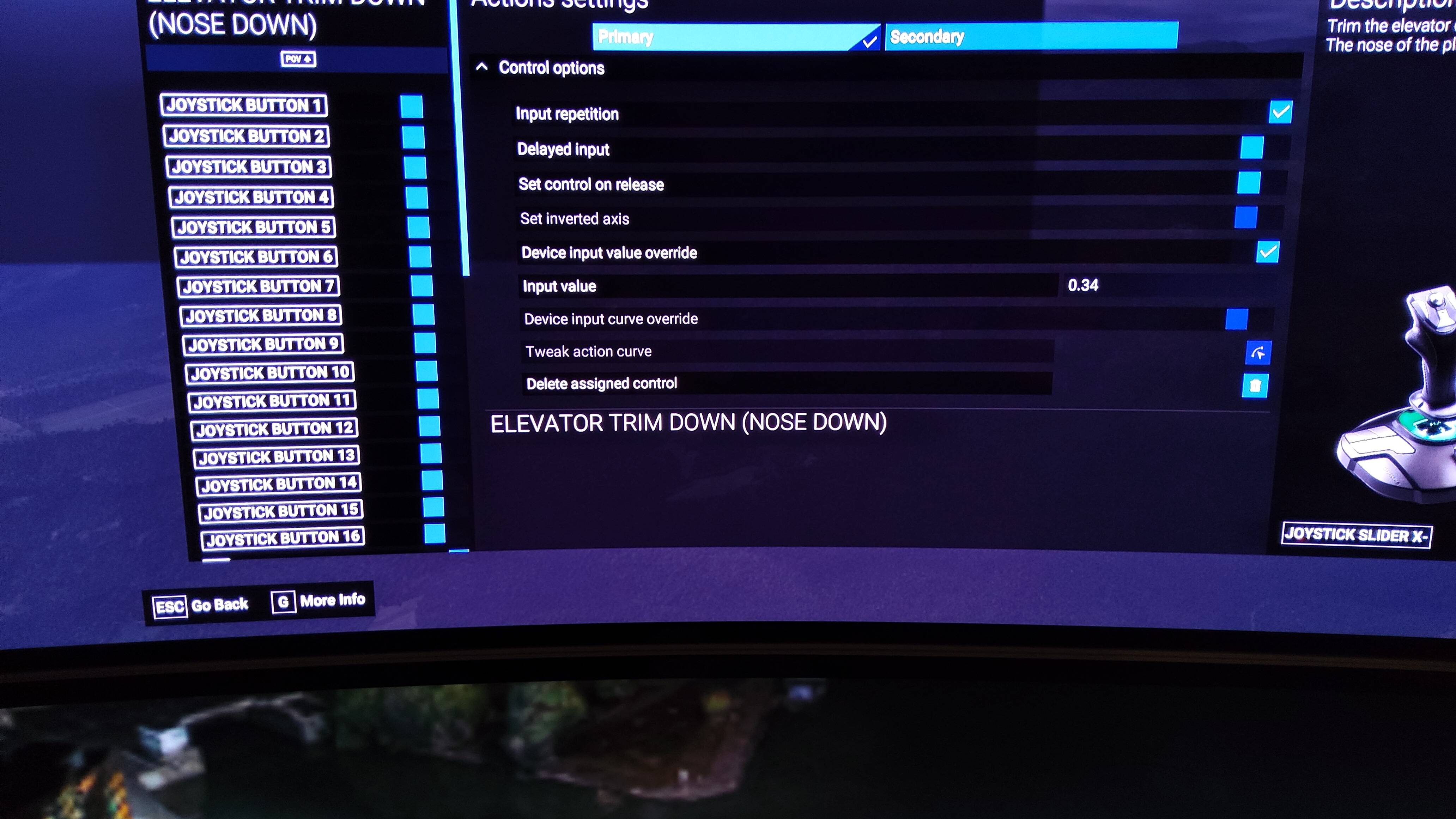
If using a button in action setting it is imporatant to set a check mark to input repetition, device overide and crucial is to give in an input value to make it incremental.
So if hold the button longer then it keeps on going in the direction give (like nose down trim or up trim) short push can give it small increments
The larger numbers given the greater incremental steps are going to be.
For me these do fine see picture,


I have set it on the pov hatswitch of my T16000M
2 Likes

Much of your problem is that any controller on a digital device is….well, digital.

On a real aircraft the tiniest input on the trim wheel will move the trim tab an equally tiny amount (in other words, it’s analogue). In the sim, any input you give it will be in discrete amounts and it’s almost impossible to get it right, even in the best setup*.

Add to that the fact that you get no feedback apart from what you see on the screen, and you’re on a hiding to nothing.

Many simmers can get it pretty close, but they’ve had a lot of practice. And there’s your clue.

*RL aircraft that are digitally controlled get round it by making micro-adjustments constantly, but those micro-adjustments are still in discrete amounts.

1 Like

Are we advising it is better to assign analog axes to trim up/down? I can set a wheel on my controller to either analog or digital. Thanks. –Redeye

1 Like

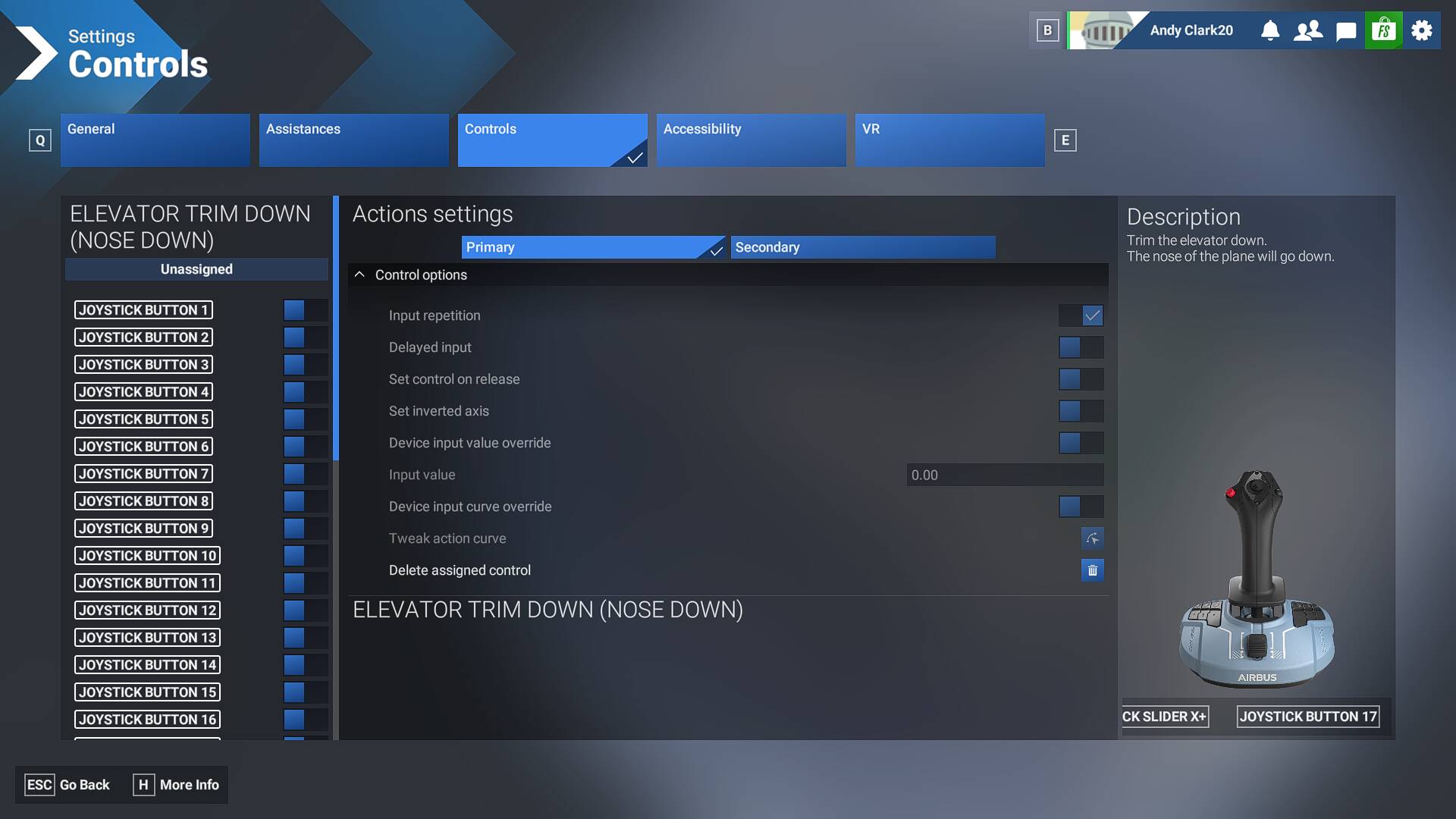
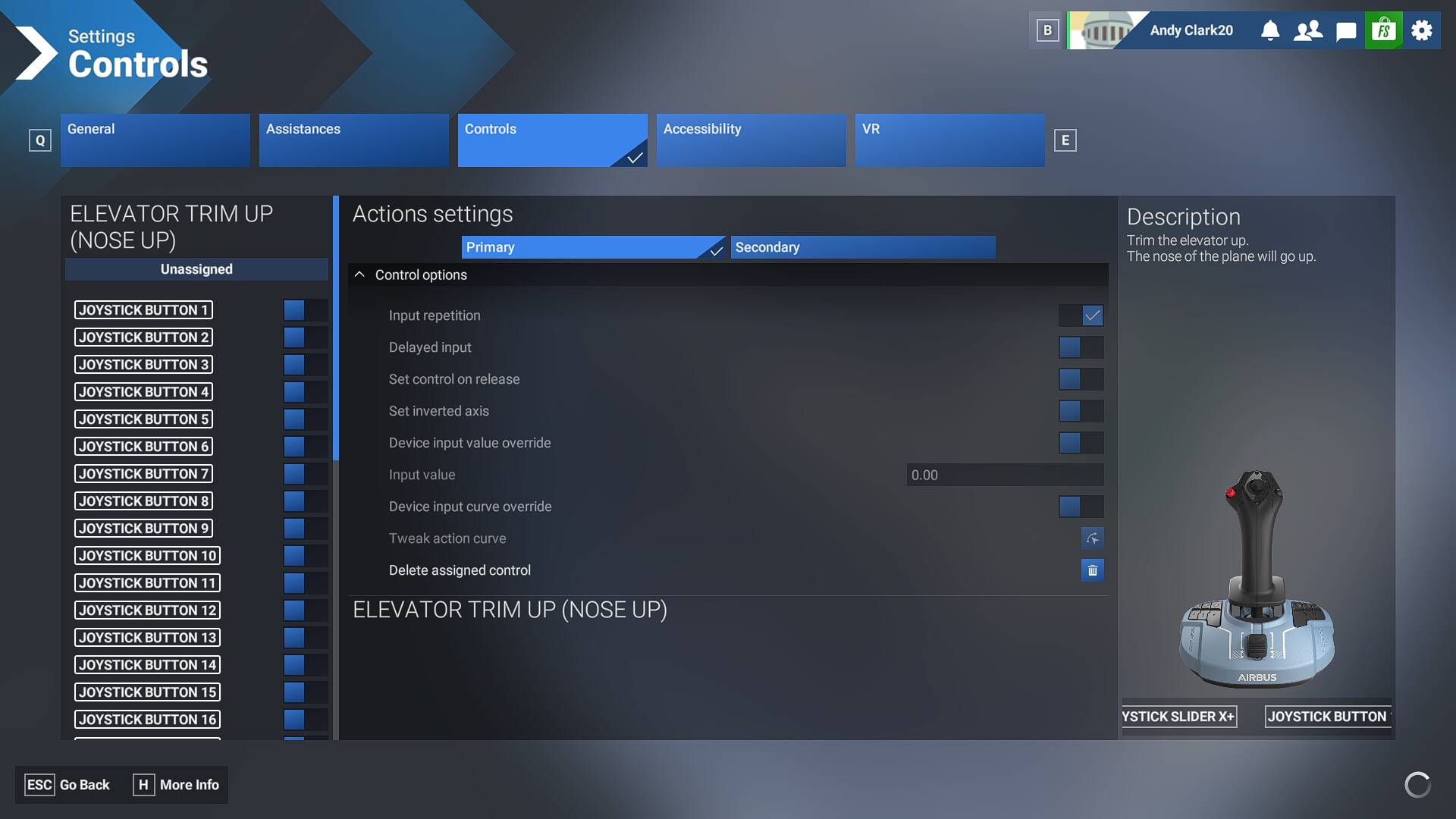
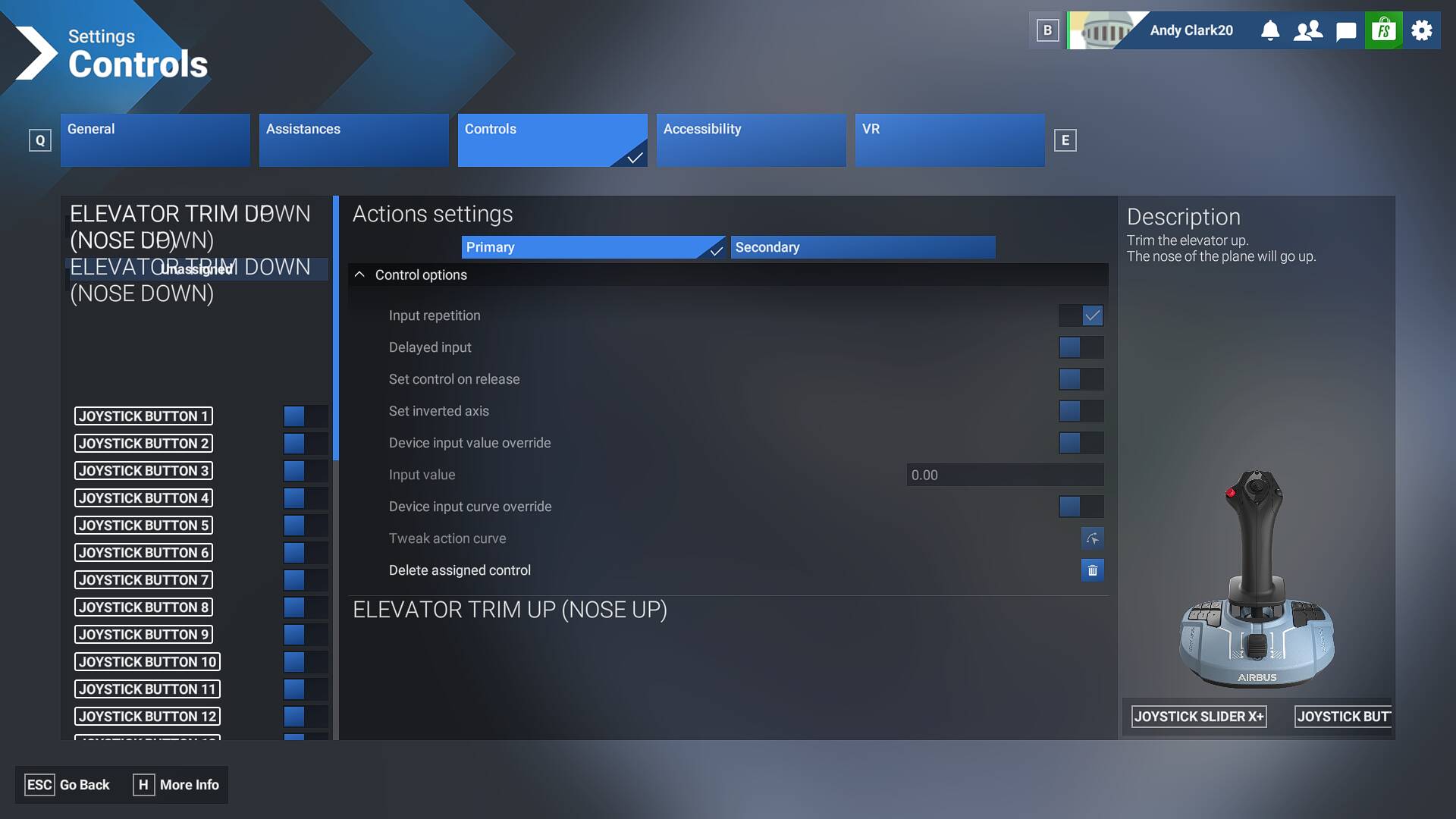
I have an Airbus flightsick with buttons assigned to trim, but for some reason I can’t make the change that you show to the input value. It’s stuck at 0.00. Input repetition is shown as checked (in a greyish way) but none of the other items can be changed at all. Any ideas?

Can you post a screenshot here

Here’s the screenshot

What is going on there in the left column with the formatting of the assigned control’s name repeated and formatted with the odd characters in “down” plus the second one superimposed over the “unassigned” tag?

Plus, why does the bottom right say “nose up”?

Compare your screenshot to that of @PHSepp796 .
At the bottom, the same control name (nose down in upper left, nose down at bottom of right) as what is being modified is shown, not some alternate.

Yours looks corrupted.

1 Like

That is weird, I restarted it and here are the screenshots for both trim up and trim down

2 Likes

@AndyClark20

This looks right,
Now you need to configure.
You said are greyed out and do not change the digits
This makes sense since the “device input value overide”, is not set to active with the check mark in both of the last two pictures.
So when you activate these, you can edit the digits to something like mine to change to, 0.34 and enter to set it.
Once done zoom to the trim wheel and see if it works
If to slow increase the 0.34 to higher digits
If to fast reduce to lower digits

Thanks to @NixonRedgrave for the reply to get it to my attention im currently fiddling around with c172 flight in chile enjoying mountains there

1 Like

Thanks, but the ‘device input value overide” is greyed so I can’t activate it.

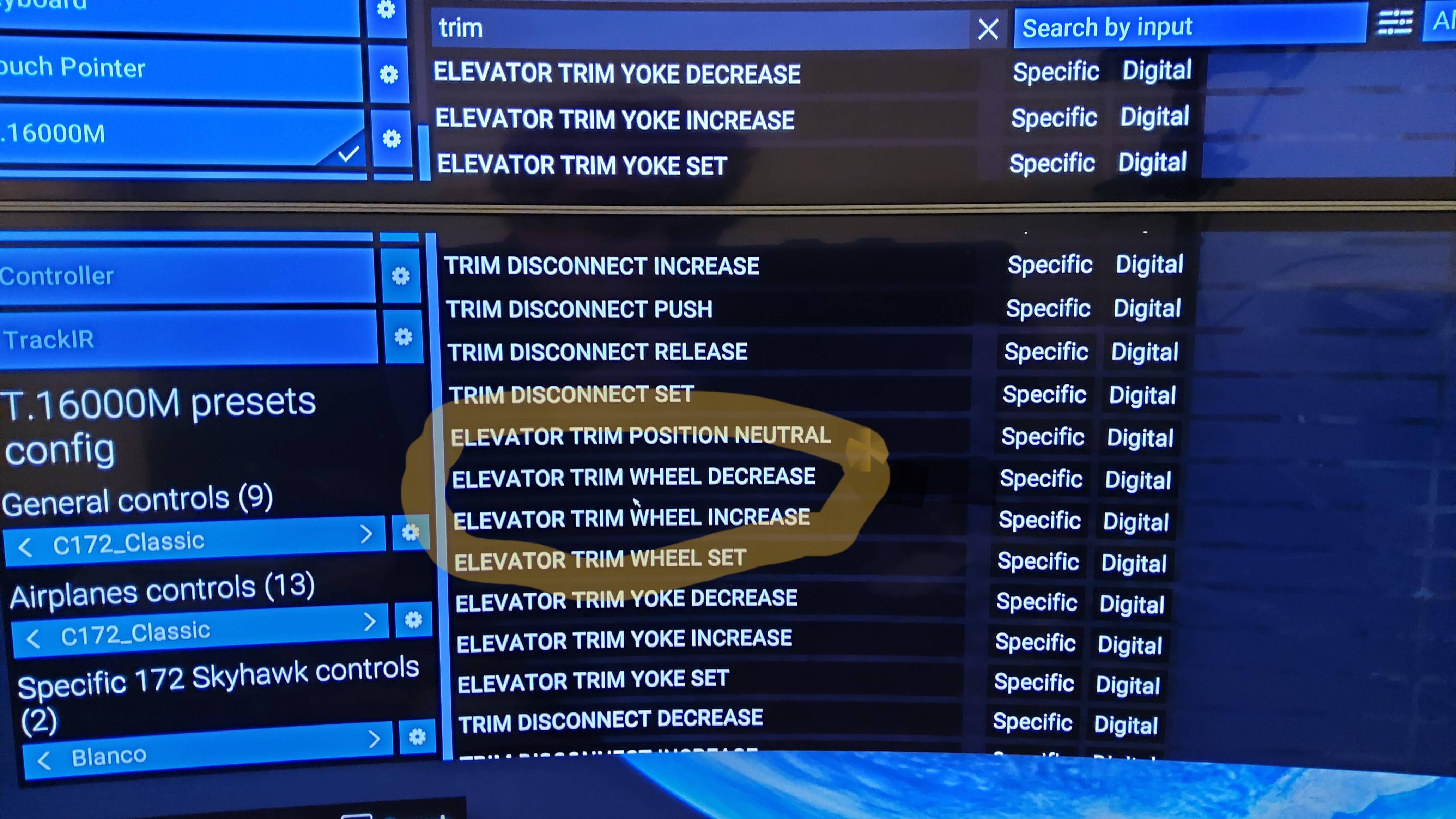
Try instead this


The elevator trim wheel increase/decrease
1 Like