ISSUE DESCRIPTION
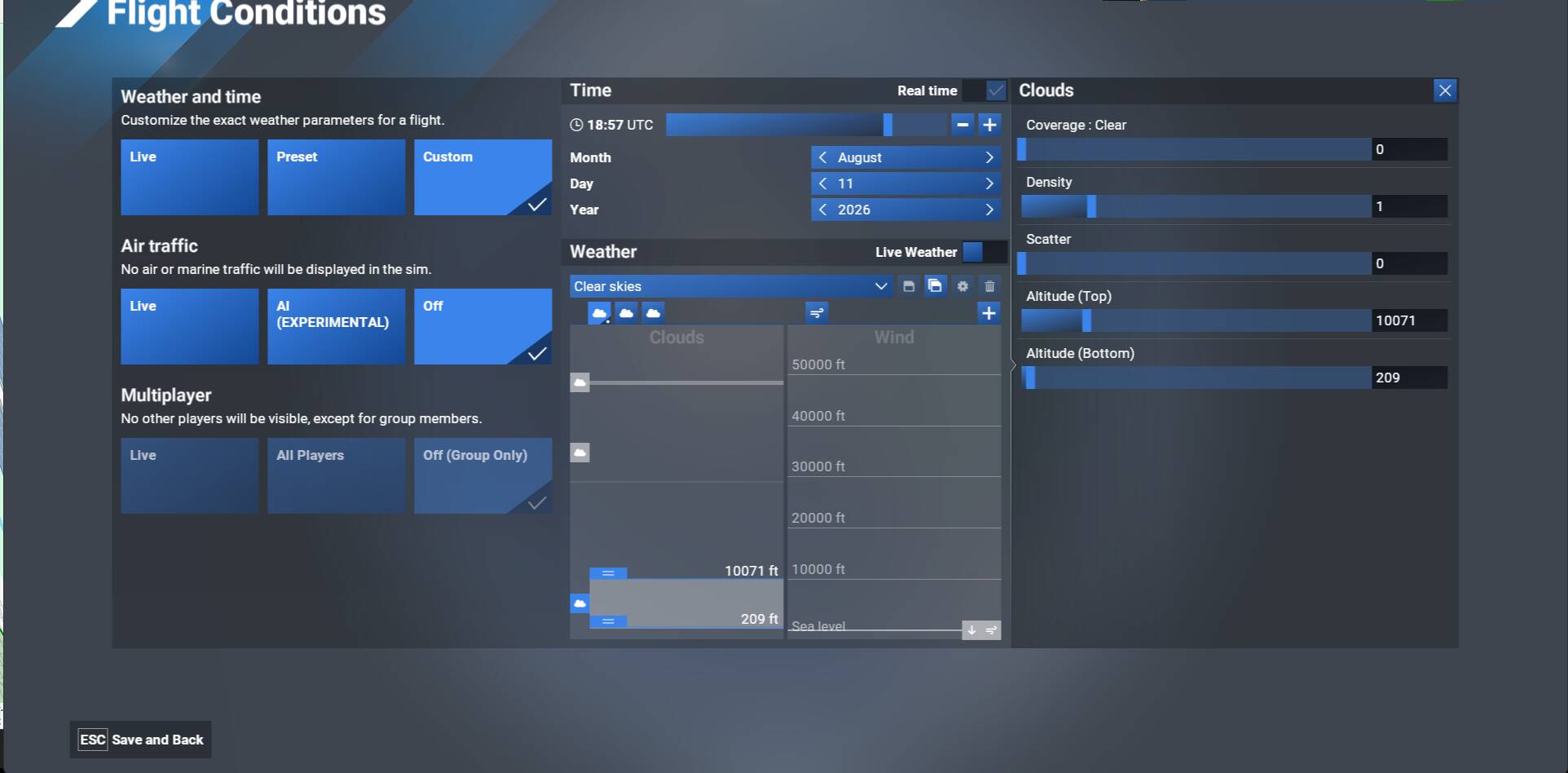
When creating custom weather, either in-game or in the preflight menu, I am unable to set an exact cloud height or altitude when typing it in to the Altitude (Top & Bottom) field. For example, if I type in 500 in to the Altitude (Bottom) value field and click enter, it defaults to 209. If I type in 600ft it defaults to 826ft, but then when I type 1500ft it gives 1442ft. I have tried both AGL and AMSL, and if I try 10,000ft in the Altitude (Top) field it goes to 9862ft.
FREQUENCY OF ISSUE
Everytime.
REPRODUCTION STEPS
Please list clear steps you took in order to help our test team reproduce the same issue:
-
Custom weather preset in menus, airport selected YSSY
-
Settings are Coverage: 100, Density: 1, Scatter:0
-
10,000ft into Altitude (Top) and 500ft into Altitude (Bottom)
-
Press enter and see what value it gives.
YOUR SETTINGS
[PC Only] Are you using Developer Mode or have you made any changes to it?
No
[PC Only] What GPU (Graphics Card) do you use?
RTX 5080