Here are some other choices that you don’t have to sign up for… (well, you do have to sign up for the forum in the second link)
Don’t stop at the first choices here, there are several options
Here are some other choices that you don’t have to sign up for… (well, you do have to sign up for the forum in the second link)
Don’t stop at the first choices here, there are several options
I think you might be on to something there. The very next flight I had went without a hitch and that’s including the supposed rudder trim issue. I’m thinking it’s either what you said or perhaps doing a twin crossfeed triggers a bug which causes funny behaviour. I still get an issue with the prop speed synch though that with a little fiddling, comes good.
Bought this yesterday and after starting it up and flying it for 5 mins it would lose RPM’s and the engines would die out. Idk what I’m doing wrong. I set the fuel selector to reserve you think that’s it?
Did you verify you have the fuel pumps turned on? Be sure as well to set the Emergency Pumps for takeoffs, landings, and flight above about 9,000’. Also, pull up the tablet and verify your fuel load.
Turned on all those fuel switches. Emergency was on too.
Are you overheating the engines? They will fail if you run them at or past maximum too long. Going from memory, but generally keep MAP below about 44” for extended cruise.
Not really sure what I’m doing wrong. I was keeping my eye on the manifold pressure and made sure it was at 44" I had the throttle at 100% for.twkeoff and then I put it on like 80% after that
What’s a good video I could watch to make sure I’m doing everything right? I’m on Xbox so I heard the startup can be tricky. I was going off a particular video for the startup
I’m sorry, I don’t know. I’m on PC. But it doesn’t sound like you have an issue with startup itself. Once the engines are running, assuming you have fuel, pumps are set and you’re not running things too hard too long, it should be pretty straightforward. There’s not some mixture control setting or controls conflict causing the engines to go to lean shutoff or anything is there?
EDIT: You do want to reduce your RPMs to about 2,000 - 2,200 for most phases of flight right after takeoff once you’ve established a positive climb.
Hmm thanks I’ll have to do some troubleshooting when I get a chance to fly it later tonight
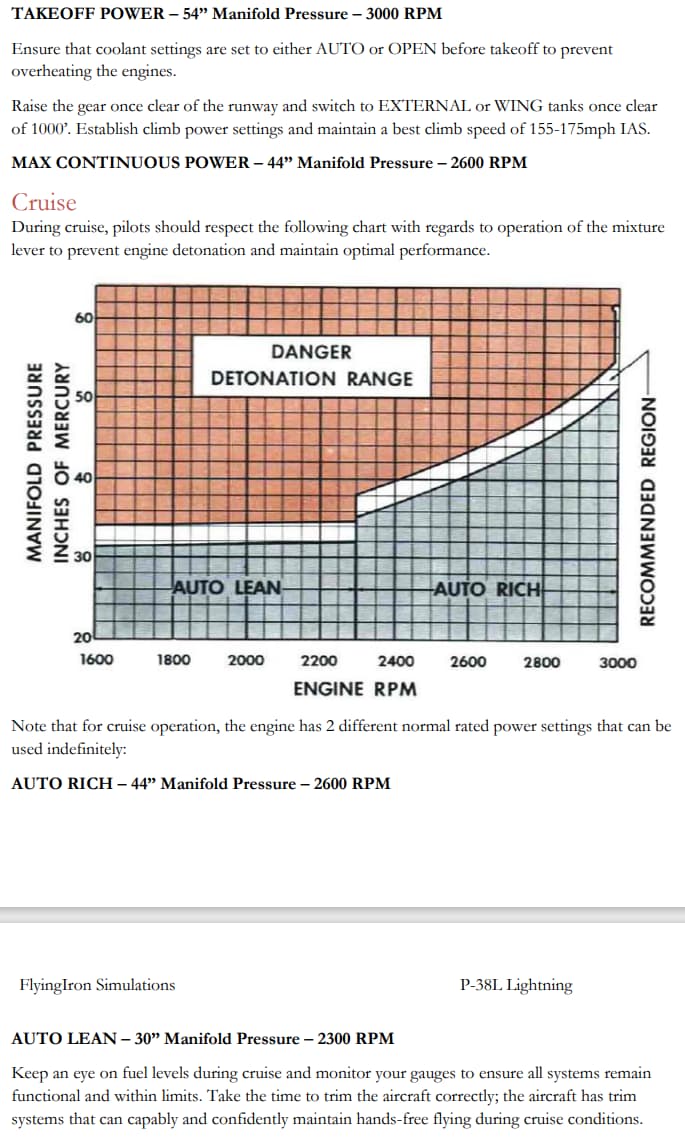
I had the same issue as you. The cause of the problem is that I was flying the plane beyond its engine limits for too long. The engines will fail if you run them at maximum RPM for five minutes. I had to check Flying Iron’s P-38 manual to make sure I was flying within engine limits. Once I was, it was smooth sailing. Here’s the relevant information from their manual:
To be perfectly honest I never was much of a warbird fan. And I still am not. But man, you guys are converting me slowly with the great Spit and the gorgeous Lightning. That sound!!!
The racket it makes on startup is nothing short of epic.
Glad you’re getting there. The double cross-suction setting should cause the engines to shut down, but users of some other planes have reported fuel system strangeness since sim update 8. So that could explain erratic power as opposed to no power. I’ve noticed since the P-38 1.1.0 update that when I turn each selector past cross suction (when changing from reserve to wing tanks) that there’s a power loss on the cross-suction setting - which should not happen, since the other selector is still on reserve. Sounds like it might be similar to the behavior you were seeing. Also, wing tanks now seem to require emergency pumps to be on, which I don’t think was the case in real life.
Not sure what would be causing prop sync issues. Do you have two separate prop axes? There might be a calibration issue. Or you might have a conflict on the prop axes. Worth checking all your controllers (you can use the search box in the controller setup) to see if something else is also assigned to prop pitch.
Let us know what you come up with.
This graphic helped. I lowered the rpm an the aircraft didnt fail. Appreciate it
No I don’t, I use the game controller with a chatpad. There I have single buttons mapped for prop speeds. I even mapped buttons for low and high prop speeds so I could lower or raise them faster as well as axis type so I could fine tune them for a middle ground/precision type speed selection.
It’s odd because it seems to be only the lowering of revs that it goes out of wack that I’ve noticed so far. The trick I’ve worked out is to hit the low speed, allow it to drop then slowly raise it again using the other binding for the more precise tuning.
I get the mismatched prop speed using the t.flight hotas one on pc too. I just got the warthog today and was gonna see if it happened on that too before I mentioned anything on discord
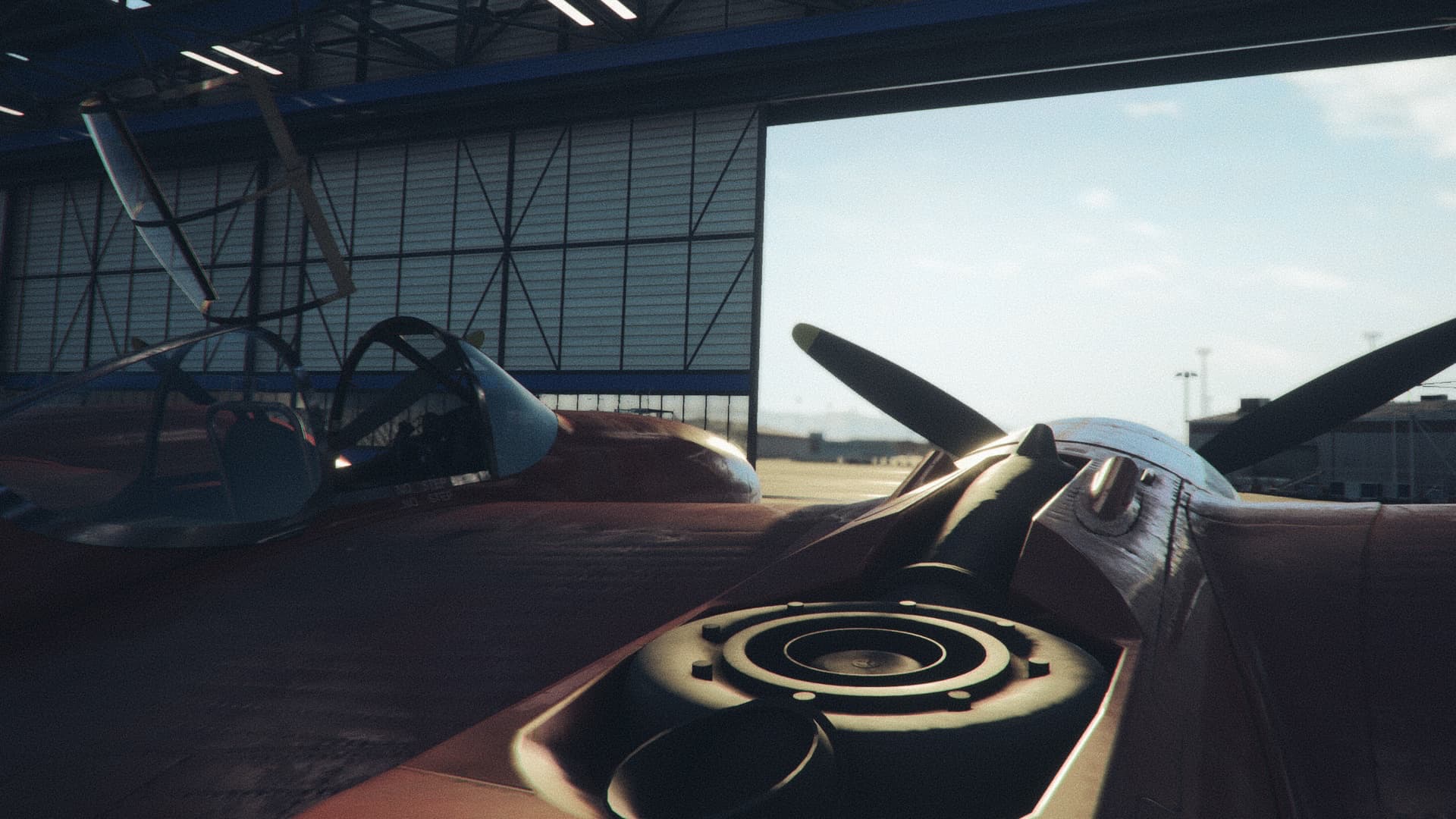
That’s awesome! And what a hangar shot…worthy of a prize 
I can’t quite replicate your scenario as I don’t have your hardware, but typically when things like this happen they are caused by keybind conflicts in MSFS.
Thanks for helping out 
As a sidenote: MSFS currently does not support Auto Lean for piston engines, and since the Lightning uses auto mixture it simply means, for now, the mixture lever will always function as Auto Rich. However Asobo has been making great improvements to engine and prop systems lately, so here’s hoping for a lean future.