[UPDATE 1.5.0] FFB-Bridge | Rohsam Inc

FFB-Bridge brings real force feedback back to the cockpit - For Free!

Force-feedback is back! You can use an old force-feedback joystick with MSFS 2024 and 2020. Built for the Microsoft Sidewinder ForceFeedback v2, the tool also supports many other sticks.

It reads live telemetry from Microsoft Flight Simulator and drives the motors in your force-feedback joystick — a full flight-model force model, not a rumble effect. It’s free, runs locally, designed to be privacy-first and user-respecting, and needs no account.

Real force feedback, back in the cockpit — FFB-Bridge drives the SideWinder Force Feedback 2 straight from MSFS.

What it works with

  • Simulators: MSFS 2024 and MSFS 2020 (over SimConnect), plus X-Plane 11/12. The active sim is auto-detected on startup.
  • Hardware: the Microsoft SideWinder Force Feedback 2 is the primary, plug-and-play stick, along with the Logitech Force 3D Pro, WingMan Force 3D, and Flight System G940. You can also enable other force-feedback joysticks experimentally to try all other sticks. More hardware will be validated in time.
  • Platforms: Windows and Linux for MSFS; a signed macOS (Apple Silicon) build is available for X-Plane.

Tune every effect, or just pick a control-system feel — Manual, Hydraulic-boosted, or Fly-by-wire — per aircraft.

What you actually feel

  • A centring force that loads up under G and shifts to where you’ve trimmed
  • Airspeed-loaded pitch and roll forces — the controls get heavier with speed
  • Stall buffet and a stall stick-shaker, overspeed and Mach buffets
  • Runway rumble (by surface type), touchdown thump, gear bumps, brake shudder
  • Engine rumble (from the sim’s own per-engine vibration when reported)
  • Gear-deploy and flap-extension shudders, spoiler and turbulence buffets
  • A per-aircraft control-system feel selector — Manual, Hydraulic-boosted, or Fly-by-wire — so a trainer and an airliner feel different

Per-aircraft profiles with auto-select, plus a free community Profile Library to browse and download.

How it works

No plugin and nothing to install inside the sim — FFB-Bridge runs alongside it and reads telemetry over SimConnect. It ships with starter profiles for common aircraft, supports per-aircraft auto-select, and has a free community Profile Library you can browse and download from.

Local-first by design: no account, no telemetry, no cloud. The Windows installer and macOS build are code-signed.

Get it

Downloads for every platform: https://ffb-bridge.com/
Docs and setup guide: https://ffb-bridge.com/docs

Support

Built by Rohsam Inc. Feedback genuinely shapes the tuning and the next round of
supported hardware — let us know how it feels.

5 Likes

Update: FFB-Bridge v1.1.2 is live

FFB-Bridge v1.1.2 is now available. This update expands real hardware support, fixes several user-reported hardware quirks, improves aircraft profile auto-select, and makes support bundles more useful when something feels off.

Headline changes

  • MOZA AB9 + MH16 is now supported

    • Current updated AB9 units detected as 346E:1000 are supported.
    • The earlier MOZA probe PID 346E:1002 is also recognized as the same AB9 family.
    • AB9 + MH16 has been validated end-to-end on Windows through DirectInput/PID.
    • AB9 + MH16 has also been validated on Linux through evdev, including MSFS under Proton and native X-Plane.
  • Logitech G940 Windows detection is fixed

    • Some Windows Logitech driver installs expose the G940 stick as 046D:C2A8 instead of the raw/Linux 046D:C287.
    • FFB-Bridge now recognizes that Windows PID as the G940 stick, so affected users should no longer need to run it as a generic/unlisted device.
  • Linux G940 spring-safe hotfix

    • The Linux G940 path now avoids repeated spring-condition uploads after the initial spring setup.
    • This is meant to stop the motor pulsing/ticking some G940 Linux users saw when the kernel driver reacted to frequent spring updates.

Flight and tuning fixes

  • Aircraft profile auto-select is more reliable

    • Older saved aircraft defaults now survive profile key/path/name changes better.
    • Saved profiles named after an aircraft can be inferred even when an older binding is stale or missing.
    • Known aircraft with no matching profile now fall back to a neutral starter instead of silently keeping the previous aircraft’s profile.
  • Optional smoothing for steady pitch/roll load forces

    • New Smooth steady forces option under Settings → Hardware.
    • This applies a small filter to steady pitch/roll load forces only.
    • It is mainly for stronger sticks where sim telemetry stepping can be felt as small force jumps.
    • Buffets, one-shots, engine rumble, and springs are not filtered.

Better diagnostics

  • Support bundles now include hardware settings

    • Support bundles now include hardware-settings.json.
    • That captures backend choice, software blending, steady-force smoothing, polarity invert, pitch/roll swap, unlisted-device opt-in, and related hardware settings.
    • This should make “it feels inverted / weak / jumpy / different on my machine” reports much easier to diagnose.
  • Hardware testing is more consistent

    • The Settings hardware axis/direct-force test and Mock Sim direct stick pad now use the same control path.
    • This makes polarity, pitch/roll swap, and direct force checks more useful when validating new hardware.

Community Profile Library

One of the biggest things FFB-Bridge needs now is shared tuning.

The app includes starter profiles, but every aircraft, stick, driver stack, and pilot preference is a little different. If you have a profile that feels good, please share it.

Profile Library: https://ffb-bridge.com/profiles
Community forum: https://ffb-bridge.com/community

You can browse and download profiles without an account. To publish your own, use the globe Share action on the Profiles page in the app. Nothing is uploaded silently — it opens a share form with your profile details pre-filled, and you choose whether to publish.

Profiles that would be especially useful right now:

  • MOZA AB9 + MH16 profiles
  • Logitech G940 profiles
  • SideWinder FFB2 profiles for common GA aircraft
  • Airliner and fly-by-wire tuning experiments
  • X-Plane-specific profiles
  • Profiles for aircraft where the default feel is close but not quite right

Even imperfect profiles are useful. A shared starting point gives other pilots something to test, adjust, and improve.

Current supported hardware

FFB-Bridge now supports:

  • Microsoft SideWinder Force Feedback 2
  • Logitech Force 3D Pro
  • Logitech WingMan Force 3D
  • Logitech Flight System G940
  • MOZA AB9 FFB Base + MH16
  • Other force-feedback joysticks experimentally through the in-app unlisted-device opt-in

Platform notes

  • Windows: SideWinder FFB2 uses raw HID/PID by default with DirectInput fallback. Logitech sticks and MOZA AB9 use DirectInput/PID.
  • Linux: supported devices use evdev force feedback. MOZA AB9 + MH16 has now been validated on Linux with both MSFS under Proton and native X-Plane.
  • macOS: still SideWinder FFB2 only for now.

Get it

FFB-Bridge remains free, local-first, and does not require an app account.

Main site: https://ffb-bridge.com/
Docs and setup guide: https://ffb-bridge.com/docs

Support

For bugs, screenshots, or support bundles, please use the feedback form so reports stay organized: https://ffb-bridge.com/feedback

Thanks to everyone sending hardware reports and tuning notes. The G940 Windows PID fix, the Linux G940 spring hotfix, the MOZA AB9 support, and the profile auto-select fixes all came directly from real user testing.

2 Likes

Update: FFB-Bridge v1.1.3 is live

FFB-Bridge v1.1.3 is now available.

This is a hardware-correctness update focused on force direction, trim behavior, pause/sim-exit cleanup, and MOZA AB9 validation on macOS.

Headline changes

  • Force direction and polarity fixes

    • DirectInput force direction is now the standard convention across Windows, Linux, macOS, raw HID/PID, and the internal test paths.
    • Force polarity and spring-center polarity are now handled separately.
    • This should make standards-compliant hardware behave more consistently, while still leaving the existing hardware polarity controls available for local device quirks.
  • Logitech G940 Linux trim fix

    • Static-spring trim now works better on the Linux G940 path.
    • FFB-Bridge avoids repeatedly re-uploading spring conditions after the initial spring setup, which should prevent the stepping/ticking behavior some Linux G940 users saw.
  • Pause and sim-exit cleanup

    • Pause, zero-force, and simulator-exit transitions now scrub stale dynamic effects more aggressively.
    • The goal is that engine, buffet, or other periodic effects do not restart after the sim has gone quiet.
  • MOZA AB9 + MH16 is now validated on macOS

    • Public AB9 support now covers Windows, Linux, and macOS.
    • The supported Mac path is Apple Silicon with X-Plane 12.
    • The macOS raw IOHID/PID backend now opens the AB9’s PID-capable HID interface and uses the validated MOZA report layout.

Current supported hardware

FFB-Bridge now supports:

  • Microsoft SideWinder Force Feedback 2
  • Logitech Force 3D Pro
  • Logitech WingMan Force 3D
  • Logitech Flight System G940
  • MOZA AB9 FFB Base + MH16 on Windows, Linux, and macOS
  • Other force-feedback joysticks experimentally through the in-app unlisted-device opt-in

Platform notes

  • Windows: SideWinder FFB2 uses raw HID/PID by default with DirectInput fallback. Logitech sticks and MOZA AB9 use DirectInput/PID.
  • Linux: supported devices use evdev force feedback. MOZA AB9 + MH16 is validated on Linux with MSFS under Proton and native X-Plane.
  • macOS: Apple Silicon builds now support X-Plane 12 with SideWinder FFB2 and MOZA AB9 + MH16.

Support and feedback

If something feels wrong, please send it through the feedback form so reports stay organized:

https://ffb-bridge.com/feedback

or you can email feedback@ffb-bridge.com ,

Coming next: Pro beta

The first FFB-Bridge Pro beta starts tomorrow, and it will be open to anyone who wants to join.

The free app stays free. Pro is about turning FFB-Bridge from a force-feedback bridge into more of a cockpit system.

The first Pro beta will focus on Cockpit and Voice Tune.

  • Cockpit brings live FFB-Bridge controls to a tablet, phone, or second screen, so you can see sim/device/profile state and tune without alt-tabbing out of the sim.
  • Voice Tune is an experiment in hands-on-stick tuning by voice: adjust the feel while flying, then feel the change immediately.

These Pro features are being built with the same privacy model: local-first, private, and designed around your sim setup staying on your machine.

Get it

Main site: https://ffb-bridge.com/

Download: https://ffb-bridge.com/download

Full changelog: https://ffb-bridge.com/docs/changelog

Feedback / support bundles: https://ffb-bridge.com/feedback

Thanks

A big thank you to Kristian for the polarity field report that led to the DirectInput standardization, and to Raphael for the G940 Linux reports and follow-up testing.

Thanks to everyone sending hardware reports, support bundles, and tuning notes. Those reports are directly shaping the hardware support.

3 Likes

Update: FFB-Bridge v1.2.0 is live — the big one for feel: control forces now point the right way, a new Flight Check page lets you prove every effect on your stick, and there’s new MOZA hardware support.

What’s new in v1.2.0

  • Force directions, fixed for real. The long-running pitch/trim sign issue is fully closed. Pull back and the stick loads up correctly; ease off at low speed and it falls forward; trim nose-up and the stick now settles aft like it should — confirmed on hardware (MOZA AB9, Sidewinder FFBv2) in both MSFS 2024 and X-Plane 12 (Windows/Linux). Pitch and roll are now symmetric.

    • Because the directions are finally correct in code, any axis-inversion you set as a workaround is cleared once on this update (it would now double-flip the stick). Your hardware.json is backed up first. If you’re on genuinely reversed custom hardware, just flip the invert toggle once more.

    • Trim strength now ships at a sensible moderate default — nudge it to taste under Tuning → Trim.

  • New: Flight Check. A bench page that proves every single force the bridge makes. Each effect is its own step with a Test button and a Works / Doesn’t tally — centering, airspeed load, trim, runway rumble, gear thumps, stall/overspeed buffets, the lot — so you can confirm your setup with zero guesswork, no sim required. It finishes with a guided “now fly it” demo. Great for first-time setup and for checking new hardware.

  • New hardware: MOZA AY210 FFB Base. Added to the supported list (Windows DirectInput/PID only for now), promoted from an approved community FFB-Probe report. Linux support will follow later (once my own yoke arrives and I can validate it. It’s been ordered)

  • Per-axis polarity fine control. Settings → Hardware now has an advanced disclosure with four independent polarity signs (directed force vs centering, pitch vs roll) — for the odd stick or firmware that inverts just one effect on one axis.

Currently supported hardware

  • Microsoft SideWinder Force Feedback 2

  • Logitech Flight System G940 (stick)

  • Logitech Force 3D Pro

  • Logitech WingMan Force 3D

  • MOZA AB9 FFB Base (+ MH16 grip)

  • MOZA AY210 FFB Base (new)

  • Plus an experimental opt-in to drive all other joystick-class FFB sticks not yet on the list (with the offline hardware probe + crash-recovery as the safety net)

Platform notes

  • Windows: raw HID/PID by default for the SideWinder FFB2 (automatic DirectInput fallback); DirectInput/PID for the Logitech sticks and the MOZA bases. MSFS 2024/2020 via SimConnect; X-Plane 11/12.

  • Linux: native evdev — MSFS under Proton and native X-Plane. AB9 + MH16 validated on both.

  • macOS (Apple Silicon): signed + notarized build, raw IOHID/PID for the FFB2 and MOZA AB9 (X-Plane 12; MSFS connectivity is Windows/Linux only).

A heads-up for MSFS 2024 users
MSFS 2024 no longer exposes a reliable “you’re now flying” signal to external apps (Microsoft changed the flight lifecycle, and there’s no Ready-to-Fly event over SimConnect). With auto-arm on, the bridge can briefly engage forces during the final loading screen, just before the Ready-to-Fly prompt. If that bothers you or messes up your yoke/stick, turn auto-arm off (Settings → Session) and arm manually once you’re in the cockpit — that’s 100% reliable. We’re waiting on a Microsoft fix to handle it automatically.

Support & feedback
Bug, request, or weird hardware? In-app: Support → Diagnostics → export a bundle and attach it. Or reach us at ffb-bridge.com/feedback / feedback@ffb-bridge.com.

Get it

Thanks to the users who chased the trim/sign behaviour on real MOZA and SideWinder hardware, and to the ffb-probe reporters who made the AY210 entry possible. Keep the reports coming.

4 Likes

Update: FFB-Bridge 1.3 is here

FFB-Bridge 1.3 is live — the largest FFB-Bridge release so far. It introduces first-class helicopter force feedback, managed MOZA hardware, native device paths, a completely rebuilt Flight Check, stronger safety systems, automatic diagnostics, improved profiles, in-app updates, and a much clearer setup and tuning workflow.

FFB-Bridge remains free, local-first, and requires no account. It supports Microsoft Flight Simulator 2020 and 2024 on Windows and Linux, runs alongside the simulator through SimConnect, and never modifies aircraft files or simulator control bindings.

Helicopters are now first-class

Version 1.3 introduces a dedicated rotorcraft control system instead of treating helicopters like lightly modified fixed-wing aircraft.

  • Classic force trim holds the cyclic at its trimmed position and releases it while FTR is held.
  • An optional force-trim on/off control supports pedestal-style systems that fully release and re-engage the hold.
  • Continuous four-way beep trim works with either a POV hat or four ordinary buttons.
  • AFCS follow-up trim can move the physical control with the aircraft’s trim system.
  • New effects include ETL and VRS cues, rotor rumble, two-per-rev vibration, skid scrape, and retreating-blade-stall buffet.
  • Bell 206, H125, and generic helicopter profiles provide starting points for the main trim-system families.

Guided setup now explains and captures FTR, force-trim toggle, POV hats, and button-based trim controls consistently.

MOZA hardware is now managed directly

MOZA AB6, AB9, and AY210 bases are supported on Windows, MacOS, and Linux. No need for Moza Cockpit.

FFB-Bridge now prepares a known hardware session and prevents stored device effects from fighting the live flight model. Settings owned by FFB-Bridge are captured at startup and restored when the application exits normally.

Native HID/PID paths reduce latency and mean MOZA Cockpit does not need to remain open during normal flying.

MOZA firmware 1.1.4.6 or newer is required. MOZA Cockpit is still used for firmware updates, lighting, and maintenance, but it should be closed while FFB-Bridge is running.

Flight Check is now a complete hardware bench test

The rebuilt Flight Check can test:

  • Pitch and roll direction
  • Centering, damping, and friction
  • Trim and autopilot follow-up
  • Fixed-wing and helicopter forces
  • Runway, engine, buffet, and one-shot effects
  • The real Safety Stop path

Each check starts from known temporary settings and restores your previous configuration afterward. Results explain what passed, what failed, and what to adjust next.

Stronger safety systems

Every device now has a Maximum physical strength ceiling that limits all output paths.

Arming begins at zero and ramps in smoothly. Safety Stop can immediately cut gain, stop all effects, latch a visible warning, and require an explicit re-arm. Optional spoken warnings make an emergency stop unmistakable.

Runaway-motion and oscillation detection have also been strengthened, while hardware changes such as polarity or axis swapping are prevented while forces are active.

Setup and diagnostics have been rebuilt

Startup health checks now inspect the selected device, force-feedback readiness, permissions, and output path automatically. Healthy launches remain quiet; actionable problems open a guided review-and-fix experience.

Linux now checks the active input node and verifies complete udev coverage. The repair wizard can install the required rules and explain when FFB-Bridge needs to be restarted.

Button learning is more reliable, POV hats and four-button hat switches are identified separately, and cancelled setup no longer leaves partial assignments behind.

Profiles and tuning are clearer

Hardware settings now own device selection, physical strength, backend, calibration, polarity, and control assignments. Aircraft profiles own how the aircraft should feel.

For normal tuning:

  1. Choose the closest aircraft profile.
  2. Adjust Master gain.
  3. Open Advanced mode only when you want individual effect controls.

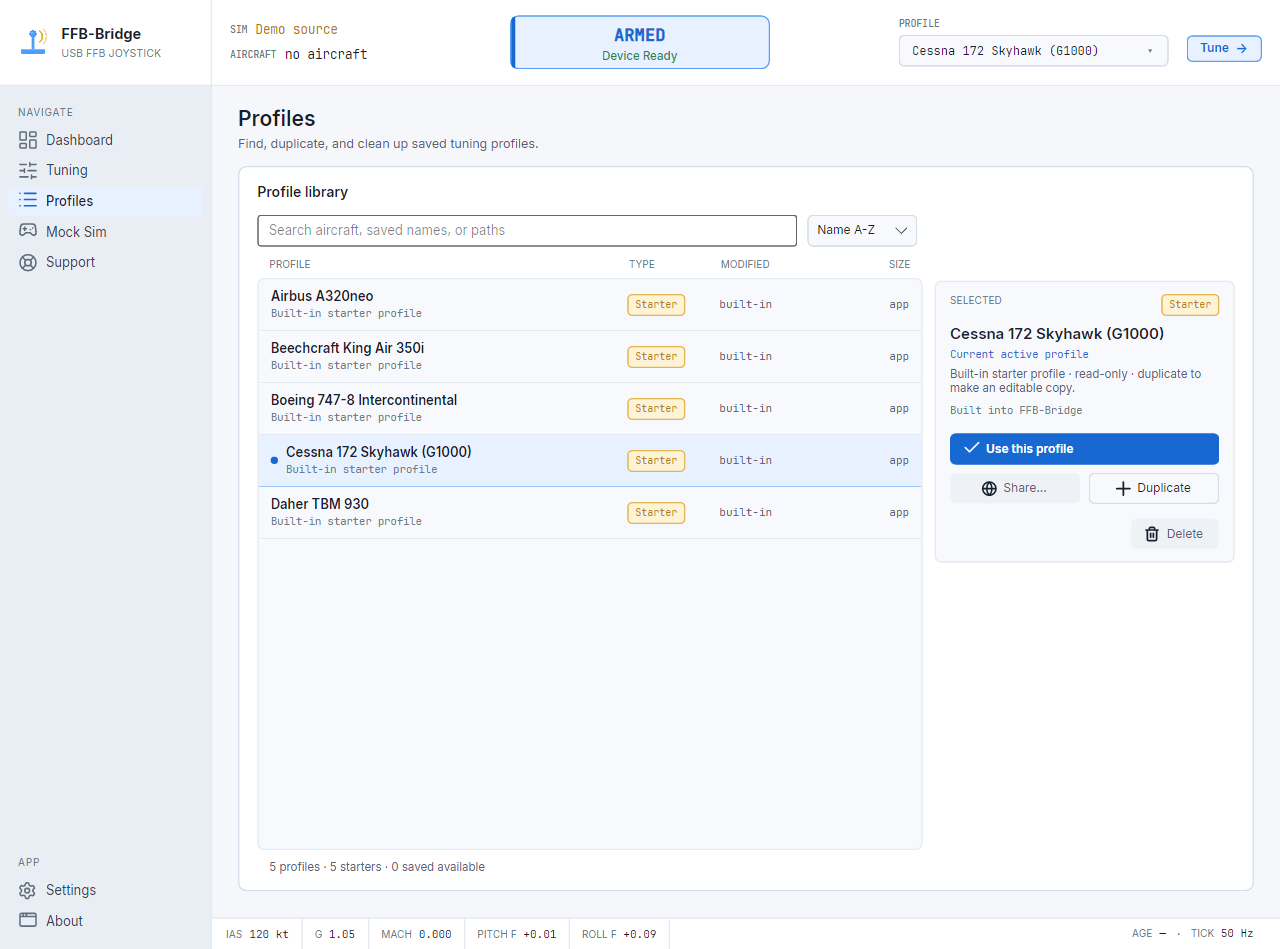
The profile library now supports search, sorting, import, duplicate, rename, sharing, and protected starter profiles. Detected aircraft can automatically select a closer starter profile or a saved aircraft binding.

The force model also adds native control friction with separate breakout and sliding resistance, airspeed-dependent glider control feel, improved flap and buffet behavior, and refinements to autopilot back-drive, damping, trim, and device normalization.

Supported hardware

FFB-Bridge 1.3 supports:

  • Microsoft SideWinder Force Feedback 2
  • Logitech Flight System G940
  • Logitech Force 3D Pro
  • Logitech WingMan Force 3D
  • MOZA AB6
  • MOZA AB9
  • MOZA AY210
  • Experimental joystick-class force-feedback devices through the unlisted-device option

The SideWinder FFB2 now prefers its complete native HID/PID path where validated. Device-specific rendering policies handle springs, damping, friction, periodic effects, and one-shot effects according to each hardware family’s capabilities.

Updating

Your existing profiles and hardware preferences migrate forward.

After installing 1.3:

  1. Update MOZA firmware first, if applicable.
  2. Run Flight Check.
  3. Choose the closest aircraft profile.
  4. Adjust Master gain before changing individual effects.

Packaged Windows and Linux installations can now download, verify, install, and restart after explicit consent.

Get FFB-Bridge 1.3

Explore and download FFB-Bridge 1.3:

https://ffb-bridge.com/ffb-bridge-1-3

Complete release notes:

https://ffb-bridge.com/releases#1.3.0

Documentation:

https://ffb-bridge.com/docs

Support and feedback:

https://ffb-bridge.com/feedback

Community forum:

https://ffb-bridge.com/community

FFB-Bridge 1.3 is completely free. If it improves your flying or brings new life to hardware you already own, you can help fund continued hardware testing, code signing, hosting, and development here:

https://ffb-bridge.com/support-dev

Thank you to everyone who tested the betas and release candidates, sent support bundles, tested real hardware, and explained when something did not feel right. This release exists because of that feedback.

6 Likes

Update: FFB-Bridge v1.4.1 Stable is live

FFB-Bridge v1.4.1 Stable is now available.

This release substantially improves MOZA flight-base support, physical Autopilot Follow, force safety, helicopter force trim, simulator accuracy, aircraft effects, and hardware diagnostics.

MOZA AB6, AB9, and AY210

FFB-Bridge now treats the AB6, AB9, and AY210 as separate devices, with behavior selected for the exact connected hardware.

Supported MOZA settings are recorded before the session, deliberately configured while FFB-Bridge owns the device, and restored when the app closes or the device changes. Recovery information is also retained if a previous session was interrupted.

On validated hardware:

  • AB9 and AY210 preserve independent pitch and roll force proportions
  • AB9 supports configurable Force Sensing mode
  • AB9 and AY210 support official physical Autopilot Follow
  • AB6 remains supported for normal input, force output, managed configuration, and local effects

AB6 physical Autopilot Follow remains disabled because its current tested firmware did not reproduce the validated AB9 and AY210 behavior reliably.

Physical Autopilot Follow

On the MOZA AB9 and AY210, the base can now physically move the connected stick or yoke to the position commanded by the autopilot.

Pitch and roll remain independent, inactive axes are released, and the controls still allow deliberate pilot pass-through.

Follow speed controls how quickly the hardware moves. Authority controls how far it may travel.

FFB-Bridge now follows the control position actually commanded by MSFS, fixing cases where the aircraft was visibly pitching or banking while the physical control remained centered or moved incorrectly.

Legacy force-feedback devices retain their existing software-rendered autopilot behavior, now with a firmer breakout-style hold that remains deliberately overridable.

Helicopter force trim

Helicopter force trim now captures one consistent physical and simulator control position.

This removes the unwanted pitch-up pull that could occur after releasing force trim and allows the hold to use the device’s available strength independently of the normal in-flight output ceiling.

MOZA rotorcraft support includes:

  • Force trim on/off assignments
  • One-press trim reset
  • Configurable hold strength and breakout
  • Beep trim
  • Firmware-local position holding
  • Assignments from a separate button box or controller

More accurate aircraft forces

Control loading now follows the aircraft’s actual aerodynamic state through flight-model dynamic pressure.

This means the controls can continue to feel correctly loaded even if the cockpit airspeed indicator or pitot-static system is failed, frozen, or unpowered.

The update also corrects X-Plane pressure units and audits spoiler, flap, rotor, autopilot, and control-surface telemetry.

Improved vibration and aircraft detail

Engine rumble now has more character at low power, with a new idle-roughness texture that smooths into cruise.

Helicopter vibration follows rotor speed and blade count more accurately, including windmilling rotors, two-per-rev vibration, and a tunable retreating-blade-stall effect.

Aircraft vibration, bumps, buffet, and engine effects now follow the aircraft profile and selected pitch/roll output limits without an additional hidden detail cap.

New Cessna 208B Grand Caravan profile

The Cessna 208B now has a dedicated sourced profile.

It is lighter in the pattern, more deliberate in cruise, firmer in roll than pitch, and uses a 150 KIAS reference with restrained Caravan-specific mechanical cues.

Safer force handling

Safety Stop is now a true latched force cut.

When triggered, it removes device gain, stops active effects, and requires an explicit re-Arm before forces can return. The sustained-oscillation detector also responds sooner on strong hardware.

Additional safety improvements include:

  • One owned output path for all normal flight force
  • Device-aware motion protection
  • Gradual force application during bench tests
  • Conservative test ceilings for strong or uncharacterized bases
  • Reduced outward force during fast movement near travel limits
  • Output-heartbeat detection for a stalled force loop
  • Complete device restoration before process exit

When disarmed, generic devices return to their normal centering behavior. Managed MOZA bases enter a gentle Standby spring while aircraft forces, trim, Follow, resistance, and vibration remain off.

Better Flight Check and diagnostics

Flight Check now exercises more of the real signal path.

Guided speed and RPM sweeps can test aerodynamic loading and engine effects without requiring a live flight. Force direction, polarity, backend behavior, and saved settings now use one consistent convention.

Support bundles also record:

  • Simulator and aircraft identity
  • Selected profile
  • Why that profile was selected
  • Saved aircraft bindings
  • Installed profile inventory
  • Hardware and force-path diagnostics

Logitech improvements

Linux support is improved for the:

  • Logitech Flight System G940
  • Logitech Force 3D Pro
  • Logitech WingMan Force 3D

Devices whose Linux driver exposes constant force but no native Spring can now receive synthesized centering and software-rendered periodic effects.

The G940 also receives corrected autocenter, Spring stop/restore, and force-trim release behavior.

Supported simulators and platforms

FFB-Bridge supports:

  • Microsoft Flight Simulator 2024
  • Microsoft Flight Simulator 2020
  • X-Plane 11 and 12
  • Windows
  • Linux
  • macOS for X-Plane on Apple Silicon

Updating

Your existing profiles and hardware settings are preserved.

After installing v1.4.1:

  1. Open Hardware and confirm the selected force-feedback device.
  2. Review your pitch and roll output limits.
  3. Run Flight Check, especially with a strong MOZA base.
  4. Confirm trim, force-trim, and Autopilot Follow assignments before relying on them in flight.

Download FFB-Bridge 1.4.1

Download:

https://ffb-bridge.com/download

Complete release notes:

https://ffb-bridge.com/releases#1.4.1

Documentation:

https://ffb-bridge.com/docs

Support and feedback:

https://ffb-bridge.com/feedback

FFB-Bridge remains free.

Thank you to everyone who tested the release candidates, submitted support bundles, and helped validate the physical hardware behavior behind this release.

3 Likes

FFB-Bridge v1.4.2 Stable is now available for Windows, Linux, and macOS (Apple Silicon).

This release completes MOZA AB6 autopilot support, adds Zibo 737-800X compatibility, and makes the Logitech G940 driverless on all three operating systems.

MOZA

  • AB6 autopilot follow is complete. It runs through the base’s own firmware, the same official mechanism as the AB9 and AY210, and the conditioning was corrected across live flights before acceptance: no centre detent, a follow spring sized for the 6 N·m base, and the yoke is never left unsupported during engagement.
  • The AB6 cyclic stays where you leave it in helicopter mode. In a hover with force trim released, the base’s own weight used to pull the cyclic forward; a measured counter-force plus a matching friction hold now cancels that on this base.
  • MOZA bases keep their own feel until you arm. Opening the app no longer changes how the AB6, AB9, or AY210 behaves: your Cockpit settings, including spring, damping, friction, and the advanced settings, are suspended during the flight and restored exactly at disarm and quit. The old advice to zero your Cockpit spring before flying is retired.

Aircraft and autopilot

  • The Zibo 737-800X is supported (X-Plane). Its autopilot is detected and FFB-Bridge no longer writes to the yoke datarefs the aircraft drives itself, so command mode no longer drops to control wheel steering on engagement.
  • Autopilot follow on X-Plane renders the full saved authority range on every supported device, with your hand input still reaching the simulator. On MSFS the coupled path uses a steadier reference with a validated 20% ceiling.

Hardware

  • Logitech G940 support on all three operating systems. FFB-Bridge drives the stick directly through its own force protocol, so the 2010 Logitech driver is no longer needed on Windows, the native spring and damping channel work on Linux for the first time, and the stick has force feedback on macOS for the first time.
  • New Base resistance controls in Hardware set resting damping, friction, and inertia minimums for the selected base, applied in every state. A profile can ask for more resistance, never less than you set. A stick base whose own spring is zero is now always held up while the app is not armed, so the grip never hangs.

Feel and fixes

  • A deliberate pitch input no longer triggers a phantom turbulence burst, spoiler buffet stays on while the boards are held out at any flying speed, the stall buffet is silent on the ground, and trim moves the stick only on aircraft whose controls are cable-linked to the trim system, so a 737 or A320 column now correctly stays centered while trim runs.
  • New cues: a gear-transit vibration while the landing gear travels, with its own control, and an optional hydraulic-loss loading effect that raises control loads when the aircraft reports hydraulic failure.
  • Forces stop in the MSFS 2024 main menu and above 2x time compression, and if another program such as SteamVR resets your device mid-session, FFB-Bridge rebuilds its effects automatically within a second.
  • Linux: arming a second time in the same session works again on every device, and a clean quit is no longer reported as a crash on the next launch.
  • Arm and Disarm can act on a single click. The first time you arm, the app asks once whether to keep the confirmation step; you can change the choice anytime in Settings.

Full release notes: https://ffb-bridge.com/releases#1.4.2
Download: https://ffb-bridge.com/download
Updated manual, all eleven languages: https://ffb-bridge.com/docs/manual

If you are already running FFB-Bridge, the built-in updater will offer 1.4.2 on the Stable channel. Feedback is welcome here or through https://ffb-bridge.com/feedback.

2 Likes

FFB-Bridge 1.5.0 released — easier tuning, improved MOZA controls, and smoother force feedback

FFB-Bridge 1.5.0 is now available.

This release makes the Dashboard much more useful for tuning, adds independent vibration control for supported hardware, restores the correct fixed-wing trim behavior on the MOZA AB9, improves Flight Check movement on direct-drive bases, and fixes several problems with saved hardware limits.

FFB-Bridge remains free and local-first, with support for Microsoft Flight Simulator 2020 and 2024 on Windows and Linux through Proton.

Click an effect and tune it

The effect chips on the Dashboard are now clickable.

Clicking a chip takes you directly to the corresponding slider on the Tuning page. FFB-Bridge will automatically:

  • Open the Tuning page.
  • Enable Advanced controls when required.
  • Expand the correct section.
  • Centre the setting on screen.
  • Highlight the relevant row.

This makes it much easier to identify an effect you are feeling and immediately adjust it.

Rotation kick, Surface follow, and Sideslip remain display-only because they do not have individual sliders.

A new pointer hint below the effect grid makes this shortcut visible without relying on mouse hover.

Watch the feature in action:

FFB-Bridge 1.5 — New Dashboard Feature Makes Tuning Easier

Independent Vibration & detail control

Hardware now includes a separate Vibration & detail output ceiling.

This controls the physical strength of:

  • Engine rumble
  • Stall, overspeed, and Mach buffet
  • Runway and ground vibration
  • Flap, gear, and spoiler cues
  • Mechanical shudders
  • Touchdown and other transient effects

The vibration ceiling is independent of the pitch and roll output limits. This is especially useful on strong direct-drive hardware where you may want conservative control-loading forces while retaining more detailed vibration.

Until you adjust it, the vibration ceiling follows the lower of your pitch and roll limits, preserving the previous behavior. Once changed, it is saved independently for that device.

Saved hardware limits now apply correctly

Version 1.5 fixes three related problems that could discard or clamp saved hardware limits during startup.

  • Saved pitch, roll, and vibration ceilings now apply as soon as the device opens.
  • Hardware sliders no longer shrink a saved value because the device recommendation loaded first.
  • Acknowledgement of values above the recommended limit is remembered separately for each device.

This fixes cases where a saved high-output configuration could unexpectedly return to the automatic recommendation after restarting FFB-Bridge, particularly on macOS and the MOZA AY210.

MOZA AB9 fixed-wing trim restored

Fixed-wing trim on the MOZA AB9 now uses the normal centering spring, matching the behavior of other supported bases.

The previous firmware trim route could suppress the centering load, airspeed feel, and stick weight whenever trim was above zero. Trim now moves the spring’s centre without removing the rest of the aircraft’s control-loading feel.

This also removes the related Safety Stop that could occur when the trim setting crossed zero.

Helicopter force trim on the AB9 is unchanged.

Smoother force transitions

Force reversals now complete more quickly, reducing the sluggish feeling that could appear during rapid changes in direction.

End-of-travel braking also begins later. It now acts within the final 15% of travel instead of the final 30%, preserving more usable movement while continuing to soften fast outward motion near the physical limits.

Both changes were flight-tested on a MOZA AY210.

More stable Flight Check movement

Pitch and roll direction tests now slow down and settle near the end of travel on direct-drive bases.

On the MOZA AB6 and AB9, the previous held test force could reach the stop, chatter, and bounce back. Flight Check now reduces outward drive progressively based on position and movement speed, allowing the control to park cleanly.

This conditioning applies only to the guided direction tests and does not change normal flight forces.

The first MOZA Start Test should also remain armed. Firmware preparation is now timed per operation, preventing a healthy first-time configuration sequence from incorrectly tripping the control-loop watchdog.

Dashboard, navigation, and status fixes

  • Mouse back and forward buttons now navigate between FFB-Bridge pages.
  • The DEVICE lamp now reflects whether a physical force-feedback device is connected.
  • Dashboard effect chips provide direct navigation to their Tuning controls.
  • The new on-screen hint makes the clickable chips easier to discover.

Update improvements

Beta-channel installations now compare both the beta and stable update feeds.

When a stable release is newer than the installed beta, FFB-Bridge can offer that stable version instead of leaving the installation stranded on an older prerelease.

MOZA and FFB-Bridge are partnering

I’m also excited to announce that FFB-Bridge is now officially partnering with MOZA.

The partnership gives FFB-Bridge direct access to MOZA Flight hardware, official SDK resources, and MOZA’s technical team. This will support earlier testing, faster investigation of device-specific issues, and stronger validation across supported platforms.

Read the FFB-Bridge partnership announcement

Read MOZA’s official announcement

Download FFB-Bridge 1.5

FFB-Bridge is free to download and runs locally without requiring an app account.

Download FFB-Bridge 1.5

Thank you to everyone who tested the release candidates, submitted support bundles, reported hardware behavior, and helped refine this release. Feedback from different devices and aircraft continues to shape what comes next.

2 Likes