Would like to go curved wide screen, 38". From experience, generally what FPS hit should I expect ?
Current settings are a blend of high and ultra, managed to retain lock of 30 - sometimes drops in heavy weather. Just new upgrade - trying to select a monitor that won’t kill my modest system.
Advice appreciated.
i5-9400F CPU @ 2.90GHz 2.90 GHz|
RAM|16.0 GB|
GTX 1650
I’ve got a system that’s a good 4 years old. I just purchased a GeForce RTX 2070 Super last year, and I’ve got an Acer EI491CR 49” curved 1080p monitor. My frame rates are generally in the mid 20s, and when up at cruise they’ll go into the mid 30s. I think you’ll be just fine!
Warning though - once you get a nice, big, curved monitor you’re never going to want to go back to a smaller, flat monitor! I liken the change to going from dialup to high-speed Internet. While I can’t quantify exactly what it is that makes me feel that way, I just gotta say I love it!
The res you will use going to be the thing that could impact your framerate. You could us the res your monitor is made for. Then turn down renderscaling until you have the same FPS as you had before. Maybe will look worse but i think it will look better. If you can’t get the same fps on that res at 50 or above 50 (never above 100) render scaling you turn down the res and then start over decreasing renderscale until you get good fps.
How high do you have the terrain LOD? Sounds like you are CPU limited. If you want it at 30fps all the time you should decrease terrain LOD to not have it drop to 20 on ground. Maybe you want to have it as it is just wanted to let you know Just learned this from somewhere else on this forum
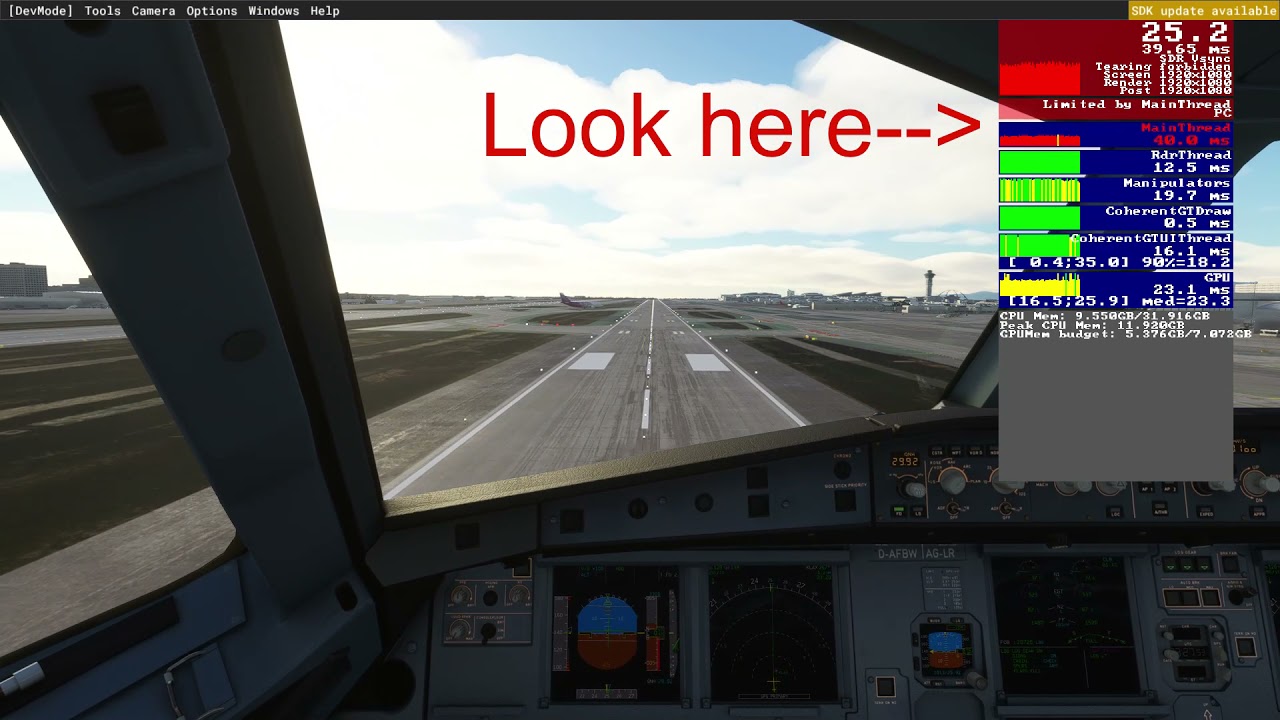
You should use the developement mode and then check on the fps measurement to tune it for your hardware. I know that terrain lod use the most cpu and res use the most gpu.
That depends what is limiting his sim right now i would say. If you realy know that the gpu is limiting your sim right now it would be worse with higher res that we know for sure. I running my sim at 4k now at 30fps in new york smooth. If we set fps limit on 30fps we limit the gpu to use all of it’s power. Tuned i using all of my gpu even if 30fps limit is on.
If you use FBW A320 i would set the terrain lod at 150 or below. I use 150 with my I910900 CPU and that is tuned on ground at KLAX airport.
Main thread (mostly affected of terrain lod on ground level) measure should always be yellow (above 30fps) or green (above 60fps) never red (below 30fps) same with GPU (mostly affected by resolution or flying in heavy clouds).
No problem. I got help with it too and want to help others.
Tune it where you mostly flying and always on ground. It’s not the same settings everywhere. Or do as i did tune it where you see the most cpu load then you know you can fly almost anywhere without stutters. I used KLAX
This is a clip i did to illustrate the how cpu is impacted. You see when it’s red it goes bellow 30fps. It’s the same with gpu.
Side note. If you tune it now you may not reach the resolution the new monitor runs on but if you can set the res higher now without RED on the measure after tuning than the other monitor you should be fine with the new monitor too.
The GPU i don’t know where you should be to tune it though. That depends on so many things. Fly around and see if you are maintaining it above red mostly all the time.
I wrote my hardware, make sure to tune those other settings too because i have all my settings at ultra. Those settings may affect you more than on my system. On my system those do not affect that much as the res does. If you want to use your monitor res in as smooth as possible fps you may need to lower those too. Now you know how to use the fps measure. If you turn down one by one you will see what affect the most and what type of hardware And please let me know if you want more help with it
Only 100. Yes, I am CPU limited according to the “Dev Mode” FPS overlay. Going to fix that with a new system (lol man, FS addictions are expensive) - hopefully by the end of the year I can start ordering parts.
It drops to as low as 1fps, but usually 10-12 on approach to larger airports. Makes it a little tough to fly smoothly, but eh, it’s what I have to work with right now.