 .. no Ron, I explained above why these 65GiG pagefile ( memory dump creation )
Wow have 64 gigabytes of RAM?
But we were all watching Linus Tech Tips and JayZ 2 Cents hmmmm before building our rig… 
In real-life every-day-computing 64 or 128 GB are a little bit over-the-top for all known common programs and games, and will not be used in 90% of all applications except 4k rendering or video editing.
You should not have any technical problems even with 32 GB of RAM.
I personally have 32 GB RAM and 32GB Virtual Memory to keep the system clean and tidy and fast without overstressing and slowing the SSD with too bloated cache files.
Virtual memory is deactivated on all NVMe because these kind of drives have limited write cycles and virtual memory would reduce the life of an NVMe. It of course does that to an SSD too but I don´t care if my 20€ SSD will die in 2092 or 2090 A.D.
well, buy addition 32GIG RAM and you are on topic and you not need the 32GIG Virtual memory and not think about lifetime of your NVME
It is all relative. One of the genetics/genome servers at work has 1.5TB of RAM and the users are complaining its not enough.
The server in question can take up to 6TB of RAM - but an upgrade would require removing all the current RAM and replacing it with 6TB of LPDRAM at around $US20K minimum for the swap over so I suspect they are out of luck.
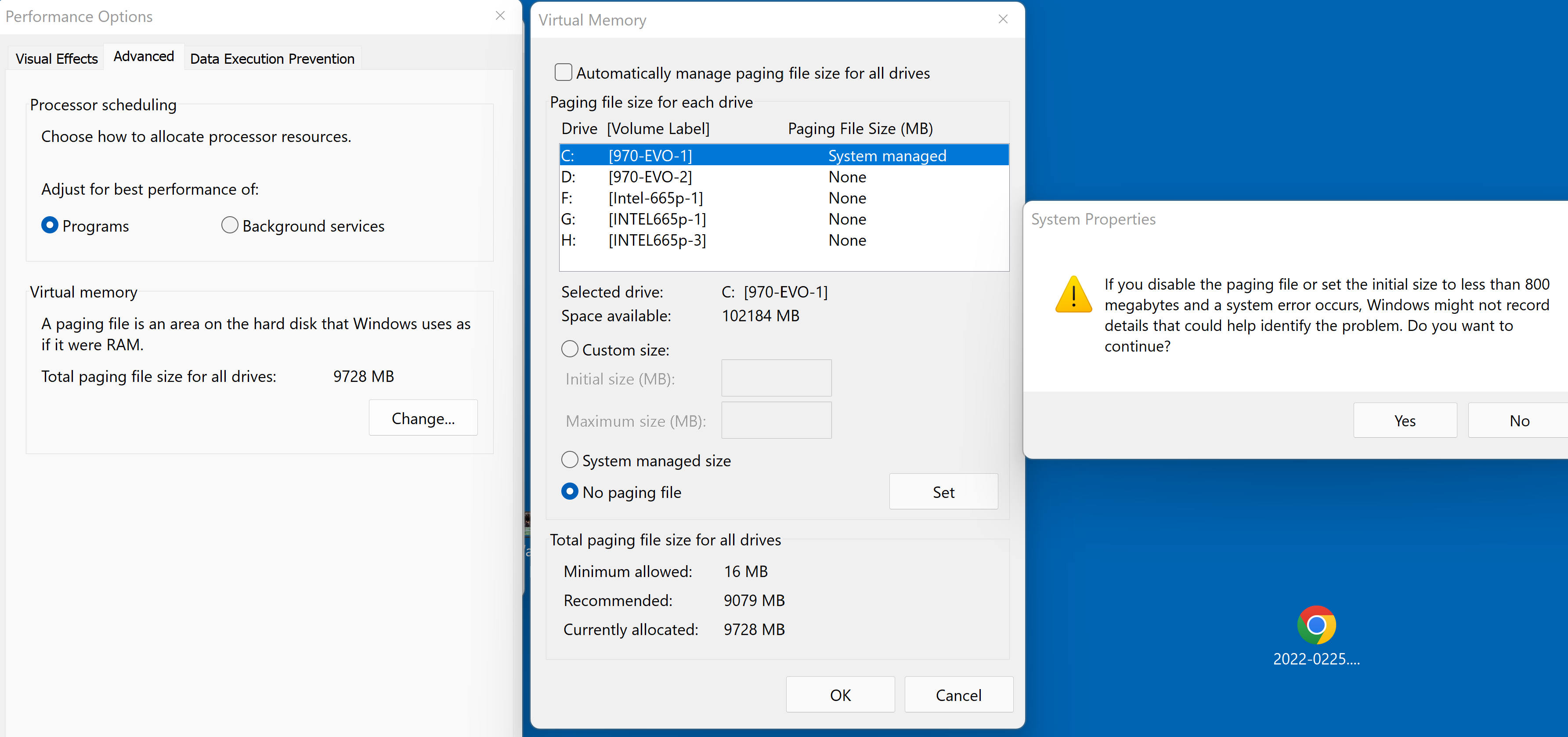
yours is on the default I mentioned: 8-9GIG for 64GIG RAM users and Syarasd got a higher value of 65GIG pagefile because the “(full) memory dump” creation was enabled.
If you have enabled “kernel dump” creation you got the 800MB minimum warning , because this amount of pagefile is then necessary. If you have only the “small dump (256k)” (mindump) enabled, the minimum warning is about 1MB.
Its only the order of the two posts from @Syarasd which is a bit misleading.
PS: and the most important info was in the topic was again: never disable the windows virtual memory completely
I’m running 64GB RAM and had a “resource exhaustion” CTD after about 9 hours of flying recently. The virtual memory was set to system managed.
Changed this to 64000-128000MB + using ISLC and completed CTP yesterday with no CTD or issues whatsoever.
How MSFS can “exhaust” 64GB of physical memory is beyond me but I’d happily hear from someone more knowledgeable.
I assume its a specific mod , ext. application. May be you can mention more informations about your flight / setup. Might interessting for the developers as well. I still have, in my 64GB RAM system, my pagefile setting 512mb/4G ( min/max ) and no issues ( the pagefile size is not increased above the 512mb ), but also not realy “big” mods and usually 9h is behind what I sit in front of a game.
Sure. I was flying the inibuilds A310 from LOWW to KLAX. The crash happened 7hr 57mins in. I was running DX12. PC specs include 13900KS, RTX4090 and 64GB of DDR5 memory.
In Event Viewer, the following were logged:
Fault bucket 2087123578667333951, type 4
Event Name: APPCRASH
Response: Not available
Cab Id: 0

Problem signature:
P1: FlightSimulator.exe
P2: 1.31.22.0
P3: 6409dda0
P4: FlightSimulator.exe
P5: 1.31.22.0
P6: 6409dda0
P7: c0000005
P8: 0000000001f0fda8
P9:
P10:

Attached files:
\\?\C:\Users\[redacted]\AppData\Roaming\Microsoft Flight Simulator\CrashReport.txt
\\?\C:\ProgramData\Microsoft\Windows\WER\Temp\WER.e1775948-7cfc-40ed-a3fd-cdb836d27040.tmp.dmp
\\?\C:\ProgramData\Microsoft\Windows\WER\Temp\WER.b3d56b47-6b41-42a6-bdc9-6cc8397711fd.tmp.WERInternalMetadata.xml
\\?\C:\ProgramData\Microsoft\Windows\WER\Temp\WER.30121070-01b1-46ee-967f-badc60b26001.tmp.csv
\\?\C:\ProgramData\Microsoft\Windows\WER\Temp\WER.4ce8d93f-3973-41ae-95d0-bba79e9a1451.tmp.txt
\\?\C:\ProgramData\Microsoft\Windows\WER\Temp\WER.67a71912-9e4a-4816-b388-33bea6bf6fde.tmp.xml

These files may be available here:
\\?\C:\ProgramData\Microsoft\Windows\WER\ReportArchive\AppCrash_FlightSimulator._eb38cda897f9c3c446458e3841ccfbd81a0fe50_80e0a2b7_565ab044-af94-48e2-bfaf-452e6122fab9

Analysis symbol:
Rechecking for solution: 0
Report Id: 08f66fa2-bb3c-489b-a5a4-dac9f36c6181
Report Status: 268435456
Hashed bucket: 10c6906b9c7dd9733cf6f3d634cef93f
Cab Guid: 0
Faulting application name: FlightSimulator.exe, version: 1.31.22.0, time stamp: 0x6409dda0
Faulting module name: FlightSimulator.exe, version: 1.31.22.0, time stamp: 0x6409dda0
Exception code: 0xc0000005
Fault offset: 0x0000000001f0fda8
Faulting process ID: 0x0x5F30
Faulting application start time: 0x0x1D963AAE14729FB
Faulting application path: C:\Program Files (x86)\Steam\steamapps\common\MicrosoftFlightSimulator\FlightSimulator.exe
Faulting module path: C:\Program Files (x86)\Steam\steamapps\common\MicrosoftFlightSimulator\FlightSimulator.exe
Report ID: 08f66fa2-bb3c-489b-a5a4-dac9f36c6181
Faulting package full name:
Faulting package-relative application ID:
Windows successfully diagnosed a low virtual memory condition. The following programs consumed the most virtual memory: FlightSimulator.exe (24368) consumed 29757202432 bytes, FSRealistic.exe (28288) consumed 7556362240 bytes, and redacted.exe (30372) consumed 2285584384 bytes.
29757202432 = 29.75 GB
7556362240 = 7.55 GB
2285584384 = 2.28 GB
What I can’t understand is why FS would consume nearly 30GB of virtual memory.
Thoughts?
I have a 16GB RAM Drive. The best DRAM config for me is 4 x 16GB dual-channel.
well, the airplane and other used mods / apps ( e.g. FSRealistic / redacted / ( - simconnect ) ) are intressting. Each mod /app can of course cause a “real” mem-leak. But in that case I expect, that also your physical RAM is fully used in that case. Did you monitor the RAM usage of the game ?
If the RAM is not full, then its may be again such a strange OS thing where it use the pagefile, when it should better use RAM. I remember some reports where it was better to limit the pagefile size. But that would really a bit strange, again
What I would recommend is, as mentioned: monit the RAM usage for a while. Here important is the “working set” and the “commited memory” ( you can choose that in taskmanger details page, or also visible in resource manager ).
If you have time, you can also repeat the flight with a different airplane ( I know, the hardest thing if you like the A310 most ). In case it happens allway with the A310 and never with another airplane, we are a step more by the reason.
EDIT: I remember somewhat about FSRealistic am mem consume , but can’t find the topic for now. May be its not caused from the A310.
Thanks for the insight. Any suggestions on an app to monitor RAM usage over a long period of time?
I’m doing a test today, repeating a long flight however I have changed a few variables - 13 hour flight in the Salty 747; DX11 instead; page file is now fixed to 64-128GB on SSD. Not running ISLC either.
If this works, I will repeat with DX12 instead of 11. My gut is telling me this could be a DX12 related memory issue.
usually the RAM consume should not much increase over time. It can increase depend on the area you flight, or the airport, or may be there is a range in “how many planes are around”. But over time not. It can go up, but it should also cleaned from time to time.
The problem with huge pagefiles is, that cleanup these takes such a long time and may be at a point-x in time, the situation escalate. Also fragmentation of memory is a point, etc. Therefore pagefile should be avoided if possible. And I still assume that 64GB should be sufficent also if you set a pagefile like my ( min/max e.g. 1G/4G ) - “more” is not allways the better solution
About DX12.. not sure.. but who knows.. I have more the external tools , which connects to msfs under suspection.
So the above test complete, no crash, 100% stable. No performance loss. Same add ons running in the background (Volanta, Simlink/Navigraph), just no FSrealistic.
So at this point it’s safe to say the crashing is either due to; the A310, or DX12, FSrealistic, or inadequate virtual memory size. Personally my money would be on DX12 – thinking back to my days of game dev there is clearly a memory allocation/clearing issue based on the DX12 issue with ground textures, and MS are really finding this difficult to resolve. This is a bug that’s been around for ages now. I think I may stick to DX11 - performance isn’t as good for me as it’s so CPU bound, but it’s playable.
Some of these people reporting are Microsoft themselves
Nuff said: the issue is not within a program using paged memory. Windows is being slow in automatically allocating the virtual space needed so if an application tries to access memory which in fact is not yet ready/none existent at this point an exception is triggered
So it may help to set a fixed amount of paged memory as it doesn’t need to be reserved regularly by the OS on demand - it just acts like another chunk of RAM installed
ah.. yep.. I also remember that report from MS. At least it match with my understanding of the pagefile and what I allways do: limit it as possible, but allways let a small emergency pagefile ( dumps, etc ).
If a game this days really needs more than 64GIG RAM and run in Out-Of-Memory because of my “low emergency setting”, I’am pretty sure the solution is not to increase pagefile ( and reduce lifetime of SSD ). Its more to find out why its happens. In case the app realy needs that, then I buy another two sticks for more physical RAM