VR - Cant access custom graphics settings!

ISSUE DESCRIPTION

Description of the issue:cant access advanced graphics options in the vr tab, happens nothing when clicking the button.

FREQUENCY OF ISSUE

How often does this occur for you (Example: Just once, every time on sim load, intermittently)?

REPRODUCTION STEPS

Please list clear steps you took in order to help our test team reproduce the same issue:

  1. Try to enter custom settings in vr settings

YOUR SETTINGS

If the issue still occurs with no mods and add-ons, please continue to report your issue. If not, please move this post to the User Support Hub.

What VR headset and peripherals are you using:

[PC Only] Are you using Developer Mode or have you made any changes to it?

[PC Only] What GPU (Graphics Card) do you use?

[PC Only] What other relevant PC specs can you share?

MEDIA

Please add a screenshot or video of the issue occurring.

The workaround is to click on VR Mode, then click on VR Graphics, then click on Global Render Quality.

There is no work around.

I cannot access VR Global render menu no matter what I do

Prob self-explanatory but here it is:

Thanks that workaround worked for me

Same here, I was clicking on the VR menu tab instead of the side tab

Just to add to this, after I did the workaround, it also seems to work now by directly clicking the custom global rendering settings button, even after resterting the sim,.

I’m having this problem too. I was able to access VR custom graphics settings by enabling dev mode but that has its drawbacks

Thank you for the workaround - works for me … now

Using the template below will greatly help the team reproduce the issue and ease the process of fixing it. Before posting, search for an existing report. If you are not sure it’s a bug, please first report in User Support Hub.

ISSUE DESCRIPTION

Unable to select Global Rendering Quality (GRQ) settings in VR section of settings.

I have always been able to select GRQ in VR settings before 1.8.5.0

FREQUENCY OF ISSUE

Every time I try to select VR GRQ

REPRODUCTION STEPS

Please list clear steps you took in order to help our test team reproduce the same issue:

  1. Start the sim and go straight to Settings/VR/ from the main screen and try to select Global Rendering Quality to make changes. Click once or repeatedly nothing happens.

  2. In VR flight select Settings/VR and again try to select Global Rendering Quality and again nothing happens.

  3. The issue occurs whether the VR headset is connected or not.

YOUR SETTINGS

If the issue still occurs with no mods and add-ons, please continue to report your issue. If not, please move this post to the User Support Hub.

What VR peripherals are you using: PICO 4 Ultra

[PC Only] I am not using developer mode nor have I made any changes.

[PC, MSFS 2020 Only] PC MSFS 2024, I have not tried MSFS 2020

[PC Only] What GPU (Graphics Card) RTX 5080

[PC Only] AMD 7900X, 64 GB RAM, PICO 4 Ultra

MEDIA

Please add a screenshot or video of the issue occurring.

Same here.

Also it is not possible to acces this item for VR when you are in 2D

Workaround:

First click on ‘VR Mode’ in the window above left.
Then click again on the button ‘VR Graphics’, then you can access the settings until you leave the VR-Window.
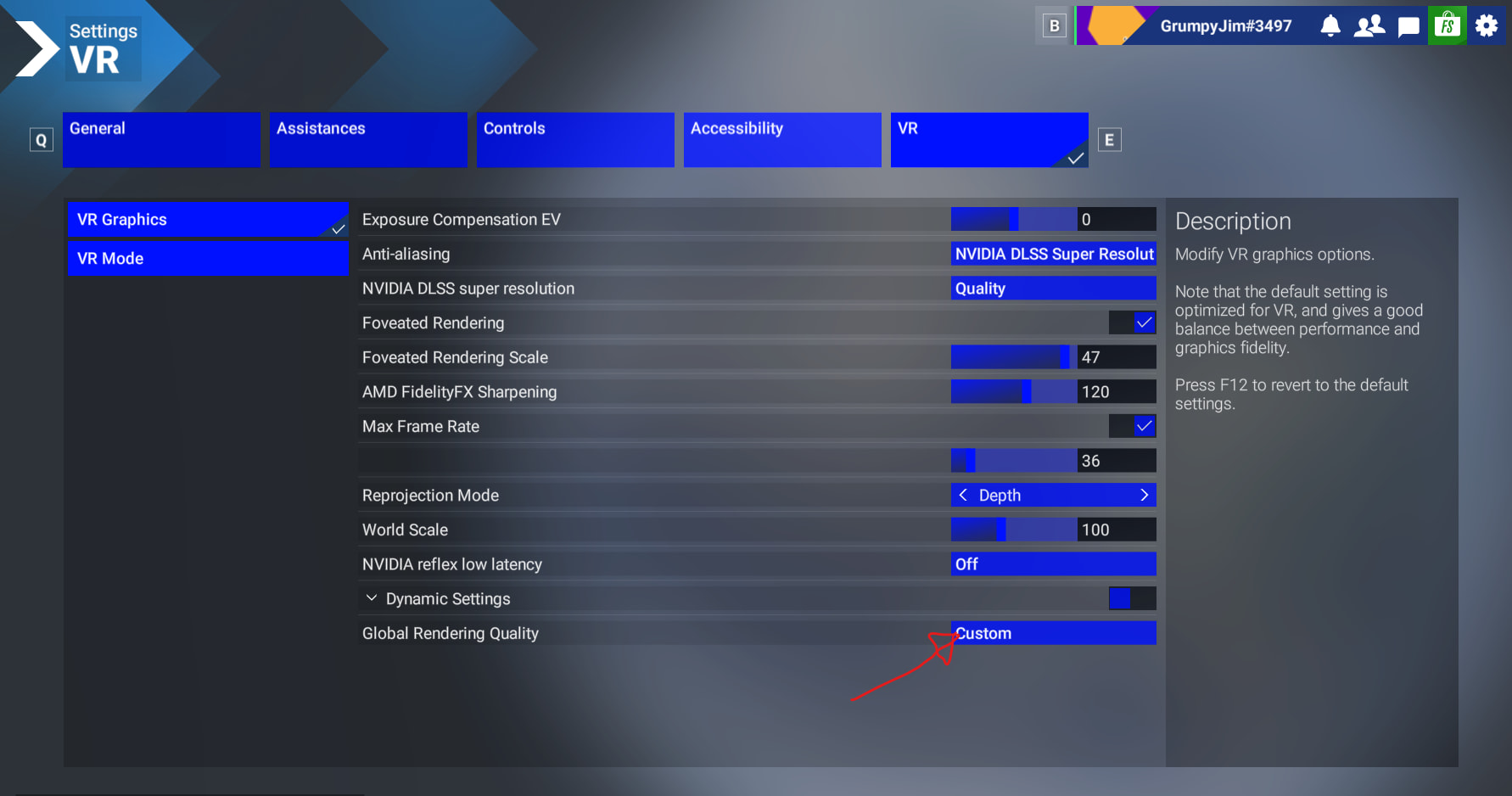
ISSUE DESCRIPTION

Description of the issue:

In the VR Graphics Section. The “Custom” button does not work.

FREQUENCY OF ISSUE

Always

REPRODUCTION STEPS

Please list clear steps you took in order to help our test team reproduce the same issue:

  1. If you Click on the VR Mode Button then go back into the VR Graphics Section the button will begin working.

Mee too. Please fix.

Thanks, this worked for me.