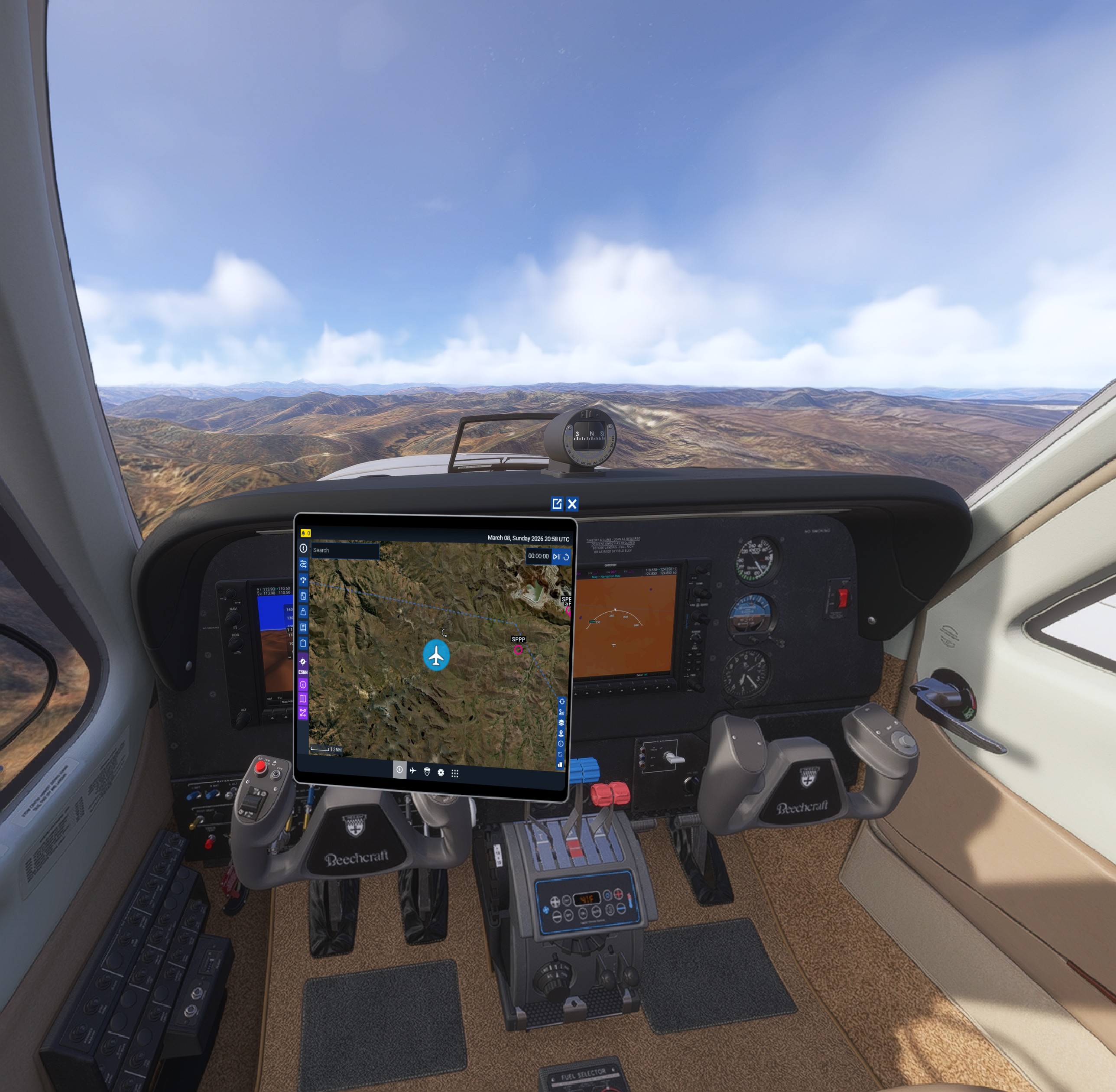
using the efb windows inside the cockpit should disable the mouse so it cannot interact with the flight deck. Right now in VR and if the EFB is called using the TAB hotkey, interacting with the efb can cause clicks on instruments or other things in the cockpit that are behind the efb. The efb should disable cockpit interaction for anything that is behind it like it does in 2D.
FREQUENCY OF ISSUE
every time
REPRODUCTION STEPS
Get in the Asobo Beechcraft Baron (for example)
Start VR (this is only a bug in vr)
Open the EFB and put it somewhere so there are interactable cockpit swithches or similar behind it. You can now interact with the switches behind the efb through the efb causing inadvertent cockpit interaction when using the EFB.
YOUR SETTINGS
If the issue still occurs with no mods and add-ons, please continue to report your issue. If not, please move this post to the User Support Hub.
What peripherals are you using:
[PC Only] Are you using Developer Mode or have you made any changes to it?
no
[PC, MSFS 2020 Only] Are you using DX11 or DX12?
[PC Only] What GPU (Graphics Card) do you use?
rtx3070
[PC Only] What other relevant PC specs can you share?
MEDIA
Image below, cursor is hand due to interaction with throttle (behind EFB)
I cannot replicate this issue in 2D and have not seen any report.
Could add in reproduction steps with which aircraft you are experiencing the issue and add in the settings section information about your VR headset ?
Yes, of course. I noticed it in the BlackSquare Beechcraft duke. It is a HP Reverb G2 headset running the oasis driver. I can see if this is only for the Duke or if i can reproduce it with other aircraft. For example, the Duke has the circuit breakers over at the copilot’s side. I usually place the EFB to the right of me in the cockpit. I noticed a lot of breakers popping and after a while i realized it was because they could be interacted with through the EFB. So by interacting with the EFB i inadvertently disconnected circuit breakers behind it.
edit:
I can confirm this is a VR issue, and that it happens in default aircraft as well. I tested it in the Asobo Beechcraft Baron for example and I could interact with the Garmin buttons through the EFB.
I use the classical mouse interface.
Here is a screenshot where you can see the EFB is open and the cursor is the rotate arrow because it is interacting with the Garmin below. (Look just northnortheast of the plane icon on the EFB) In the second picture the arrow key has turned to a hand because it is interacting with the throttle. Through the EFB.
Please update the “Reproduction Steps” section with this 1st party aircraft so that devs and users can try to replicate. Report will then be moved back to the Bug Reporting Hub.
Original post updated and i also posted the pictures there. Hope that’s ok now, if you need more info or data please let me know and I’ll do my best to accomodate