The other day, i heard from a fellow VR user, that he had eliminated stutters in all games by using a HDMI 2.1 for the monitor, and DP for the headset. I got thinking about this, and was contemplating how their GPU must behave when in MSFS. I know from experience that switching to often between monitor and VR introduces instability in MSFS, so was wondering if there is something to this. I am planning on using a 2.1 for monitor and DP for pimax light to test, rather than x2 DP ports.
I have done it both ways and haven’t really noticed a difference. The GPU really doesn’t care. However, when having my monitor and PCL both on DP I have run into black screen issues on reboot in certain circumstances. It’s a problem with the DP handshake that is eliminated by keeping my monitor on HDMI.
You have a PCL. Nice. Can i ask, if you look through passthrough mode, and turn your head quickly, is there any latency? Mine is like looking through a 25hz camera. High latency blur.
My quest 3 uses USB3 (usb-c) and the monitor (one of them) is connected via display port and the other via UGREEN USB-C To display port adapter. No manner of different connections seem to matter. Virtual desktop streamer seems to be a bit smoother than the cable, I didn’t expect that. I have two GPUs and thinking of if I can run the streamer app from the second one.
in the old days of Reverb G2 I used to notice I’d get crashes to desktop if I connected two 5K screens (5120x2880) with thunderbolt and reverb G2 via USB-C to display port adapter. I suppose it was too much for one GPU to manage.
I have one DP monitor and one HMDI monitor and a DP headset. Doubt it makes any difference at all. Also, I never see stutters that don’t show up as frametime spikes (usually CPU), so it’s clear what’s causing them, and it’s not a cable!
Your right, it made no difference. Although it was worth doing, because i discovered, in light of my own occasional stupidity, I already had both a HDMI and DP cable connected to the monitor!! Yes, very foolish.
Something I am going to try with Quest 3 is the USB-C to ethernet adapter trick. The adapter has a charging port so the headset can remain charged.
Connect the USB-C adapter to the Quest 3, then the ethernet cable to the router. The computer is also connected to the same router directly by ethernet cable.
This supposedly gives very good performance, but different people get different results.
Edit:
I got delivered today Cable Matters USB-C to 5 Gigabit Ethernet adapter with charging.
I connected ethernet cable to the adapter along with USB-C cable (for power). Connect the adaptor USB-C to the quest 3 USB-C port.
Connect the ethernet cable to router
Computer also connected to router
Disable headset WIFI
Start Virtual Desktop - the connection works immediately.
I tried it in MSFS and seems to be quite good. I had “God Mode” selected without issue.
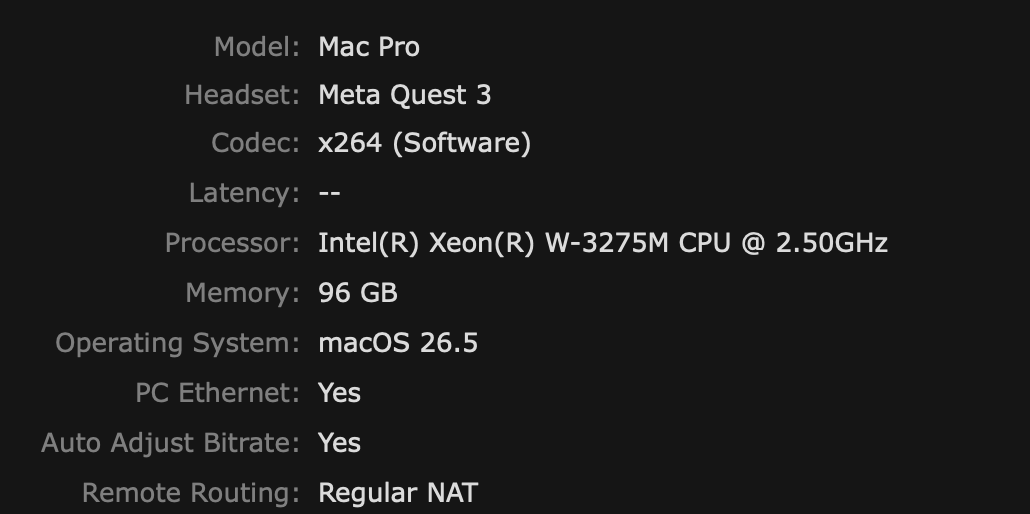
One little extra to the above. Using the Virtual Desktop Streamer in that method, should you have both WIFI and the cable ethernet connection on the machine, it’s important to turn off WIFI on the computer.
Otherwise Virtual Desktop Streamer will often use the WIFI and then complain about “PC Ethernet: No”:
 Keep ya’ll posted.