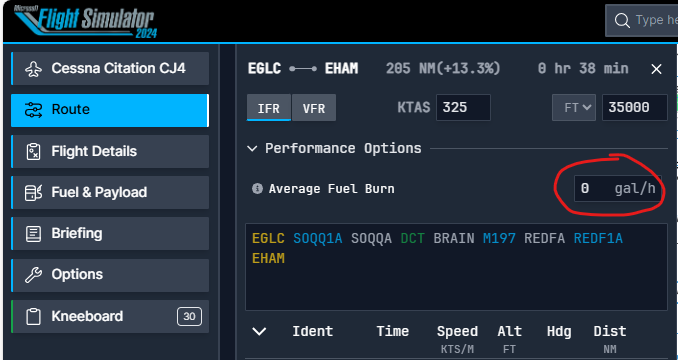
I am uncertain whether this is a bug or a calculation that must be performed manually. When creating a flight plan, I set the departure, destination approach, and altitude. However, when I access the fuel and payload section, the payload is randomized, which is acceptable. However, the fuel tab displays zero values for all fuel quantities until I manually input the average fuel consumption for the selected aircraft (e.g., A320 Neo). Once I enter this value, the fuel is calculated and displayed correctly.
I am unsure whether the average fuel consumption should be manually calculated or if the tool should automatically calculate it based on the route and payload.
For example, I had to research the average fuel consumption for such a plane online and found that it is approximately 2100 kg. Once I input this value into the field, my briefing displays the correct fuel load.
Therefore, my question is whether I inputted the correct value or not. Perhaps the tool should automatically calculate this value once the aircraft is selected.
Good questions and the right ones to ask! I have not spent any time trying to figure out what they have done here across the web based flight planner and what is set-up in the sim (24). What I have been doing is refueling GA aircraft when configuring them, i.e., version, liveries, etc. and just going with the 50% or topping off as needed. Most of my free flights have been on the short side due to all the bugs getting worked out, etc.
For an airliner, and I have only tried the Dreamliner in 24 so far, and just this past week; I start with a Navigraph/SimBrief flight plan as I would do for a flight in 2020. Then I manually input the fuel, weight + balance values into 24. This works for me with the Dreamliner, maybe something like this would work for the Airbus pilots? Just a thought. Cheers!
I’ve seen many tutorials that use Simbrief, but I created an account and was welcomed by a 10€/month fee, which atm I don’t see it needed for my experience level.
Since I need to do these things manually, including entering the Flight plan manually in the MCDU, I thought the MS Planner could do this calculations for me, as I see simbrief does in all the tutorials.
Got it. While I have a Navigraph subscription which you would not need, I thought SimBrief could still be used for free? Airliner fuel calculations, indeed all aircraft fuel calculations, should take the weather into account; air density/temperature, winds aloft, etc. I think SimBrief flight plans integrate those parameters for us so that when we fly in sim with live weather, the fuel burn will work out correctly for that weather. Would be interesting to see if 24 will also take live weather into consideration for fuel burn and how much fuel to take on any particular flight.
The Simbrief OFP also gives the average fuel burn for the flight in the summary data on page 1 top right. The 24 web based planner has a field to enter this on the route page and this has stayed populated for me for subsequent flights. The value is then pre-populated on the fuel and payload page but doesn’t trigger a trip fuel calculation unless you then edit the value.
Also anyone else getting Alternate fuel being calculated to many decimal places?
Like most of MS2024 it has great potential but must try harder.
Also worth noting that the web based planner has a field for pasting a FP string. I don’t know of a way to get a Simbrief FP in string format directly but Navigraph provides a copy to clipboard that works. Useful if you need a FP from Simbrief matching the World Map/EFB flight plan.
Thanks for this note about pasting a character string FP into the planner, that’s a time saver I didn’t know about! It has been good for me to recreate the FP in the planner so that I can see how it works, but over time, that will get old!
interesting when I created the account, and login, Im immediatly taken to a page where requested to pay. I don’t have any other option.
EDIT: I just gave it another try, and for some reason it allowed me to continue.