After reading about people having the smoothest and best VR experience more than once every day, I was wondering what exactly is “smooth?”
Since “smoothness” is mostly subjective, I was wondering if I actually have a perfect functioning VR environment and it is just as it is supposed to be, or if something is wrong.
I am asking since I seem to have constant issues with my headset.
I reach roughly 45FPS in the FBW at a big airport, in the PMDG 737 even more.
However, I still have jidders and stutters when looking around inside the cockpit, especially noticable around the window frames. I tried a broad range of settings, with and without OpenXR TK, Nvidia CP, etc. to no avail.
The most frustrating part is its inconsistency. Sometimes I have 30 FPS but I can look around smoothly without issues. Other times with the same settings, aircraft and location, I have 45 FPS but looking around makes the whole cockpit jumpy and stuttery. Sometimes Motion reprojection makes everything perfect, other times it is as if I’d drank a bottle of whiskey before boarding the plane.
So after reading tens of times about smooth as silk VR, I was wondering what I am doing wrong?
I have a original Reverb G2 and I read that the old cable has some issues, which got fixed with the omnicept cable. Could this be the cause?
Try OpenXR toolkit anti-shake set at 50%, which smooths things out nicely for me. Don’t do this if you use MR however as it creates a lag loop that makes the screen go all wobbly.
Nobody has 100% smooth frame pacing in VR just yet. SU10 has brought us a step closer but there are still moments of stuttering.
Also everyone uses motion reprojection due to the fact that no PC can actually run a consistent 72 FPS in all scenarios at the resolution of current day HMDs. Motion reprojection varies per headset but is never as smooth as native framerate due to artifacting.
I think we should all consider the fact that the smoothness is also influenced by the scenery loading time - so it’s basically down to the MSFS servers. A lot of micro-stuttering are caused by that.
And this also explains (at least partially) why things can change so much between sessions with the same setup.
i had severe inconsistencies in frame rates when loading multiple flights successively. The first flight would be fine, then the second one would be bad, after that the 3rd one was worst.
on some days, all flights were perfectly smooth !
Drop the resolution in the headset itself as far as you can.
Increase resolution rate of the headset if you can.
Drop the LOD in the game to 20-50.
Drop other graphic intensive settings in the game.
Set “Clear” weather with no winds.
Fly and see if you get a “smoother” experience than what you usually get.
That’s probably going to be your benchmark for the “smoothness”.
Obviously graphic fidelity will suffer, but the the way that the world moves under you will be a good depiction of “smooth”.
Unfortunately one mans smooth is another mans stutter fest. It sounds like you are probably sensitive to stutters as am I which is really frustrating. I see so many smooth vr settings tutorials on much less capable hardware than many have (including myself) but those same settings are a dogs dinner for real smooth vr experiences.
VR is msfs is a game within a game, one day it seems ok, the next day it’s terrible. I don’t feel there is hardware capable of giving a truly smooth experience yet but at the same time it seems fairly well acknowledged that the software is not very well optimized for it either.
Take a look at the post in here about Epic VR Performance! Best VR Settings Guide Quest 2. It just looks absolutely terrible, like looking at a potato. There’s no ‘immersion’ if you can’t see anything with clarity. I tried his settings exactly as he’s got them, genuinely wanted to stomp on the headset.
His setup & mine are virtually identical. He’s not using supersampling in Oculus which is why there are potato graphics. But some are happy looking at those shapes on the screen!
In my case, VR is smooth most of the time. No matter how fast I turn my head, it is just responsive and smooth.
But: at irregular intervals, the world around me freezes for a second, or I see huge black bars left and right, or the tracking stops alltogether. All comes back to normal (=smooth) after 2 or 3 seconds.
So, is VR perfect? Far form it, but for me it’s amazing enough today, with all its flaws. I have never looked back at 2D.
And the stutters and black bars: I accept that as a heart attack simulation (I’m always very happy when I recover :-))
the trick is that you don’t jump between 30 and 45 fps with motion reprojection = stutter. you can lock your fps to 30 or 45 with the openxr toolkit. without the toolkit you are forced to set the graphics settings very high so that it stays just by 30 fps and not trying to go any higher. at 45 fps you are forced to lower the settings so that it at least reaches 45 and does not fall below it. I hope you can follow me
I have both a Quest 2 and a Reverb G2 and have only been able to achieve ‘smooth’ with OpenXR motion reprojection on my G2 when locked at 30 FPS. Despite months of trying with the Quest 2 I could not get smooth results - capping at 30FPS got me close - not much judder, but still stutter as it is only 30FPS and MR is useless with the Quest 2.
The other thing I track is the App CPU and App GPU from the Open XR Toolkit overlay - as long as those two numbers do not add up to more than 33ms - max frame time for 30 FPS - I get very smooth. 33-37ms and I start seeing a few judders - above 37ms and things start falling apart. So I use that to tweak settings.
With Toolkit FSR I cant get much above 70 scaling, with the sim settings below ultra for most things.
With DLSS I cant get above ‘performance’ - quality takes it too far. DLSS+DX12 seems to be better than DX11.
As far as subjective ‘smooth’ goes - when I first got smooth results it was very noticeable compared to anything that had gone before - zero judders, zero stutter.
I do occasionally get other issues that cause severe judder that I have never gotten to the bottom of - when switching in and out of VR having changed Toolkit or Open XR settings seems to be one, and requires a sim restart sometimes; doesnt happen all the time though. Another was when I had Steam VR running at the same time as Oculus Link. Another seemed to be related to the rolling cache - deleting that cleared up the issue.
Oh yes - one thing that I changed early on was to disable hyper-threading in the bios - the issue was that the CPU wasn’t maxing out on the main sim threads - turning off hyper threading seemed to unleash the CPU. I have not gone back to revisit that yet.
I also set Vsync in the Nvidia control panel to Fast (and definitely not ‘on’) - that too reduced judder.
For me, it would be 75 or 90 real fps. At the moment we can not achieve that, so with smartsmothing I would be happy with 45 fps at all times (90 not real frames).
Dx12, well coded, should help with the cpu and with the new gpus maybe we …
Smoothness is not subjective as it can be measured. I think most of you can’t find smoothness because you haven’t figured out what to measure. You don’t measure your fps and strive for the highest fps. That’s not smooth. Smooth is consistent frames. You want very little variation between one frame and the next. That’s what smooth is.
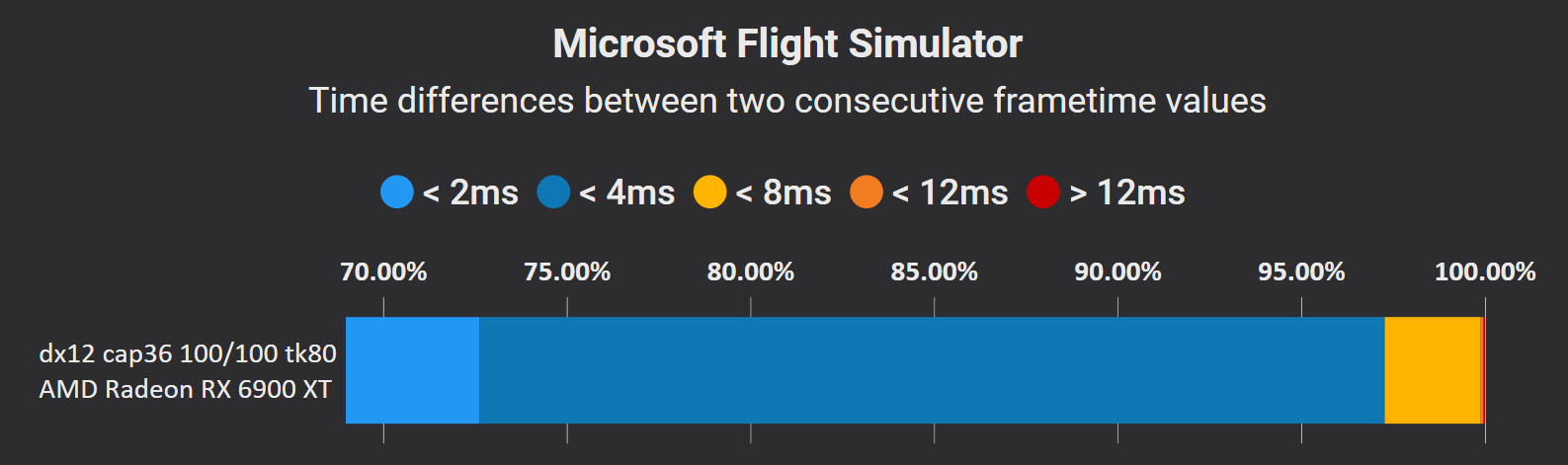
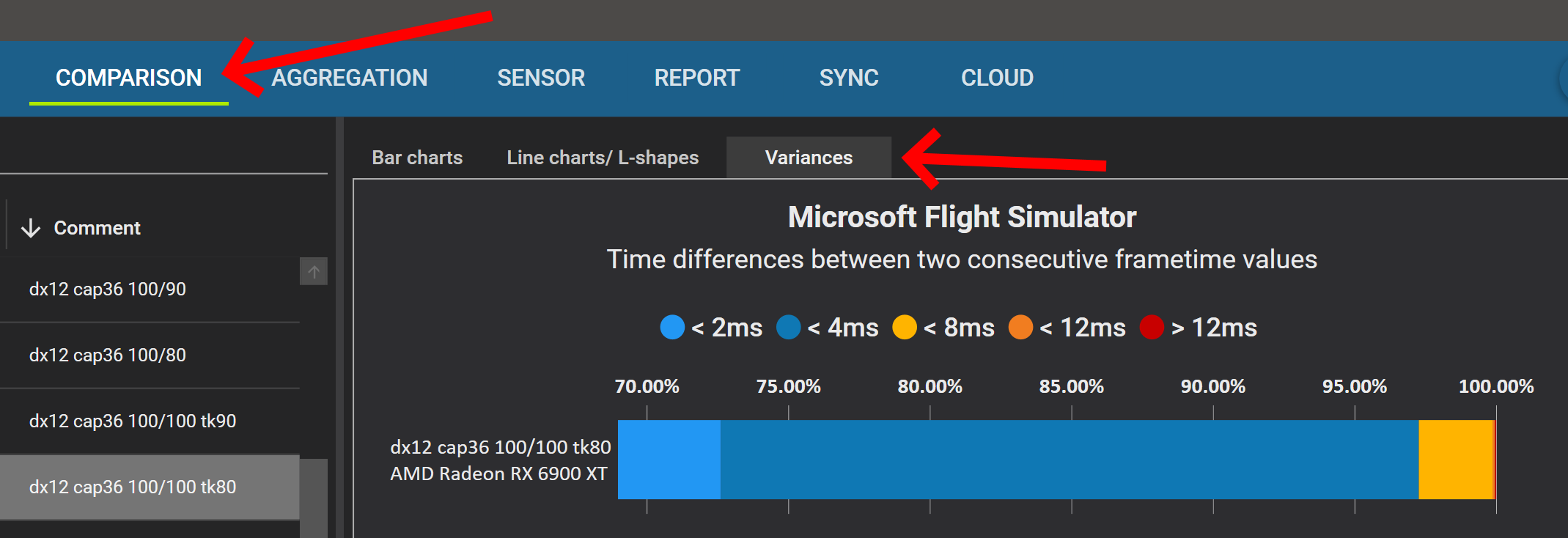
To measure smoothness you need to look at the results like I’m showing below. You can measure your frame-to-frame variation with a program such as CapFrameX.
Here’s my current results with my settings. Motion reprojection is off and I cap my framerate at 36 fps. Use this tool to evaluate your settings and find your settings which will produce consistent frames, not the highest framerate. If you can get the blue colors like I’m showing over 95% then I promise you’ll know what smooth is. Good luck.
I have a 9700K@4.8Ghz and a 3080ti - but on the latest 22H2 of Windows 11 (which is known for stuttering and I have done all the known fixes) I can’t get smooth results at all (blue of 65%). What app do you use to cap at 36? If you don’t cap the FPS, what fps do you see - I get about 40fps. There is the Nvidia Control Panel, Riva Tuner, OXR Tool Kit, and maybe more. I would appreciate any guidance. We all need to check this out!
By the way, what settings/options of CapFrameX give that single bar chart as above - I see a pie chart.
But I would be cautious about interpreting ‘smoothness’ from it - it will say things are smooth based on frame timings but things can still be not smooth in the headset.
I could easily get all blue smooth in CapFrameX but if I didnt then sync frame rate with refresh rate by capping FPS I would get some juddering.
Also, if capping frame rate to sync with refresh rate, then likely the best you are going to get is 30 FPS against 90Hz with high fidelity - and 30 FPS will still give stuttering without MR because there just arent enough FPS to avoid it from an experience perspective.
On a Quest 2 I never really got past those issues - and that’s with an i9 and 3080ti.
Only when switching to a reverb g2 and Open XR Motion Reprojection did I get smooth in the headset - with my definition of smooth being completely fluid motion. The difference between the Quest 2 and G2 with MR is stark for me - night and day.
But I will say that it is not 100% perfect - the odd judder happens some times.
So with MR you can lock the FPS - and I lock mine at 30FPS - just cant quite get to 45FPS with the fidelity settings I want.
With the Quest 2 I tried both the Nvidia Control Panel and Rivatuner Stats Server as a means to cap FPS. RSS was more convenient as I didnt have to restart the sim.
In all cases I have relied on the Open XR Toolkit to get the most out of the GPU.
I, for one, don’t use motion reprojection in the sim, Oculus debug tool, OTT, OpenXR Toolkit or anywhere. I don’t like the blurry, tearing effect it causes.
I run smooth with most aircraft using a Quest 2, TAA 100 OXR 90, settings mostly high/ultra with a i9-9900k OC 5.0GHz and a 3080Ti. Frames limited to 45 with the Oculus Debug Tool (no ASW!). This is running my Quest 2 at 72Hz native resolution (slider full right).
Smooth doesn’t mean high framerates (for me, anyway). It means no stuttering when I move my head to look around and no stutters when the aircraft is moving past objects. Things are not as smooth depending on the aircraft and airport - Fenix gives me some stuttery-ness at KATL, for example.
Oh, and this is smooth while on VATSIM with StreamLabs running in the background. Here’s a video of my settings. Works for me. Maybe use it as a starting point and go from there? Note - this is for a Quest 2, but the MSFS and OXR Toolkit settings may apply -
Are you guys with lots of smooth (lots of CapFrameX blue) using 22H2 Win11? I wasn’t testing using CapFrameX before when I was on 21H2 but in just the last week (when I downloaded the upgrade ) that things seem quite stuttery. Now that I am looking at the variance chart and the raw plot of frametimes, I can easily see why when I look out the side window down at the ground, things are jumpy
I changed to DX12 and get the smooth timings (as you show above) just in 2D pancake mode (still using 22H2 Win 11) but the results with VR still are quite stuttery. Were your above results bar in VR or nonVR mode?
I’m just trying to decide if I just will have to wait for Windows folks to fix 22H2. I’m pretty sure that 21H2 was much better for steadier VR.