What i need to do to play with a decent fps in this game? What i need upgrade on my pc?
i7 - 9700k , 32GB , RTX 3070 OC Gaming , SSD NVMe 2TB , Windows 11 Pro x64
What i need to do to play with a decent fps in this game? What i need upgrade on my pc?
i7 - 9700k , 32GB , RTX 3070 OC Gaming , SSD NVMe 2TB , Windows 11 Pro x64
Thank you 
What in your views would you consider decent fps ?
I have a rig less capable than yours, and I get a decent 35 locked fps even over big PG areas.
Win10, GTX1660Ti, Ryzen5 3600, 16Go RAM. No VR. The storage means not much to the sim performances.
Mix between high and ultra, and I’m perfectly fine, within my expectations.
Thing is, in my experience with a handful of MFS iterations, this one is the one less demanding material-wise.
Then again, you might have other more precise expectations. Just sharing my 2 cents here.
Indeed i didnt play after last patch, i think last patch was about performance improvements or am i wrong? Well, maybe 35 fps in big cities is good, but about stutters etc..? im installing the game again, after a few time stopped.
And about A320, are you using FBW or Fenix?
Minimum 35fps for this game. People running Ultra at 25fps are kidding themselves. It’s like someone driving a Toyota 86 thinking it’s fast.
I’m using the FBW’s dev branch, and am very satisfied with it.
As I read it, last patch was 1 of 2 about performance. Take this information with a grain of salt, don’t take my word for it.
As for the stutters, they did indeed happen in my case. My solution was to lower LOD to no more than 200, again with my own setup. You might use another setting with yours.
From the previous SU to this one, my experience was to not being able to fly long haul routes to having no problem with anything regarding distance. I’m talking about 10+ hours flight, up to 17.
I indeed experienced stutters then, that I solved with that LOD setting.
In any case, I do think it is good practice to go all over the settings again as soon as a SU comes out.
Moved to #self-service:install-performance-graphics
Some patience, as the sim (and Hardware) evolves over the next few years
I have the same CPU and a 3080 and I can get 70FPS in ultra 4k most of the time. You should be able to get similar with slightly dialed down settings
What are you wanting to achieve within the sim? What aircraft do you fly? And in what areas?.
I have a 9700k OC to 5ghz and am using a RTX3060 12gb with 32gb of 3200 RAM and run off a 1tb nvme Samsung 980.
Personally I just fly either the TBM or the jplogistics 152.
I have a 40inch 1080p TV as main monitor and a 17inch flat panel monitor for my TBM panel, also I have 2 android tablets, one running Matric for an autopilot and the other using spacedesk for the touch panel on the TBM.
With this setup, using DX12 and now running at 1080p while using Nvidia dlss in dlaa mode I get great FPS. Usually around 55-60 with vsync on in the sim. All settings ultra except clouds at high and motion blur off and depth of field off.
I will say I’m in the SU11 beta. Performance is fantastic, only a couple of stutters as things are loading in the background occasionally, but I’m more than happy with the way this sim performs now.
So I can’t see why you would be getting bad performance unless you’re running @ 4k and in the airliners at dense airports all the time.
Also to note is that I run the pc in the windows 11 beta channel, all updated, hags on, game mode on, with virtualization turned off in the bios, and re-BAR on.
Usually if you have good hardware and a bad result the issue is a bad setup of Windows and/or BIOS. Also depending on your resolution there are sim graphic settings that are just not needed. One example would be Supersampling at 4k. Totally useless and only kills performance. Stutters may come from incorrect BIOS settings or badly matched hardware as well as wrong/bad NVIDIA or AMD settings.
I’m on the same GPU as you and I’m not even getting 30 FPS anymore ;( and that’s on Low/medium
Depends what you understand with “decent”. The performance of this sim relies on so many situations and factors that it’s hard to nail down a performance lack to a single cause.
I have the following configuration right now:
Ryzen 7 5800X
Gigabyte X570S Aero G
32GB Crucila Ballistix
PowerColor 6900XT Red Devil
To make it short, the game runs very smooth, even in really crowded INTL airport scenery and surrounded by photogrammetry, whereas I consider smooth to be in the mid 30s framewise in such a high traffic situation. Outside of these areas, over PG scenery, I am in the mid 50s, out in the wilderness it can be mid 60s to 70s. I consider this a very decent performance.
However, I have situations especially in big airports where the CPU is still bottlenecking and the GPU twiddles thumbs at 40% load. So what you would definitely want is a CPU with a friggin high single-thread performance. These have been usually Intel CPUs in the past but such a processor also costs half a kidney, namely the I7 and I9 13xxx. And you should ask yourself if you want to spend that amount of money for one of a few games that benefit from this. MS is constantly improving the multithread performance in the sim and I think, in a couple of months we could be at some point that all cores in a CPU (ore at least more of them) get assigned to dedicated tasks - which in turn relieves the main thread.
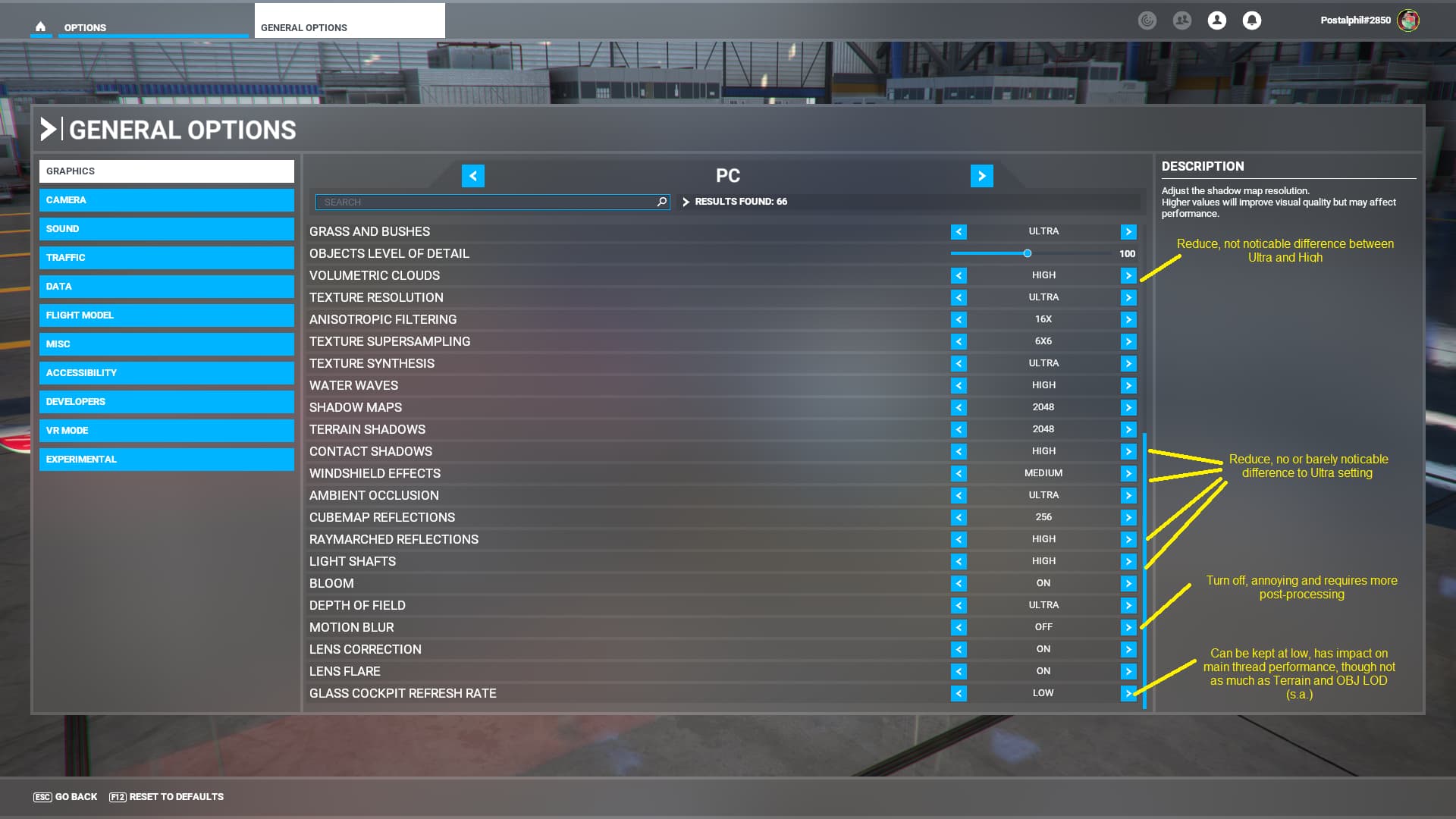
You should never expect to run this game like CoD, always looking out for that “120 FPS and everything beloiw is unplayable” thing. This sim is super complex and it will not be performing like a Ubisoft AAA title right out of the box. Also take care for the performance guide posted here in in one fo the blogs. A lot of graphical options you can lower since you normally don’t see any difference from Ultra to High.
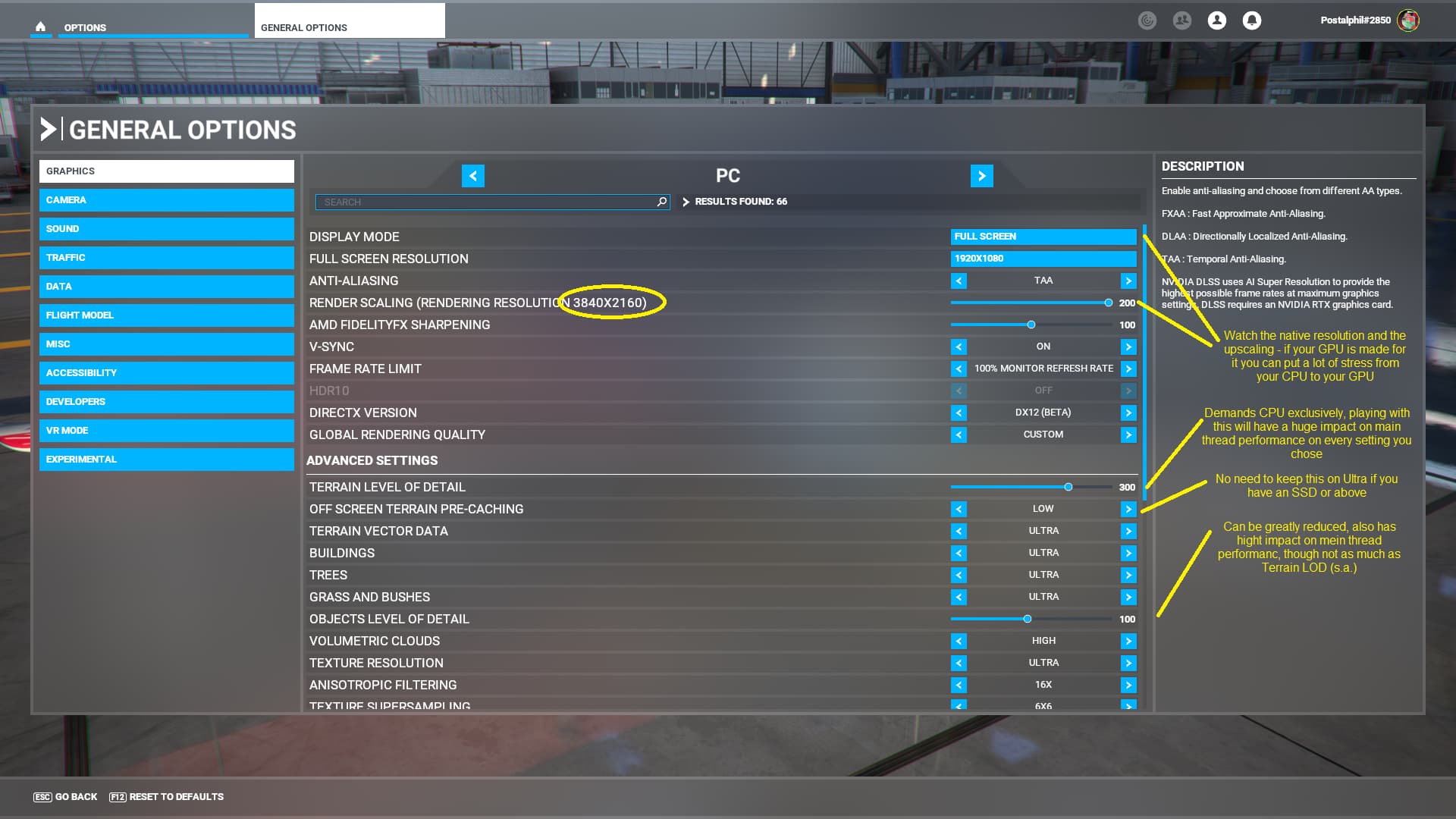
What hits performance the most is the Terrain LOD. Leaving that on 200 or not over 300 works fine. I also reduced to Object LOD to 100. I seriously cannot see any difference. Also, I am playing at upscaled 4K resolution on a 1080p screen to push the graphics card more - looks absolutely fantastic and creates a picture so sharp it hurts the eye.
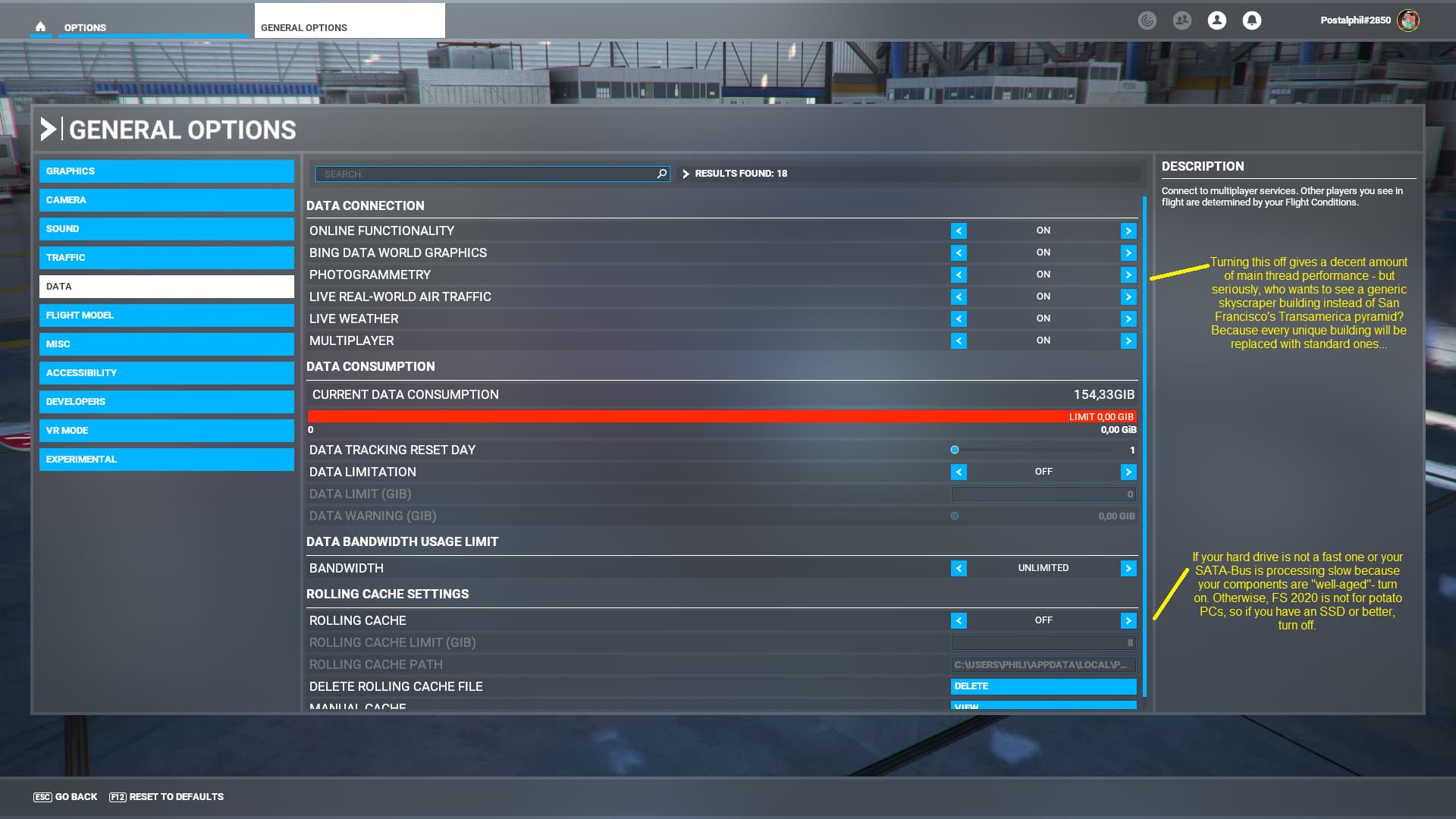
Recently, I added to NVMEs into my system (both WD Green with 240GB and 2TB). Other than usual voices saying this doesn’t bring much, it dealt greatly with this buffering lag when the sim shovels new texture tiles on the ground. I don’t notice it anymore. With my Samsung SSD it was clearly noticable and very annoying.
I think this is the most understated avenue to performance throughout this entire forum.
Sadly it is because even companies like Microsoft do not seem to be able to create gaming engines which access today’s hardware capabilites. I think there a multiple ways to assign cores exclusively to threads like physics, aerodynamics, weather, traffic etc. It just has to be done.
Is the case with MSFS, specifically, is this due to building this sim on legacy code?
I understand Asobo has done much work to update and move the code forward, but to what extent is it still hamstrung by legacy architectural design?
Of course, we all just speculate here about what they are doing and have done, so what do we even really know?
Yes and no.
The core of the sim was from FSX but was basically rebuilt prior to release to be fully 64bit compatible (so it can use more than just 3GB of RAM) and to utilize more than just one CPU core/thread.
However as the source code was pretty old there are surely some areas which need rework - anyway comparing performance to FSX (while considering the extra complexity added) MSFS made already big steps forward keeping in mind there are people simming on 8th gen Intel CPUs with GTX 970 GPUs.
Some databases and basic effects were ported from FSX, e.g. the ATC database.
That’s the first time I hear about that… Are you sure the sim would capable of doing all the things it already does (weather depiction, CFD flight model, raymarching, ambient occ, DX12) if the code is like, 15 years old? I don’t think so but as you said, what do we know.
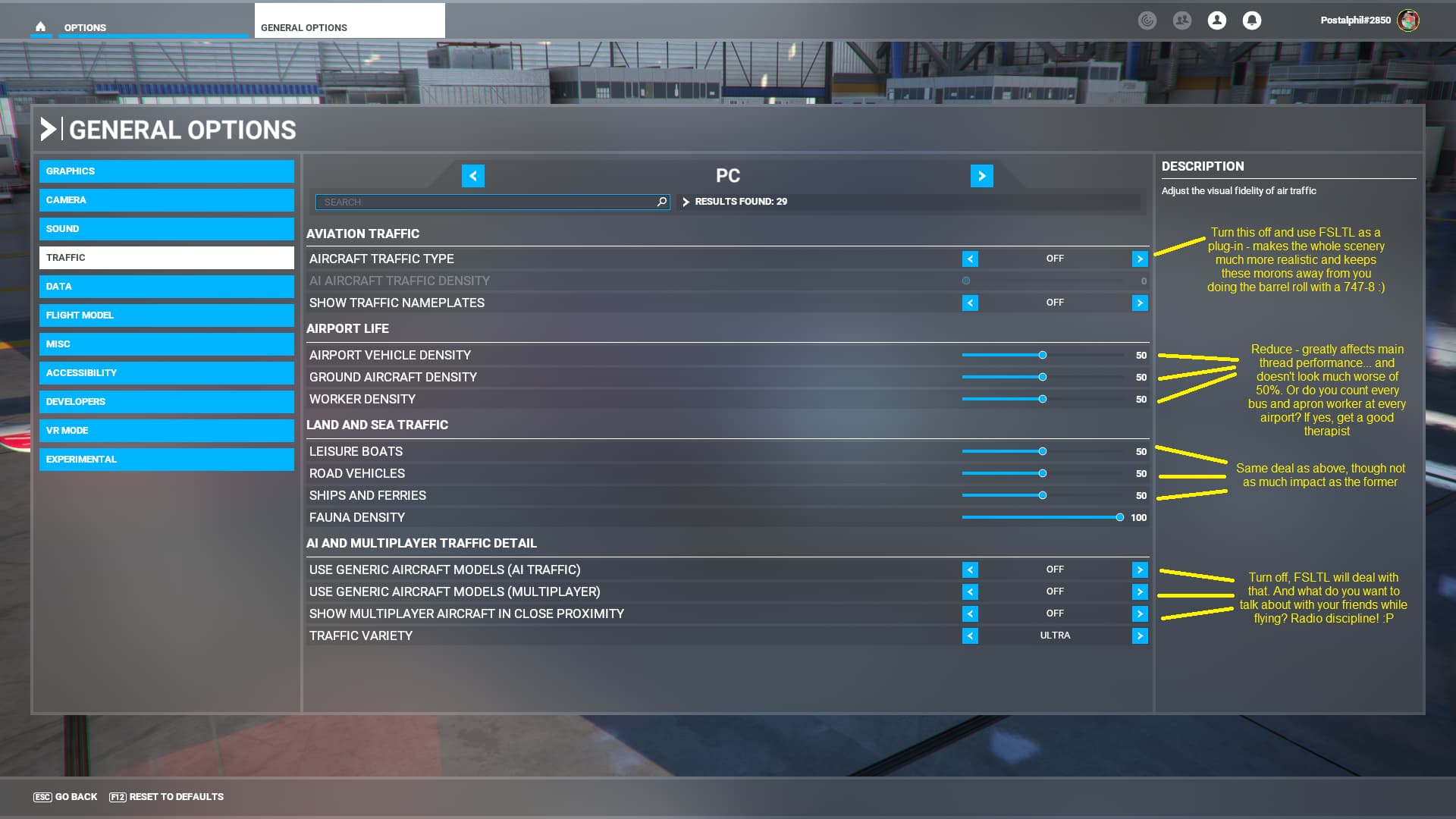
Anyway, I going to share some screenshots with comments from my setup:
I’m just trying out some of your advice..
First thing I did was set from 3840x2160 to 1920x1080 while upscaling. It’s MUCH smoother but looks noticably worse. I’ll try a bit with supersampling and external AMD AA though. If it works it’s a great recommendation!
Second is your advice to turn terrain precaching to low. This is only good if one uses a straight view with cockpit presets. If you use a Head Tracker it will cause popping terrain though. It is needed to be set to high or ultra and I haven’t noticed any difference in performance.
Trying the rest now!
Try to read about the importance of “frametimes” over “framerates”
You’ll discover that FRAMETIME is much more important for MSFS