Quest 3.
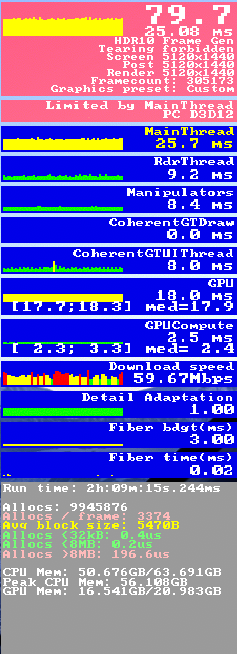
Is there a way to get the resource manager from the dev option in VR?
What you use to measure resources in vr?
I use mainly the open xr toolkit but that is limmited.
Is there a good way to record these values?
(Image as a example)
Quest 3.
Is there a way to get the resource manager from the dev option in VR?
What you use to measure resources in vr?
I use mainly the open xr toolkit but that is limmited.
Is there a good way to record these values?
(Image as a example)
There is a way but I forget it right now. Er, it may have been by greatly reducing the resolution in 2D, which enlarges the view of the dev mode resource manager in VR, so you can see it while wearing the headset. I think that was it.
The other way is to take off your VR headset, place it on the desk, recenter it and then you can see the Dev mode frame counter on the monitor. If your headset times out, you can place some tape over the sensor so that the screens stay on.
The quest has it own preformance measuring methode but its not so complete and dont know if its tailored for msfs?
OpenXR toolkit has an option to show gps and cpu/gpu frametimes as well as vram usage. I usually fly with it on just in top right corner so I can glance up when needed. Its much less distracting also then the build in fps display.
Sorry, I don’t know much about Quest headsets. I just use the Toolkit advanced FPS counter with my Pimax Crystal. Note that the Toolkit disables GPU frame-times when using Turbo mode, at least for me.