Why do some have CTDs and Others do not?

In this particular case, it is mostly due to lack of documentation from Asobo, and lack of Asobo demanding that unique paths be used.

mycompany is the example name Asobo uses in their examples, and developers just copy the example, make a couple changes to code, and ship it out, without understanding they need to create a unique file path to their package contents for the VFS. This is just one small example of reasons why CTD’s happen.

One, Asobo should be verifying the VFS as they load it. How hard is it to say “Hey, wait a second, I thought I already read this file… and… why is it different… maybe you want to look at this”, instead of “la dee dah, here’s a file… hmm, it’s got the same name… oh no! I’m so confused… What do I do??? ahhhhhhhh” and crash…

Two, They need to be more explicit in some of the rules developers should follow in package creation

Three, they shouldn’t accept stuff that is the same as their examples. Granted, that’s not easy to do. But, I dunno, something’s got to be done about developers not understanding what things mean and that it actually is important that they come up with a name for themselves.

Maybe it’s just a case that they need to implement more guid’s so these names are just symbols and then they don’t matter?

Thrustmaster FF

Device Descriptor:
bcdUSB: 0x0100
bDeviceClass: 0x00
bDeviceSubClass: 0x00
bDeviceProtocol: 0x00
bMaxPacketSize0: 0x08 (8)
idVendor: 0x044F (ThrustMaster, Inc.)
idProduct: 0xB550
bcdDevice: 0x0100
iManufacturer: 0x01
0x0409: “ThrustMaster”
iProduct: 0x02
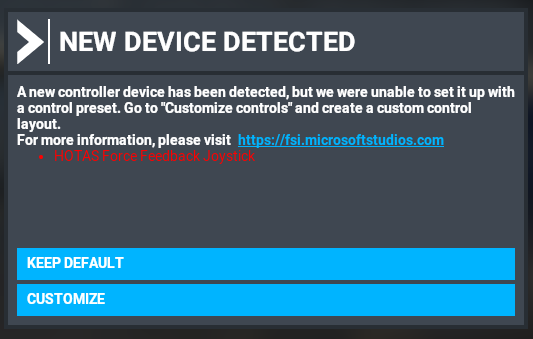
0x0409: “HOTAS Force Feedback Joystick”
iSerialNumber: 0x00
bNumConfigurations: 0x01

ConnectionStatus: DeviceConnected
Current Config Value: 0x01
Device Bus Speed: Full
Device Address: 0x0B
Open Pipes: 2

Endpoint Descriptor:
bEndpointAddress: 0x82 IN
Transfer Type: Interrupt
wMaxPacketSize: 0x0010 (16)
bInterval: 0x08

Endpoint Descriptor:
bEndpointAddress: 0x01 OUT
Transfer Type: Interrupt
wMaxPacketSize: 0x0020 (32)
bInterval: 0x04

Configuration Descriptor:
wTotalLength: 0x0029
bNumInterfaces: 0x01
bConfigurationValue: 0x01
iConfiguration: 0x00
bmAttributes: 0xC0 (Bus Powered Self Powered )
MaxPower: 0x01 (2 Ma)

Interface Descriptor:
bInterfaceNumber: 0x00
bAlternateSetting: 0x00
bNumEndpoints: 0x02
bInterfaceClass: 0x03 (HID)
bInterfaceSubClass: 0x00
bInterfaceProtocol: 0x00
iInterface: 0x00

HID Descriptor:
bcdHID: 0x0100
bCountryCode: 0x00
bNumDescriptors: 0x01
bDescriptorType: 0x22
wDescriptorLength: 0x0353

Endpoint Descriptor:
bEndpointAddress: 0x82 IN
Transfer Type: Interrupt
wMaxPacketSize: 0x0010 (16)
bInterval: 0x08

Endpoint Descriptor:
bEndpointAddress: 0x01 OUT
Transfer Type: Interrupt
wMaxPacketSize: 0x0020 (32)
bInterval: 0x04

for comparison, the MS Sidewinder 2 FF

Device Descriptor:
bcdUSB: 0x0110
bDeviceClass: 0x00
bDeviceSubClass: 0x00
bDeviceProtocol: 0x00
bMaxPacketSize0: 0x08 (8)
idVendor: 0x045E (Microsoft Corporation)
idProduct: 0x001B
bcdDevice: 0x0A00
iManufacturer: 0x01
0x0409: “Microsoft”
iProduct: 0x02
0x0409: “SideWinder Force Feedback 2 Joystick”
iSerialNumber: 0x00
bNumConfigurations: 0x01

ConnectionStatus: DeviceConnected
Current Config Value: 0x01
Device Bus Speed: Full
Device Address: 0x0A
Open Pipes: 2

Endpoint Descriptor:
bEndpointAddress: 0x81 IN
Transfer Type: Interrupt
wMaxPacketSize: 0x0040 (64)
bInterval: 0x01

Endpoint Descriptor:
bEndpointAddress: 0x02 OUT
Transfer Type: Interrupt
wMaxPacketSize: 0x0010 (16)
bInterval: 0x04

Configuration Descriptor:
wTotalLength: 0x0029
bNumInterfaces: 0x01
bConfigurationValue: 0x01
iConfiguration: 0x00
bmAttributes: 0xA0 (Bus Powered Remote Wakeup)
MaxPower: 0x32 (100 Ma)

Interface Descriptor:
bInterfaceNumber: 0x00
bAlternateSetting: 0x00
bNumEndpoints: 0x02
bInterfaceClass: 0x03 (HID)
bInterfaceSubClass: 0x00
bInterfaceProtocol: 0x00
iInterface: 0x00

HID Descriptor:
bcdHID: 0x0100
bCountryCode: 0x00
bNumDescriptors: 0x01
bDescriptorType: 0x22
wDescriptorLength: 0x053F

Endpoint Descriptor:
bEndpointAddress: 0x81 IN
Transfer Type: Interrupt
wMaxPacketSize: 0x0040 (64)
bInterval: 0x01

Endpoint Descriptor:
bEndpointAddress: 0x02 OUT
Transfer Type: Interrupt
wMaxPacketSize: 0x0010 (16)
bInterval: 0x04

That’s a no go. Seriously. If opening up to third parties, unique paths are a no go. Companies in different geograpical locations without possible world wide business name infrigment, especially for small devs, is just impossible. Hence identical paths can exist.

Yup, absolutely clear.

Well, i can say, that’s in fact easy. Just run a comparitor, but yeah. I do not know enough about it.

What a about a vid&pid kind of thing or guid generator? like in:
"If you want to develop for MFS, go to this website: whatevermfs/createvidpid_or_guid and create a unique identifyer for your creation.

I know it’s ridiculous, but, it could “help” against colliding guids.

1 Like

I’ll be honest, I like the way you’ve impersonated the process and I’ve just had a laugh reading this :rofl:

4 Likes

Well, that’s nothing out of the ordinary. Looks legid, you could also have dm’ed this :wink: (i think)

Yes, but others might have some input – and you never know if a Dev at Asobo is reading some of this stuff !!!

@scriptkid @FlyingsCool5650

In my opinion the problem here is not Asobo’s VFS.

As a virtual file system it is not supposed to know about these overlapping names, on the contrary, it is meant to supporting this as a feature, so that you could replace files by other files.

I believe the following is missing and could help a minimum instead:

  • a “validator” tool in order to check what is important and missing when packaging your add-on, including these stupidities (default name), including also advises about the package memory footprint and suggestion for optimizations.
  • a log file tracing important steps during execution like in XP11. This is not only helping end users finding out most problems by themselves but this is also giving context when analyzing crash dumps.

PS: while on the topic of the VFS I’d really like Asobo to add support for the ZIP and/or 7Z VFS I/O abstraction, so that we can:

  • save tons of space (DDS seem to compress quite well)
  • save tons of IOCTL (1 file instead of thousands per package)
  • save time when managing our add-ons (moving 1 file only)
  • cure the bug with the path exceeding MAX_PATH limits…
2 Likes

I think you’re not understanding what I mean.

So, using a scenery as a typical package:

it consists of the following directory structure

Community<package directory name> contains:
layout.json - list of files in the package
manifest.json - package information like author, title, dependencies, type, etc.
contentinfo - a directory containing a directory containing a thumbnail to represent the package in the content manager
scenery - the top of the scenery package, everything inside goes into the VFS, and typically has these things in it:

scenery\<mycompany> - this is model stuff created by the author typically, mycompany is meant to be replaced with the author’s “company” name, or their name, something other than mycompany
scenery\global - I think this is stuff that’s globally available
scenery\world - I think this is stuff that’s available to the local world

What actually goes where in this structure is kind of messy. Sometimes authors put their models in the <mycompany> directory, sometimes it goes in the global directory, and the local stuff goes in the world directory.

The example file for the first case (models in a separate directory) puts the models in a directory like this:

scenery\mycompany\modellib.bgl

And when multiple developers just use this filename structure, you end up with a CTD because scenery\mycompany\modellib.bgl exists at multiple locations, which you can’t do. The fix for any package that’s written like this is to change mycompany to some unique name and update the layout.json. Problem fixed.

Sometimes modellib.bgl ends up in global. In this case, you have to rename the modellib.bgl file to a unique name… any filename. again, update the layout.json with the new file name.

Anyway, no licensing, etc. involved, just file structure of the package.

Right, I’m not saying it’s a problem of the VFS per se.

As you noted, given CTD’s can happen because people create packages with the same path that then cause CTD’s (I don’t know what that is, but it’s related to everyone calling their models in mycompany\modellib.bgl), that there must be an analyzation (to make up a word) that could search for problems and notify the user they have a “corrupt” installation (just to scare the bezeebus out of them).

It seems this has been a good idea to create the topic indeed!

So INVALID_HANDLE_VALUE might not be the specific reason for your -1 CTD, and it is very hard to tell from the limited information.

I’d tend to suggested (my turn): did you post this question with the debugger dump (the code you posted here) in the developer website? Because with their PDB/MAP they should know what this address relates to in the code, or at least their is a greater change they know than all of us added?

Otherwise, I just thought about something: you’re stick supports force feedback and could it be just this part of the stick which is causing a problem? I don’t know if it takes active current besides USB like the SWFFB2, but if it does, is it CTD with power? without power?

To be honest:

That’s in fact exactly what i mean. Also it should not matter if this specific naming is in root or not :wink:

I don’t know how the MFS VFS is setup and what they consider root for a package and how this internally is identified. If they have distinctive package root identification, this would be even worse then i thought. If they don’t have a distinctive root identification, well guids could help.

Distinctive root identification would/could be for example:
‘community/package/
and
'official/package/

If they forget to include this, well, some guid could solve this with:
‘what-ever-guid-4dot0-unique/*’ which would be harder to track though :woozy_face:

But again, i don’t know their internals or how the VFS is setup.

Edit:
Post from @CptLucky8 below and @FlyingsCool5650 above combined now cleared it kind of up for me in understanding it’s not specifically the VFS not able to make/track distuingished paths in relation to the sim.

1 Like

Yes this I got 5/5, I know about this problem, and I know you know about the VFS (I tagged you in my answer only for creating a sort of a sub-thread so to speak in the topic).

However you’re putting the finger on something which is evident here: this is just a bug in FS2020, not a limitation of the VFS implementation. What I mean with this is that you can perfectly replace an existing HTML or JS file with an add-on, with the same subfolder path and filename.

If this game is CTD on same path and same name BGL files, but not on same path and same name JS/HTML files, here lies the bug: their loaded assets manager is CTD on this case whereas it shouldn’t because the VFS is supposed to offer the capability to overriding a file by another one if named the same…

1 Like

If you want to talk about the SDK and package names, ( a Valid Topic), please can you create a separate Topic, and discuss it there, and not Hijack this CTD thread

It will only cause a CTD when Powered. It will only get detected by windows when it is powered. ie It’s USB circuitry is powered by the AC Power supply, not through the USB port. ?

Anyway, when plugged in, it does detect the Joystick, and reads at least some of it’s Info, but then will CTD “BEFORE” creating a profile file (or maybe when creating it).

The reason the CTD is happening is because, for instance, a modellib.bgl gets replaced by another (but it should not have been replaced, they contain completely different information, and both are required, one for one scenery, and the other for the other scenery). Then the code goes to look for an object from the original modellib.bgl that got replaced, it can’t find it, (or rather, it tries to read from the wrong place in the file), and crashes.

@N6722C I’m sorry for the highjack but I just wanted to asnwer @FlyingsCool5650 this is the core problem: their code is blindly loading whatever the file is externally referring to (textures or whatever). Prior loading the file it could cross-check external references and only load the file if all are there, instead of just using a “layout” file prone to further desync. Otherwise they could “catch” the exception but this would (maybe?) add a fraction of overhead in the game loop. This just means thought the VFS should not be offering a per-file override by default, only a root folder override by default, unless explicitly told otherwise via a specific entry in the manifest.json file… and a LOG file is mandatory anyhow so that end-users could trace themselves why this or that add-on didn’t load, and eventually why, or which last add-on did CTD, like X-Plane 11 (invaluable tool their log file for support). Anyhow, we’re not working for Asobo…

1 Like

Well, the SWFFB2 only uses USB power… It only takes AC power for the Force Output, not for the Joystick input.

I was discussing CTD’s, and what Asobo could do to fix them. They have a serious hole that will forever cause CTD’s until they patch it. They can’t just say, “Eh, it’s bad development”. They created the issue on several levels.

1 Like

True, but the THRUSTMASTER seesm to be different, and gets it power from a PSU, powered off the supply that also owers the Force Feedback Motors.

Anyway, the CTD is being cause as it reads the data about the Joystick over the USB port, but its virtually impossible to tell really what the code is doing, looking at the disassembler listing !!