 SIM INFORMATION
This is vital information for our test team, please do not skip it or your issue may not be able to be reproduced or fixed.
-
Microsoft Flight Simulator: 2024
-
Version Build Number: 1.1.7.0
-
Game Platform (Exampe: Steam, Xbox, MS Store): MS Store (PC) GamePass
ISSUE DESCRIPTION
- Description of the issue:
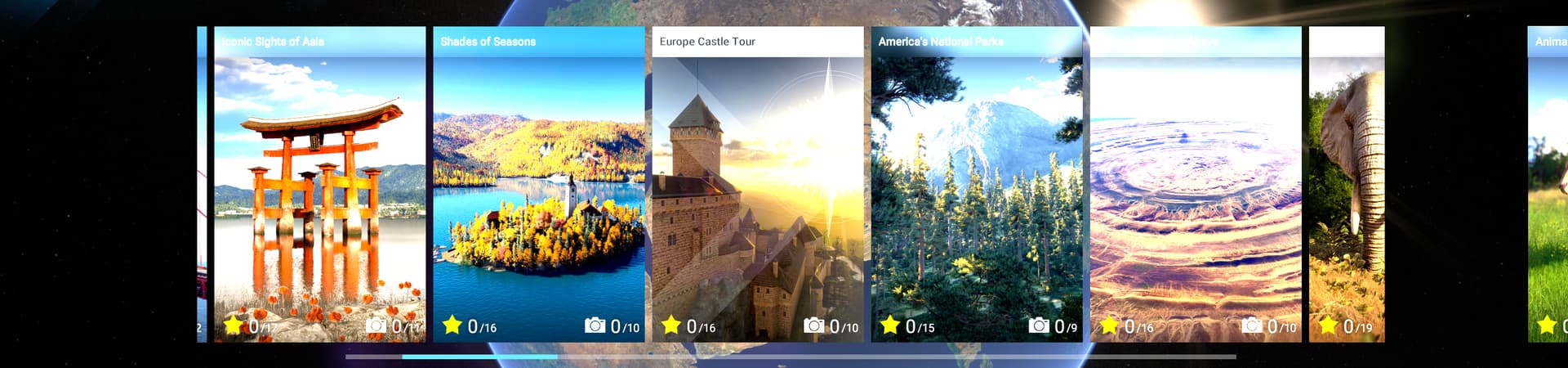
- Using WideScreen Monitor (2560 x 1440) and the options n the window do not operate correctly. Horizontal scrolling lists, challenges/photography, seem to have a box that hides the list on the left and right side, at approx wher ethe 16x9 edges of the screen would be, this is approx 100px or so wide, then the list items can be seen again, This feels like a mask that is a fixed size, to wide the edges of the screen, but is not adjusting with the wide aspect ratio
- This also seems to cause issues with the position of the world/map when viewing locatios for photography and other locations. when at this apect ratio, they seem to be partially off screen, making it impossible in some situations to see where the population is for some animals.
- Did you remove all your community mods/add-ons? If yes, are you still experiencing the issue?: no mods installed, fresh installation of game.
FREQUENCY OF ISSUE
How often does this occur for you? (Example: Just once, every time on sim load, intermittently) N/A UI interface issue, constant.
REPRODUCTION STEPS
Please list clear steps you took in order to help our test team reproduce the same issue.
- Load game in wide aspect
- experience issue
YOUR SETTINGS
If the issue still occurs with no mods and add-ons, please continue to report your issue. If not, please move this post to the User Support Hub.
-
What peripherals are you using, if relevant: N/A
-
[PC Only] Are you using Developer Mode or have you made any changes to it? Negative
-
[PC, MSFS 2020 Only] Are you using DX11 or DX12? DX12
-
[PC Only] What GPU (Graphics Card) do you use? Nvidia 3070
-
[PC Only] What other relevant PC specs can you share? N/A
MEDIA
Please add a screenshot or video of the issue occurring.


[END OF FIRST USER REPORT]
 For anyone who wants to contribute on this issue, Click on the button below to use this template:
Do you have the same issue if you follow the OP’s steps to reproduce it?
•
Provide extra information to complete the original description of the issue:
•
If relevant, provide additional screenshots/video:
•
