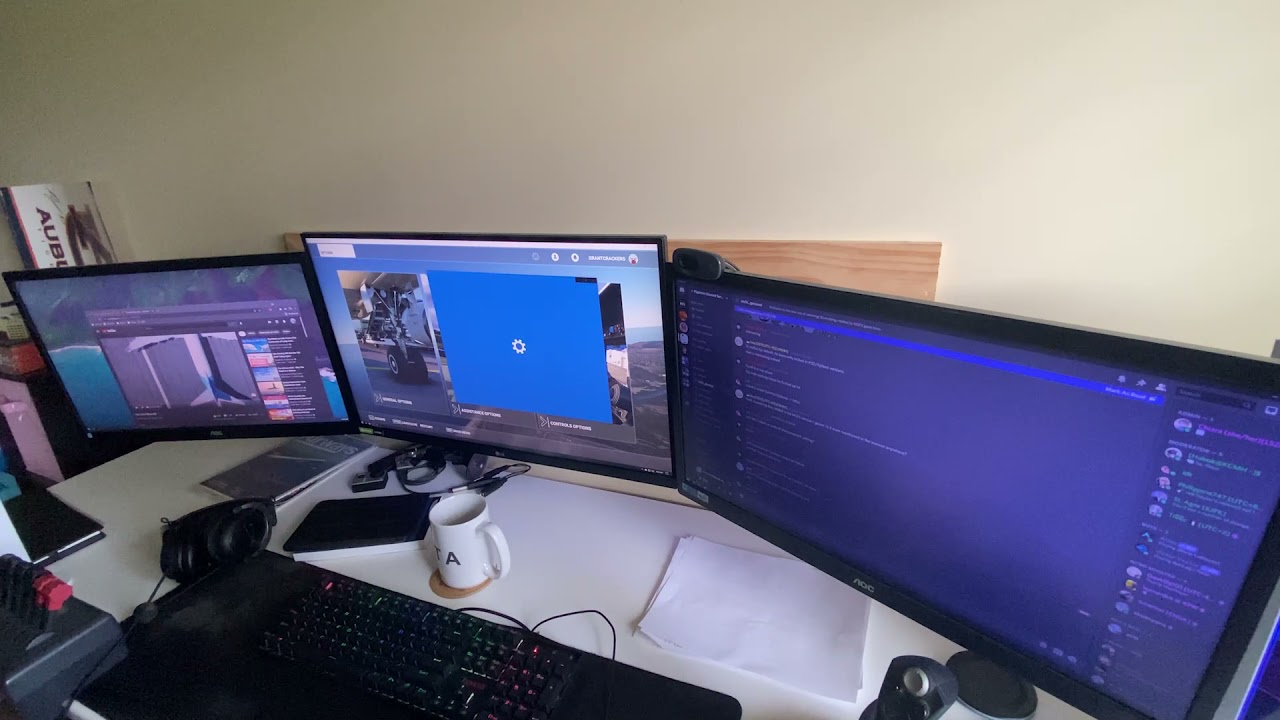
I made this video explaining my issue in great detail - because it’s very difficult to describe.
TLDR: Computer “Hangs” randomly: everything will suddenly stop animating/playing/whatever, but mouse can still move, some windows can still close, some button animations still play, but nothing responds, commands do not work, computer will not close of it’s own volition even if the Start Menu can be pulled up and clicked through. No artifacts besides hanging windows and screens. Windows look “Frozen” but videos will be showing a constant loading circle. Occasionally still able to use internet while this is happening. Reset button on Tower restarts PC and it is perfectly fine afterwards (until it inevitably happens again)
Very strange. My first thought (around the middle of the video) was disk I/O hanging, but that should leave traces in the event viewer. In general, when a disk stops responding, things can act up in pretty weird ways. It still wouldn’t surprise me if that was the cause, but to be clear I don’t think it’s the only possibility – just the only one I can think of right now.
If you haven’t you could at least check the SMART status of all your disks.
If you have multiple disks, try disconnecting all but the system one and see if the issue persists. (Of course the symptoms would be the same if that one is the problem, but it’s easier to rule out the others.)
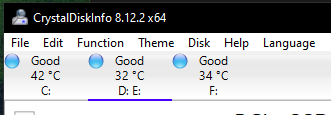
I originally thought it was a storage issue too, but I checked and both of my M.2’s and even my external HDD are in 100% healthy condition according to CrystalDiskInfo:
Some RAM faults seem to sneak past testing, the first thing I would try is substituting some known good RAM from another system, or if that is not possible remove one stick at a time and if the fault persists pop it back in and test with the next stick removed.
I ran MemTest86 overnight and it passed multiple times - unfortunately I don’t have another set of RAM to test. I’ll test one stick overnight again and see if that happens to change anything.
@GrantCrackers18
Are you sure you are not affected by USB problems? All current B550 boards have problems with USB and there are always severe system hangs. To date, the problem has not been solved and can only be worked around.
It should help:
- Set PCIe mode from Gen4/Auto to Gen 3 in the BIOS
- Disable Global C-State in the BIOS.
A real solution is a BIOS update that finally eliminates this problem. However, this may take some time.
1 Like
Your passagers would not be happy if they would know that you looking YT video while flying the airplane 
At first we should repeat: it is NOT a MSFS issue which you looking for, because it happens for much many other applications / situations at your PC.
If you do many many things in parallel to a game and in special FlightSims which are known as “very demanding” then you should not wonder that your PC becomes very slow. In special you own 32GIG RAM which eats MSFS easily. There are also a lot of known issues with browsers “hardware usage”.
And why you need tools like “Wise Force Deleter” ?
The question might be: does it crash also in case you simple play the game and not have many applications open in parallel ?
If yes, it looks like a driver issue.. may be chipset drivers. But I see also gpu related dll and these WUDFHost is also strange ( some special usb devices ? ).
And may be you should update your windows.
UPDATE:
I have’nt seen this while I wrote my post in parallel. These may be match with the WUDFHost crash..
This page is from Microsoft support.
System file check (SFC) Scan and Repair System Files & - Microsoft Community
Assuming your problem is Windows related and not hardware…
Open your command prompt “in administrator mode” and type this command:
DISM /Online /Cleanup-Image / RestoreHealth
It will check your Windows system by using the latest Online Image and it will restore any system files that are corrupted. I do this on regular basis just to keep my WIndows healthy.
Another thing, running 3 monitors and several things at the same time with MSFS could be the reason of the slowdowns that sometimes look like if the computer freezes up. This thing (MSFS) is so CPU demanding that I would try running with just one monitor on and no other apps in the background.
I’m in the process of updating Windows at the moment, but I will definitely look at those settings and see if they may help. I haven’t had any USB issues but I’m not ruling it out.
In special you own 32GIG RAM which eats MSFS easily. There are also a lot of known issues with browsers “hardware usage”.
And why you need tools like “Wise Force Deleter” ?
Yes, I understand MSFS will chow through RAM, but even in many other apps it does this same behavior, I was just using MSFS as an example. Yes I agree it is not an MSFS issue, but because it’s happening with MSFS, and I’m desperate for answers, I decided to post here to see if anyone else had this issue too.
I’m in the process of updating Windows right now, then afterward will probably update my BIOS because a new version of mine came out yesterday. I have uninstalled and reinstalled my GPU drivers almost a dozen times to no avail.
Thank you all for the comments and suggestions though, really hoping we can nail this issue somewhere. Also in talks with MSFS Support team to figure out what is going on.
no problem.. only the blue category may be better then 
Let us know whether updates helps. I know such problems with Windows ( explorer crash , reboots , etc ) and very often it was because of the faulty drivers ( and a win10 which is in meanwhile very susceptible to that ). Issues contained in BIOS are in meanwhile also not rare..
The USB problem has nothing to do with crashes. Everything connected to the USB (mouse, keyboard, joystick) simply freezes briefly. I had only watched the video briefly and read B550. As I said, crashes have nothing to do with the USB problem. I rather agree with MichaMMA and think you have a driver problem. But the power supply unit is OK or is it older?
1 Like
one additional point I’ve seen , as looking the video again: “Event 10110 DriverFrameworks…” .. this can also be caused by and old usb driver and this can start a big-error-chain till freezes and bsod..
1 Like
Little update - I found many posts that have similar Windows behavior in regards to the
"The device HID-compliant headset (location (unknown)) is offline due to a user-mode driver crash. Windows will attempt to restart the device 4 more times. Please contact the device manufacturer for more information about this problem"
error found in my event log. I found many threads with behavior (like this thread right here: https://www.reddit.com/r/HyperX/comments/adgo7a/hyperx_cloud_ii_restarting_my_pc_without_warning/) and tried many fixes, none of which helped at all. Then I found this thread saying to disable the driver that keeps crashing (https://www.reddit.com/r/razer/comments/l3v2f0/psa_i_finally_found_a_fix_for_the_hidcompliant/) That did not help the issue. I still get random crashes and Windows freezing, just without all the “This USB device” errors.
I’m literally at my whits end of this issue. I have no idea why my PC is freezing and there are 0 logs or ANY event viewers that have had any sort of luck triangulating what the issue could be. I’m clueless.
I would be looking at a full windows wipe and reinstall and adding one device driver at a time and testing it each step.
Have you tried running the Windows Reliability Report? It provides a daily summary of crashes and other failures. Attempts to translate failure codes to English. I found out that Windows was having an occasional problem with a hardware driver failure. Windows would then kill MSFS with a CTD because MSFS needed that driver.
Windows also has an in-depth diagnostic report although it might be TMI for most users.