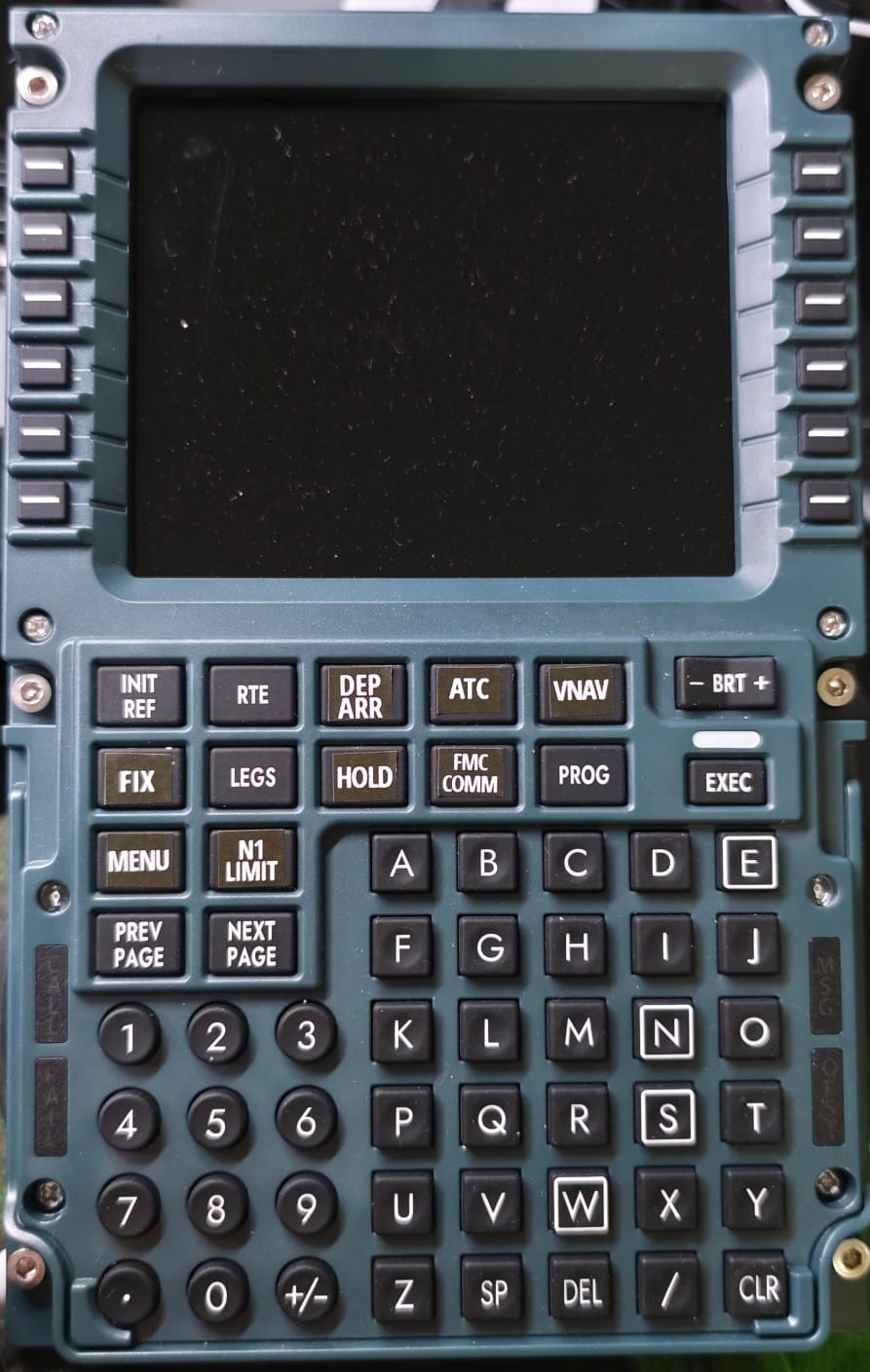
Recently received the above which in principle is working fine. However, despite numerous efforts with third party software (Mobiflight) , in-sim key bindings alongside SImApp Pro, I cannot resolve the issue around key bindings for the FMC in the default 2024 737-Max8.
Particularly troublesome are the MENU and DEP/ARR keys on the panel/in-sim. They are placed differently between the panel and the sim and if I try to rebind them, I am still picking up a duplicate key bind, so if I press the DEPARR panel button it also activates the in-sim HOLD button.
I hope this makes sense and can provide further info as required. Thanks
I have the same, the layout is based on the 737 ngx and is slightly different. I have no experience with mobi but keen on learning allthough it should be possible by using SimApp pro i think
Also I have noticed that the pfp screen will lock up sometimes, especially on long hauls. The buttons still work but no refresh on the screen. Only way to deal with that is a restart of the SimApp pro. Do you have this too? Like to hear
Hello, I have experienced this but only in 2024 with the Max 8. There has been a SimAppPro update since for me but I have not flown the Max again since the update, so no idea if fixed.
There are videos and tutorials online for Mobiflight.
The closest I have got to resolving my issue is by allocating key bindings in FS24 and then loading this as a local profile within the key bindings tab in SimApp Pro. However, there appear to be elements of the default SimApp Pro profile that are causing conflicts. This is the issue I am having.
For your lock up I suggest making sure all your USB devices are not set so that Windows can switch off power. This helped a bit for me, but I do sometimes still get the issue as you say. Equally the only solution appears to be to restart SimApp Pro mid flight.
I’ve just purchased the iFly 737 Max 8 which is in experimental phase for 2024. I know there are profiles available online for this with Mobiflight so once I have resolved some other basic setup issues with the iFly and other hardware, I may give this a try.
I’m really pleased this thread has been opened. This problem has been playing hell with my OCD.
My temporary solution has been to get the trusty label maker out (white text on black) and relabel the keys to match the iFly max FMC.
I hope WinWing sort out SimAppPro soon and tidy things up. Or possibly what would be better if the were to sell a replacement key membrane specifically for the max. Assuming of course that it could be easily swapped out.
I second that on the OCD front my friend. I have spent countless hours trying to find a solution and am waiting for WinWing support to give me their thoughts! In fairness to them, they do seem to be addressing things quite quickly with the level of app patches that have been rolled out and in the time I have had the hardware. Further, support for the default 737 Max has only recently been added by them so there are bound to be some issues.
I’ll keep you posted on my progress/success!
Also I recently received the PAP3, which has worked a treat out of the box.
My PAP3 arriving on Monday (with luck) and I’ve been stressing about it working on the max as it should. So I appreciate the heads up that it’s good to go from the box. Can’t wait…
i have same issue regarding Key Layouts of the PFP3N. Could not figure out how to adapt them as they are in the Ingame 737Max. So far a Printed stickers and put it on the Keys.
As of Mobiflight i can’t get the display to work. All keys are no issue. If someone has any ideeas how to get it to work with the PFP3N i would appreciate it. Also couldn’t find any other hints besides of the Payware like IFLY or PMDG Planes
I am hoping that WinWing will provide an update somewhere along the lines that make this easier to achieve. I’m not happy to stick things onto the keys. I just remember where the functions are opposed to the keys - also not ideal.
Shame right. There have been several updates to the software recently but none of them seem to have provided a solution and I have not had anything further direct from WinWing.
Sorry, currently it’s not able to keybind panels manually.
Dear customer, thank you for your support, currently, we have not opened this feature and we apologize for the inconvenience. This is a great suggestion, and we appreciate you your feedback. We will report it to our team and consider whether to adopt it.
I suggest that anyone interested in this topic visit the WinWing website, contact them via chat, and submit a suggestion for manual key binding. The more people, the better; there’s a much greater chance they’ll implement it quickly.
@FibroNiels , just finished a 2 hour Max 8 flight in SU2 with SimAppPro 1.16.55 without losing the display, which seems to have been fixed through this update. YMMV but some progress made.
Edit: I have tested it but unfortunally the screen still freezes. I do use sim rate on long hauls… maybe that is triggering it. Need to do some more testing to check it.
Is anyone else having issues with getting any display on the PFP3N (or the PAP3) since the recent iFLY 1.0.4.2 patch? I hadn’t flown in a while and went to do a flight yesterday, only to find that I get nothing come up on the displays or any inputs. It works fine with the default 737 Max. This is in MSFS2024.
I’m chatting with them now and having a similar issue. Apparently they have never said it works/is supported in FS2024 (only the default 737max). I guess something has changed with permissions or the interface with the latest iFly update as it used to work. Pretty frustrated by all this TBH.
They have just said they are working on it and to watch the SIMAPP updates.
Also, to my original post about key bindings, they have eventually replied to say they will not be supporting direct key bindings within the SIMAPP Pro software. I guess the only option is to eventually get it configured with SPAD or Mobiflight.