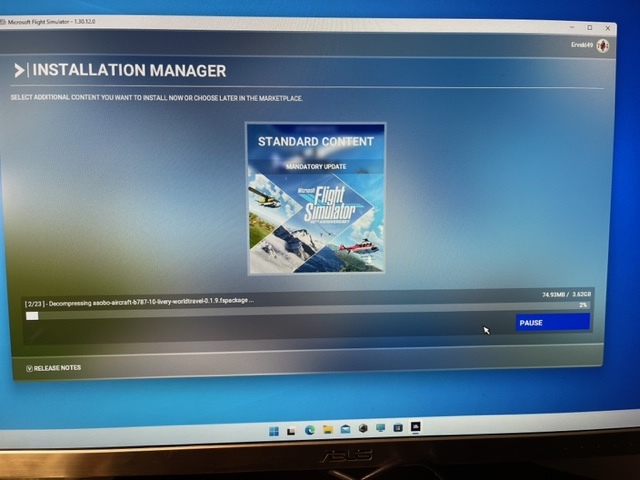
Installation Manager shows 1/23 Decompressing Asob-Aircraf-b787-10livery-xbo-aviators-0.15 fspakage… 114.79 MB/3.55 GB stuck at 3%. I suspect I caused this issue by deleting several large Asob-Aircraft some time ago because I never use them. It appears the update stuck because these acft not installed.
Is there a way to re-install these acft with totally installing the complete sim? I do have another old computer with sim loaded that was infact updated with NZ - no issue. Tks!
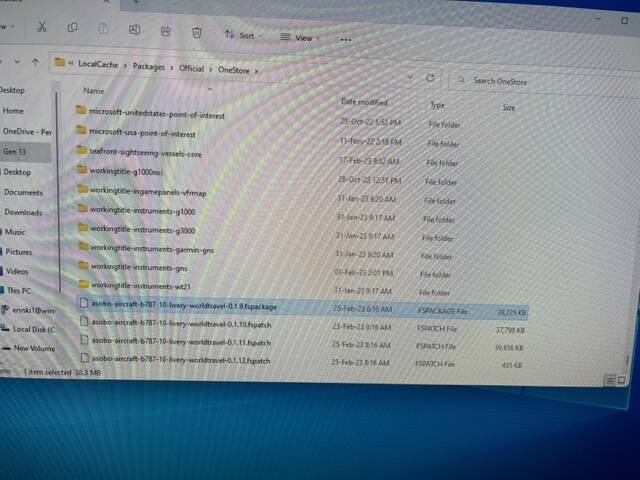
Sounds more like what I call download looping. I can tell you how to fix it on a PC, but it involves opening the Official folder and deleting the bad file, then starting over. I have no clue if this is even possible on a console.
Sorry, should have indicated PC! I have almost given up on this issue, driving me nuts. Thanks much!!!
On PC, there is definitely a fix!
Shut down the sim
Open the Official\OneStore or Official\Steam folder
Set view to Details mode, then sort by date with the newest at the top.
Delete anything in there that’s not a folder
Restart the sim and resume the download.
You may have to do this more than once if the looping comes back, but eventually, it will work. My record is five restarts on one Sim Update.
Did ten times but seems to get stuck in or around same area. I’ll keep working but don’t seem to be making head way. Appreciate your recommendation.