Using the template below will greatly help the team reproduce the issue and ease the process of fixing it. Before posting, search for an existing report. If you are not sure it’s a bug, please first report in User Support Hub.
2 tags are required - add them in the tag section next to the title above:
Feel free to delete this quote section after adding your appropriate tags.
ISSUE DESCRIPTION
Description of the issue:
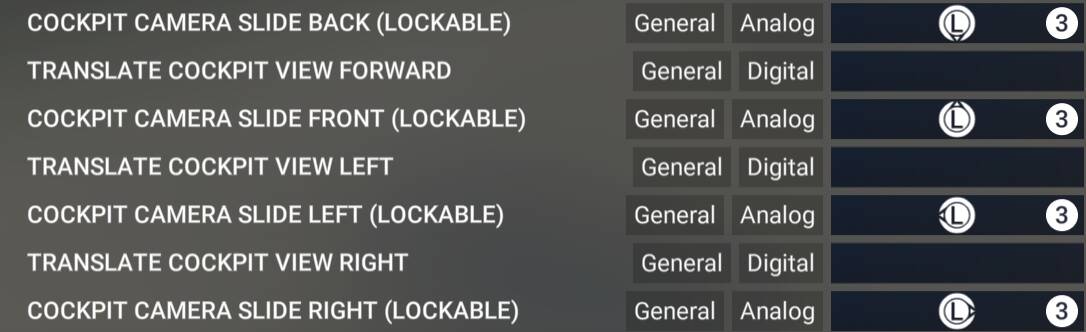
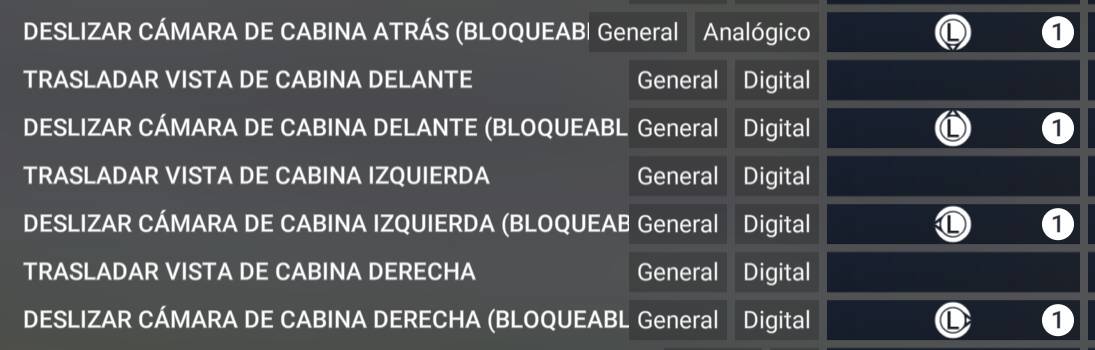
XBOX controller on PC left joystick is invisibly bound to a cockpit camera move function
[PC Only] Did you remove all your community mods/add-ons? If yes, are you still experiencing the issue?
yes
FREQUENCY OF ISSUE
100% of the time
How often does this occur for you (Example: Just once, every time on sim load, intermittently)?
REPRODUCTION STEPS
just open sim and fly
Please list clear steps you took in order to help our test team reproduce the same issue:
1.open sim
2.start flight
3. xbox controller left joystick is invisibly bound to a move cockpit camera function, cant be unbound as nothing can be seen to be controlling any function like that on the joystick.
YOUR SETTINGS
If the issue still occurs with no mods and add-ons, please continue to report your issue. If not, please move this post to the User Support Hub.
What peripherals are currently plugged in? Please name all of them as there could be a potential conflict.
keyboard, mouse, xbox controller.
[PC Only] Are you using Developer Mode or have you made any changes to it?
no
[PC, MSFS 2020 Only] Are you using DX11 or DX12?
[PC Only] What GPU (Graphics Card) do you use?
1660 super
[PC Only] What other relevant PC specs can you share?
i5 2.9 ghz, 16gb ram
MEDIA
Please add a screenshot or video of the issue occurring.
[END OF FIRST USER REPORT]
 For anyone who wants to contribute on this issue, Click on the button below to use this template:
Do you have the same issue if you follow the OP’s steps to reproduce it?
•
Provide extra information to complete the original description of the issue:
•
If relevant, provide additional screenshots/video:
•