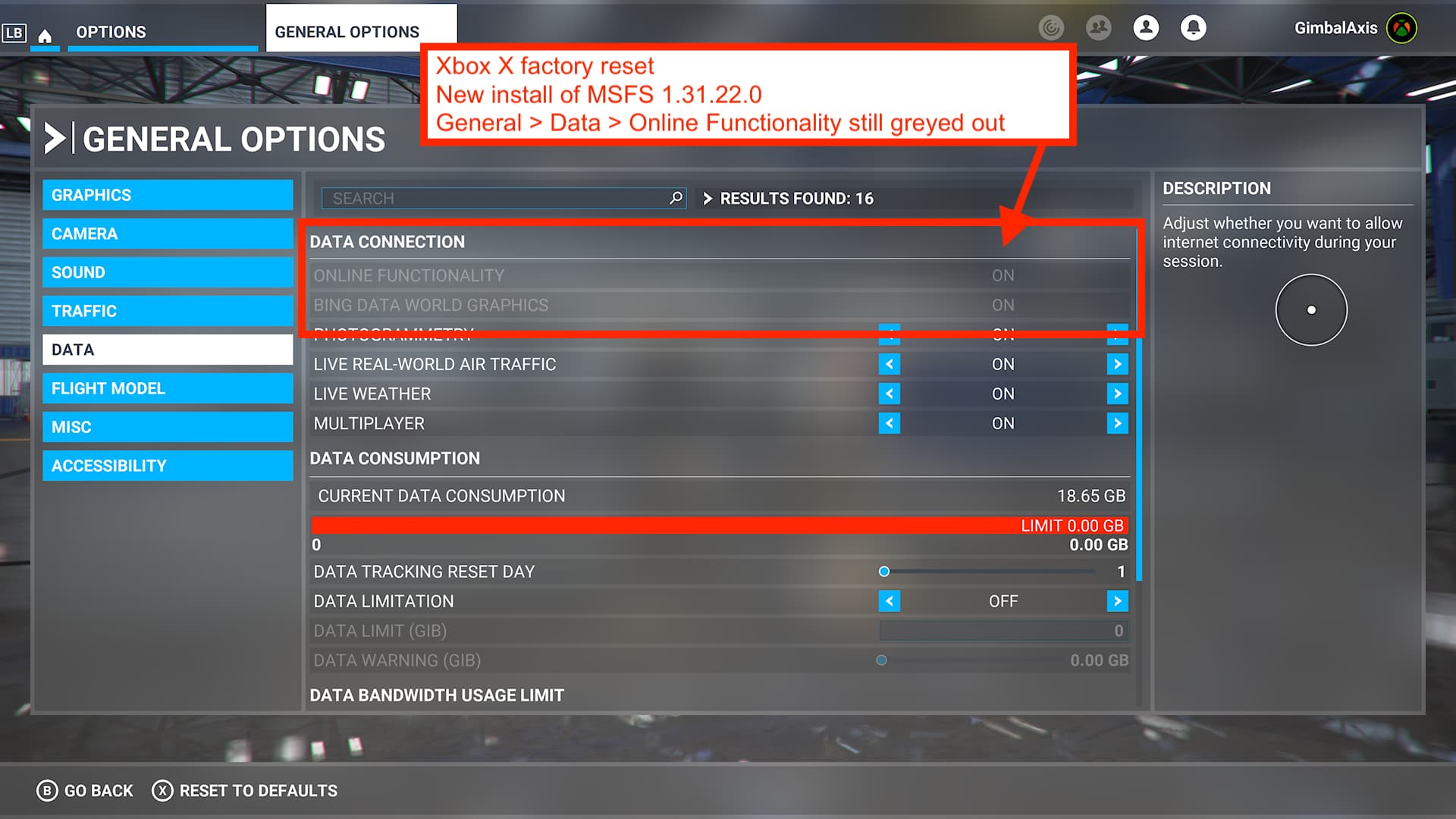
I have the exact same issue as OP - Did a full reinstall on XBOX Series X. Problem still exists (Top 2 items greyed out as per OP)
1 Like
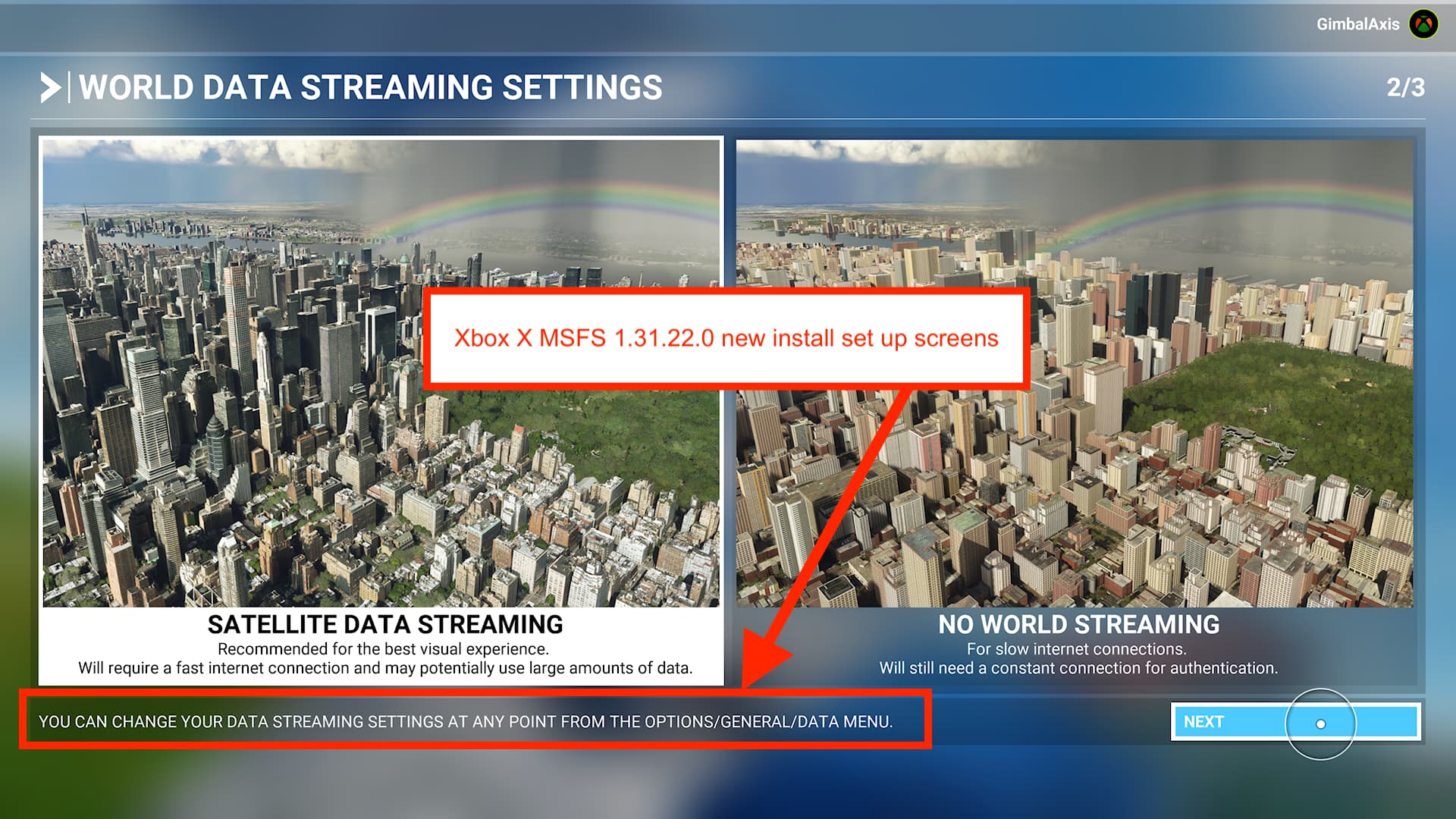
I factory reset Xbox X yesterday, and did a clean new install of MSFS 1.31.22.0
General Options > Data > Online Functionality is still greyed out, and can not be changed.
If anyone at MS or Asobo can’t see the same thing, then I challenge you to factory reset and install MSFS as new, without any saved settings… so that you get the experience of a new customer. You will see, the functionality is greyed out.
The problem is that when you get any kind of connection issue, MS Support and Zendesk instruct you to go to this setting and turn it OFF then ON again. But it is greyed out, and can’t be changed.
Yes, it is broken.
I too am using an XBOX series X - Not being able to see my friends in groups and this bug make it extremely frustrating.
When you tot up the cost of a console, the game, xbox live and then extra downloads in the form of aircraft and scenery it’ leaves a bad taste in my mouth that after a week at work I can’t even just turn on the console, have some beers and fly about with mates.
They really need to sort this out.
Do you have the same issue if you follow the OP’s steps to reproduce it?
Yes, can’t go into offline mode.
Provide extra information to complete the original description of the issue:
Not much to tell, same issue as the OP above, stuck in “online” mode !
If relevant, provide additional screenshots/video:
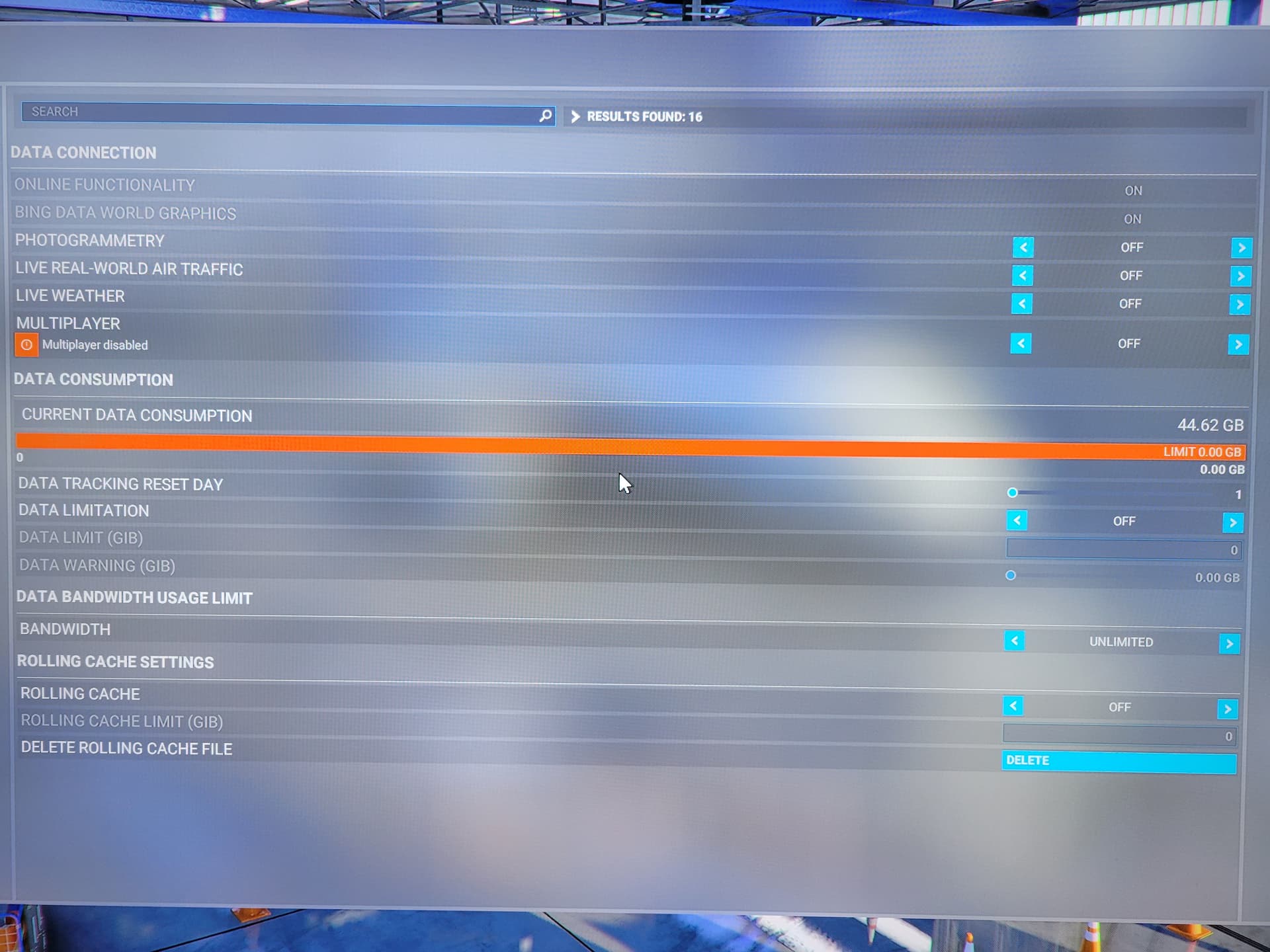
Seriously…
New Xbox series X. Single account. Fresh install. Two nights of downloading all the offline content packs further… everything came to a screeching halt while hitting this frkn  BRICK WALL of offline warning bugness…
How can a previously working feature (I’ve read the forum posts) be de-activated and thereby shutting off thousands of paying customers of their paid for application feature?
After a FS sabbatical of 15 years… I pulled the trigger and bought a Xbox series X with FS Ultimate last week. The prospect of stepping into a glider and soaring away… I guess I’ll have to wait… 
Does anybody have any progress update on this bug?
You guys might want to delete the “rolling cache” files. Find it in the DATA menu.
Out of frustration deleted my rolling cache, while I never had one flight or tutorial… and seemingly that triggered something because I got to actually FLY 
Might need some verification of other users…
As I’m only a total noob with settings 
Update: While it lets me fly, now it goes spawning “press B to quit and install offline files” error dialogs in game… I give up.
Broken game. Paid 100 euros for error dialogs
I am having an issue really close to this. Both are also greyed out to me, but it says I am “online”. Marketplace is available. Yet when I load a flight, I am clearly in offline mode because the graphics are terrible, it looks like flight simulator 2004. Things aren’t loading properly, like the bing data isn’t on or something. I am really disappointed, the entire reason I bought an xbox x was to play this game and not have to deal with so many technical issues like a PC would. This is basically $800 flushed down the toilet. Game is unplayable for me offline.
I too am having this problem on the Xbox. Its really been screwing my game up lately. I will try this and see if it works.
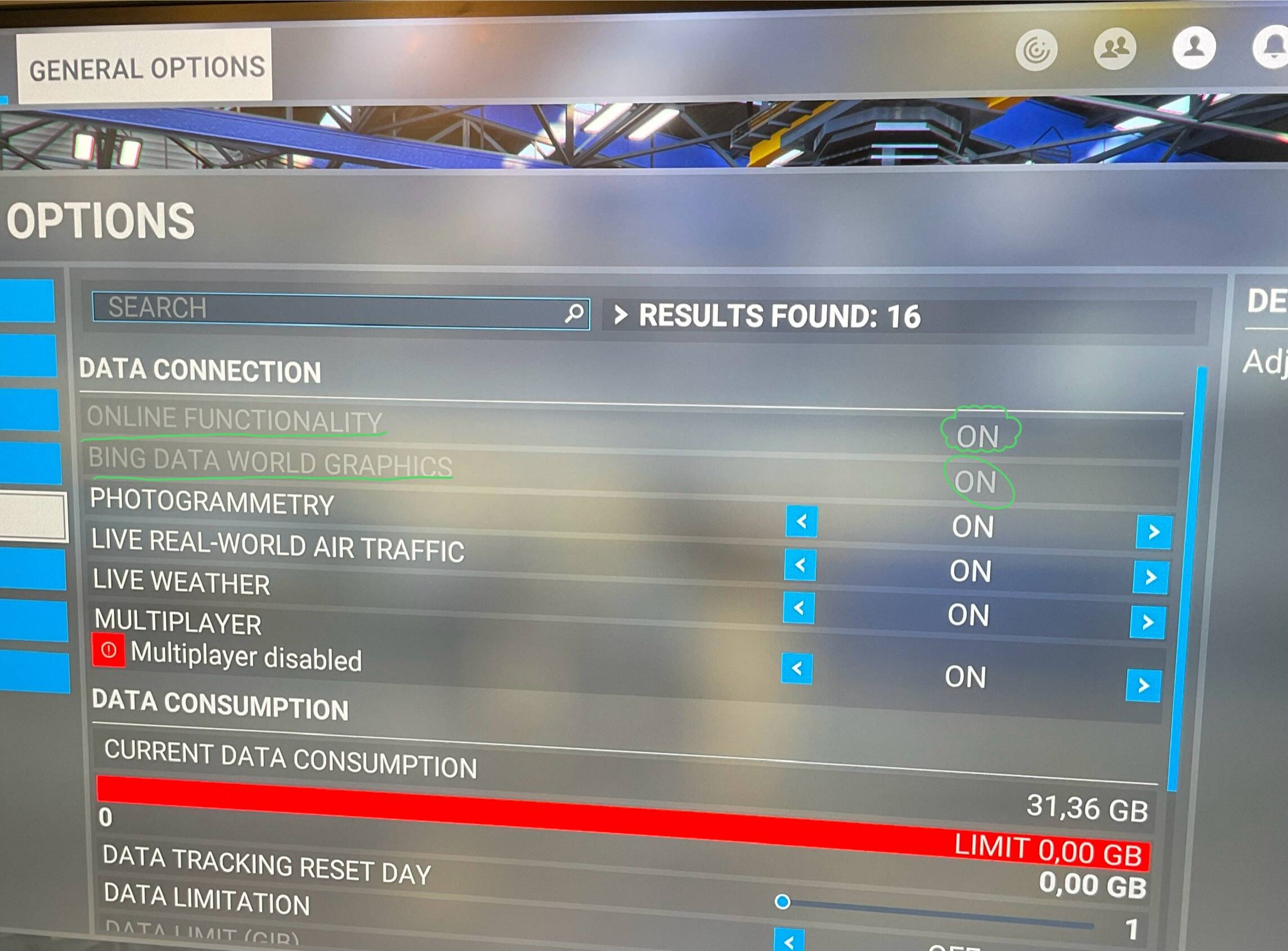
Hi, I’m new on this forum. I just bought Microsoft flight simulator with a brand new Xbox series X and velocity one joystick to play the game. So far I am being using the game for two weeks and it’s incredible but I do have the same problem as mentioned in this thread, as you can see on the picture, the online functionality, and Bing data world graphics are on, but greyed out, I also have multiplayer disabled. There is no way I can turn it on. It says your current Xbox settings prevent you from playing online multiplayer. But I did change my Xbox setting on my account to allow everybody to see everything I’ll talk to me or send me messages text everything, but it doesn’t change a thing on the game, The multiplayer is always off and it says it change Xbox live privilege. When I click on that It brings me somewhere to buy a game pass, ultimate or core, which I don’t need because I bought the on the Microsoft store online.
I think to have multiplayer you have to subscribe to game pass (on xbox at least) maybe a forum staff can help to confirm this.
I think you’re right. It makes sense to me. But I read a lot on This forum and some people swear that if you bought the game, you have free access to multiplayer. But it would make more sense to me if you would have to buy a game pass access instead. but the remaining question is why the two items Underlined are Grey?
I was originally on Game Pass for the default MSFS version, then I purchased Premium Deluxe and still had game pass, and multiplayer was active. Then I cancelled Game Pass (so I just have the purchased Premium Deluxe) and multiplayer is no longer available. I’m pretty sure in the settings (somewhere) it said one needs Game Pass for multiplayer.
Thank you for your answer. Now it’s clear in my mind that you need a game pass to go multiplayer.
3 posts were merged into an existing topic: Bing data streaming issues nov 23
i have the same problem my online functionality is grey out my bing data world graphics is also grey out fix or tell me how to fix
Delete rolling cashe file - thank me later 

Same issue in 22/05/2024 -
I take my previous comment back - after I deleted my rolling cashed, the Online Functionality and Bing Graphics options momentarily could be selected again.
Instead of simply continuing to play, I re-booted the game and the options were greyed out again.
Deleting the rolling cashe again didn’t do anything.
Really struggling to find a soution to this, been looking for 4 days now.
I think I have the same problem as you now maybe I reproduced your problem is that when you reinstalled your game cleaning during the screen where it checks if your game is up to date you get a message disconnection or connection problem white and red message.
have you tried with another xbox account if the game does not make any errors and works without problems.
Just for test ?