had the same problem on my xbox. only without the reset. there suddenly came the error message with the license. then I wanted to fly. pressed the go fly button and after about 80% loading bar–>CTD. both problems occurred at the same time. currently, the problem with the license has regulated by “itself”. it’s magic… have performed a soft reset yesterday. will test today whether I can fly. PS. Zendesk is less and less a help…
Do you have the same issue if you follow the OP’s steps to reproduce it?
Yes
Provide extra information to complete the original description of the issue:
I joined the preview beta and then left the beta because the performance was terrible. After I restarted my Xbox Series X this happened to me.
If relevant, provide additional screenshots/video:
I received the most dismissive response from Zendesk: They said I must open MSFS and go in to Content Manager and apply any updates… They ignored the fact that MSFS would not even open.
MSFS 40th Premium would not open after the 1.30.7.0 update (license authentication error).
MSFS 40th Premium would not open after factory reset and clean install on Friday, Saturday or Sunday…
However, this morning, with no changes to my system, it opens to the first General Settings setup screen (first screen for a new user).
So that proves this WHOLE thing was the Microsoft “Authentication Server” being offline for 3 days. AGAIN, the error messages in MSFS are themselves WRONG. They are worded to blame the paying customer, instead of stating what the actual problem is - that the server is offline.
Regardless of whether my game now works or doesn’t, yet again another terrible experience, and I will restate - another lost sale. I’m not buying MSFS as a present this year as I had planned to do. I’m not giving the gift of disappointment and frustration.
And another dismissive reply from Zendesk. I mentioned their authentication servers were unable to authenticate a valid purchase for 3 days, and the reply, “Thank you for letting us know that the issue has been resolved…” What? It’s not resolved… and this dismissive attitude is why some bugs get ignored and never fixed.
First of all, if there is an issue with the “authentication server” when everything else is able to connect, there should be a much more robust, automatic report sent to a human at Microsoft, since this direclty impacts sales - and whether a customer can even open the software or not. Imagine if Microsoft Word was unable to open because of an authentication server being down?
Next, the wording of error messages continues to blame the customer, when in fact it is the Microsoft servers that are having the issue. The wording causes all comletely unnecessary frustration and troubleshooting on the customer’s end, when nobody is even alerted that the issue is at the server end. This is really lazy, terrible error reporting design. Please do better.
I am not just venting here. I am in Beta testing and taking the time to give MS / Asobo / Working Title / Forum Mods and Zendesk feedback about what is problematic with a very negative experience. I’m pointing out a new category of bug reporting - server issues, and the wording / messaging logic of error messages ARE a problem that can easily be fixed, and avoid others having bad customer experiences. Thanks.
While I understand your frustration, this authentication issue doesn’t seem to have impacted the release version. Don’t let a Beta bug prevent you from gifting someone MSFS - if the release version was also bugging out, that would be different.
But anyway, I hope your issue is fixed now and you’re able to take part in the beta or alternatively leave the beta and go back to the more stable release version.
I dunno…
Well now I have the same problem and it has been going on since morning, I have tried everything but it’s not working and I am not a beta tester but I do have the premium version so I don’t know what’s wrong.
It was working fine yesterday but since this morning I keep getting the same error and I can’t fly becsaue, even though I do have the offline pack installed, it still says it’s not
The forum moderators have limited access to see / report such an issue, all they can do is push it up the chain (and thanks to those who have).
I’m slowly learning you have to file a Zendesk report. I documented every step, took photographs of the TV screen showing my Xbox OS, MSFS file info, my Microsoft receipt, everything - and Zendesk were still completely dismissive of the issue, they barely read it based on the response … but if a few people report the same thing, then maybe - just maybe - somwone will notice.
https://flightsimulator.zendesk.com/hc/en-us/requests/new
I’m not tired of bugs - I am in beta testing after all - but I am constantly disappointed at how much effort I must go to, just to convince MS / Asobo / Forum / Zendesk, thet an issue actually exists. And every aspect is siloed from every other aspect. The forum can collect certain bugs, but for purchases you have to go to another place, and nobody can see the server issues except Microsoft, and so on. The biggest bug with MSFS is this fragmented, siloed structure - where everything is interdependent, but communication is … lacking, IMO.
I won’t gift MSFS until the experience of both using, and reporting, improves. Thanks.
Unable to play due to this issue myself on the release version. It’s definitely not confined to the beta. And like the OP, Zendesk’s “support” has been as helpful as grinding my face off with a cheese grater.
I switched to public release today with a fully clean installation for my mother, was on beta without that warning message. We began to get that "due to an unexpected error, your game license cannot be authenticated " warning now. We managed to open the game but that error keeps coming. Previously bought just the upgrades from marketplace while using gamepass ultimate, this was months ago. We bought the main game 3 4 weeks ago for my mother. Now we are so confused. https://imgur.com/a/gUQndE7 And graphics is not looking as good before, there are big holes everywhere, textures also look different.
Are we stuck on offline mod now and lost our digital ownership please?
Edit: so sorry i couldn’t fix message formatting, i am on samsung tablet.
Edit 2: no more warning message popping up today, fixed i think, not sure.
I suggest filing a Zendesk report here - it seems that even the forum moderators don’t have access to contact Microsoft about server issues, and I believe this issue is a server / account issue (nothing else makes sense). You’ll want to give them your order number and screen name at least.
Thx for your answer, i will try to contact them tomorrow, so stressed now. Have a great day.
And just to set expectations, Zendesk was 100% dismissive, but then the next day ‘magically’ the problem went away. So, expect zero help from Zendesk, but the more people who report the problem, the more chance they might actually consider the remote possiblity that there is actually an issue.
1.30.7.0 AAU1 on Xbox X, with Premium Deluxe purchased via Xbox Store.
Was able to open MSFS Premium Deluxe and fly for the past week no problem, but this morning I get this again. MS / Asobo / Forum mods, a simple question:
Do you want customers to purchase Premium Deluxe, or not? I did, and I get this screen half the time. I don’t care whose department this falls under, the experience is pretty broken for customers. I have reported this to Zendesk, and they really don’t care, they give canned, dismissive responses that indicate it’s a user error (it’s not) or some other thing outside of their area.
It offers to “download offline content” but of course it can’t because no servers are available (even though my network connection to One Drive is alive, as I’ve uploaded these screenshots).
Again, the messaging from both the Sim’s error message, and from the so-called help at Zendesk, is to blame the user for a Microsoft server issue.
Really disappointing - seriously, the server issues need a category, and the messaging needs to be fixed too.
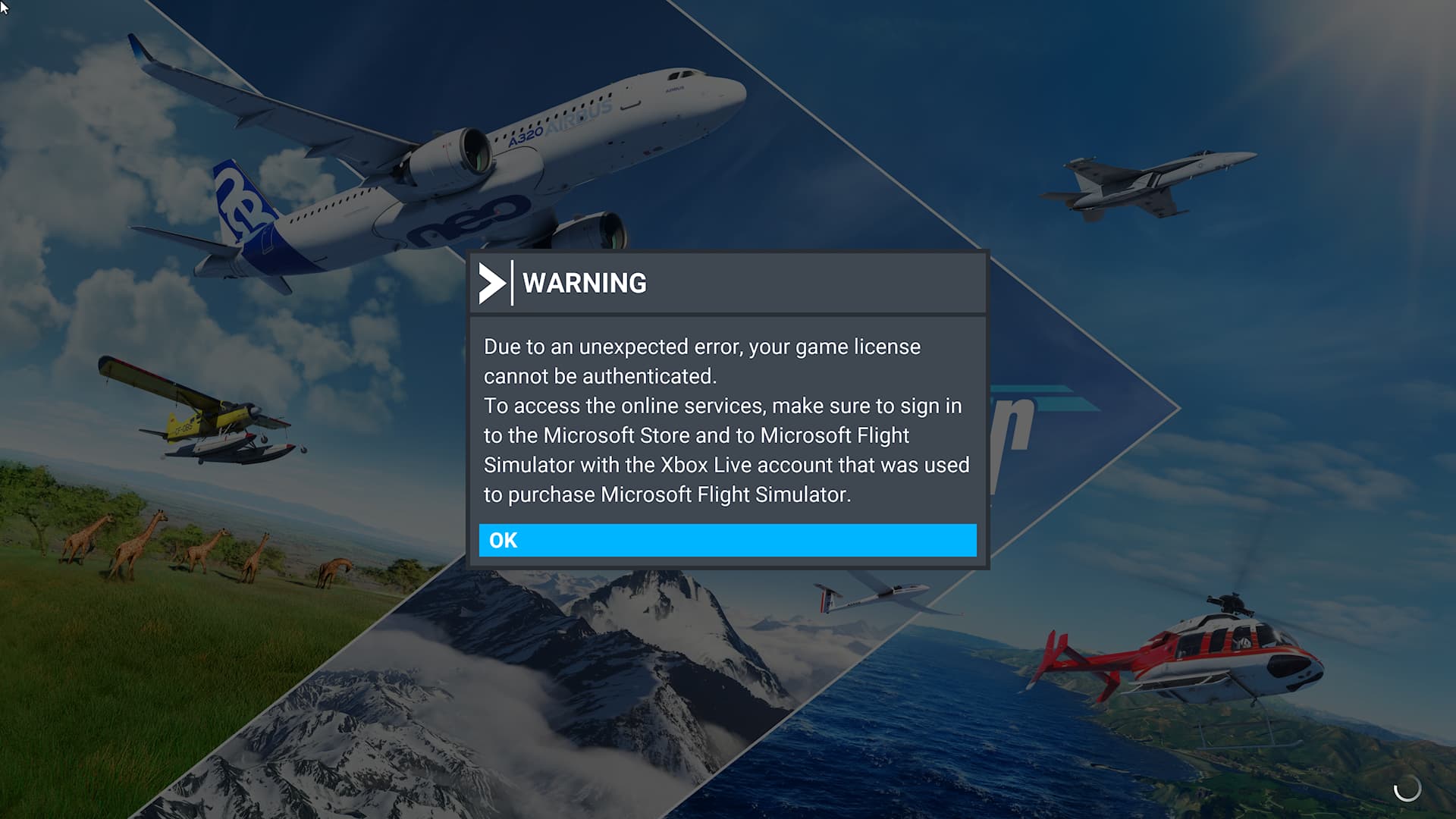
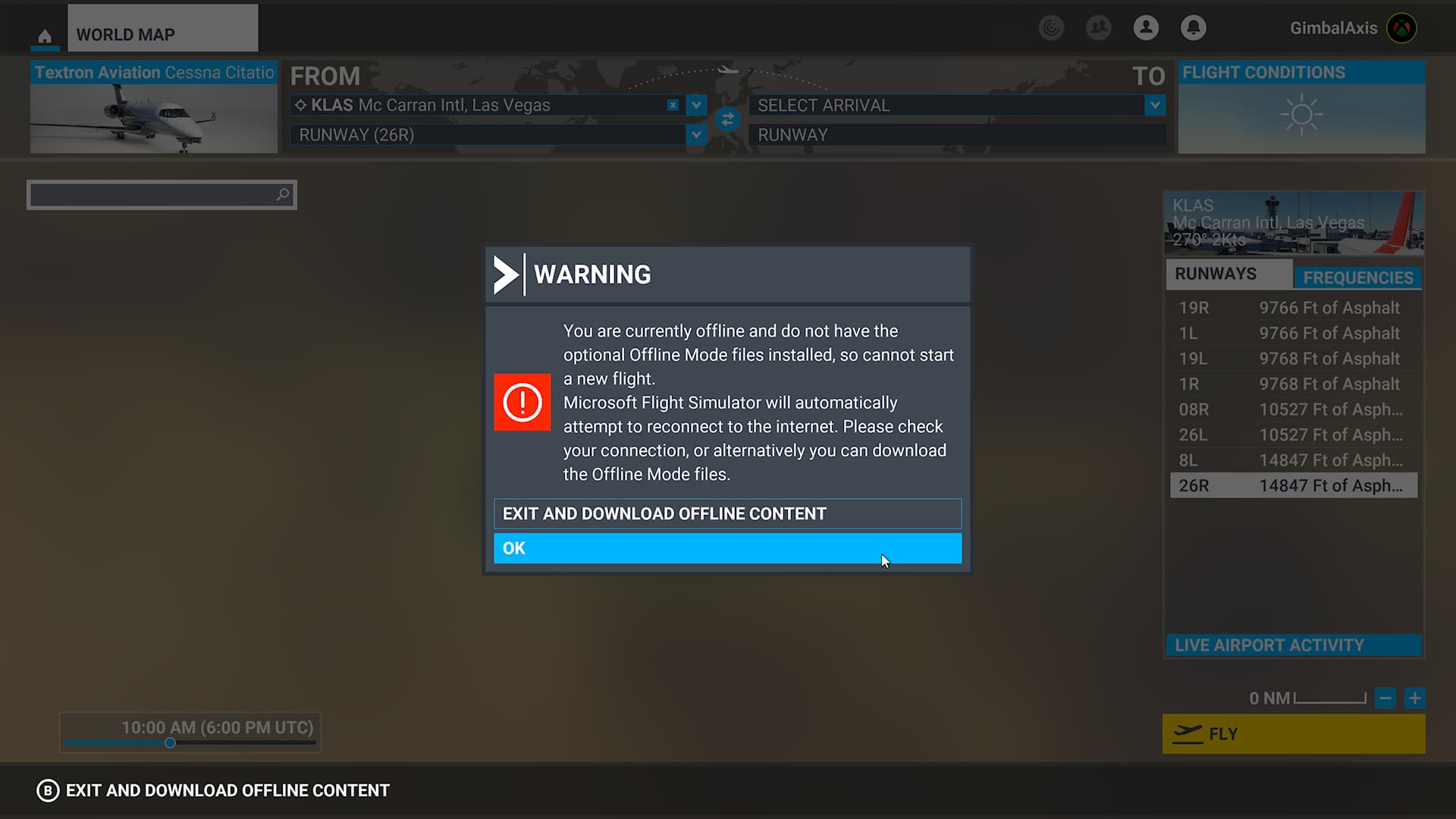
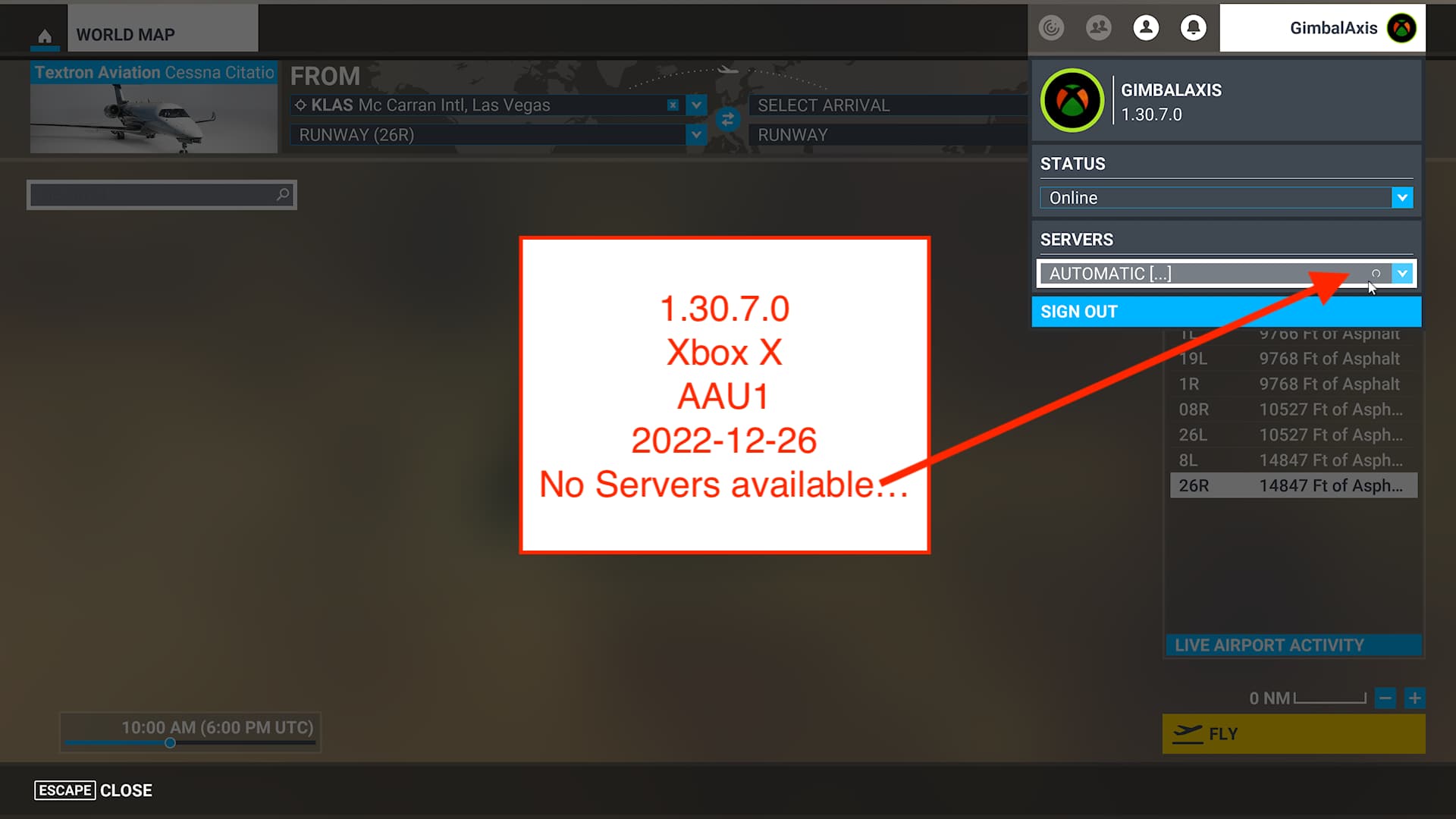
I know you have been having grief for weeks ,I also did for a few days weeks ago as you might remember,are you using a wired connection?,have you tried again with signing into wifi instead ?,not a fix but possibly a workaround.
Wired, Xbox X, 1 Gbps fiber optic internet verified by Xbox network Test, no other issues.
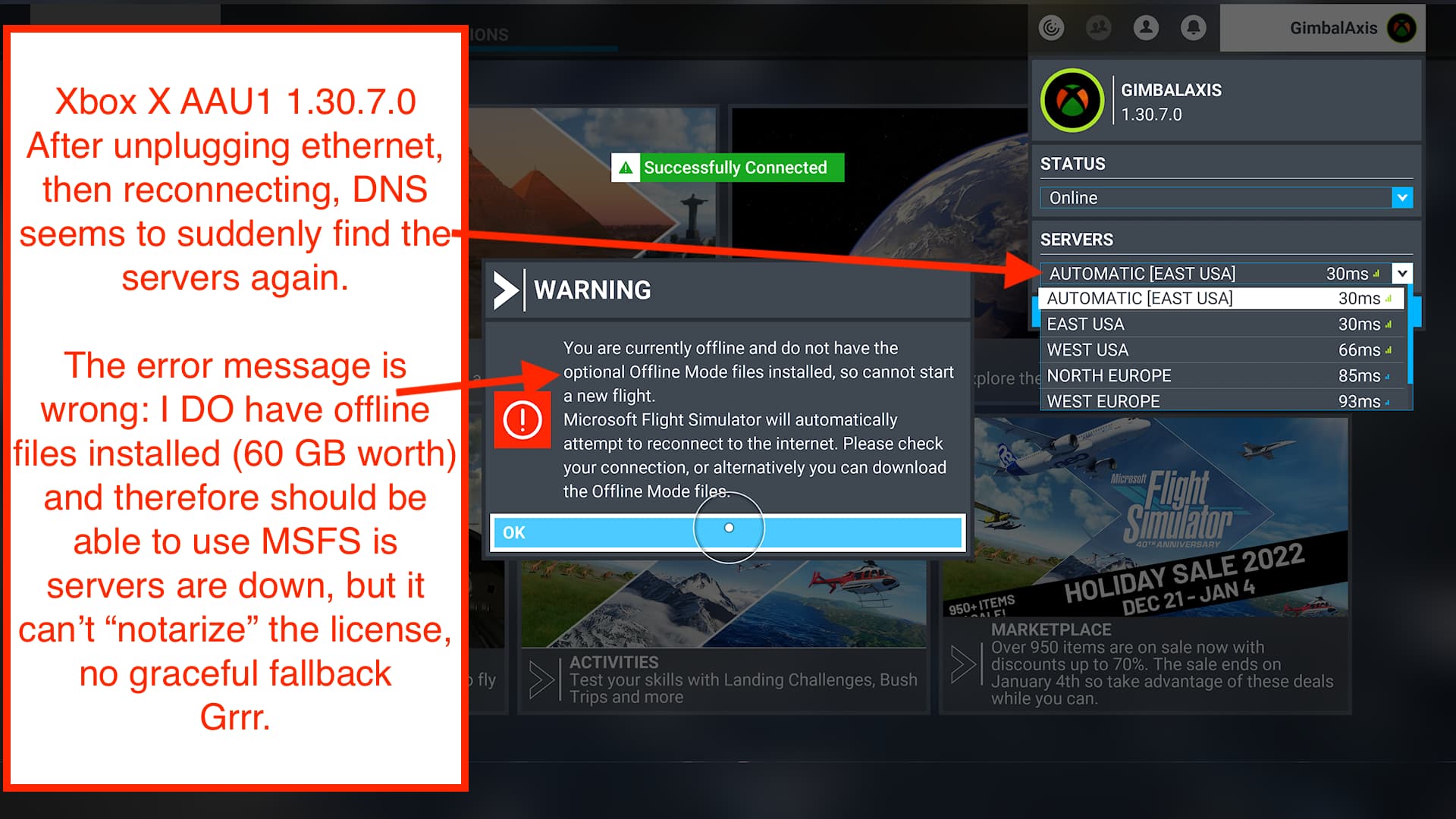
When you open almost any modern application (on PC, on Mac, on Xbox) the standard practice is to verify the signature via a “notary server” online. If that notary server is offline or unreachable, the OS should have a graceful fallback logic (example, recognize that it has been ‘notarized’ on previous launches with no changes and allow you to launch) however the Xbox is not doing this, and is instead throwing up a generic error that there is an issue with the license which seems to blame the user, instead of distinguishing that it is an unreachable server. It’s really lazy programming, resulting in a terrible experience.
I believe MSFS or the Xbox is using stale DNS cache results, because if I unplug the ethernet cable (effectively the same as switching to Wifi and back) it forces new DNS requests which then resolves and finds the servers.
What s worse, is the error then states that I don’t have “Offline Mode Files” installed so I can not start a flight… but I DO have Offline files installed, 60 GB worth, so the error is 100% incorrect. It is because it can’t reach the “notary servers” to validate the license and has no graceful fallback. So again, the error messaging is WRONG. Who is the person who decides the error flow chart, please? They need to include graceful fallback for DNS resolution errors, and MSFS needs to not use stale DNS cache results.
Since we are beta testing, I’m TRYING to give MS / Asobo feedback about this bug, but it is falling on deaf ears, apparently.
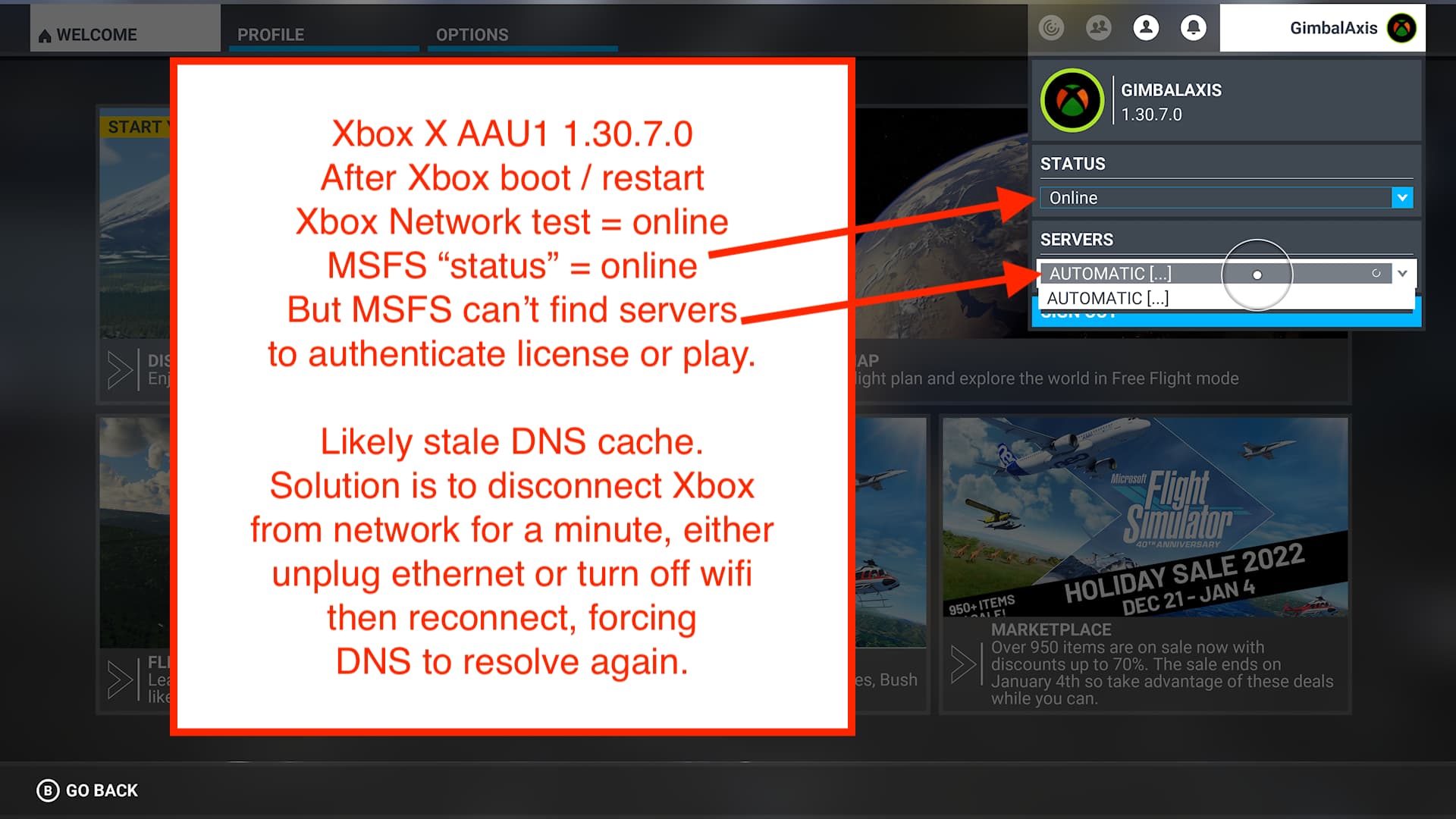
I have no idea why switching to wifi worked for me and at least one other person as I agree it is not logical but I repeated it multiple times with success each time ,even though my wired connection test on xbox always showed up in the late 900’s so download speed was always fine,have not had it for weeks .I have recently bought a new Xbox and have chosen to have a brand new account and am presently staying on wifi so maybe thats why it has not reappeared as illogical as that would be.
This item has been tagged with feedback-logged, meaning our team will investigate and attempt to reproduce the issue. If more information is needed, we will let you know. Thank you so much for the information provided above!
Thank you - although I believe this to be a server-related issue, so “reproducing” the problem will depend on the state of the servers. I would suggest instead a slightly more thorough review of the logic flow chart for starting MSFS in relation to the license. Specifically:
-
If the notarization server is (for whatever reason) unavailable while a connection to the internet itself is fine (an easy ping test to any other Microsoft server), there should be a graceful fallback - especially if the installation has been successfully notarized and opened recently with no hardware changes. This logic is standard for most software that uses a signature notary server of any kind.
-
The error messaging around server-related issues continues to be inadequate (and frankly, quite lazy). If a particular server is not reachable, while the internet connection itself is fine (again, an easy ping test to any other Microsoft server), then it is a “server connection” issue, not a customer issue. The messaging gives the user the impression they have done something wrong, when they haven’t, and results in all kinds of frustration and needless troubleshooting - all while there seems to be no error collection about server connectivity issues that Microsoft should be collecting in real time to fix issues.
Thanks again! And Happy New Year.
I have the same issues and contacted Zendesk. We will see if and when they will fix the problem…