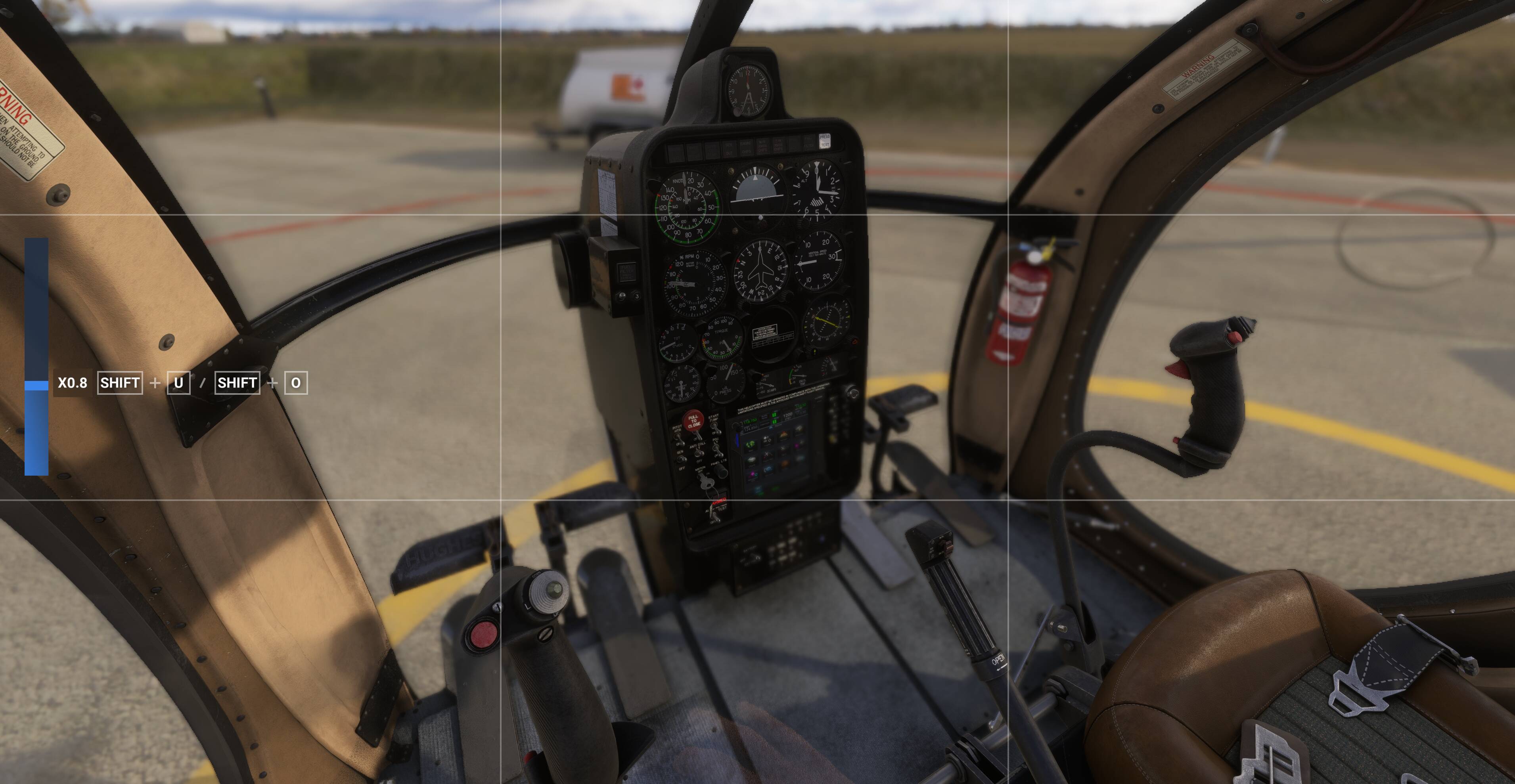
When i choose no HUD i mean no HUD. I was able to live with it being around during walkaround, but as someone who set’s up their aircraft from cold and dark, i just so annoying to have this around. Please remove this again.
It would work like the toolbar mod .. it takes out both files (html, json) as to put into the community folder … im testing it right now
Edit: Got the css changed to get them as a community package  I upload them, you can try on own risk (link)
And yes: It removes all shortcut boxes… but, as someone who came here should know that “ESC” quits the game etc… it might be disturbing for controller settings, yes … but until Asobo provides a update (and this can take long in SU4) … i accept this as the Ctrl+C inside the cockpit is even worse than not to see how to leave to the Main Menu :
3 Likes
Excellent. One unintended effect I noticed already is that the shortcut overlays are also gone from the photo mode screen. I have them all mapped to a controller anyway so it’s fine by me but maybe not for everybody
1 Like
Hey guys, the hud is absolute crazy that you added that. Talk about annoying having that text on the bottom off the screen. who in their right mind would say " oh this is a good idea". Hope it gets changed asap and you have a serious talk with the guy /guys that added it. Thanks
1 Like
Your file should look like this. I’ve just pasted the contents of my file.
<input-bar resource-id="{5D8D140B-0F7E-4213-B2F7-E16727D57DDC}" resource-path="coui://html_ui/VFS/components/shortcutspage/shortcutspage.uxml" name="ShortcutsPage" class="transform absolute" style="width: calc(var(--unscaledScreenHeight) * 1920px / 1080); height: calc(var(--unscaledScreenHeight) * 50px / 1080); --h-anchor: 50%; --v-anchor: 50%; --pivot-x: -50%; --pivot-y: -50%; top: calc(var(--v-anchor) + calc(var(--unscaledScreenHeight) * 495px / 1080)); transform-origin: 50% 50%; opacity: 1;"><ui-resource-element resource-id="{93025B24-B5CD-4A25-BE31-EF67B7747DDF}" name="ShortcutsBar_Left" class="transform flex flex-row justify-expand items-stretch children-spacing gap-first-item absolute" templateid="{93025B24-B5CD-4A25-BE31-EF67B7747DDF}" id="pDmnKrVg" style="height: calc(var(--unscaledScreenHeight) * 50px / 1080); --h-anchor: 50%; --v-anchor: 50%; --pivot-x: 0%; --pivot-y: -100%; left: calc(var(--h-anchor) + calc(var(--unscaledScreenHeight) * -940px / 1080)); top: calc(var(--v-anchor) + calc(var(--unscaledScreenHeight) * 25px / 1080)); transform-origin: 0% 100%; min-width: unsetpx; min-height: unsetpx; max-width: unsetpx; max-height: unsetpx; --selfSpacing: calc(var(--unscaledScreenHeight) * 18px / 1080); padding-left: calc(var(--unscaledScreenHeight) * 6px / 1080); padding-top: calc(var(--unscaledScreenHeight) * 6px / 1080); padding-right: calc(var(--unscaledScreenHeight) * 6px / 1080); padding-bottom: calc(var(--unscaledScreenHeight) * 6px / 1080); width: auto; --gapShortcutsBar_Left: calc(var(--screenHeight) * 18px / 1080);"></ui-resource-element></input-bar>
5 Likes
Not really, just using existing code for something else. You already couldn’t get out of your plane when it was moving, either on the ground or in the air, but you can when you stop. They are now using that same rule to define whether the hint for that ability appears on screen or not.
On one of the dev. streams I remember them mentioning that in a possibly pre-release version of the sim you could bail out while you were in the air.
1 Like
this worked, thanks 
1 Like
this worked a treat, thankyou
1 Like
Thank you fearlessfro9 and hobanagerik for the information and directions, works perfectly.
1 Like
Thanks - this fixed it!
The only real disadvantage of the workaround of disabling the .html file was, that also the button to “customize” aircraft is gone and therefore it is not possible to change livery or weight and balance.
Compared to the permanent tooltip on ground this is the smaller annoyance, though. Until they fix this properly.
Rather than disabling the html file it’s better to use hobanagerik edit of the html above. Working well for me
2 Likes
Passion is no excuse for entitled vitriol. Everyone on this beta has elected to opt-in and that comes with some expectation of issues.
Nothing wrong with feedback, everything wrong with the way in which it is being delivered.
Very few people in this thread have any idea what software engineering a product of this scale requires…..that is very, very clear from the commentary.
Putting that aside, can people be frustrated? Sure, but there is a right way to do it and sadly the internet facilitates the kind of BS seen in this thread all the time.
There are clearly some much more productive and industrious people here as well, those who have noted their disagreement and even in offered workarounds.
Most of us would never treat each other with this level of rudeness in the real world yet give someone a keyboard and the shield of anonymity and this is what happens.
7 Likes
I’m confused.
Do you guys reckon they will make a patch to the Shift+C button so you can toggle it on or off?
It would be nice to have the ability to toggle it.
2 Likes
Remains to be seen. This is where to spend your vote and offer feedback though
1 Like
One good thing that comes out this issue blowing up is that it finally led to the community figuring out how to remove the UI from walkaround mode that has been requested since day one. Big thank you to hobanagerik, fearlessfro9, DaveDeMo6132 and any others who contributed to the sleuthing.
9 Likes
Ah okay thank you!
So how to remove this highly annoying “Shift+C to exit aircraft”? So stupid idea to add it!
Vote and wait for an official fix/solution or at your own risk use the workaround.