2024 ActiveSky Weather Program Main Thread

I think AS has generated a lot of genuine interest because weather, clouds and turbulence etc is pretty fundamental to a flight sim and AS is supposed to improve those aspects.

A few of us though are on the fence because it is not crystal clear yet (at least to me) whether AS is an improvement over default and can’t see the point of spending money on an app which might only be used a couple of times and also might be made redundant anyway with the impending FS24.

Some of us here (a fair few I think) just want to get a bit more clarity about what it offers rather than to knock the devs or complain about the app.

This is very confidently stated, but very incorrect. Even though it’s slightly off topic (but not really, as it demonstrates a broader misunderstanding of how weather affects aircraft and resultant expectations of sim weather), in the interest of not allowing this fallacy to be spread as fact, I’m going to explain:

Your POV with regard to IAS increasing on the ground is happening because in that case the aircraft is at a fixed reference point on the ground and the fluid of the air is moving around it, thus changing the IAS. However, once airborne, the airplane becomes part of the fluid and changes in the speed of the fluid itself only affect the resulting groundspeed.

Yours is a common misconception that leads to dangerous fallacies like believing the airplane encounters a change in performance when turning from the upwind to the downwind in the pattern, or when doing a 360° turn. It does not. In fact, you could do a rapid turn of several degrees per second, essentially moving the relativewind yourself, and your airplane’s performance will not change (the only limiting factors being wing loading in the turn and available excess power), only your groundspeed and ground track will. Try this in a series of sustained, stabilized 360° turns and you will see the performance remain the same throughout.

An airborne airplane simply does not care (performance-wise) which way the wind is moving over a fixed reference point as measured on the ground.

The only exception to this is when there are sudden, drastic changes in the fluid (like with windshear or strong gusts - we’re talking a magnitude of 15kts or more in less than a second), which can momentarily affect indicated speed and performance. However, a positively stable aircraft will quickly regain its original indicated airspeed without any changes in pitch or power, especially in higher-energy regimes of flight.

The only time these sudden, drastic changes in the fluid of the air become problematic is when the aircraft is at a low, draggy energy state (such as final approach or just after takeoff) and the margin above stall speed is thin and/or the resultant momentary change in performance with a sudden, drastic headwind loss is enough to possibly cause contact with the ground or obstacles. This is why we approach at a higher IAS (gust factor) when it’s gusty.

Otherwise, with the vast majority of wind shifts, the IAS will not change.

I understand that but it seems people are bias against it from the get go.
Just don’t understand this negative mentality from people that didn’t bought and will not buy the product, and others who bought it didn’t bother to read how it works and do the necessary adjustments…
Well, I’ll keep using it as long as I find it useful for my flights.

There is some truth in what you say for sure and I can see why you made the post.

I can only speak for myself though.

Glad you are enjoying it by the way :slightly_smiling_face:

An excellent explanation. I was about to write something similar. An aircraft in flight is part of the moving airmass and is not affected by it in any way insofar as local measurements of things like airspeed.

You could ride as a passenger in a hot air balloon in an airmass moving at 40 knots (over the ground) and from the passenger’s perspective in the balloon basket, the air would be dead calm.

However simulators, because of the way they are coded, typically do show some effect on IAS as wind direction or velocity changes, but those effects are temporary and no longer manifest once the wind direction or velocity stabilizes.

Yes, clear with their program.

I wanted to say only that doing also tests on sim Beta and also on AS is somehow complicated to judge where the problem can be. Nothing special I mean, my intention was every time do job as is expected. Hope my previous posts are clear about relation to AS product, satisfied customer can say and said already but sims are changed also with their requirements, especially MSFS.

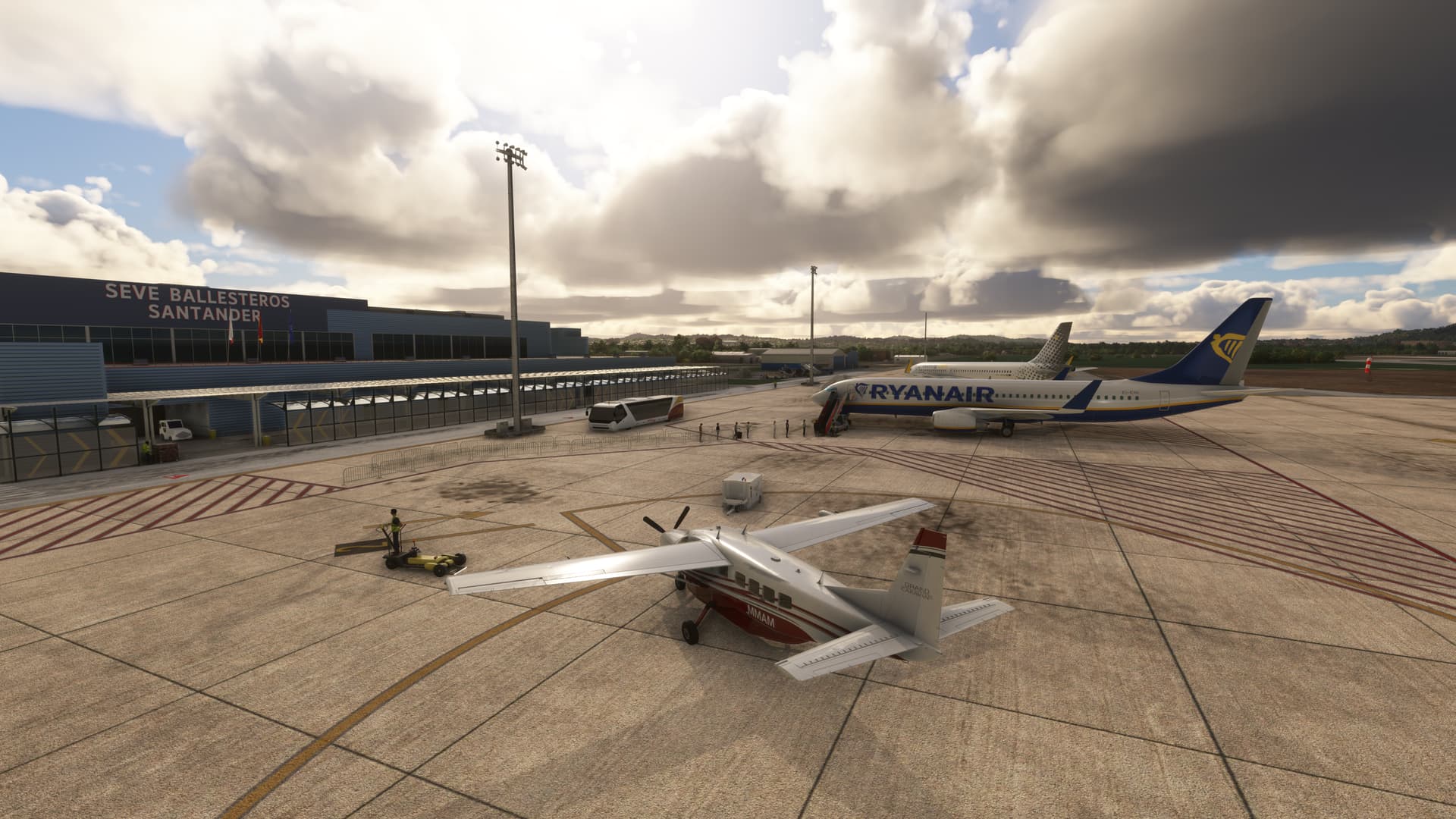
just trying beta - i know everyone thinks the clouds have flat bottoms - but i never really noticed it - but this one had a very clear flat base on fluffy clouds (cumulus) which stood out slightly (UK flight). It might of been because they where overcast and had some gray and so the line really stood out.

Now at Santander in Spain and you can see it, but i like the ASFS depiction

MSFS

ASFS

And here is what the ASFS app says about it…

@POS 241530Z 32008KT 290V030 9999 FEW032 14/06 Q1020 RMK AS DEPICTED
(Cloned by: LEXJ, closest weather station when the aircraft was on the ground)

FEW032 extends to:14763 feet (Cloud type:CU, Turbulence:Light, Icing:None, Shear:Gradual, Cloud shape:Flat). Previous cloud: None, next cloud: OVC380 (Through metar)
OVC380 extends to:38914 feet (Cloud type:CI, Turbulence:None, Icing:None, Shear:Gradual, Cloud shape:Flat). Previous cloud: FEW032, next cloud: BKN391 (Synthed Cirrus)
BKN391 extends to:42227 feet (Cloud type:CI, Turbulence:None, Icing:None, Shear:Gradual, Cloud shape:Flat). Previous cloud: OVC380, next cloud: None (Synthed Cirrus)

This station has complete visibility information. No interpolation needed
Altimeter interpolation based on:
-LFBZ 101nm NE (Q1019), LEXJ 1nm SE (Q1020), LEVD 112nm SW (Q1017), LEAS 96nm NW (Q1021)
This station has complete Precipitation information. No interpolation needed

NOTE: Clouds, visibility and precipitation reported are the ones from the active cell weather

FINALLY- i personally enjoy having options for my weather depiction :slight_smile:

I installed this version but not injecting when I turn off sim live weather. Does it require sim live weather on now?

I’m glad you took the time to explain all that.

Don’t turn off sim live weather.
Go to Wx Control and select your preferred weather mode and sim depiction mode.

To make sure AS depiction has control, before you Fly Now, change the weather in the preflight Page from Live to any preset. I usually pick an extreme one like Snow, so I know AS took over once it loads in after a slight delay.

I never thought of that (With AS or REX), I always did Clear Skies but that makes allot of sense.

However, picking snow, still represents live weather up here lol snow storm yesterday!

:slight_smile:

That said, I did a GA flight in the 414 from CYTS back down to CYOO and there was snow on the ground in CYTS with AS, live weather had none.

Sim depiction mode it’s already set to active sky preset control or do I select passive?

No, gracias. :sweat_smile:

Click again active sky

Thank you for helping me out here! I am not an expert but common sense gave me serious doubts about the original statement. Much appreciated.

i dont think it makes a difference if its live weather or not in the sim.
You can see the app force the weather out of live (and oddly it briefly puts it into snow conditions for me) and then the ASFS weather appears. But that is how it seems to work for me.

New Beta is out;

Update 042424B - B8880B

  • Initial implementation of >5000ft cloud generation especially in Europe (NSC/NCD) - More work in progress
  • Smoothing tuning, mainly in attempts to eliminate earlier shifts/clearing in some cases
  • Added new option: Use periodic theme reloads. Default On. Enable this option to have the weather theme rebuilt periodically, approximately every 7 minutes, to provide updates and variation to the weather as you fly. Without this option enabled, updates will occur only as per your download interval setting.
  • Added temporary additional UI console logging for transitions monitoring (http://127.0.0.1:19999/inspector/Main.html?page=38)
  • Added additional logging for turbulence (simconnect log) and transitions events (main session log)
  • Adjusted METAR sky condition element filtering to not bypass “on the ground” 0 AGL altitude layers specified (e.g. FEW000)
  • Attempted fix for issue where after pressing REFRESH (debug screen) and then moving download interval slider (general options), time request can default to beginning of hour and could cause historical mode to activate
  • Attempted fix for flight-plan-related anomalies in weather updates, locking, and refreshing
  • Fixed issue with Enabled temperature-based altimeter errors option not persisting properly
  • Fixed issue with AS_FS_SimConnectLog.txt not properly attaching to log exports
  • Removed Maximum Upper Visibility option (this is not having the desired effect despite our attempts to control upper visibility without MSFS overriding this at higher altitudes)
  • Fixed NCD/NSC/CAVOK cloud generation issue causing loss of METAR cloud layers in some cases

Ok thanks and how can I tell it’s injected the weather and not the live sim weather?

You need to turn off live weather in the sim and select a pre-set, it can be anything, clear skies, snow etc…

@CasualClick made a good suggestion, set it to a preset like snow, then you know for sure it injected when the snow is gone and AS took over.