2024 ActiveSky Weather Program Main Thread

Yeah, I know what you mean. We have been pretty spoiled by Asobo/Meteoblue live weather. When I was testing at KOSH yesterday, the vicinity of the airport was the same in both instances, but with Live weather I saw cloud banks in the distance in several directions, and you don’t see that with AS. You never really see weather “over there”.

I have tried a few flights where I don’t create a flight plan, and just spawn somehwere, and those where I have created a simple A to B flightplan. AS can pick up that flight plan, and I think in that instance it does a far better job of interpolating the weather scenarios, as it calls them, as you fly the route, and the transitions aren’t as jarring.

Passive mode is a nice compromise.

The thing I immediately noticed, when I was doing circuits, and crosswind landings, is that my landings immediately improved! Not only was I nailing the crosswind landings almost every time, but I was even doing a good job of nailiing the dots at KOSH. In Asobo live weather, the wind speed fluctuates so much that I find myself drifting from one side of the line to the other, as I fail to keep up with the changes. Again, the thread I linked to above cites a paper discussing gusts, and gust frequency.

Using a flight plan definitely helps and will allow you to see distant weather on occassion. But you can still get caught out - for example flying towards a weather system in VMC you can suddenly be in IMC in a blink of an eye (or in the time you were looking at your gauges). Same with showery convective weather.

1 Like

Running a test now at KFLO, looking at gusty conditions.

Confirmed METAR in the sim, and an external tool actually match.

KFLO 071902Z 03015G27KT 10SM BKN021 BKN035 27/24 A2960 RMK AO2 PK WND 02027/1854 RAE1854 P0000 T02670244

With Asobo live weather:

Now repeating with AS live weather:

@POS 071902Z 03015G27KT 10SM BKN021 BKN035 FEW303 27/24 A2960 RMK AS DEPICTED
(Cloned by: KFLO, closest weather station when the aircraft was on the ground)

Maximum surface wind

Surface attenuation cancelation enabled

I left it running for a little more than the time for the first test, and left the original Asobo values in place to show AS values to scale. I’m not really seeing any massive gusts.

Clicked the button to restart the flight, in case there is some oddity with the switching from one to the other. I had slewed the plane over to a windsock, so that may affect the slightly different wind values, but still no huge gusts on the ground. The huge spikes are the simulation reloading after restarting the flight.

This was after one circuit. Really happy that I nailed the centre line in a 172. I couldn’t have done that in the Asobo live weather. Not a boast, AS I would guess is just dealing me with a fair hand.

2nd circuit.

Really quite impressive, and doesn’t look too bad either.

The other thing I can see in the Asobo data is that same repeating pattern that I found back in January. The “fake” gusts.

Here is the image from that other thread, with todays below it.


Almost identical peaks, and troughs, along with the period, and grouping. Different airport, different weather, six months apart.

ActiveSky’s gusts are far more dynamic, and that should hopefully bear out over time.

4 Likes

Repeating my tests at a place a little windier, found via the website https://badbadweather.com/

FAPE is currently reporting:

image

I then ran with Asobo live weather for 120 seconds, ASFS Passive weather for 120 seconds, and finally ASFS preset control weather for 120 seconds. This was the result:

image

From what I can see, Passive mode has zero effect on wind gusts, or wind in general on the ground. However, when preset control kicks in you can see the change quite clearly. The Asobo baked in gusts are also quite apparent, even in Passive mode.

So it leaves me wondering what exactly Passive mode is able to affect?

On post on their official forums clarifies that Passive mode only affects how the plane reacts to turbulence, and other wind effects, not the weather itself, so that explains why the graph looks like it does.

For me, this makes Passive practically useless, but I’ve yet to run tests on acceleration on all three axes.

1 Like

In passive mode, ASFS should have no effect on wind, cloud depiction or anything else weather as the SIM weather engine is running. It just allows access to the localised effects for those who want to use MSFS live weather. It’s a fairly narrow use-case but some may want it.

I’m more interested in your graph. If the last 120s is ASFS gusts then it would seem they are on the one hand far more more frequent and on the other far less strong. What level did you have the MSFS gusts set at? Realistic? My non-scientific observations are with ASFS are that gusts seem to be much less significant (hardly noticeable) compared to MSFS even with that set to moderate (or whatever the option one down from realistic is called).

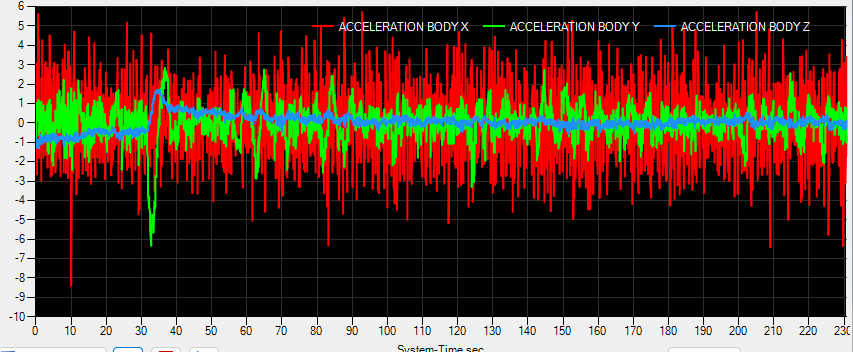
Here is a graph I made, watching acceleration on all three axes, in, and out of storm clouds, and toggling ASFS Passive mode on, and off by turning the program on, and off. I cannot see a difference.

The blips around 35 seconds in are me engaging the AP on to heading, and altitude hold mode. I really can’t see a difference in how the plane is moving either, viewing it from the outside.

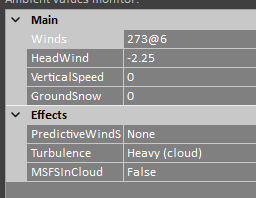
MSFS turbulence is set to realistic, and realism is enabled in ASFS.

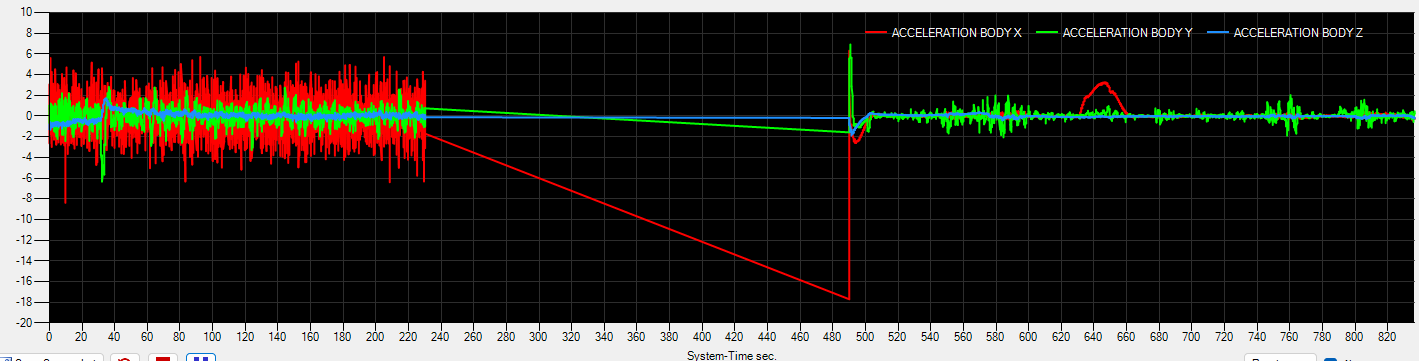
Going to do a quick switch to ASFS preset mode for comparisons sake.

The red hump is where I adjusted my heading to head into a very dark cloud.

It’s going to vary from storm to storm, but it didn’t feel very energetic to me. I have seen 2000fpm updraughts before though, and I only saw about 200fpm here.

Just noticed that although I had turbulence set to 100%, turbulence scale was at 50%. Let’s set that to 100%, slew back before the cloud, and fly through it again.

Now we’re talking. Very easy to spot the none to CAT before I enter, and leave the storm cloud.

The biggest difference here is that Asobo live doesn’t seem to discriminate between being inside a cloud or not. You get that really aggressive pattern all the time.

I’ve tested Asobo live weather like this before, and where some users reported that there was no turbulence in clouds, there is infact very little. A small difference, but hardly noticeable unless you graph it. Whereas ASFS shows clear differences.

The graph shows a predominantly Y axis change i.e. up or down, with very little on the other axes, but I wonder if those would change along with a heading change, altering the direction the wind is coming from in relation to the plane heading.

1 Like

Always interesting to see how the renditions are. Live WX yesterday leaving Friday Harbor near SeaTac.

Stock Live WX


ASW rendition in Live WX


3 Likes

Interesting differences, but I’d love to also see what a live cam of that area shows in comparison…

Sorry, I should have thought of that. Windy.com is handy for that.

35G45 doesn’t mean that the wind varies between 35 and 48 knots, as MSFS falsely implements it. It means that the average wind speed during 10 minutes is 35 knots, the gusts reach 48 knots, while the lulls are obviously not reported.

1 Like

I would check the Portland area out now, but its dark over there, so I will have to wait till later, then hope they have something to report.

Incidentally, if anyone is interested in scripted METAR output, which can be quicker than firing up some tool or visiting a website, I wrote two PowerShell scripts. One reports METAR, the other TAF.

METAR/TAF stuff inside

First you need an “avwx” account.

Then generate an API token. Those of you who use the PMS 750 may already have this.

The two scripts are below. Enter your API token where it says API_TOKEN, as I have removed mine.

Scripts
Function Get-Metar {
    param (
        $ICAO
    )
    Try {
    $metar = ((Invoke-WebRequest -ErrorAction SilentlyContinue -Method GET -Uri https://avwx.rest/api/metar/$ICAO -Headers @{Authorization = 'BEARER API_TOKEN'}).Content| ConvertFrom-Json)
    }
    Catch {"ICAO not found!"}
    Return $metar.raw
}

Do {
   Do {
    If ($args.count -eq 1) {Get-Metar $args;Exit}
    $code = Read-Host "Enter ICAO, or press q to quit:"
    }
    Until ($code -match "^[a-zA-Z]{4}$" -or $code -match "^[a-zA-Z0-9]{3}$" -or $code -like "q")
    If ($code -notlike "q") {Get-Metar $code}
}    
Until ($code -like "q")
Function Get-Taf {
    param (
        $ICAO
    )
    Try {
    $URI = "https://avwx.rest/api/taf/$ICAO"+"?options=translate"
    $taf = ((Invoke-WebRequest -ErrorAction SilentlyContinue -Method GET -Uri $URI -Headers @{Authorization = 'BEARER API_TOKEN'}).Content| ConvertFrom-Json)
    }
    Catch {"ICAO not found!"}
    #Return $taf.raw
    Return $taf.forecast.raw
}

Do {
   Do {
    If ($args.count -eq 1) {Get-Taf $args;Exit}
    $code = Read-Host "Enter ICAO, or press q to quit:"
    }
    Until ($code -match "^[a-zA-Z]{4}$" -or $code -match "^[a-zA-Z0-9]{3}$" -or $code -like "q")
    If ($code -notlike "q") {Get-Taf $code}
}    
Until ($code -like "q")

I’ve given these aliases:

New-Alias -Name taf -Value "$ENV:USERPROFILE\Documents\Powershell\Get-TAF.ps1"
New-Alias -Name metar -Value "$ENV:USERPROFILE\Documents\Powershell\Get-METAR.ps1"

Which are stored in the following file, whose contents are executed when either a PowerShell or Terminal session are opened.

%USERPROFILE%\Documents\WindowsPowershell\Microsoft.PowerShell_profile.ps1

Now I can open PowerShell and run:

metar egsc
taf egsc

So Portland right now.

KPDX 151453Z VRB03KT 10SM SCT025 BKN080 19/13 A3011 RMK AO2 SLP196 T01890128 53011

IRL


XP12

MSFS Asobo live

MSFS AS preset control

5 Likes

Great to see some variation in how it depicts overcast. From the textured detail of the above to PAII, where its a very uniform structure.

PAII 151833Z AUTO 13029G36KT 10SM -RA FEW007 BKN050 12/11 A2984 RMK AO2 PK WND 14037/1806 P0001


Had some interesting whether today. You really can get weather formations in the distance, rather than just being immersed in it. At one point I noticed two clouds with rain, including distant rainbows, and localised lightning. The clouds didn’t look like they should produce lightning, but I guess you can’t have everything.


I must confess they were very similar to what I saw in X-Plane 12.

Some cool lightning strikes too, but sadly I missed the best one as I wasn’t recording at that point. On final there was a strike right at the other end of the runway.


1 Like

When I look at these graphs, it looks like wind gusts were quite minimal until you were in the air. Am I reading that right? Although MSFS Live Weather has the predictable repeating (and pretty extreme) gust behavior, it at least depicts variations of several knots. Active Sky looks like it’s producing high-frequency variations of less than 1 knot, even though the METAR reports 03015G27KT.

Yes, minimal change over the short term.

This paper goes into the nature of gusting wind. If you look at figure 2 it shows the actual gust event happening over a ~90 period, across 10 minutes. What Asobo baked in gusts show is this behaviour happening repeatedly over maybe 5 seconds or so.

https://www.mdpi.com/2076-3417/12/4/2105

Oh yeah, I completely agree that the gust frequency in live weather seems…suspect. But when I look at the graph comparing wind in live weather versus Active Sky, it looks like there is no variation at all (aside from tiny high-frequency fluctuations) over approximately 5 minutes. For a report of 03015G27KT, I would expect to see some random peaks and troughs in that wind speed graph by at least several knots over a 5 minute period. I almost wonder if Active Sky is producing steady wind at ground level and starts introducing gusts once the plane is airborne. The flight graphs seem to show gustier conditions.

Can someone confirm for me if snow coverage is much improved in AS over MSFS live weather? As we know, with default live weather some places around the world get eternal winters, with snow coverage even if it’s 15C outside. Juneau, AK and Milford Sound, NZ are good examples where it goes wrong all the time.

Does AS improve this? This alone would be a reason for me to purchase the program.

I can confirm this for Milford Sound. I had a flight there a few days ago and actually it was in the morning 0C with snowcover and later during the day at 15C without snow. I don’t know how realistic this sudden change is, but at least you have no snow when temperatures are above 0C.

4 Likes

That’s excellent to know, thanks!

1 Like

I have a strange issue with ASFS historical weather. Today I wanted to go back to October 9th and land in FLL in bad weather associate with Hurricane Milton. The weather seems to indicate clouds/rain in the “current conditions” window with gusty winds, but the sim isn’t depicting any cloud cover at all. The winds are modeled OK, though not particularly gusty. Here’s the metar:
@POS 092321Z 18023G33KT 10SM BKN025 BKN054 BKN089 BKN149 OVC249 29/24 A2956 RMK AS DEPICTED

When I look in the weather menu in the sim, it seems to show those cloud layers but the coverage for all is “Clear, 0%” and I have clear skies depicted.

Could I have a setting incorrect somewhere? My departure out of BWI seemed OK from a cloud-cover perspective, and I had plenty of clouds on approach above 5K feet, but it seems like I tend to lose clouds as I get closer to my destination.