You cannot compare performance in 2020 with performance in 2024 like that. Just because you’re system ran 2020 on high or ultra doesn’t mean it’ll run 2024 the same. 2024 is a far more visually demanding sim to run compared to 2020. 2020 also has had 5 years of development and updates so it’s possible there’s been optimizations done that 24 hasn’t had yet. It doesn’t matter if the airport is steamed or not, your pc still has to render it. I’ve never used that scenery but I can assume it’s very detailed which would mean it takes a lot to render
Games get more demanding to run as time goes on, graphics improve, physics engines improve, if they didn’t everyone would still be running 15 year old hardware because there would be no reason to upgrade.
The truth is, if you want to run high end settings in 24 you’ll need a high end system, the specs you posted are multiple generations old and it’s not practical to expect a sim like 24 to run on high or ultra
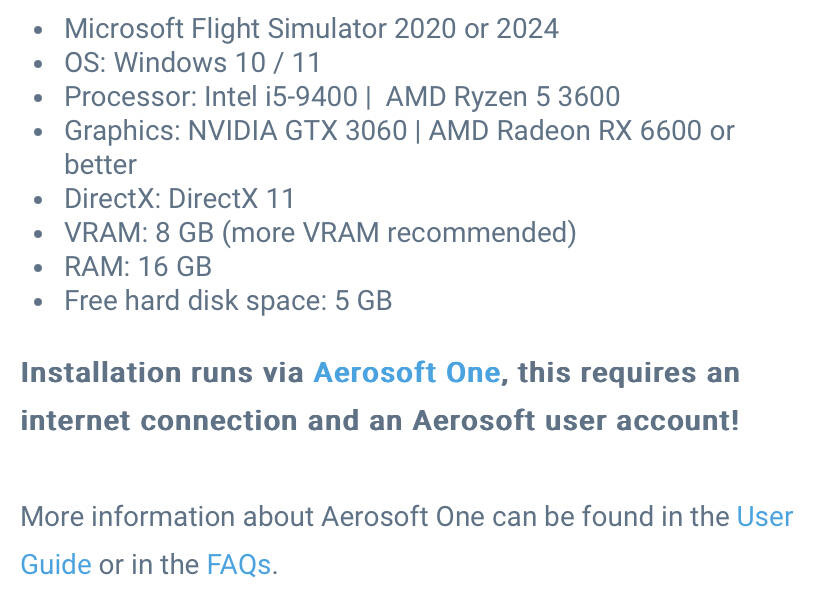
This is directly from Aerosofts store for that airport, they list a 30 series card and 8GB if VRAM (more is recommended)
Important thing to state here: CPU % is not really a good indication. You can be CPU limited with it being at 40% usage! It depends on how the SIM is utilizing the CPU. And most games do not fully use modern CPUs. So the better indication of a CPU limited scenario is the GPU not being fully utilized, eg. <90-95%.
Just as a quick reminder
My usage is basically CPU 30%/GPU 100% with stock aircraft and CPU 50%/GPU 70% with complex airliners.
5800X3D/RTX4090 3440x1440p. I usually aim for 80fps, limiting to 100fps. Big airport, Fenix on vatsim night can be down to very stuttery 50fps. CPU can’t handle that scenario
I don’t think the problem is related to the configuration.
I can get 60 or 70 FPS without any problems during part of the flight. But suddenly the FPS drops to 5~8 FPS and doesn’t go back to normal.
If I restart the game and return to the same place where the FPS dropped to 5 FPS, the game is back to normal at 70 FPS. I can’t understand what’s happening. And it only goes back to normal by restarting the game.
Indeed it is however I still don’t get how my CPU is maxed out, I know someone with an i7 8700K with a 3080TI and he’s getting 80FPS on Ultra and his CPU is only at 30% to 40%, Yert My CPU and GPU is maxed out on Medium/high and only getting 30 FPS
At the time, was at EGLL in the Fenix A320. It makes me laugh and doesn’t make sense that that system of his can run at around 80FPS on Ultra with those specs and I’m on a 10700K with a 3090 and lucky to get 30, at EGLL for me it’s 20FPS or under with the Fenix A320. With my system maxed out to 100% and yet his i7 8700K only at 30% usage
Are you both running similar monitors? If he’s running 1080p and your trying to push 4k on ultra that might explain it. On a 2k screen 2024 can get studders with a 7900xtx card on ultra with 3rd party aircraft and shirtless and that’s pushing 24GB of VRAM.
I’m on 1440p even though my screen goes 144hz, I locked it down to 60hz and I’m not on Untra I’m on Medium to high and his system he’s running at 4K on Ultra…
His 3080TI is way better then my 3090 able to do that
The 3090 is only about 4% better than a 3080ti, there has to be something else that’s causing your issues. Have you done any system benchmarks to try and find what might be holding your system back? Using something like HWMonitor to see what’s maxing out
I use 2020 mainly as PMDG’s 737 does not work in 2024. Just out of curiosity I tried a session in 2024 yesterday with the 737 max. As where I get 40-50 fps easily in 2020 with an occasional stutter, it was just a terrible experience in 2024. Perhaps 30-35 fps and it feels kinda fluid, but a flashing headset, 3 times restart because not a single button or switch was reacting to my mouseclicks, EFB issues etc etc, I gave up and went back to 2020.
5800X3D, 7900XT, 64gigs of RAM here, and still rocking Windows 10 (). Performance has been pretty solid since release for me (well since switching out my GPU from a 3070 anyway!), seems to be unchanged since SU1 released, maybe a little better? Tricky to tell. I’m even using Raytraced shadows!!! Burn him!!!
I’ve compared against 2020, and it’s that sim that gives me the most stutters, certainly not in unplayable territory, but for the timebeing 2024 is my main sim. I’m happy to wait for PMDG as I’m loving the A330’s at the mo anyway.
Temps are good, CPU is not OC’ed I mean I can OC to 5.1 however I do not want to push it, not to mention that at times OC’ed makes it worse than better (depending on the games) but all in all the temps are 38c and as high as 45c when in 2024.
I don’t get also that his 8700K can outperform well better than my 10700k and his 8700k is only running at base speeds,
So how can he able to run everything on Ultra with his LOD set to 200 on a 4k screen at 165hz and still able to get over 80FPS in a very high detailed payware EGLL and in an A320 via Fenix. And he told me that while he’s getting that, his CPU is only at 30% and his 3080TI only at 40%
Meanwhile, I have everything set to medium with LOD set to 50 on my 10700k with a 3090 and lucky to get 20FPS at the same location in the Fenix A320 at 1080p and my CPU and GPU are maxed out
My Vram uses 17GB to 18GB usage and on his 3080TI his Vram is only using 4GB - I thought 4k would use more Vram but it seems not.
Still very inconsistent - and a bit worse since SU1 - its never been great but at times comparable to 2020. But the last week has been a stutter fest - and today I started tweaking (turned off dlss and set a hard frame rate cap in my nividia). Hoping the improvements discussed in SU2 help get me to something similar to 2020.
Just going off what I know about PC performance with 2024 it doesn’t sound like he could be getting that performance, especially on a 4k screen. He has to have some things turned down.
I’m running a 1080p TV, i9-14900KF CPU, 4080 Super and 32GB DDR5. And I don’t always get 80fps at default airports with the FBW A320. If I upgraded to a 4k screen and changed nothing else I’d be running closer to 30fps. Even on a high end 40 series card.
Ask your friend to send you proof of that. Because from everything I’ve seen I don’t know how he’s doing that because I couldn’t do that with my newer high end setup
The 10700k only supports PCI-E 3.0, so you won´t get full performance on a 3090 that supports PCI-E 4.0. On the other hand your CPU can only handle 16 PCI-E lanes. Those 16 lanes alone would be needed by any on the recent GPUs running x16 alone, for instance (this would be the ideal case, you know, as switching still happens).
I read in your posts that you have at least one M.2 disk installed as well. Did you check that the GPU slot has no shared bandwidth with the slot where your M.2 is installed or any other PCI-E device you are using (external sound card for instance)? If that´s the case what you are most likely facing is a capacity problem on your MoBo. Shared bandwith will reduce speeds from the connected devices, which could be ok for some M.2 disks, as they do not work faster than x4, but in some MoBos it could also mean that GPU slot could work at x8 instead of x16, which is yet another performance reduction.
You need to ckeck those things carefully when upgrading a system to avoid generating HW bottlenecks artificially and more important to avoid paying for a HW that will underperform. If you check that this is the case one easy solution is to change M.2 to another slot that does not share bandwidth with the GPU slot, if it exists at the MoBo, obviously. All this info is included in the MoBo documentation.
Sometimes I had to select a different MoBo when preparing my systems just because those things. The MoBo could be cool and cheap but it may not support everything you know you will need to install or you plan to install in the future. With latest MoBos is even worse, as many of them have indeed shared bandwidth with GPU slot, meaning that you need to limit the amount of M2 disks you can install or meaning that some other slots will be directly disabled if you put a M2 disk there.
Note: changing M.2 slot can affect Windows booting process, so in case you want to go that way prepare for a Windows re-install if the disk change (the booting order) can´t be fixed at BIOS. Save everything you need before just in case!
This⬆️… I’m not well versed enough in PC hardware knowledge to diagnose the way you did but I was starting to suspect that it was a hardware bottleneck that wasn’t obvious. Such as shared bandwidth between the PCI-E devices. I have a feeling that since he’s running 10th gen CPU that most likely the Mobo has some years on it too and may not be able to handle the demands of modern hardware running modern game requirements. Maybe was fine for 2020 but not 2024
It´s a real pain. It´s not the end of the world but it can be a limitation, that can be acceptable or not depending on the use case, sure.
Some days ago I found the perfect MoBo for my new system: good price, with all slots I needed, with enough rear USB ports, supporting also the front USB ports the PC case itself would have and before I added it to my purchase wishlist I checked the MoBo user manual and bang!.. Shared bandwidth between GPU and 2 of the M.2 slots…, the fastest ones (PCI-E 5.0). I had to start searching for another one again I also found MoBos that deactivated some M.2 slots instead of reducing the slot speed.
Recently you see a lot of stupid designs, but well, the new faster devices can mean some limitations. You can´t have everything everywhere and also for a cheap price.


 I also found MoBos that deactivated some M.2 slots instead of reducing the slot speed.