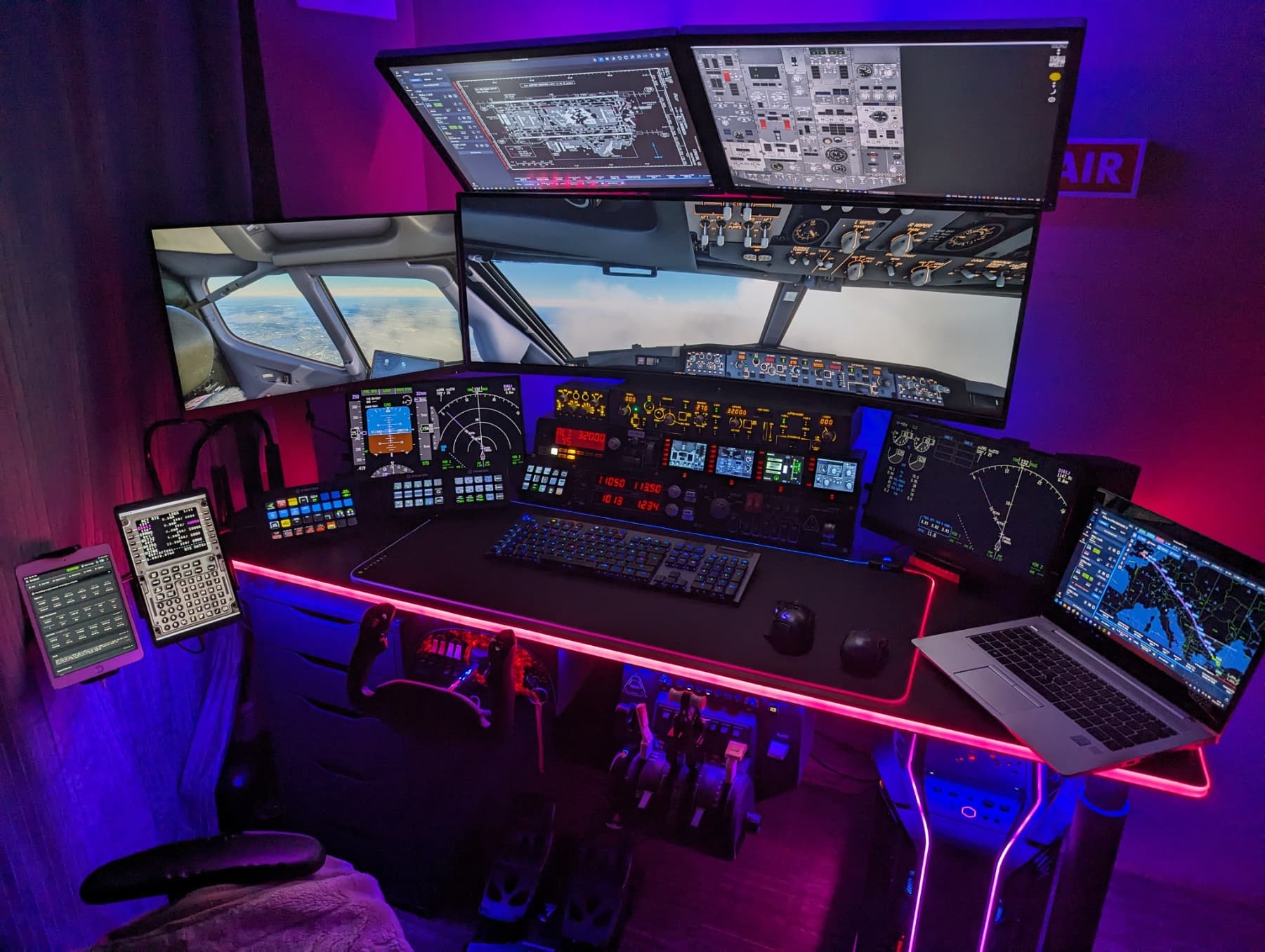
I discovered a thread with a 7x monitor setup earlier, but since things are a little different for me, I started a thread.
A short explanation about my photo.
A total of 6 x monitors can be seen.
4x of them are connected to my flight sim PC.
The large screen, the screen on the left, and the two 15.6 inch displays below.
Above the 2x 24 inch monitors are connected to an extra PC.
But I’m currently concerned with my flight sim PC.
I can connect a maximum of 4 x screens here and wanted a fifth screen to the right of the large screen.
I currently have an RTX 3080 12GB installed.
I’m thinking about buying another GPU or buying an HDMI-USB adapter?
I think a GPU would be better. I thought about buying a GT710 or GT720 in low profile.
But it is an old GPU and is no longer supported by Nvidia… Will Windows still install drivers?
Or do I need at least a 1030 because it is supported by current drivers.
The GPU doesn’t need much power either.
That’s why I’m also wondering whether an HDMI-USB would be enough?
I would connect the fifth screen directly to the 3080 12GB and then connect the 15.6 inch display to the extra GPU or HDMI - USB adapter
Dual GPUs (Crossfire & SLI) are seldom used in video games. Having to buy two high end graphics cards, a bridge and a compatible motherboard never really caught on to the mainstream. That said, Windows will only let you choose one GPU at a time to use, so adding a 10 year old GPU won’t do much for you anyway.
I would grab a KVM switch with enough inputs to accommodate your monitor needs. You could then also theoretically control your second PC controlling your overhead screens with the mouse and keyboard from your flight sim pc
Or just grab yourself a $100 tablet and copy of Air Manager.
I have an Intel Arc A380 as a secondary GPU for some Air Manager touchscreens. It works well. It can be a little tricky to get dialed in but it’s better than the USB to HDMI adapter. You can try to force applications to use the secondary GPU, freeing up resources on your fast primary GPU.
A cheap secondary card should be fine. I had a 5800x3d and 3080 and added the Intel A380 GPU card. Only pain was that my motherboard wanted to make the Intel card the primary card so bios boot screens showed up on a monitor that was connected to it. FWIW, it was an MSI x570 Unify.
Why not try to buy a dual or triplehead to go from matrox
It uses one digital port of your gpu and depending on the one you choose you be able to connect 2 or 3 monitor screen to it.
Than you connect the left screen to it and attach one new screen right of the main screen of the same size as the left and connect this one also to this device.
It will see it as one screen but you can drag two individual screens to them.
In this way you would not need a second gpu
I have 7 screens running on 2 GPUs. A 4090 for 3 large 4K screens, and an AMD rx7600 for 3 touchscreen monitors. I also have an overhead screen for navigraph running in the integrated GPU of my 7950x3d cpu, but I could run that on either of the 2 GPUs. In my case I had to find a 2nd GPU that windows and my mobo would recognize. My mobo (b650 board) runs the 2nd pcie slot at x4 speed so that meant I needed a GPU capable of that speed. I used the tech power up database to screen for GPUs that can run at x4 pcie bus speed. The list is small but a few cards are still available and worked. I first tried an NVidia 3060 before realizing that it needed x8 speed and thus it wasn’t recognized when I tried it. I returned that and got the AMD rx7600 upon doing the research on tech powerup to sort GPUs by their required bus speed, and it worked no problem from the get go. I could have gone lighter on the 2nd GPU as the 3 1080p touchscreens run at 30fps (by my choice) and only use 20% of the GPU under load. So a smaller single fan GPU might have worked but I wanted 3 ports on the GPU and something like an rx6500 itx GPU only had 2 ports. Ping me if you want more details but it was very easy to make work once I sorted out why the mobo and windows were not recognizing the 2nd GPU due to the pcie slot speed limitations on that second pcie slot. I think using the usb solution is still going to put too much strain on your current setup and degrade its performance….but it’s worth a try and you can always return the parts if it doesn’t work well.
Please note, the above is not ideal for running anything above 1080p, but it should give you a better of idea of what you need: A little more complicated than a splitter, but less techy than a full KVM switch.
I recommend using Display port as the throughput is typically better than HDMI. This may translate to better picture and picture efficiency. Beauty is in the eye of the beholder
If all your TVs have is HDMI, then it’s not so much “better suited” to use a DP>HDMI as it is “doing the best you can do.” Most name brand TVs made in the last two years have a displayport
You shouldn’t notice any degradation in performance that wouldn’t be caused by the sim already (or: you shouldn’t have any issues as a result of using a DP>HDMI cable, none the average person would notice)
Hi,
Yesterday I found an HDMI - USB adapter and tried it out.
What can I say ? , plugged in driver installed → works.
This HDMI-USB adapter runs over 15.6 inch display for PFD/MFD displays.
Works great and haven’t noticed any distortion
Hi
That’s what I did. I plug x3 4k TV to my graphic card, and x3 PC monitor (PFD ND ECAM) to USB/VGA adaptator. It work’s fine because the USB/VGA adapt’ have is own driver…
You can check my channel : TB Airbus Simulation - YouTube
Bye
Hi, i am planning the same as you did and i want to connect the 3 Displayports of my 4090 to screens and i´m searching for a solution for the PFD / Ecam Screens. Could you tell me the exact USB to VGA Adapter you used please?