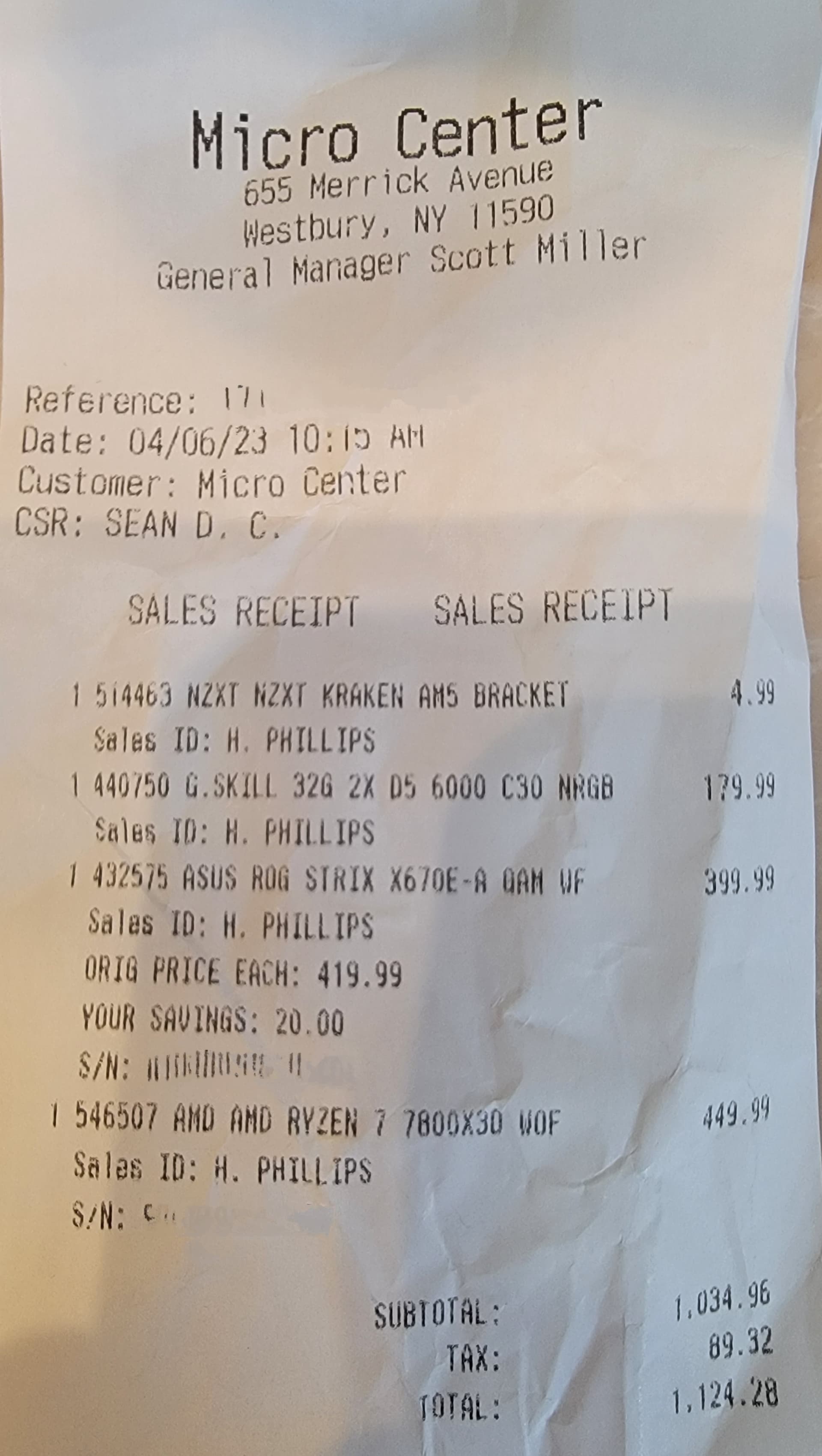
Thats crazy!!! Got mine for retail at the local Micro Center. Plenty in stock…
4 Likes
Nice! If you can, post videos on youtube at a major airport, using a complex airliner (A310, Fenix A320 or PMDG 737) and live traffic.
KLAX would be amazing. By the way, what’s your GPU?
Amazon here in the States is showing the same stupid $999 as the AMD Store.
Um, no.
EDIT: Just picked one up at newegg.com.
Am I building a PC, now?
Looks like newegg still has stock. Better get it while they still do.
Given Newegg’s reputation lately, I would rather wait until someone else has what I need back in stock.
1 Like
Msi RTX 4090
The newegg reddit page looks scary.
I miss Fry’s.
Getting high end CPU’s/GPU’s at the retail price is what I love about Micro Center. The one caveat is that you must purchase in store and 1/customer so the scalpers/bots can’t buy them up online and sell at an upcharge. While this helps keep these items in inventory (the store in Dallas is listing 25+ 7800x3D’s in stock), unfortunately, this means you have to live in a city that has a Micro Center.
1 Like
AMD just cut down the 7950x3d and 7900x3d prices by 100 and 50 dollars respectively.
Clearly because the 7800x3d would canibalize the sales of the other two if they kept a larger price gap.
2 Likes
Does anyone know, if the 7950x3d with core parking in bios is as fast as the 7800x3d?
Why would you want to park the cores for MSFS? It is already proven (in another thread) that MSFS actually benefits from the non 3dvcache cores when you use other programs simultaneously (Volanta, vPilot, VatSpy etc). Another user tried a few things and said that if nothing is open other than MSFS, it actually only uses the Vcache cores, so it is pretty well optimised as MSFS is correctly recognised as a game.
And core parking is different to disabling a whole CCD, which you do in the bios. Core “parking” per se is not done by your bios. It is done by the chipset driver.
2 Likes
Fortunately I am lucky to have one located near-by.
Would be nice if other retailers followed the 1 per customer policy, but I guess with online purchasing there always a way around that.
1 Like
Can you provide a little more information about how the 7950X3D is able to use its additional 8 cores to leverage better performance of background apps with MFS? I can’t find any information that supports this, is it in a thread on this forum?
My understanding of the 7950X3D is that whilst background applications can use the cores on the HF CCD, that CCD will generally be parked where possible when running MFS, to ensure MFS uses the CCD with additional cache. If, say Volanta was buzzing away on core 16, then there is some risk of MFS jumping to that core as well, which would have the effect of increased latency.
Surely the 7800X3D or 5800X3D has the advantage of utilizing a single CCD, given MFS is unlikely to fully load the 8 cores anyway. Leaving headroom for background apps. Or to look at it another way, wouldn’t Volanta, vPilot, VatSpy etc. be running on the high cache CCD along with MFS when MFS is running?
3 Likes
Yep that’s what I suspect will happen. Yes those cores are not as fast as the extra cores on the dual CCD chips but let’s face it most MSFS companion apps are not hungry on resources so I doubt you’ll even notice the difference. Unless you are using the machine for other intensive stuff like video encoding or such like and on a fairly regular basis it really makes no sense to spend the extra. Here the 7800 is $400 cheaper and to me that’s quite a difference for in my case any many others not a lot of benefit, if any.
1 Like
2 Likes
So if a 8 core CPU is enough, why do I lose 30% of FPS with my current 8 Core 5800X3D when I run all the background apps I need compared to running the sim and nothing else?
2 Likes
“how the 7950X3D is able to use its additional 8 cores to leverage better performance of background apps”
I did not say the background apps perform better, like you just suggested with this sentence. I said the the Sim will perform better with a lot of those programmes open. Which, to be fair, is also not true and worded wrong. The sim doesn’t necessarily perform better on a 7950X3D, it just doesn’t lose as much performance when using other apps in the BG.
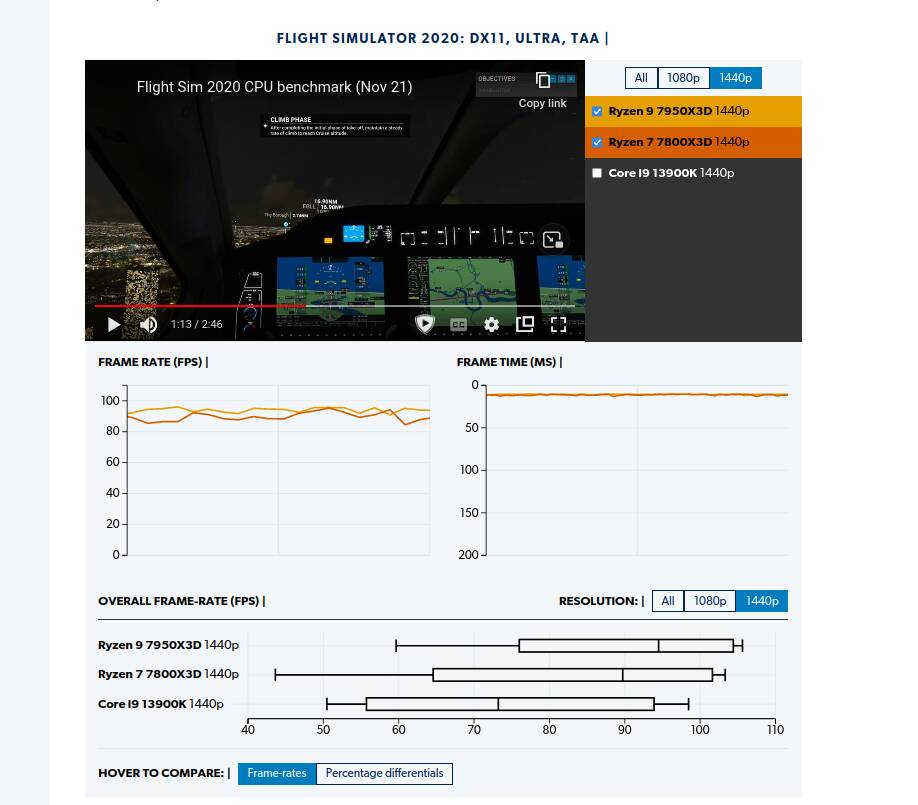
Sure, you can believe everything those benchmarkers tell you, go ahead, I won’t stop anyone from doing so. But many ppl don’t get that our daily sim scenario is heavily different to 95% of the games that those benchmarkers test. This is why for MSFS, although they give me a general idea, I don’t solely rely on what ppl say about the CPU after testing them in COD, Far Cray or whatsoever.
(And I think with process lasso you can “hard lock” every task to certain cores so MSFS won’t suddenly jump to another core when it “awakes” after being parked.
1 Like

Here is a sample of core usage on a 7950X3D / X670E / 32 DDR5 @6000 /4090, provided on another thread.
For context, monitor is 60 Hz at 4K. I don’t have the exact list of companion apps, but this is a power user, not vanilla MSFS.
This image was taken flying very low in a PG area, on GA aircraft, right after take off.
It’s kind of blurry, as it was taken with a phone.

Out of 16 cores we see 5 performance cores are nearly completely idle, 3 performance cores are between 17 and 41%.
The 8 Vcache cores are not all fully utilized.
This is just a sample, I am not saying it is enough to declare whether or not more than 8 cores is useful.
I’d be happy to see a similar snapshot showing a better utilization of the 16 cores in 7950X3D, so far I have not.
I think the difference between the 8 and 16 core chip will come down to occasional higher frame times on the 8 core version, that too, only if windows schedules background tasks on the parked cores on 7950x3d, if i understand core parking correctly, it does not. Those occassional frametime spikes should not be too noticable with the already stutterprone sim. The extra money may be worth it for simmers who are streaming using the same pc without any capture card, but for the rest of us, by default MSFS uses so little of the 8core cpu that total utilisation doesn’t exceed even 50%, most of the time i have seen it consume about 30-40% on my 5800x3d. And i am not gpu bound with a 4090. And the other programs which i use (spad, fsuipc, lnm, simtoolkitpro, fenix/Leonardo/vdgs clients etc) don’t consume even a single core completely. These apps are mostly sitting idle at the background and most of the time waiting on some io event. Vatsim apps may be bit more cpu heavy as they will need to process audio from time to time. But that should still be cheap on cpu cycles. And again, if parked cores are not usable by windows for scheduling background tasks, then one will have to use some other tool to bind MSFS to the vcache CCD cores and disable core parking done by and driver and windows gamebar.
To significantly stress the 8core cpu, you will have to run MSFS along with stream, YouTube in chrome, and may be some other browsing etc. And if someone is doing just that, may be higher core count will make sense for them.
All this is with current situation in mind. In future MSFS updates we may see more (and better balanced) core usage from MSFS and then on 16cores MSFS may just perform better than 8 cores, but being a programmer myself, i know how hard that will be to achieve and i don’t see that happening anytime soon. For now, for most users, 7800x3d will be sweet without the hassle jumping through the scheduling hoops for the dual CCD cpus. The extra money may be better spent on some sweet peripherals. But that’s just my openion. Like I said, it really depends on how one uses the sim.