7950x3d Benchmarks for MSFS 2020

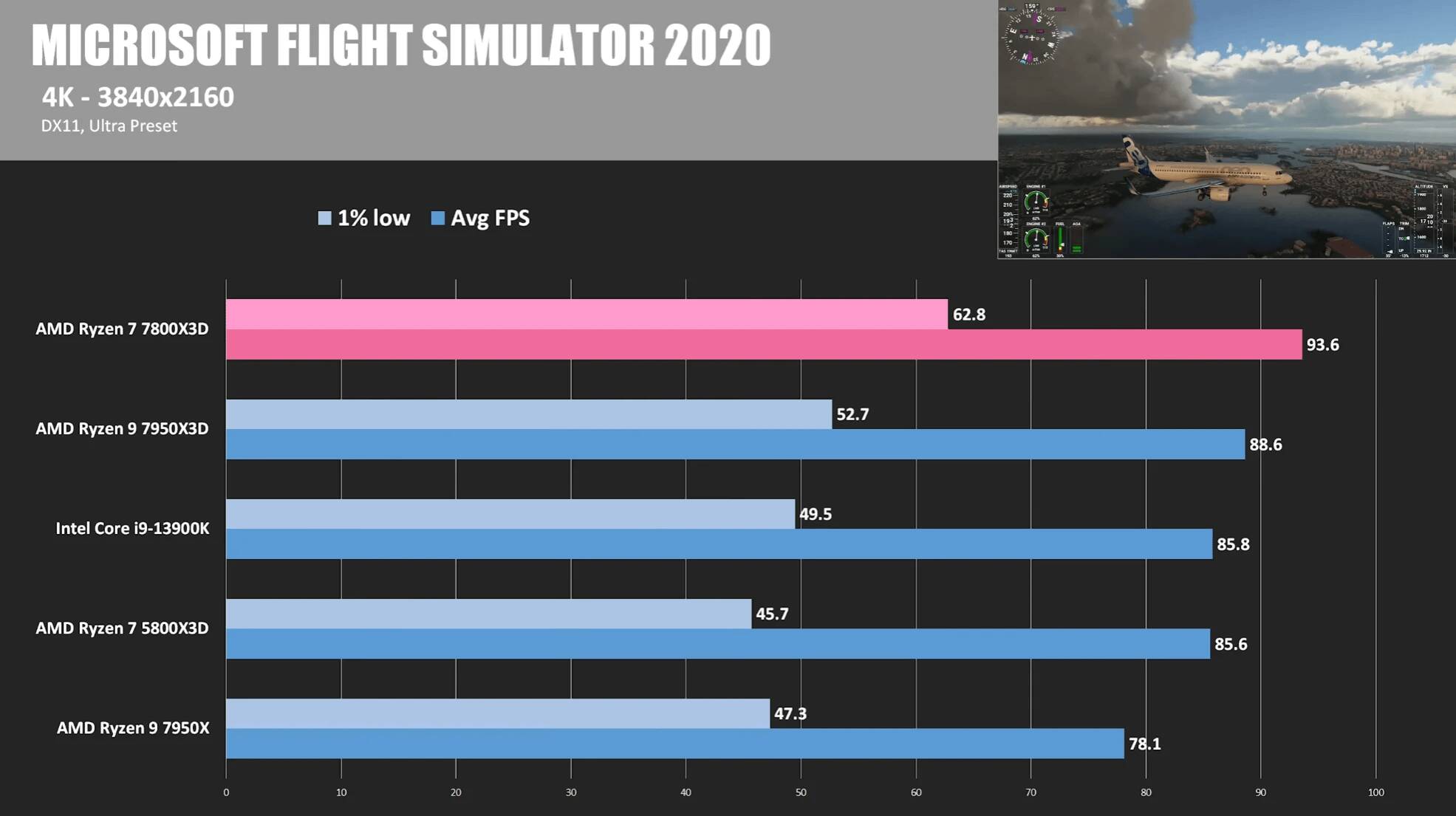
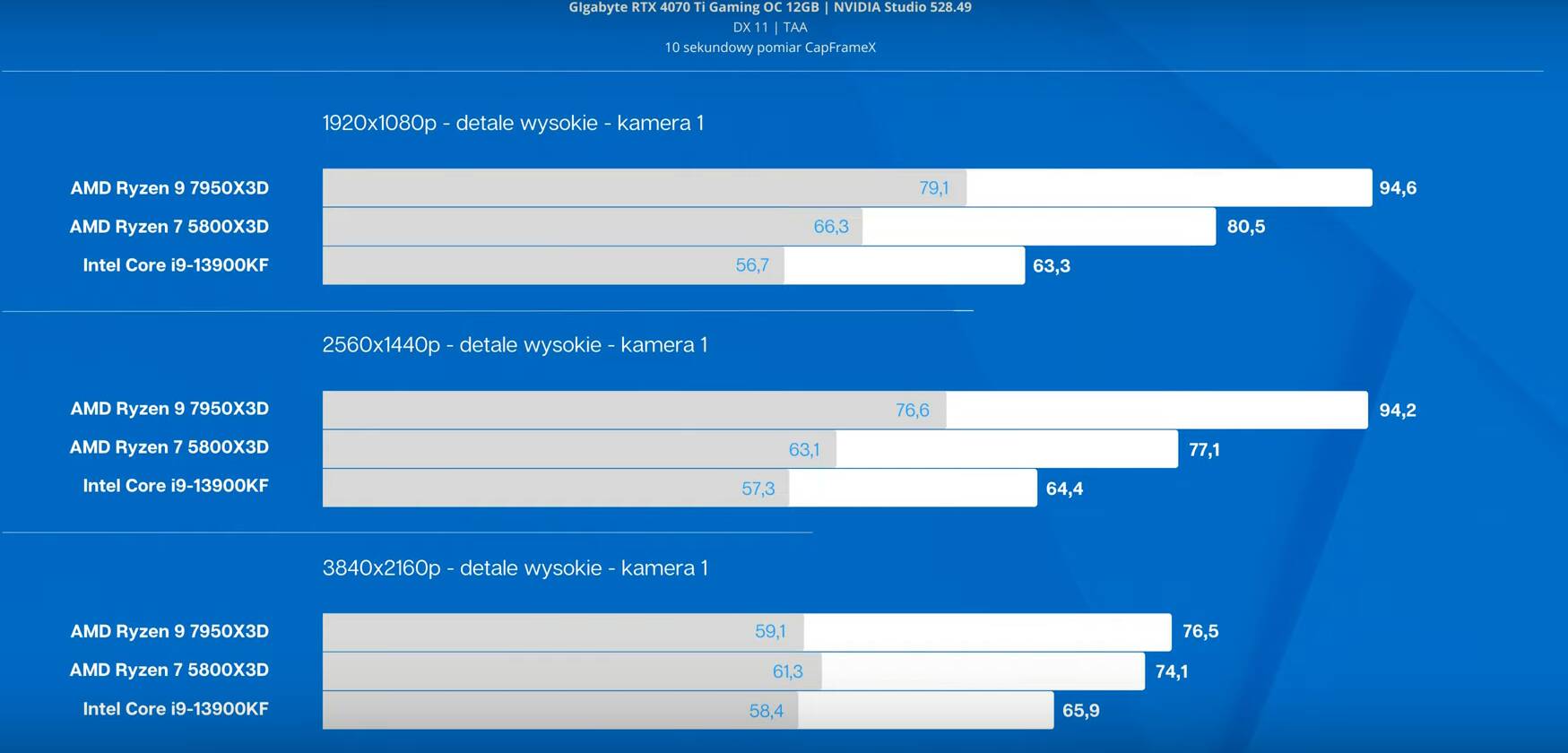
New 7950X3D benchmark.
The narration is not in English, but the charts speak for themselves.
Samples:


Youtube link for more.

On another note, AMD has released new “inhouse” numbers regarding 7800X3D. They are claiming it provides 7% better performance than 13900K on average, but their numbers vary greatly depending on the game (+31% to -9%). No word on MSFS. If you’re interested in seeing their chart, it is here. Of course, grain of salt, etc.

Exactly. Which is why I chose 7900X3D for my upcoming virtualization setup, as I will be pinning the 6c/12t with Vcache exclusively to the windows VM running MSFS, whilst the rest will be used to run other tasks on the host, including the hypervisor, sound, etc…

Indeed…

I thought this info was important enough that I moved it to a dedicated thread. Please give us your insights there as well! Thanks.

Planning on buying 7800X3D for MSFS? Consider the 7900X3D - General Discussion & Interests / Hardware & Peripherals - Microsoft Flight Simulator Forums

2 Likes

The 7900X3D looks quite interesting with its bigger cache. Unfortunately, i cant find any MSFS specific benchmark on Youtube… id like to see it in a real usecase scenario.

1 Like

I wouldn’t get that one for one single reason, it has “only” six cores with 3d cache. While both the 7800x3d and the 7950x3d have eight cores with 3d cache.

But in general, it performs basically the same as the 7950x3d and the 7800x3d (when released).

1 Like

What they are saying is the cores that the sim will likely use will have more cache per core so if 7 and 8 are not doing a lot then perhaps having more cache on the ones that are improves performance in MSFS. I’d like to see a specific MSFS comparison of all 3 chips once the 7800X3D is out.

1 Like

If you have a 4xxx gpu and a 7xxx card until the next gen of Xbox comes out does it really matter which version of X3D you have? Without a counter I know I wouldn’t be able to distinguish between a 90 and 150fps

1 Like

Yeah, thats also what im thinking. Thats why i really would like to see a detailed MSFS specific review, before pounding lots of money into a few frames. :slight_smile:

1 Like

7800X3D is due to hit the stores tomorrow.

In the past couple of days, AMD has started to release ‘first party’ benchmarks with their claims on the new 8c/16t/1CXX vs its elder 5800X3D as well as the competition (posted above).

Today AMD released a comparison vs 7950X3D (just in)

Source here.
As usual first party benchmarks are to be taken with pinch of salt. At the same time, these claims are fairly consistent with numbers published by independent reviews measuring the performance of 7950X3D with one CCX turned off.
Unfortunately, no word on MSFS yet.

Sorry I missed your question here!
It’s from Cyberpower PC (UK).

Strange turn of events. I just called them since they’ve had my returned machine for a couple of days to see if they managed to figure it out.

They said it works with all 4 sticks of their original Fury ram and works fine with both of the G.Skill I bought. With Overclock on (Expo on the G.Skill, and whatever it’s called on the Fury). No problems. They just reseated the ram and reset cmos. Which is the same as what I’ve done a few times in trying sticks in different slots etc. I don’t get it!

Anyway I am away for a week or so now and as they’ve left it with the Fury in and were going to send it back to me like that (which wasn’t the plan - they said they are going to refund me the Kingston so there’s no point sending it back to me for me to swap again, risk it not posting again and mail their ram back!), so I asked them to put the ram I bought back in and test again over a few days to see if it’s consistently working.

Now conundrum is that I’d be nervous to change anything in bios after I get it back if it’s posting with 64gb OK. I could check what settings they have used for it but won’t feel like tinkering myself. Very strange!!

@Baracus250 I sure would like to know how they claim they have 4 sticks of RAM running at 6000MHZ or above. No X670 can and remain stable at the moment. If you look at any QVL the max you can run is 2x32GB in slots A2 and B2 to get to 6000 or better. 4 sticks is going to get you a max of 4300MHZ.

I would also question how they are testing the timings. Are they using real world software or just synthetic benchmarks?

I would tell them you want the PC setup with the 2x32GB sticks you purchased and a refund for the original 4 sticks of RAM.

I hope this all works out for you and that there are still not underlying issues.

1 Like

They didn’t specify what speed they set it up as, just that the docp was on. Mind you the first set of Zen Timings screenshots I took when it still had the 4x 16gb Fury in did say 6000!? Someone here commented that they had done well to get that working.

I asked if they have done a memtest and they said not with memtest86 but they use Burn In and OCCT, which do thoroughly test the components beyond what normal usage would do (his words).

Yea it’s what I’ve said. I’ve been following and writing in another thread here about performance issues someone is struggling with and sounds similar to my NEXT problem that I’m not sure it’s performing as fast as it should. XxxYunior’s PC seems to be screaming along much faster in similar conditions. But if they have tested everything and the Cinebench result wasn’t too far off published values then not sure what else I can push them to test or check or even replace!

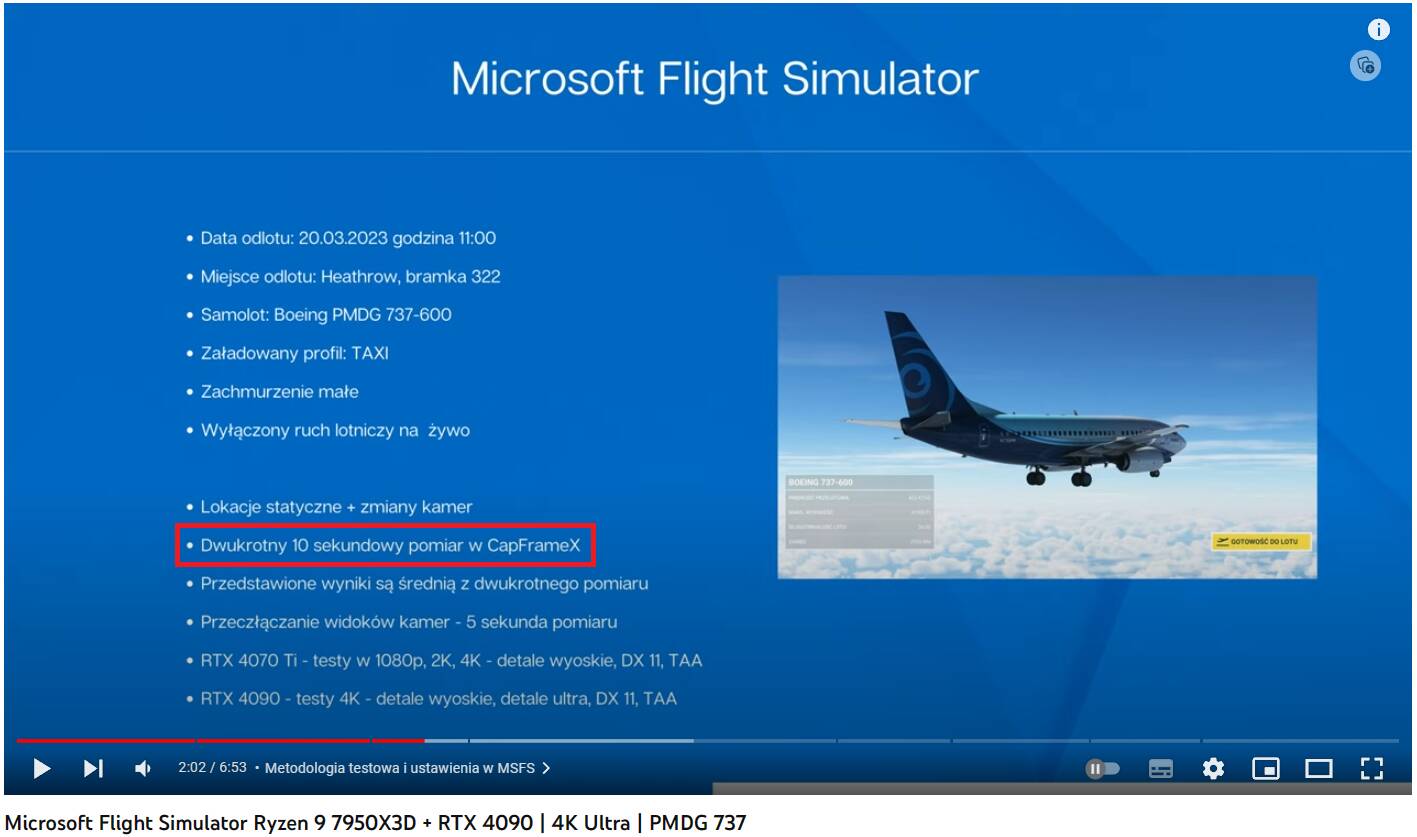
Test duration - 2x10 sec :rofl:

Polish efficiency :rofl:
I thought that video was interesting, they measured FPS in diverse settings: using an airliner on tarmac, in air, several camera views, 2 different graphic cards.
Most reviewers don’t even bother with MSFS, they stick to more mundane games, especially those with built in benchmark tools.
Of course none of them use all the add ons, extra apps, etc…

1 Like

Well finally it is here. There is one contradictory benchmark result.

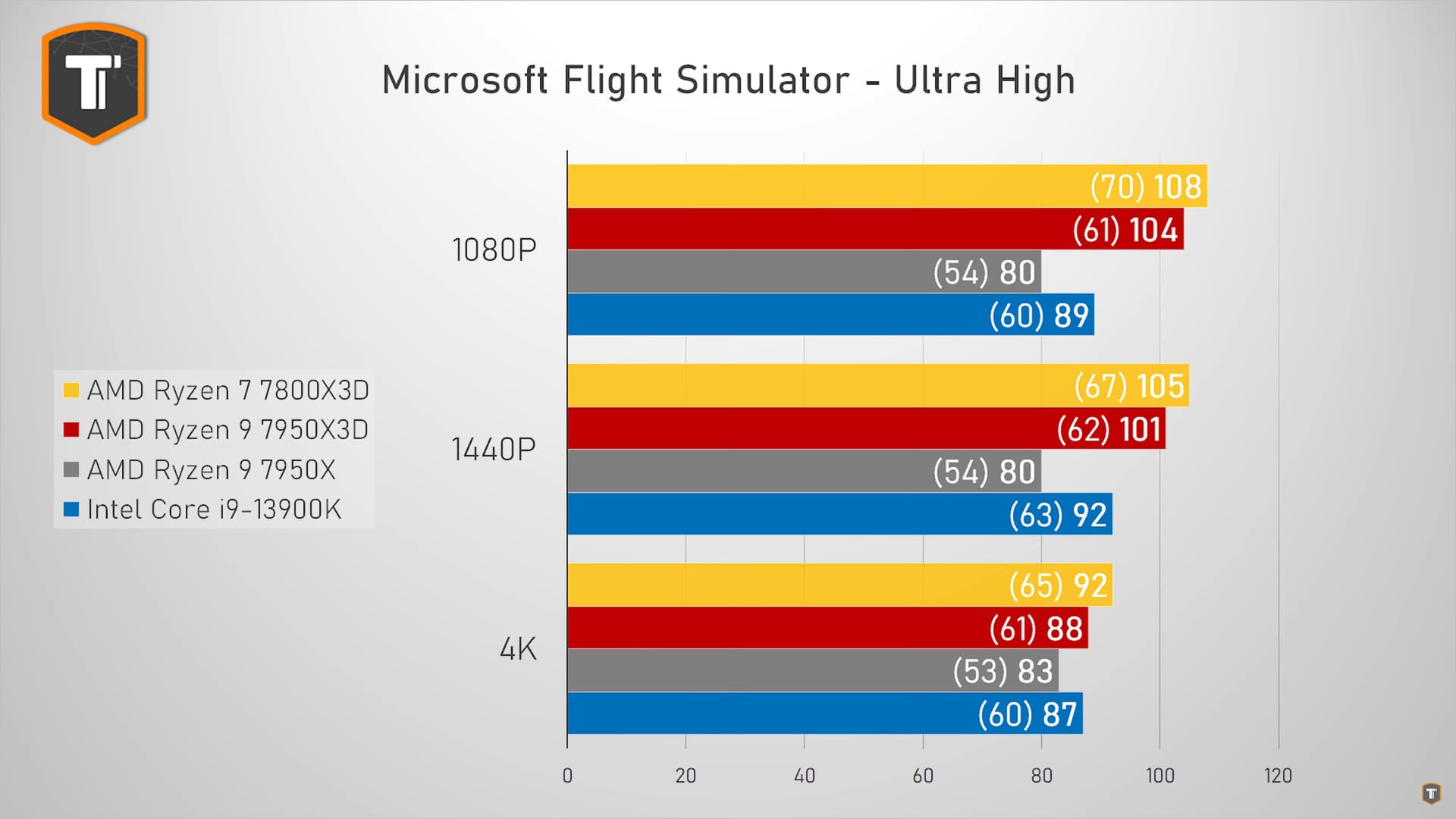
I could see at least three benchmarks in favor to the 7950x3D. Paul’s Hardware benchmark is odd tho.
Since there are no official benchmarking tools for MSFS we don’t know in what context they are done. But such a difference against the tendency could be because he messed with the BIOS preferred algorithm for the CCDx, Game Bar, used another third party scheduler program or didn’t set up its drivers properly. Or any other minor reason, who knows.

Those that went for the 7900x3D didn’t make a bad choice after all. Around 3% over the 7800x3D (both stock). And probably same percentage with PBO and undervolt.


Paul’s Hardware


It’s not that simple. You should watch the tests on other games and the reviewer’s conclusions to understand it better. MSFS doesn’t have a built-in benchmark, so the tests will be all over the place. It is expected to be like that. We can say at least they are all three on par, so just buy the cheapest you can find.

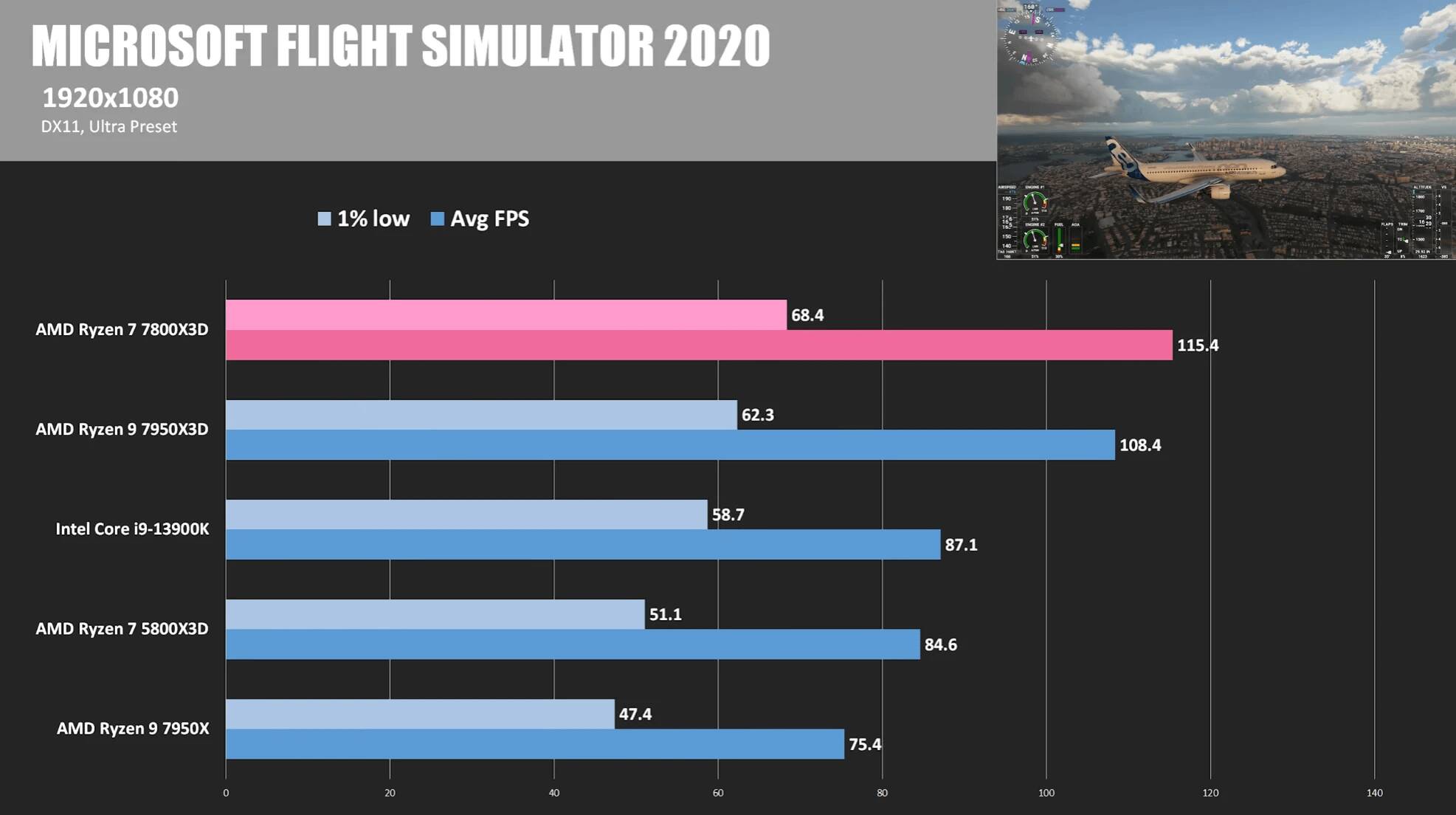
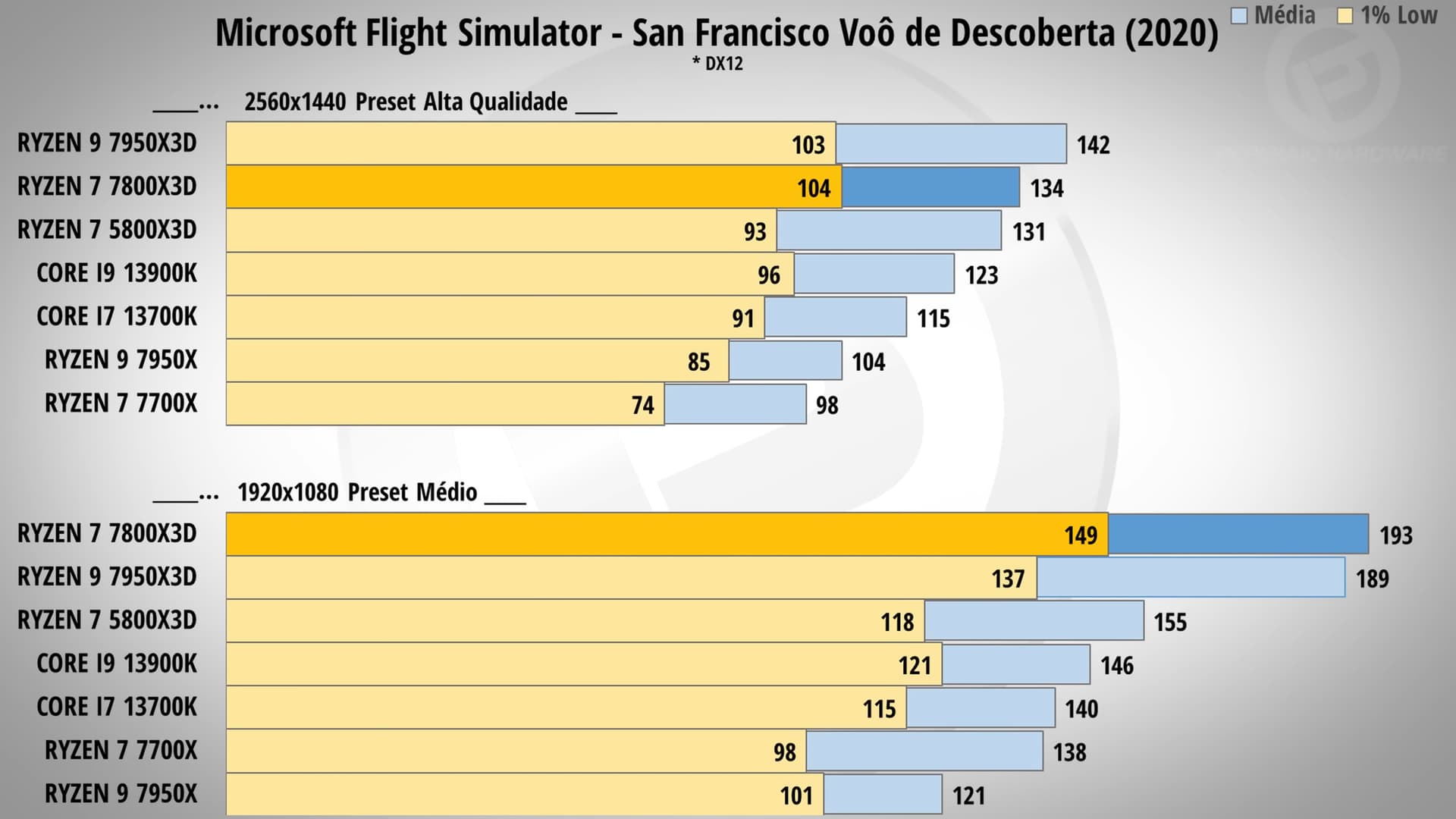
A test where it basically wipes the floor:


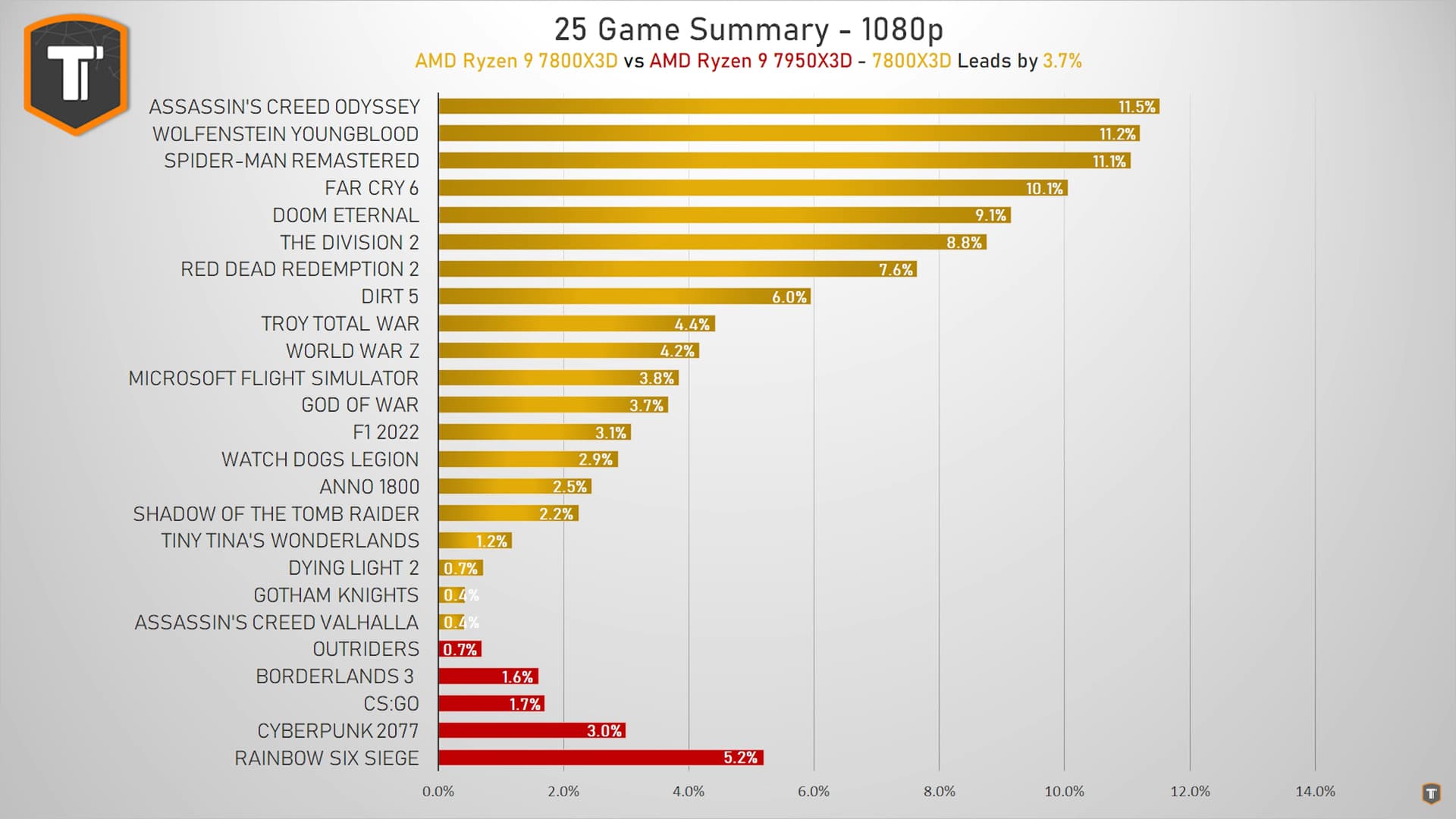
Another test, where the 7800x3d wins the lowest and the average (1080p):

1 Like

I have no intentions to start a debate about which one is the best or the worse. Or get to any personal misunderstanding.

But, don’t get me wrong if I tell you that not everyone here trust every review and follow up like a sheep without reading and making a proper research to get to a supported opinion.
My conclusions, apart from reading reviews, come from first hand experience as well.

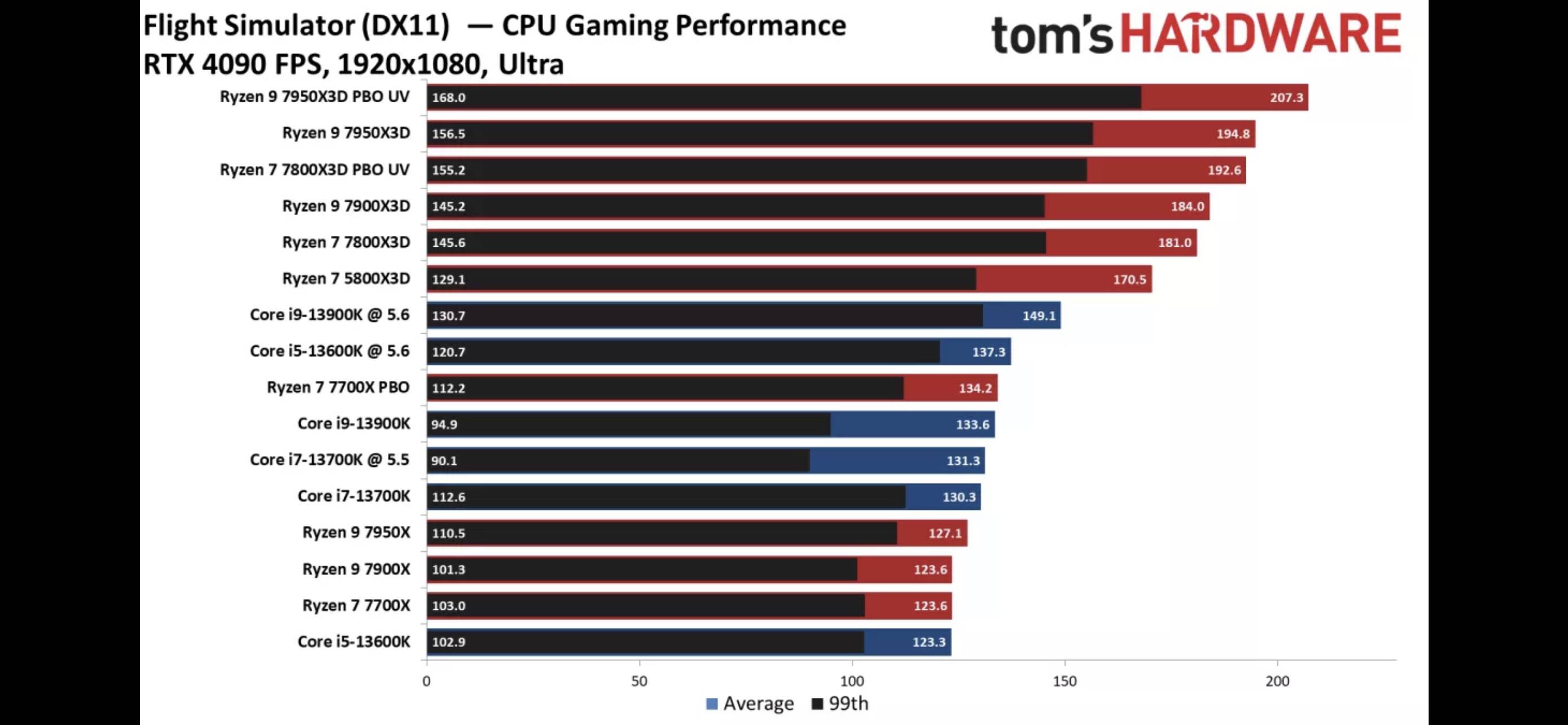
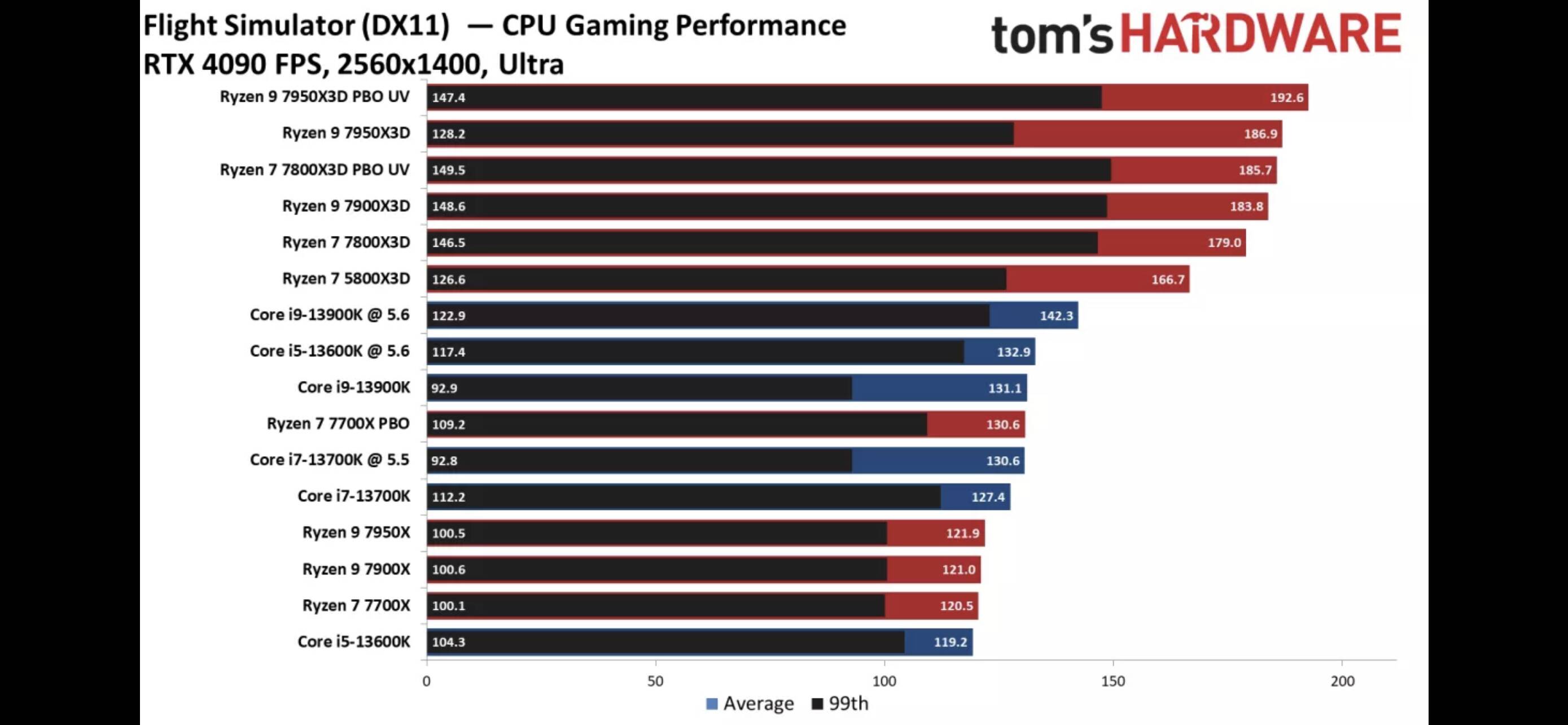
In this particular topic, with several 7000 CPUs and MSFS. Of all reviews the latter benchmark you shared and the one I shared from Tom’s Hardware are very close in performance % to what I experienced with all the CPUs I tried with MSFS.

Not talking about max or min fps, but about the % increase.
For example, with the same precise settings from 7600x to 7700x I found ~4% increase.
From 7700x to 7950x I could see ~3%.
From 7950x to 7950x3D it was an astonishing ~37%.
There were other factors changing as well, the lows and stutters were some of them.

Then I read reviews and see benchmarks from Techtesters or Paul’s Hardware were the % it is almost marginal between the 7950x and the 7950x3D. A very round 10%.
So, as a real life user, with the exactly same CPUs to extrapolate how realistic the % difference of those benchmarks could be, cannot find them that reliable. And again this is not a supposition it is an empirical case.
In my personal opinion, for this particular case I find Tom’s reviews trustworthy; among others. Following a realistic tendency between the processors performance differences.

I definitely cannot tell the difference between the 7800x3D and the 7950x3D, I don’t have the first one. Neither I find it that relevant. And, of course, could agree that it could be marginal.

But, can definitely tell the differences between the 7600x, 7700x, 7950x and 7950x3D CPUs. And base my opinion on that experience to discern what benchmark seems more trustworthy.

And, again, in case it wasn’t clear enough, in a particular case for MSFS and 7000 CPUs.

I would add, “or, the best that suits your needs”
Be cool, my man. We just have different opinions. As I don’t have both CPUs to try myself. I will use as much tests as I can. And sure I trust them all, because I know the testers.

And yeah, we can all use our money the way it fits better our needs. I’m just helping others to decide themselves what’s best for them, sharing as much tests I see.

I can only repost here what I just posted in the 7800X3D thread to finally settle the debate about value:

Value is not defined by how much something costs. Value is how much something is worth to you. Thus, in some cases, where the 7950X3D is more beneficial in a particular usecase for a specific user, it has a better value even though it costs more. Basic economics. Many people, not all, seem to forget the economical definition of ‘value’ these days.

Let’s say you have 2 goods; A and B. A costs 1000€ and B costs 300€. Both do roughly the same thing, but both of them have a significant advantage over the other (more cores - only one CCD).

If somene chooses product A because the advantage of that product is more important to them than the advantage of product B, it has more value for them even though it costs 700€ more. In that case, the more expensive product is also the ‘bang for the buck’ for them because there is no alternative that does exactly the same.

You cannot question a ‘value’ compared to another product as the value is defined by the user. You can only question its price compared to other products and why it has been set at a certain pricepoint.

TLDR; value is defined by the buyer and user and not by the product’s price.

Please, for the love of god, stop arguing about which CPU is worth it and which one has the better value or bang for the buck. It is more than tiresome as some people make statements about value without even knowing what value really is from an economical point of view.