Looks dope!!! Lots of discoveries in this thread. PBO set to MAINBOARD gives great results. (At least for me, from testing against the AMD AUTO. I don’t have the skill to set up PBO voltages manually… Yet) Memory OC is a champion of adding fps, and increasing .1 and .01% lows. Rolling cache set up on RamDisk works well for smoothness when panning, some users report stutters when cache is full (Suspected) Hope im not missing anything.
Testing a flight Boston to New York MD-83 and I have LEDS on smart mode, green until 65c yellow 70c red, was getting reds and was worried then I realized my PC had raised the room temp by 2c, adjust the room air con brought it back to green.

3 Likes
Oh heck yeah!!! Great fps!!! cpu boosting nicely too!!
[quote=“MrCombatAce, post:1014, topic:578422”]
Select: Chipsets > AMD Socket AM5 > “your specific motherboard chipset” > SUBMIT [/quote]
Thanks for this CombatAce.
thanks will give it a try!
assume all were trying to do with this tweaking (via lasso or the chipset driver) is ensure that games or MSFS are only using a particular core(or any core) that has the v cache on it with everything else using the the non cache cores?
if yes what is the best way (or software) to check everything on the cores side is working as intended?
What’s your temps of 7950x3d?
I find it’s quite warm at idle: around 52-53°
In the sim it runs in 4K all ultra and 4090: 66-68°
That is perfectly normal. Mine idles from 43-51 depending on my ambient temps. Those temps for gaming are what you’d expect to see. Mine are higher
Mine idles at 36°C - 38°C, the latter when there’s a heat wave.
When using msfs it remains at 48°C
My 7900X3D idles at 39-45. In MSFS it never climbs above 79.
Wow… that’s cool as an icecube. You have the 7950X3D?
Yeah what kind of cooler is that 
I have an NZXT Kraken 360 elite, a good portion of thermal grizzly Kryonaut and all cooler settings in performance and don’t have that temps.
A/C doesnt reach where my pc is. I have had high ambients all summer. From 26-32C typically. Can’t put a window banger in this room. condo rules. I keep wanting to get a portable. then forget
Yup… that makes a lot of sense. I’ve got an A/C window unit; it’s about 4 feet lower than the PC which is not helpful… but they’re only about 5 feet from one another, and the A/C is blowing directly toward the front intake fans. My PC is mounted 5 feet up on the wall, so this winter when the forced air heat kicks on – I’m sure I’m going to see very different temps.
1 Like
A Corsair hydro 240mm at the top as exhaust. Yes is the cpu I use.
Being honest my pc is in the next room (is a small room and cables go through the wall) so temperatures are distributed and I (my body) don’t contribute to increase it. But when using it I usually turn on the AC (on my main room) and pc room gets cooled as well with the door open. Room temperature with ac is kept to 25-26.5°C. If I shut pc room’s door that room gets hotter rapidly (room temp without ac is 28°C with heat waves exterior temp ~38°C) and cpu idle gets to 39°C after some time.
My water cooler curves are to set its fans to almost 90% when coolant gets around 28°C. Also my pc case allows three 140mm front intake fans which are separate controlled depending of cpu, case and gpu temperature (from top to bottom). That keeps the temperature controlled, particularly when gpu is used.
Motherboard has temp sensor headers so they helped a lot to find out the case and gpu temperatures (min, max and avg) and to set fans curves.
Also had two more exhaust fans, a 140mm for the back panel and a 120mm just over it in the top panel (next to the Corsair).
With all of that I have a very well controlled temperature on my pc and is not that noisy.
I tried downloading one of the main fan control programs, but it didn’t work with my fans. I didn’t want to download Armoury Crate for my Asus MOBO… so I guess my fans are likely running at 100% all the time. Probably not great for power consumption and fan life… but I’m really not sure.
Yeah I hate background software hehe. In my case I use the Corsair’s Cue software, which can control sort of things like Corsair’s led strips, mouse, keyboard, etc. But I only use it for the aio fans and to turn off rgb… nobody is watching that Christmas tree to be on.
For the rest of the fans I control them via BIOS, that’s why having extra sensors is so convenient in my case.
Take a look at your bios and you can control your fans there, is not very… visual, as it is in msi motherboards, but it’s self explanatory. At least on mine I can control everything and link it to any sensor I wish.
In my opinion bios is the best way, so much I’d set aio fans through motherboard if it wasn’t because I cannot read coolant temperature without the software.
1 Like
What in the world; just looked at my Mobo’s Manual… 13 pages on fan control. Wow. Thank you.
----- MOBO OPTIONS -----
- AVAILABLE MODES: Auto Detect / DC Mode / PWM Mode
- AVAILABLE PROFILES: Standard / Silent / Turbo / Full Speed / Manual
----- MOBO CURRENT SETTINGS -----
- AIO PUMP > Auto Detect | Full Speed (currently ~2370 RPMs)
- CPU FAN > Auto Detect | Standard (currently ~860 RPMs)
- CHA FAN > Auto Detect | Standard (currently ~860 RPMs) [I have an RGB/FAN Hub, so they’re all running off one Chassis Fan Header]
From the looks of things, I think I’m good??? I would imagine the AIO Fans will likely burn out long before the chassis fans?
1 Like
This inspired me to set an aggressive fan curve in my bios rather than have that portion of my main-board software using resources.
Really simple once I selected manual 30c/40% 40c/50% then anything over that I’m gaming so 50c/80% 60c+/100%
2 Likes
A great little fan control and monitoring software is Argus Monitor if anyone is interested.
Another benchmark… Getting happier with this. More tweaking maybe. Great CPU bench I think. I need to keep benching other categories, as I’m approaching top 20 overall in my league. Rookie lol, yep. I have no Liquid Nitrogen. However, my WR Rank scores are against the world.
EDIT: I do like these longer y-cruncher runs, if you are not stable… These benches will crush your system. No wishy washy OC’s
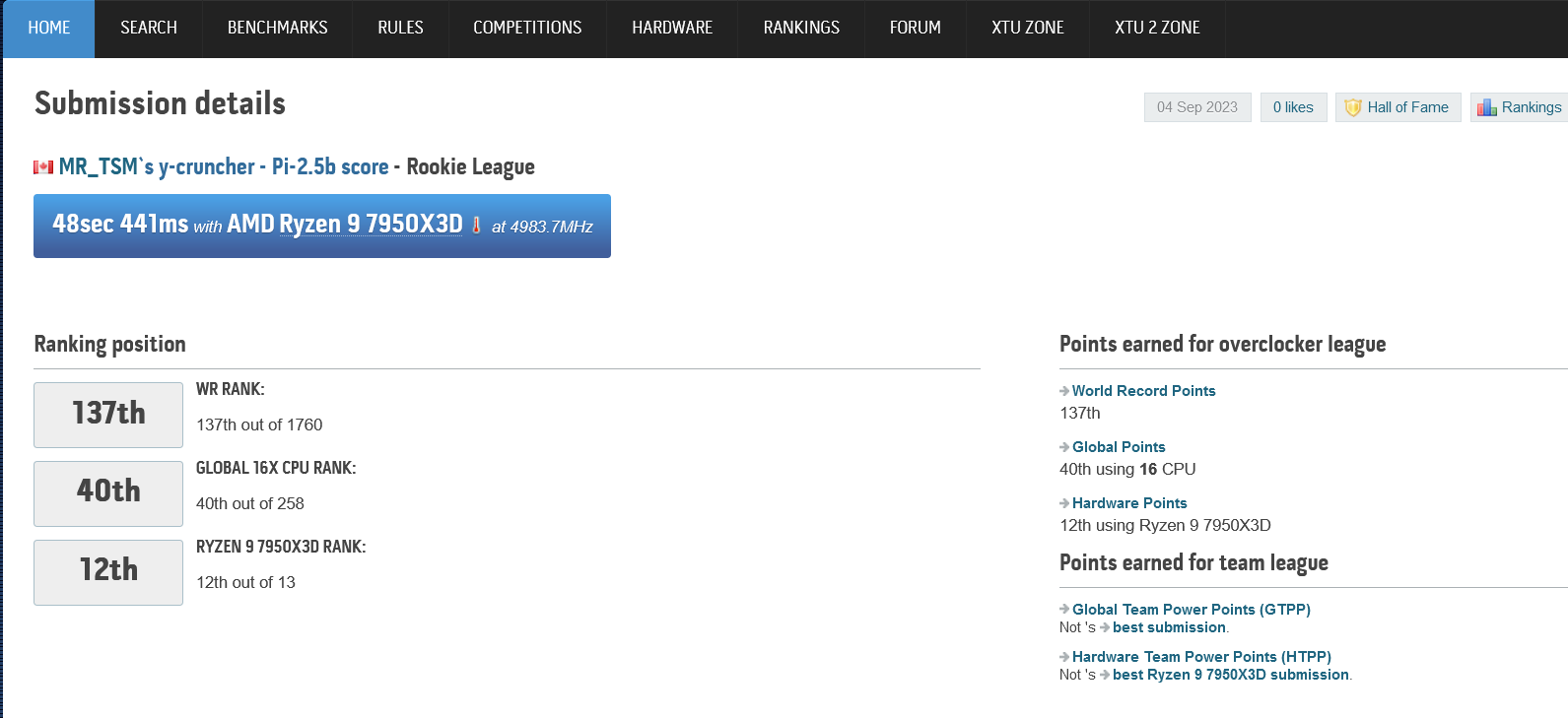

EDIT: And the dreaded y-crucher pi-10B. Dreaded as only rock solid stability will finish this test.