managed to get some time to set this up
1)followed all the steps - my system was prebuilt (2 months ago) so it looks like the chipset drivers had all been installed (not sure if it needs updated but the drivers appear to have been installed) then followed the steps after (HAGS + gamers bar)
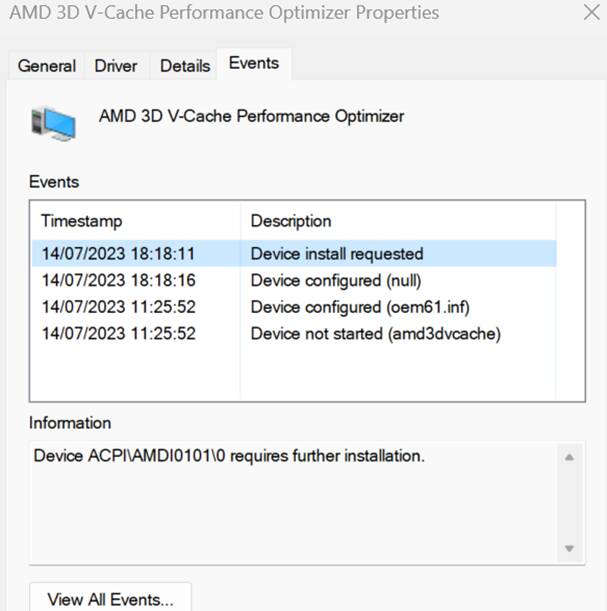
2)strangely when I run MSFS and check for core parking sim seems to be split across all cores(no parking) only strange thing is the cache performance optimizer says its running ok but givng a requires further installation error in the device manager (screen shot below) - still it looks to be running also in the game bar “gaming features tab” under direct storage section it says “E/bypassIO not supported due to driver gdmnlcpt” - not sure if this is relevant but my gamer bar does not seem to register MSFS as running also? - any help appreciated
Did you update GameBar via the Microsoft Store yet?
Definetly make sure GameBar and all MS Store apps are updated.
As for the chipset drivers… Latest Version is: 5.08.02.027 (Updated 8/17/2023)
So likely newer than what was pre-installed on your PC.
Also check that your BIOS is up to date.
yes its running and I updated it to v6.123.9061.0
2 strange observations
1)its not recognizing MSFS or other games in the game bar (assume it needs to) saying in the games feature tab - “bypassIO not supported due to driver gdmnlcpt” assume this might explain why it might not be recognizing games and parking cores because the “error” relates to all my SSD drives including the MSFS one?
2)Also in the device manager it says although “AMD 3d v cache performance optimizer” is installed and operating - the events tab seems to say it requires further installation (see screen shot)?
so:
1)Gamebar definitely updated
2)Difficult to tell if the chip set driver is the current one - there are a few different components I think 8 in total all showing different version numbers so dont know what pack they came from - but as the system was built in July unlikely to have the latest august pack installed - so would you suggest updating them all if yes - do I just download the whole .027 package which I have already done - and then just install everything over the top of the old versions without any issues?(installing the 8 components again) or should I go into all the different components and select the update button individually for each component? (screen shot of how my installed components look below)

3)in terms of the "v cache optimizer " component should it really be showing as working properly and then in the events tab - “requires further installation” (screen shot below)?
4)In terms of the bios less familiar with tweaking this one - how can I access it and also how can I check what version is installed?
5)seems the main issue is the “bypassIO not supported due to driver gdmnlcpt” on the game bar games feature tab…which means MSFS is not being recognised as running and as a game..
My 7950x3D idles at 51-52°C with an AIO liquid temp of 31°C and a case interior temperature at 27°C. The pump runs at performance setting.
…and all that with -20mV undervolted in BIOS.
No idea how people get their idle temps at 39-ish
Your at -20 all cores?
I can hit 39c doing absolutely nothing in a 23c room with the case open …
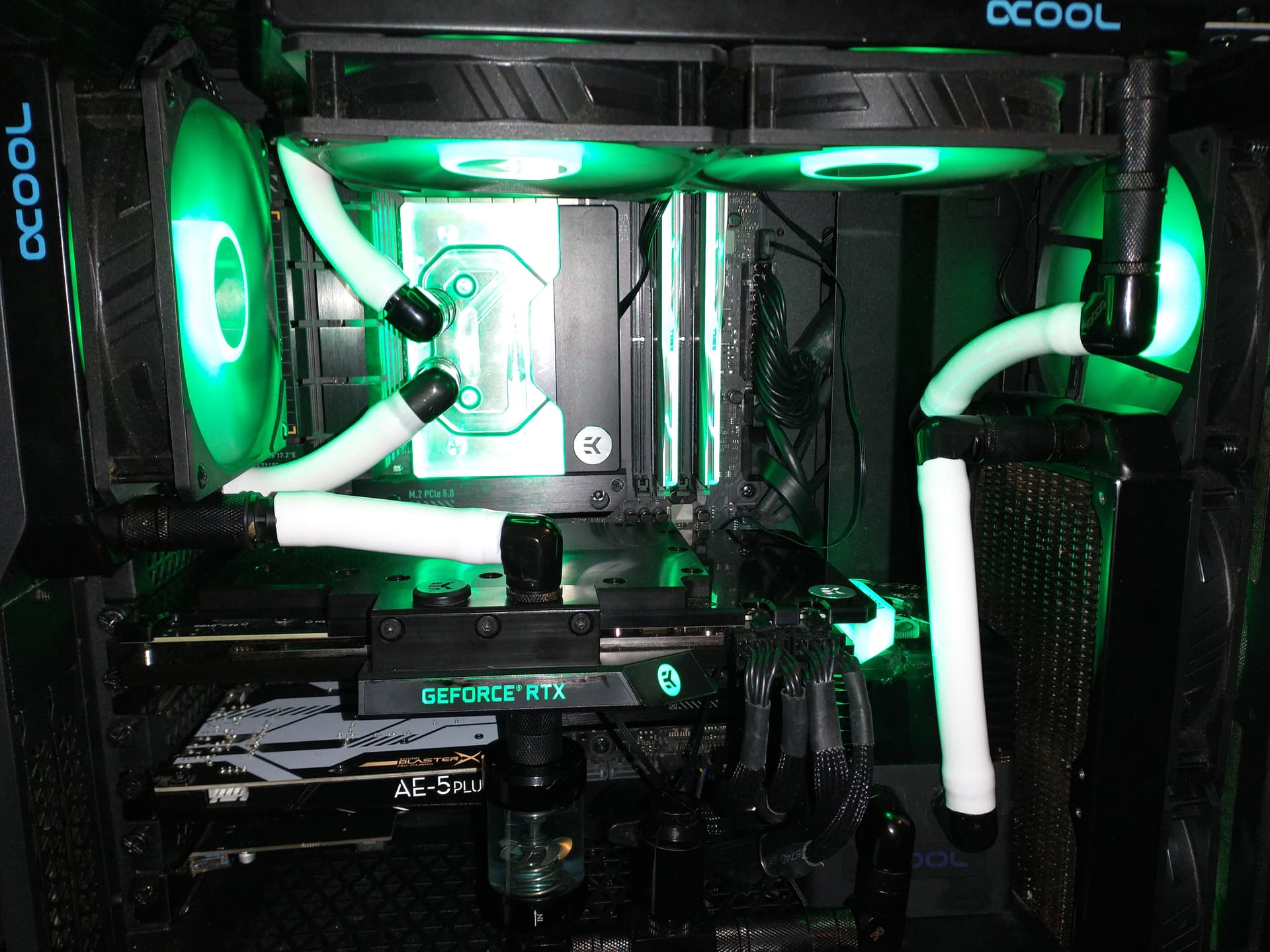
…however generally 44-46c while websurfing and whatnot.
edit: 7800X3D
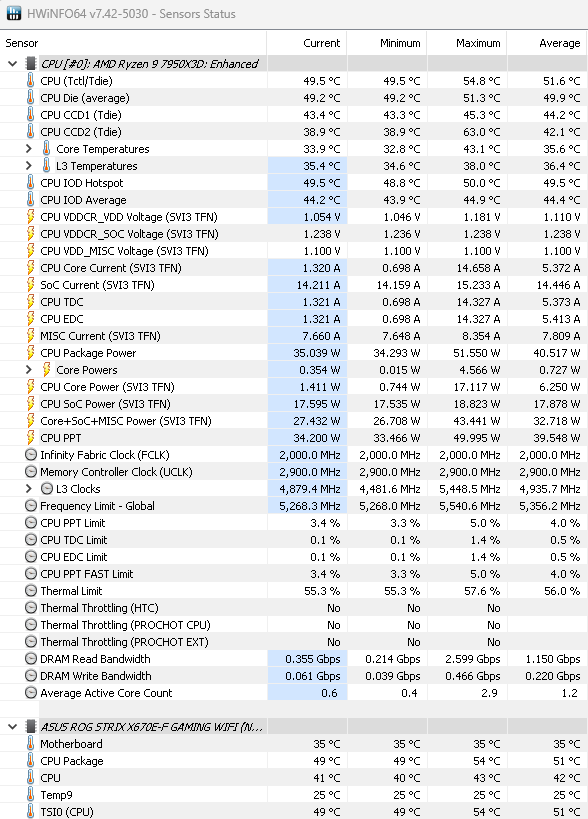
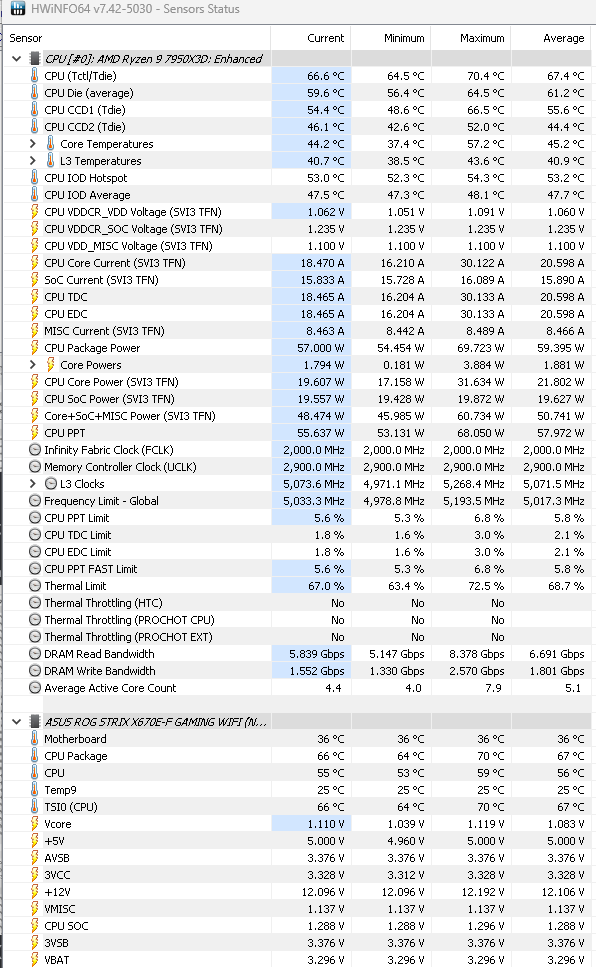
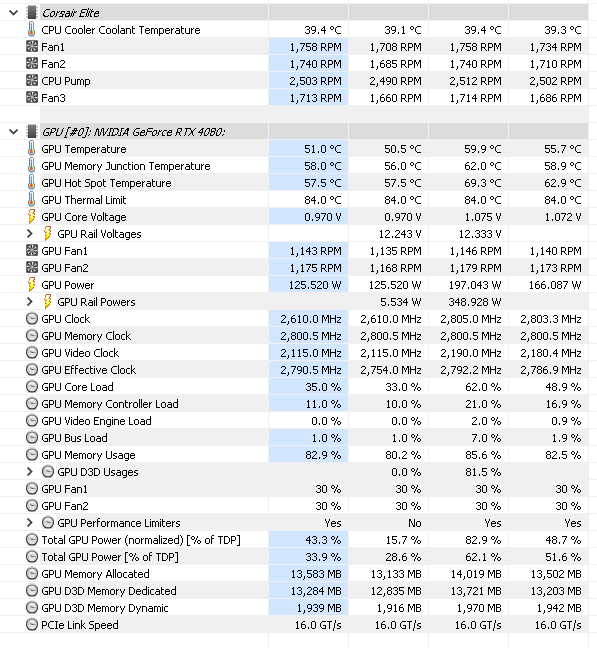
For comparison, here are my temps I snapshotted the other day:
After 15 mins flying
…in and around New York in heavy-ish demanding aircraft (FlyInside Bell 206B). Solid 60FPS with frame gen (60 capped is enough for me).
Best practice is to uninstall the AMD chipset driver via Windows Uninstall in Control Panel >> Reboot your PC >> download and install the latest AMD chipset driver (all options selected) >> Reboot PC as suggested by the installer - Once the installer has fully completed its operation.
As for the BIOS, it’s not uncommon for OEM’s to leave early BIOS revision’s on the board (as it was shipped to them). in this case, you won’t have the latest patches and fixes from AMD and your Motherboard manufacture. A good OEM will pre-update the BIOS before sending out the completed PC, but even then, it doesn’t guarantee that you’ll have the latest patch level.
If you’re uncomfortable working with the UEFI BIOS, I might recommend that you ask a local PC shoppe to help you out - and maybe show you the process for download >> instillation >> and setup.
It’s not so hard to do, but you do need to have some idea of what you’re doing so as to not make a mistake and also insure you’ve got a good baseline setup with correct memory speeds etc…
Yepp all cores.
-25 and -30 works for me too, but it was a little bit unstable at starting windows, when all the programs start.
-20 runs rock-solid
Though, indicated CPU temp is different from what is the actual temperature read out:
CPU Tctl/Tdie 52°C
CPU housing 46°C
CPU cores 31°C
CPU-IOD average 39°C
No idea why CPU Tdie is always that high as readout
Run this in avx2, small data set, extreme mode, variable load 1 hour. Then you’ll know how stable you are.
I know you have posted alot regarding this subject. Am I correct in say you are undervolting PER core? just to lazy to scroll through all the posts… 
I’m a newbie with my 7950x3d so I have a lot to learn about this thing. I did 30 minutes each of the OCCT test as you suggested above. Passed, thankfully. I’m still working on the memory timings and looking to see how much further I can push the cores. I found that one core (#12) caused a crash early on in my testing so now I have all of the cores set at -15 CO value and core 12 at zero CO value. I want to try more granular testing to tighten the screws even further on this thing. I think I got a good one though. We’ll see.
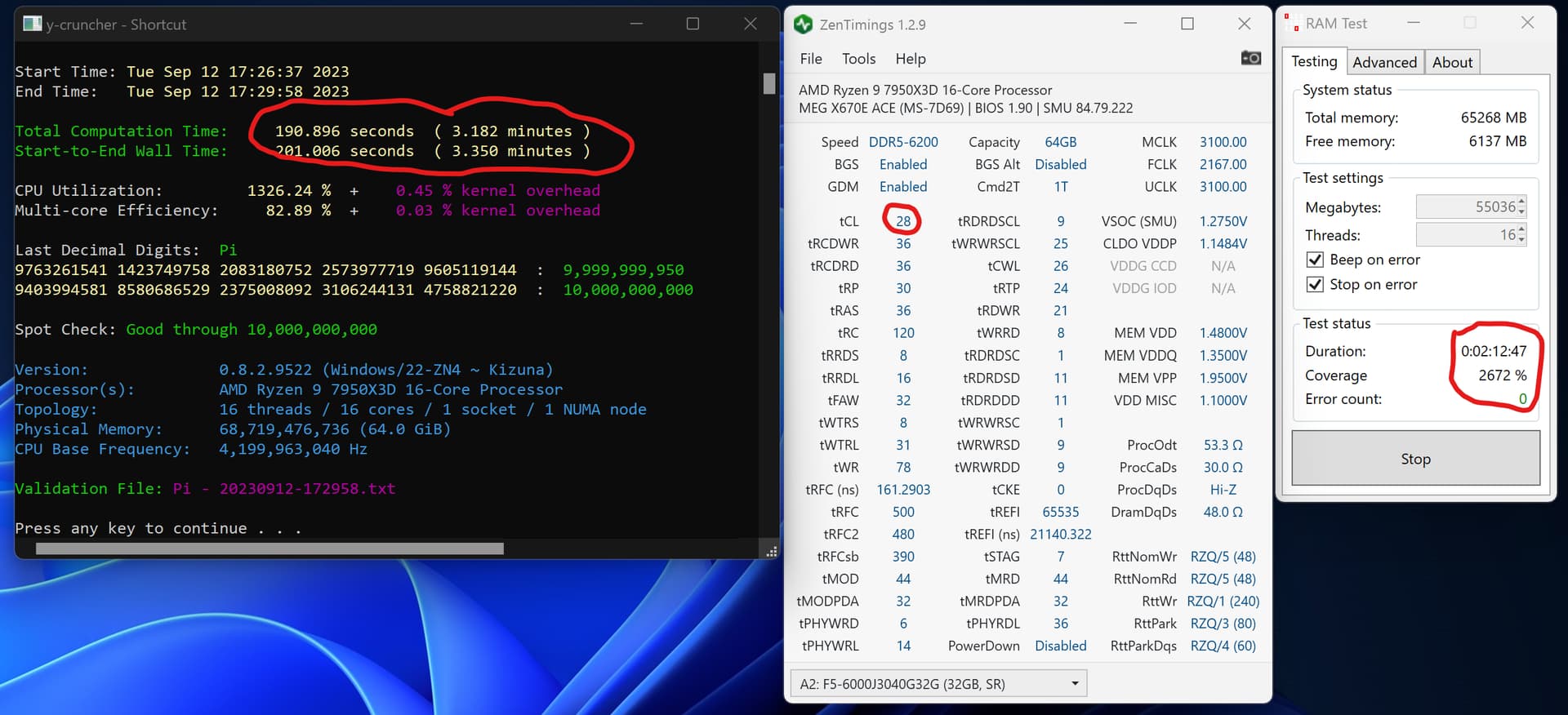
Here’s a screenshot of 10B digits of pi. I think I beat you with some margin. 
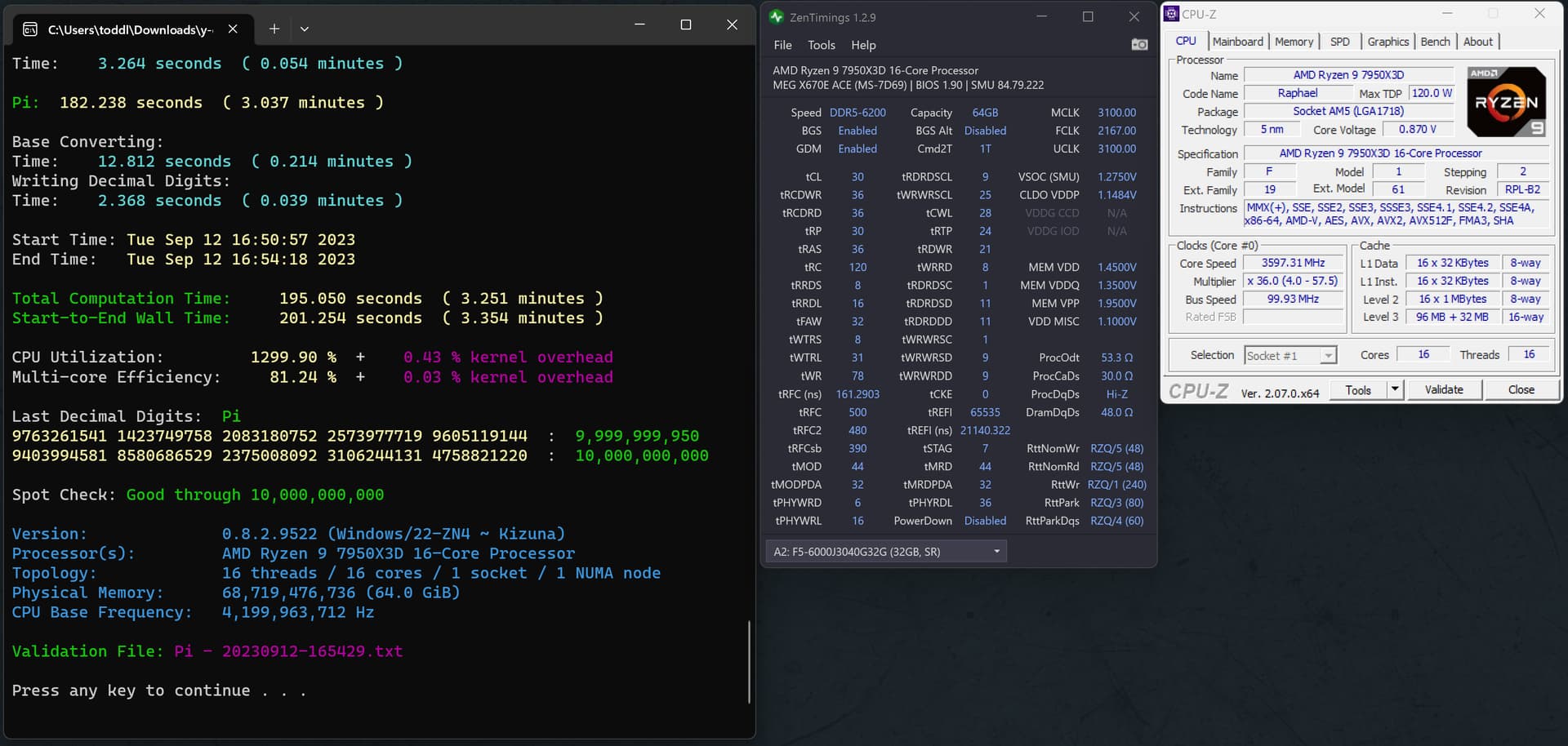
Yes sir, and CCD1 is weak almost always. Best per core on CCD0, and -15 on CCD1 all around. There is a hot spot on CCD0 in cores 4-7 especially, at the tail end of that die. Always run OCCT stress tests especially for CPU tests, and that as well as y-cruncher for ram. I used to only recommend OCCT for ram but did have a failure y-cruncher picked out. Was heat generated, but good enough.
You can get CL 28 will a big VDD bump. But you will have to relax tRCP, and tRP to 38 (That took me 1.53V CL26 @6200… but, a quad channel kit. New territory)). When you do per core, make sure you adjust one core at a time on CCD0, leave CCD1 at -15’s per core. Go through them, one through seven doing 10 min runs on OCCT when you have done all of that, per core (Only one at a time, remove the undervolt from the last core you tested but write down)… Bump all those up +2 and run all cores for an hour, if not stable, bump them all another +1. It is a fast way to get a really good per core. Also, move in increments of -5 at first with per core, then adjust when you error. I got to know the pattern by the last cores, and could almost guess perfect where they needed to be based on how long errors took and what type, hard faults, or whea. Most likely your first two or three cores on CCD0 are the best
EDIT: I will re-run that one, and keep on benching!!! Beat my every score  I dares ya
  The more the merrier!!!
Just an idle thought, but I wonder how many people who hang out in this thread also hang out in the various random CTD threads out there.
I’ve definitely had CTD but not as much as you might think. I find the edge of performance and then scale back a bit for stability. These processors are made for overclocking with native tools from AMD themselves.
But I don’t complain about them in the forums. Only complaint lately was stuttering in the beta, which seems to be fixed now.
Seems my idle temps at ~50°C are nothing to be worried.
The read out CPU Tctl/Tdie ~50°C is used as main output source for temp indications in IAO, however, this value includes an offset as it seems. AMD does this to allow CPU boosts.
CPU CCD1 Tdie
CPU CCD2 Tdie
are both around 33-35°C