Off is obvious, 1 meant to be the main light, the second for backup (as this is a mandatory light). You can even see when you switch to the “2” it lights more on the right side on the tail.
However some airlines have you select the nav light corresponding to who’s flying that leg (1-cpt, 2-fo).
Ho waw, thanks for great info ! Appreciated  .
.
- edit: this plane is super detailed !
2 Likes
Downloaded the new patch (and unchecked and rechecked the “visible pax” box in GSX. Couple of issues. Pax loading froze half way through. Had to shut down GSX. Never had this before. Also, in notes on the new update, they mentioned updated sounds both types of electric hydraulic pumps (crazy attention to detail btw). Problem is - I don’t hear anything different. Any ideas on the above?
None of the liveries are updated to use the alternative pump yet, that will come. You can edit files, instructions in discord, or just wait.
I’ve done a couple of flights on the new update with gsx pax, no issues for me.
Be careful with verifying liveries in Livery Manager. It will wipe out all the liveries you have installed. In the past it would mark them for an update, now it just deletes them.
After the latest update, not sure whether the issue from my side: the engine sound in cockpit when take off is much worse, I cannot hear and feel the engine thrust when % N1 increased as previous versions.
1 Like
"-did it get a bit quiter in the cockpit?
-depends - there’s no one cockpit volume adjustment, but all sounds have been rebalanced and refactored in prep for the A319 & A321 so all three have an accurate and cohesive soundscape
-cool. I’m under the impression that the engines are not that loud anymore (during t/o, climb) and I have a more prominent wind sound now… but that somehow sounds kinda right to me.
-yeah before it was more biased towards what you’d expect on an A319, not an A320 so of course suddenly trying to make it proportionally louder on the A319 felt like you were eating an engine. And god knows what I proportionally mixed A318 would’ve sounded like"
Post-update, I’ve lost the cabins in the handful of liveries I’ve checked so far — take it it’s not just me and that the liveries need to be updated at some point?
Do we need to uncheck and check the GSX config for Fenix every time the sim is started or is it one time activity only? I assume should be one time as it rebuilds layout json, but still wanted to be sure.
Whenever you install a new livery basically.
1 Like
Alternate fuel prediction no calculated and deccel gauge on auto brake bottom no appearing after touchdown , they didn’t fix it
I unchecked and checked the GSX config for GSX, but after the new Fenix update GSX doesn’t recognize the service doors or the cargo doors. GSX still messages me to open these doors depite are already open. Do you know how to fix it?
I noticed the same yesterday but though it’s because I am using FS2Crew and I disabled GSX integration in EFB. I wasted 20min waiting for boarding to complete before I realised cargo doors are closed :).
1 Like
Same for me, the new “saw” sounds for the engine at take off are trash
1 Like
Guys, upon landing, my ground spoilers do not extend.
(I have made sure to arm them).
What can be the causes ?
Just curious if any of the liveries have been updated to include the new sounds?
1 Like
Question for RL pilots - during the pre-flight process, do you typically load in the STAR and the approach to the destination airport on the ground or do you wait until approaching TOD? If the latter, how are you informed which runway / approach you’ll be using?
On an unrelated note- what does “ETP” mean? I see it showing on the Nav display, no idea what it’s supposed to represent.
Equi-time point. It’s the middle of your flight, in time.
2 Likes
Not real life, but my thoughts. I’m almost wondering if it makes sense to delay entering the STAR and runway until ATC gives you the expected RW, mainly because many US airports have multiple transitions to different runways. If the destination runway changes, switching these mid-flight is kind of a pain, IMO, in the Airbus.
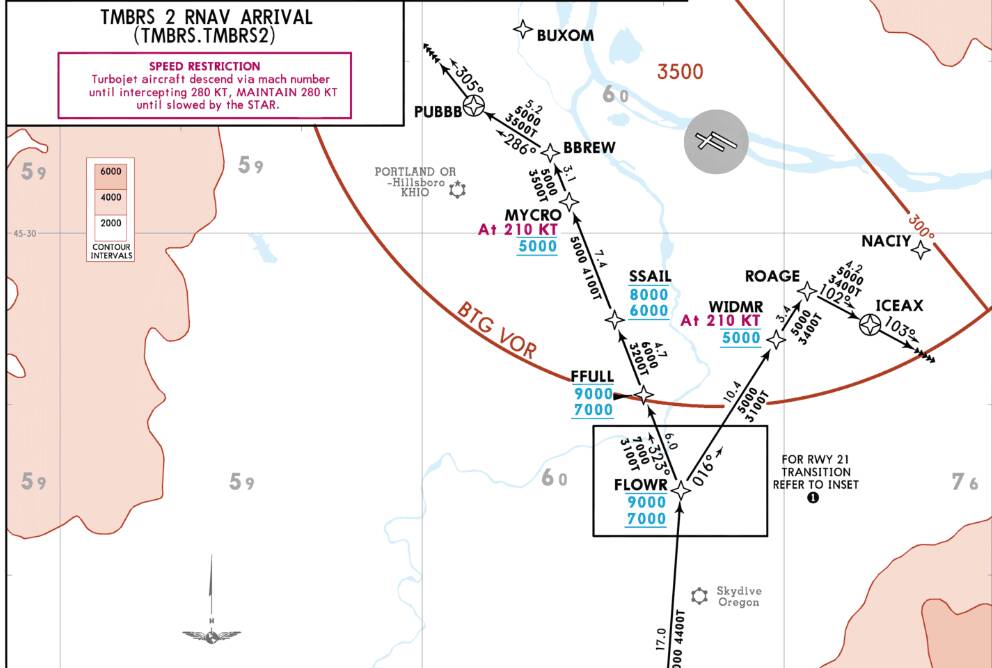
For example, say you’re flying the TMBRS2 arrival into KPDX/Portland. When you depart your origin, KPDX is landing west, so you punch in RW28L, TMBRS2 and the route will show the WIDMR/ROAGE/ICEAX waypoints as shown. Halfway there, winds shift, and then KPDX is landing east. If you simply change the runway to 10R, the WIDMR/ROAGE/ICEAX waypoints will still remain in your flight plan. I’ve not found any easy way to get this to change, other than to go temporarily into HDG mode, enter a fake runway, change the STAR to something different, save, then re-enter the correct runway and STAR, which will then give you the correct waypoints to the eastbound runways. Then go back to NAV mode (or whatever it’s called in Airbus-lingo).
My guess on why this is not easy is because I think in Europe, there is a one-to-one correlation between STARS and runways (or at least runway direction), so there are no transitions.
I posted about this in this very thread many months ago, and the best answer seemed to be to create a secondary flight plan with the alternate runway direction, and activating it if the winds change.
Anyway, this ended up being a much longer post than anticipated. 
3 Likes
I’m surprised with this, not sure how it could be much easier, it’s just a couple of clicks.
Once you’ve programmed the arrival, if you want to go in and change the STAR or transition you can just use the Next Page button to go to the second screen of the arrivals setup where you can change these directly.
IANAP but if there’s a STAR in my flight plan then I’ll program that and just the plain runway per plan, without approach. This let’s the FMS calculate the route miles and lets me check it on the ND.
BATC will give me the STAR and runway before descent so I’ll change them in the box if needed. Then I’ll do the planning, checking charts, finding which approach works with the STAR and runway, doing calcs. I’ll enter my planned approach during descent.
Eventually BATC will tell me which approach I should use and if it’s not the one I’d planned then I’ll change it in the box and do any hasty replanning.
I also pre-dial approach and later tower frequencies into the standby when I have a moment so that I can just switch them to active when handed over. Trying to fiddle with tuning knobs during time critical periods doesn’t always end well.
1 Like