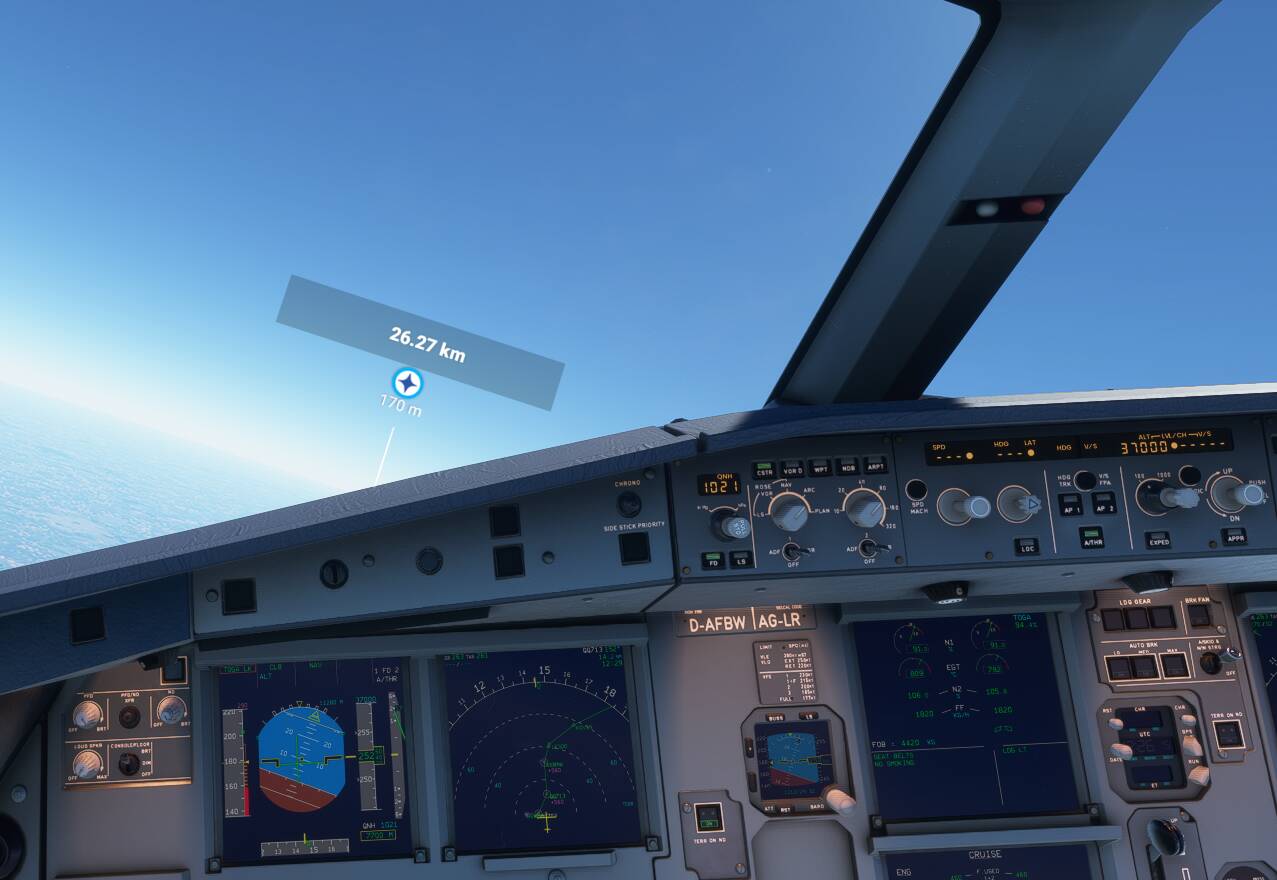
Since several days, I try to make flow that aircraft. after establishing a flight plan and installing it in the MCDU, I take off the plane. I cannot engage the AP and the plane is circling. I am attaching a dashboard photo where everything looks correct. it happens to me on every flight, no matter what.
I haven’t had any problems
Looks like the AP is not on…
In fact, I know the AP light is off. What I cannot explain to myself is that the PA is plugged in very late. It actually turned on 5-10 minutes later because I clicked the button a few times. When do you think you should plug it in after take off? Thank you.
What is the PA?
I have reversed the letters: PA is AP in English, Excuse me.
why are you flying at 25.000ft and your speed is at 180?
i don’t now if i am right but i think the A32NX ap will not turn on if your speed is to low you should be at least 250 at 25.000ft
and your throttle should be in CLB
what are you using to fly the A32NX
The altitude was set at 37,000 feet, the speed at 290 kt and set to “managed” mode. When the photo was taken, the plane was passing 25,000 feet and circling. I couldn’t connect the AP and the ATR; despite multiple attempts. Suddenly I was able to engage the AP and ATR and everything was back to normal. hence my question: is there a moment or a period of time after takeoff when we must connect the AP?
I’m using a thrustmaster airbus.
I found his videos very helpful in understanding how to fly the A320nx
He can’t watch those videos because they’re in English. Many people have suggested them before.
Although it just occurred to me he could always turn on French subtitles…
This guy does videos in French
I usually turn on AP right after take off.

You can engage the autopilot anytime after you have reached 100 feet altitude and 5 seconds after becoming airborne.
For your issue, do you see the letters TOGA.LK in the green box in the upper left part of the primary flight display? That means you let your speed get too low, so the airplane has applied maximum thrust to prevent you from stalling. If you get into this situation, you need to pitch down to regain speed. Then you can move the thrust levers to idle to get out of the TOGA LK condition, then re-engage the autopilot and autothrust and put the thrust levers back in the CLB position.
A word of advice – keep your speed above the top of the yellow band in the speed tape display on the PFD. With flaps up, there is no reason to ever let your speed go below the green dot shown on the display.
Do you realy know how to fly the 32nx? That’s no offense becaus fbw make it so realistic with every update. The Ap turns off if you do strange things. I am not a Pilot, just doing this for fun.
If you got a flight plan after take off you should follow the FD. With positive climb Turn in the Wheels. Above 2500ft the airbus told you to set the leavers to climb. Do this! Autothrottle and climb will do everything. You can now, before or later turn on the Ap. The Ap got 250kts under 10000ft and 290kts above 10000ft. You do nothing. That may be boring but so you fly it in an easy way.
You can not fly with Toga at 180kts in 25000ft. Success.
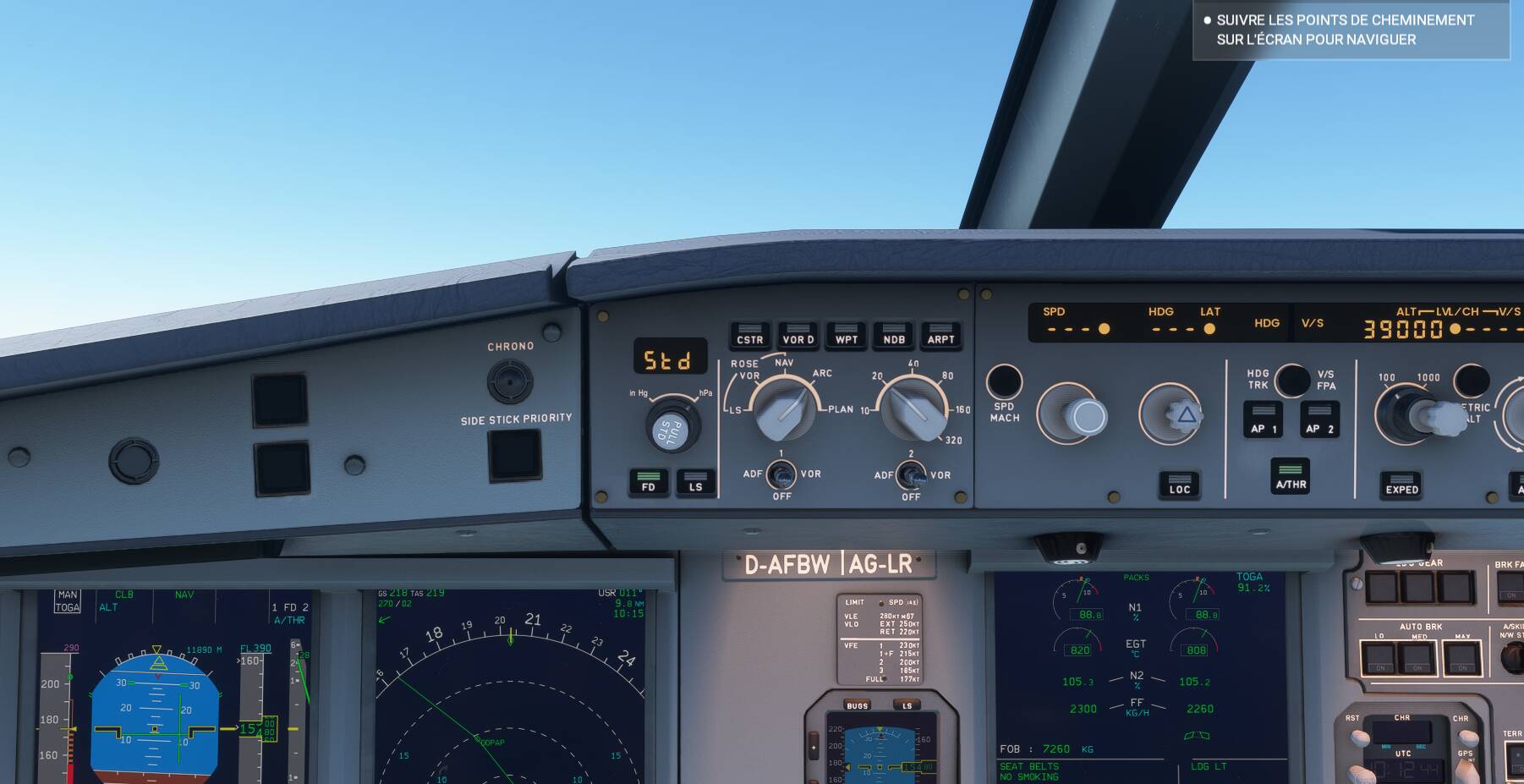
If I did not respond to your message, it is because I had succeeded in activating the AP. Now, on this day, as you can see in the attached photo, I can not plug it in. I am doing an LFPG-LGV flight and have just taken off. Speed stuck at 175, altitude increasing towards 39000, flaps and gear retracted. Unable to engage the AP, so the plane does not follow the plan. I do not see what to do, having in my opinion, nothing forgotten!
When establishing the flight plan with SimBrief, if we do not find the first STAR in the listing (for example: OKAS3A) we take another very close (example: OKAS5A), can influence the follow-up of the plan by the AP, during the flight?
In other words, if you don’t have the right star, shouldn’t you put anything?
Not really forgotten, but a very dangerous pilot error occured.
You didn’t increase the speed sufficiently before retracting the flaps/slats.
The speed tape shows that you are way too slow. (within the amber area)
The minimum speed with flaps/slats retracted is being indicated by to small green dot.
Apparently you were even slower when you retracted the flaps/slats and the A320 stall protection kicked in to avoid a stall! (Indicated by the TOGA LK message).
As this point you can’t engage the AP.
I think you’re just not doing the correct procedure after take off.
- If you use TOGA on take off, after a certain altitude, you should have LVR CLB flashing. This is when you should pull back your throttle into the CLB position. Your screenshot is showing that your throttle is set to the wrong position. Look at my video post above at 38:25 where my LVR CLB is flashing, and I move my camera to show the throttle and I move the throttle back to CLB at that stage.
- It looks like you didn’t activate AP in time. I’m not sure when were you trying to engage AP, but even if you do manual flying for the first part, you should be flying at the right pitch, and at the right airspeed to prevent you from triggering the Airbus low-speed protection like TOGA LK that you’re showing. Look at my video at 38:55.. About at 3000 ft after take off. And I pull my flaps to clean after my airspeed reaching the S speed.
- Your pitching too high. At that altitude, the pitch is usually about 7 degrees, you can see this on my video above at 42:30 mark. But this pitch can only be achieved if you activate AP a lot earlier just after take off as stated in my second point. Your FD line is also telling you to pitch down.
- Just watch my video above, look at how I do my take-off, when to manually fly, when to pull back the throttle, and when to turn on the AP.
If you do all the procedures correctly, you’ll never get into issues like underspeeding, and autopilot issues.