Access to flight planner without leaving current flight

As a suggestion, wouldn’t it be great and also ideal to have the ability to change your Flight Number DURING your Flying Session rather than having to always go back to the Menu to change it and having to constantly waiting to load another Session after clicking “:airplane_departure:FLY”

For instance, that feature could be imposed as a built-in addition in the Drop-down Toolbar menu perhaps??

At this moment in time, you can currently customise your own Flight Number on the Main Menu:
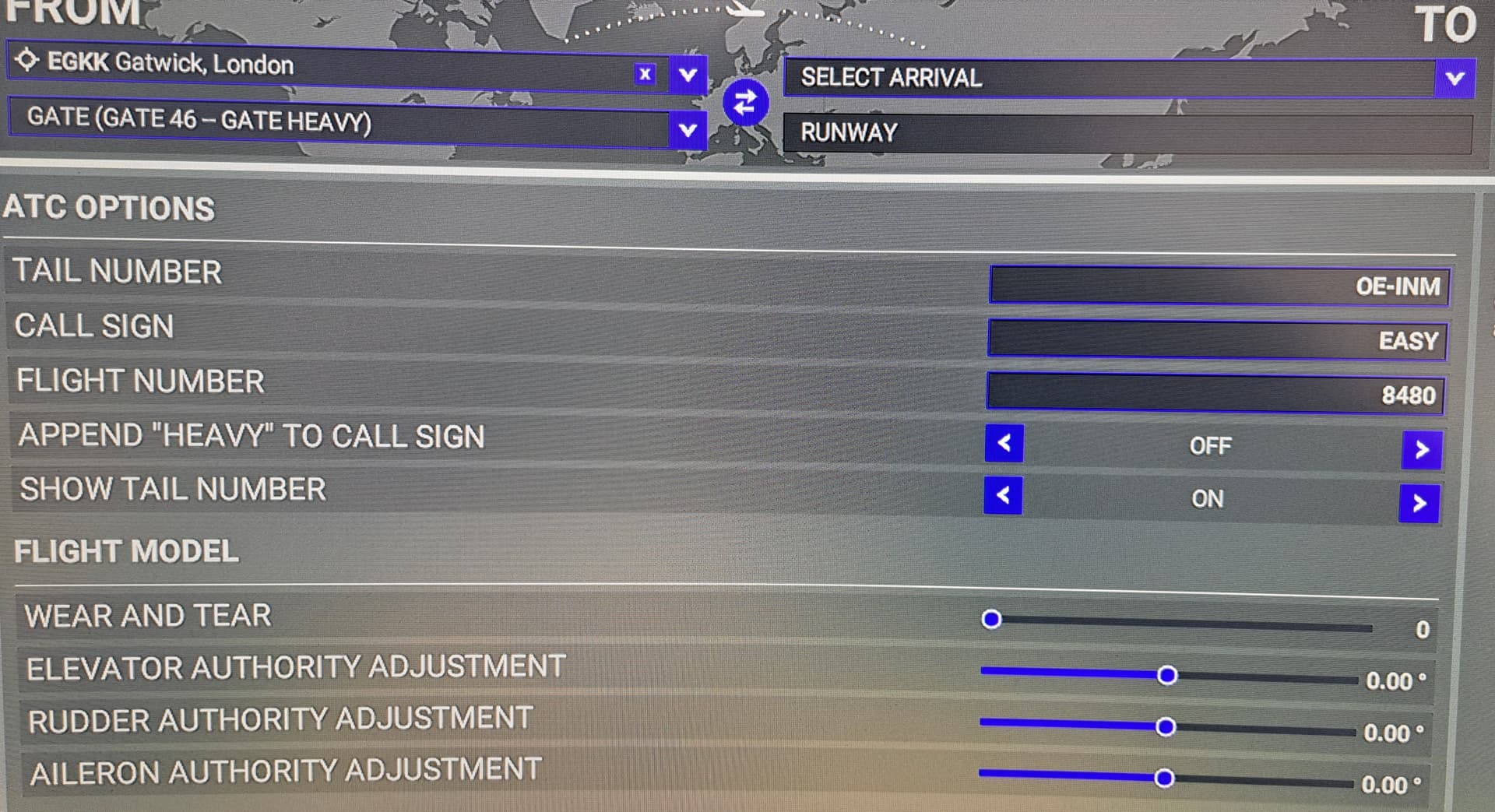
So to conclude, picture this as an example:

You get the Gate after Operating Flight EZY1234, but then you are stuck with that Flight number unless you go back to the menu to change it which requires more waiting!

You want to INSTANTLY change the Flight Number to EZY1235 for a return Journey on the spot in the Session itself!

1 Like

Hello,
i wonder why we can not select another Airport directly from pressing ESC from ingame ?

If we have started a Flight and want to change the location, we have to press ESC, got to the Main Menu and then we can select another Location via the World Map.

But why can we not have the Worldmap, when we press ESC ingame ?

Matthias

During IFR flights and half-turns, airport A to B then way back to airport A, it is really very annoying and very long to go back to the main menu and reconfigure everything.

Can’t you consider importing an IFR flight plan from the plane at the parking stand and the associated IFR clearance request option like in real life without going through this ■■■■ menu that erases all our settings and waste a lot of time.

In addition, it is impossible to plan multi-leg flights with a fuel calculation, schedules and to take fulle advantages of GSX for those who have it during stopover time.

In previous simulators we had this option which made line flying really real and immersive.

Many requests in this forum report this but I don’t see any message from Asobo or FS in the whish list saying that this will be taken into account (within what time frame) or not.

Anyone know that ? can an Asobo administrator respond ?

Thanks

This is very annoying.

I’m trying to find a workaround, with Navigraph in app panel you can click export and “Load as active flight plan”. It explicitly states it only works for ATC, which would be fine/perfect. And while it does load the flight plan (you can see it with the build in VFR map) and it does allow you to request IFR clearance it only seems to do so for the first FP you load. You can’t cancel IFR and then load a different FP, ATC doesn’t seem to respond to that.

Why can’t you still load a new flight plan into the SIM after a successful flight without going to the main menu or ending the flight?

This bug hasn’t been fixed yet because MSFS has been on the market for a few years, it’s strange.
since all simulators can do it.

The work around, where once you had started a fight, and you ESC, and go to the Load/save flight plan menu, and force the load of a .pln file , NO LONGER WORKS,

For whatever reason, Asobo actively coded that so you can no longer do that. (a few SUs ago)

But there is a work around to get a ,pln into the sim when you are fying, and with this method, you do not even need to ESC out of the flight..

The secret is to use pms50’s GTN750 (pull l down mode)

(1) generate your ,pln file with whatever app you want,
(2) Put it into the GTN750’s flight plan load folder.
(3) Go into the GTN750 and import that flight plan.

Now it is in the sim, and was even put there while you were still flying.

Note: You can then close the GTN750, as the .pln is now in the sim, and other GPS systems, and ATC will see it.

ONLY ONE CATCH. You need the premium version (Payware) to be able to do this – the FREE version does not support loading .plns (from File or simbrief)

Not really a Catch .. the pms50’s GTN750 is worth the Premium price, as you can use its Pull down GPS with ANY plane, and many planes now have native in panel support for the pms50 GTN750,

Also, pms50’s Tech Support is THE BEST by far of any MSFS addon.. no question…

Just tried this with SU13 beta 1.34.15.0

Works just as described above..
Even ATC “magically” know my GPS Flight Plan, when I call up for an IFR clearance

And of course, I can use EITHER the pms50 GTN750, or the AP in the plane (in my case the GNS530), to make any changes to that FPL when I am flying.

The only thing I cannot do, is save the current Flight Plan back to a .pln file — but I can save it in the GTN750 as a numbered pln, (and the GTN750 saves it in the Data Store), and I can then select it and load it any time in the future.

I was facing same difficulty in continuing hops from one leg to another leg not having IFR active for second leg onwards. Am using A32nx FBW. What I found is after landing before parking at gate> APU ON. At gates request for power supply unit. Then switch off all switches required as per procedure and turn off Engines/fuel pumps. Turn off APU followed by External Power supply/batteries. This will take you to cold/dark. When you plan for second leg go to Fly Pad in the cockpit (CTL+0) and reset checklist and confirm. This is enabling me to fly again with IFR clearance and flight plan but AI ATC is missed out here for second leg onwards. Please note that am not a flying professional nor do not have much knowledge on complete procedures its just my hobby to enjoy msfs2020.

The ability to file a new IFR plan or upload one from simbrief etc with ATC once a flight was completed without going back to the world map.

Sorry to bump this thread, but this misinformation needs to be corrected. You can load a new flight plan in flight by gong to the in game menu, load/save and navigate to the directory your plan is in and in the filename box in the open file dialog, type in *.pln and a list of flight plans will show up and be loadable. You can then ask for IFR clearance.

You could in 2022, but Asobo changed that to prevent loading a .pln file, once you have hit FLY

“BY DESIGN” :woozy_face:

Seemed like a bad decision to me at the time, and I suspect it was done because there were some issue with re-loading a ,pln file after hitting FLY, and the easy was out was to just code the ability out.

Well I’ll be ■■■■■■, this actually works.

Why they took the option away from the dropdown so you have to fake/force it via typing it in yourself I guess we’ll never know.

what works,?

if you are really able to load a .pln file after leaving the world map & flying, then PLEASE give a step by step way to do it .. or better yet, a Video with audio commentary ..

I don’t know why the other post got hidden, half the posts get hidden on this forum lately, but exactly as it said:

In the pause menu you hit “Load Flight”, then from this computer, and in the popup where it says filename you type “*.pln” without the quotes and hit enter. This will then remove the filetype filter and allow you to select flightplan files and it’ll load them

yes, you can do that, but it DOES not actually load a plan anymore !!

re-checking again now ..
No, it goes through the motions, but does not actually LOAD that new flight plan.. the old one stays in place in the sim.

1 Like

Hmm, well it does seem to load it for the purposes of ATC for me. I just tried. I loaded into the flight with nothing planned on the worldmap. ATC had the usual VFR options, Then I loaded the pln file as described, and then ATC allowed me to request IFR clearance to the destination as defined in the pln file.

It does not load it into the avionics, however for me personally loading it as ATC is what is important.

(Appologies the capture did not get the popup, but I did just what I described above)
(Edit: trying to upload video again)

Good observation.. then its even more messed up that first imagined.

So ATC gets the new FP, but the VFR Map or the WT GNS530 does not.

I throw my hands up in the air with despair !!!
Cannot get much more messed up and inconsistent
… (or can it )

Actually, I an pretty sure I know exactly what is going wrong here, ( as I have been living with similar issues for the past year as a Dev) and it has now got into so much of a conflicting mess, between ATC, VFR map, and WT GPS systems and their flight planner, that it might never be sorted out… at least before 2024 (fingers crossed)

Something else that is interesting is the Navigraph panel plugin has an option to export the flightplan (eg. flightplans imported from simbrief) TO the sim, but it explicitly states “ATC only, does no longer work for import into avionics since SU10”(I think it says 10).

The other thing is when you do it this way it will not respect the planned altitude, it will think you want to be at FL120 or something, however you can request higher later obviously. I do not know, but I suspect but loading the pln the way that is described here also has this bug. But I used this method a few times in the past when I just wanted to avoid reloading completely.

But like you said it’s all a bit of a mess.

2 Likes

Yes, adding NAVIGRAPH to this , and the issue take on another order of magnitude !!

1 Like

In real life, one can also save a limited number of FPs within the Garmin, and call them back at will.
One can also prepare then on a memory card, and then load them into the Garmin in the plane,
This is especially useful for complex fight plans that you may need to use more than once.

The TRICK now only partially works (ie only now for ATC), what is displayed in the GPS is no longer updateable with “The Trick”, so basically it;s an inconsistent mess, and does not reflect how the Garmin works in RL.

In fact the whole process where ATC appears to be able to read the Flight Plan in the GPS is somewhat flawed, unless there is s specific process that simulates filing a new Flight Plan, based one GPS content, which is what the system seems to do, but not for the FP in the GPS, but instead for the :“Trick” entered FP.

Once again, a design Mess…

The frustrating part of all this is that it DID work at one time till it got changed, and then declared as “by Design”, which more realistically should have been “By forced change because of not being able to fix a small bug in it”

So maybe its time this was pulled out of the back of the backlog, and finally addressed.

1 Like