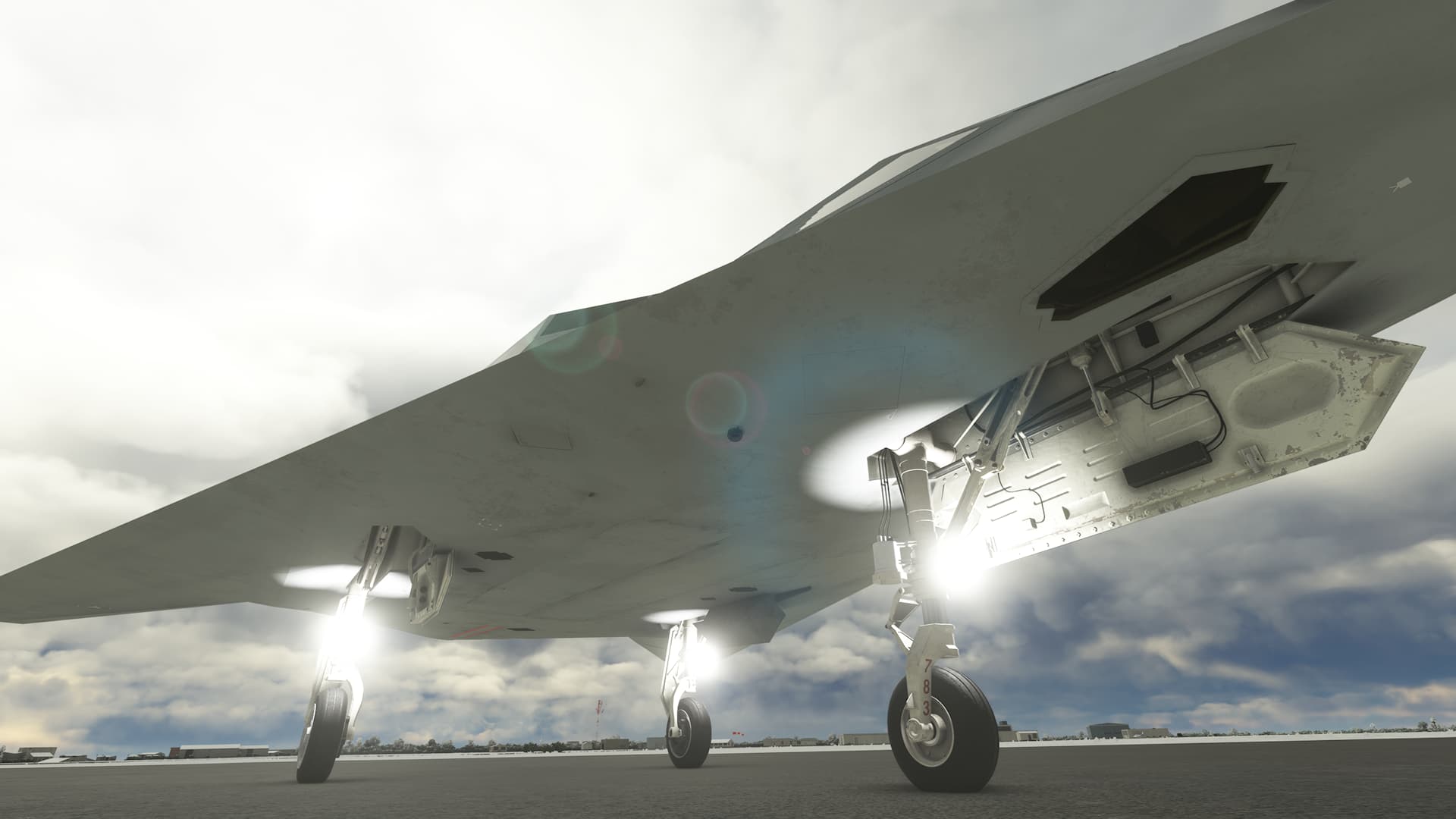
Here’s another look at the landing lights issue. It sure looks like they are pointing straight up…
I’ve flown the F-117 a few times now and I have to say it’s really well done. Only initial criticism would be that the roll rate seems way too quick and the camera is too far away from the aircraft. I know DC Designs had a similar issue with their Stearman being really far away from the camera as well but they were able to fix it and get the camera closer, so hopefully there will be a fix for the f-117’s camera distance at some point. Other than that, it’s a fun aircraft and I’m sure a lot of people are getting a lot of enjoyment out of it.
Thanks! It could achieve a 190 degree per second roll rate IRL above 300 knots, but was limited by things like AOA and load factor. As from the camera, so far the only way I’ve found of bringing the camera closer is to change the wingspan in the flight config files, but that changes all the flight dynamics. I search about once a month and so far I haven’t found a solution. Trust me, it annoys me just as much 
3 Likes
When will the update be available?
I never realized it could roll so fast. Very interesting!
Any chance of additional updates, to include a fix for the landing lights facing upward? Any other plans for this plane?
1 Like
Funny you mention that, i’m just about to submit an update that will fix that and has a few other bug fixes. but not much in the way of new features sorry. Here is the wip change log, still a couple of things to do and I need to test if the landing lights are actually fixed on Xbox, since it’s specific to the Xbox version.
Changelog 1.2:
Added:
FLIR and DLIR can be stowed (FLIR must be unstowed for IRADS to displays image)
Improved:
APU fuel is off when starting C&D
AUX heading now moves heading bug on MFD
Improved animation of Rudder and Elevon droop, now the animations are scaled by hydraulic pressure
Improved tires to get rid of “fluffy” look
Tailhook now uses proper system instead of animation.
Fixed:
AP NAV modes now turn off when NAV mode switch is turned off
Generator lights not turning on if engines running
Anti-Collision lights appear when hidden after being turned on.
CRS Knob Tooltip
Course indicator not showing 120,140,180,240,280,330,340 degrees
Left GBU31 BLU109 tail texture (PC Only)
Weapons now show when weights are metric (PC Only)
Elevator trim no longer moves the elevon to crazy angles
Wing decal in the wrong place
*TEST ON XBOX Moved the landing light node to empty to fix them disappearing from certain angles and facing the wrong way
Front Gear door decal clipping
Bomb bay door art clipping
7 Likes
Good to know.
Excellent news! It’s a great addons.
For the PC version, which I use, is it possible to add ground splash to the two landing lights on the mains? Currently only the nosewheel light lights up the ground. Wasn’t sure if that was part of the overall landing light concern…again for the PC version too.
Additionally, I’m wondering if you can add support for the HSI to show a programmed course that isn’t from the MSFS Flight Planner. Example…I pop-out a PMS GTN 750 display and will either add a new flight path or modify an existing one (due to ATC instructions). Currently the HSI only shows pre-programmed (MSFS planner) flightplans.
1 Like
They do have a splash, but it is far forward of the main gear, almost in line with the splash of the front gear.
Do you have upwards-facing landing lights on PC? Because I haven’t been able to recreate the issue on a PC, only Xbox.
And no current plans for flight plan modification. If I get MUCH better at C++, i will revisit this and hopefully do the CDU. But I wouldn’t count on this happening till after MSFS2024 is out.
2 Likes
I don’t seem to have the upward facing lights but it’s hard to tell with the two on the mains due to the lack of nearby splash. understood now it’s far forward of the main gear…I’ll take a look again. Noted on the navigation.
Hello, first off I want to say thank you for making this plane as it has always been a favorite of mine. However, I do have a couple of questions.
-
Is this plane still considered a work in progress? While it is nice to hand fly, the cockpit definitely needs a lot of work. I know you said you would like to add the CDU if you get better at C++ but just curious about the other systems.
-
Is there a way to turn off the yellowish lights on the outside of the plane near the front? I’ve looked around the cockpit but don’t see a switch for those.
Thanks
-
There are no planned changes at the moment. I will take another look once the next couple of projects are done. There will be a 2024 update to add all the new features and other things.
-
The yellow lights are the Fuselage lights on the external light console.
1 Like
Thank you. From what it sounds like, you don’t have any current plan to make updates, but do plan to take a look at it and possibly make some updates in the future. Is that correct?
Also, will have a look again, for the light switch.
Thanks
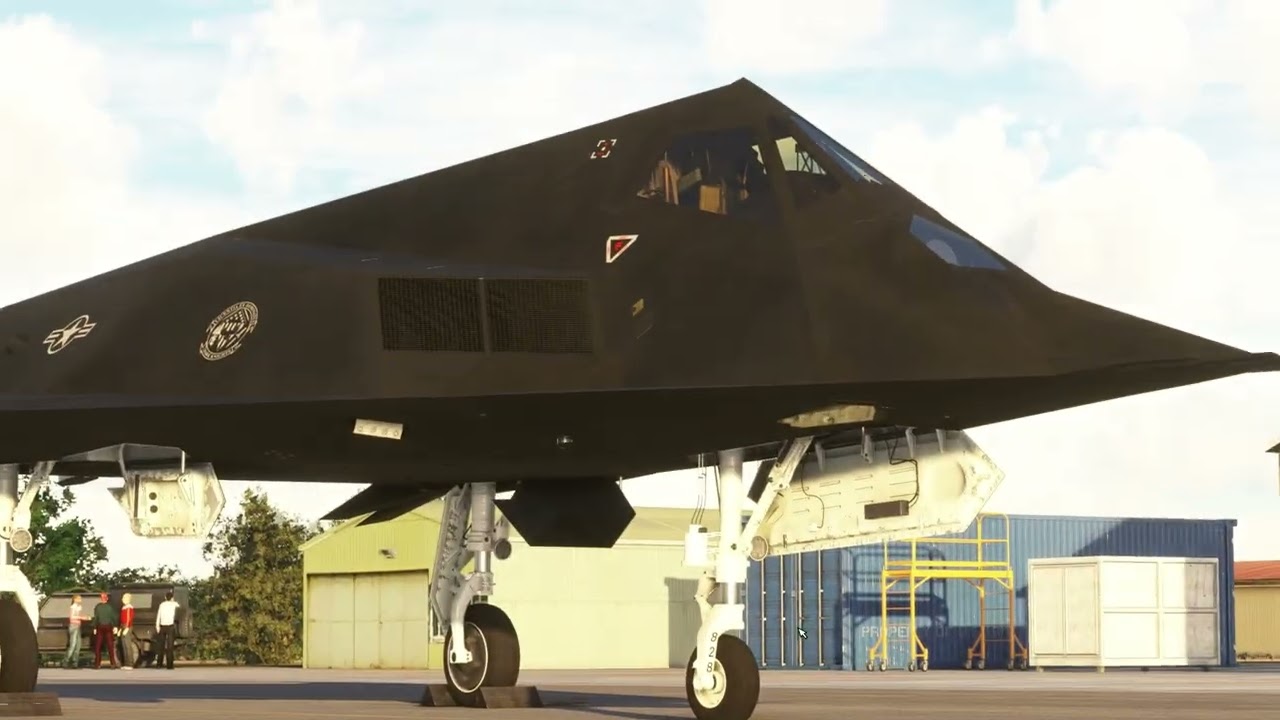
@AerialSim - Amazing work that you have done, really looking forward to the 2024 release. The only thing I’ve noticed is that the FLIR is on the wrong side of the front wheel, it should be on the Port side.
It’s on the correct side, and it’s a DLIR
The F117 seems to have an issue in MSFS2024? Or perhaps it’s just me.
But spawning on runway is spawning cold and dark, engine autostart is non-functional.
yes, it doesn’t support MSFS2024 yet. I’m waiting on the marketplace to open ao I can put in the changes it needs. But as far as I’m aware, the only thing that isn’t working is the sounds.
And for other shop like orbx where i bought it ?
A work around for now, for the sounds, if you have 2020 still installed and the the Top Gun package installed in it, you can copy the Asobo-aircraft-fa18e folder into you 2024 community folder. you will get your sounds for the f-117.
1 Like