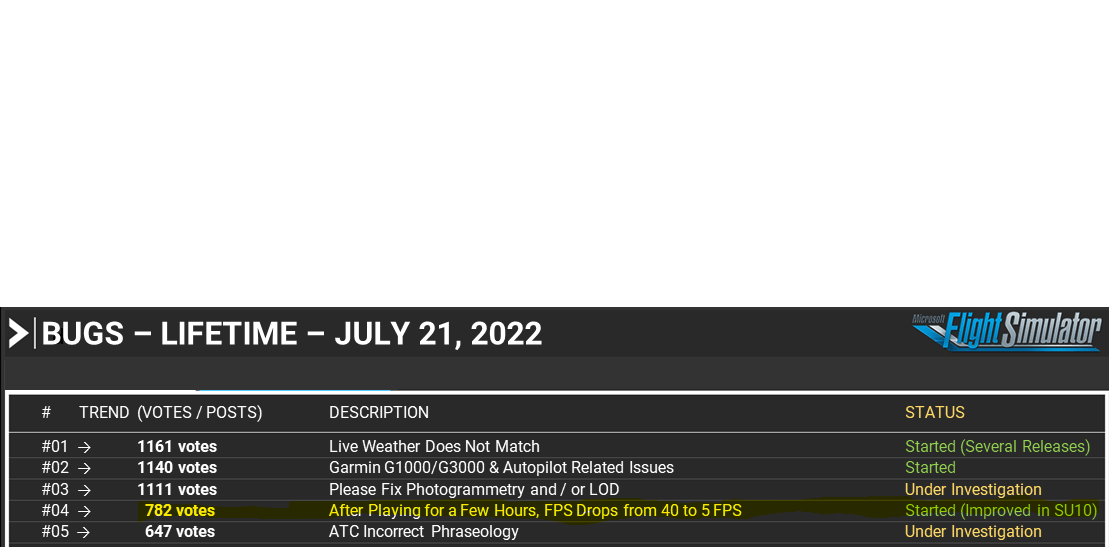
still no problems anymore so far  no fps degradation or manipulators latency increase since i disabled said things.
it really looks like this seems to be a valid workaround for now. i hope this helps more people
still no problems anymore so far no fps degradation or manipulators latency increase since i disabled said things.
it really looks like this seems to be a valid workaround for now. i hope this helps more people
Hi, for me fps degradation over time (60 to 5-10) was irrelevant to ingame settings.
However, no fps drops over time after these settings (using DX12, SU10 BETA) :
still don’t think that this is a valid workaround since flying in a solely world has nothing to do with the real world. And we should not forget that we do not play some aircraft game this is meant to be a Simulator which should simulate the real world pretty close. So good for you that this works but at the end it is not a valid workaround at all that you have to turn off all kinds of traffic out there
The game is much worse than before. I tried the flight from EGLL to VHHH 4 times in 48 hours and all flight cannot complete:
1 and 2: no cloud suddenly and fps drop after 3hours
3: CTD after 9 hours
4: CTD when landing
I feel angry and disappointed
So I was suffering from low fps syndrome again yesterday, started scanning log files, and saw on the router it was being smurfed. Now I know that if I see that message its being denied by more router, but still…so I look up the router message, and see an article on Toms Hardware related to this, it was no help except that there was one section that said he had been checking for updates to the firmware and there was never anything showing up, but when he went to the netgear page there were indeed updates to the firmware. So I did the same and ■■■■ there were updates to the firmware, installed the latest update, rebooted and now instead of getting 9 fps I was getting 16 fps. It was 16:00 on a Saturday, so Im thinking the workers on the weekend were done and have gone home for the day.
While 16 fps is still terrible its better then 9fps. Today will maybe give me a hint on whether this has fixed the issue or not, as bad and inconsistant as the sim has been running, I just dont have the ambition anymore to even try it.
But Im sure sooner or later I’ll fire it back up, I’ll let you know results from that when it happens.
I can’t say what my issue was as I was too lazy to troubleshoot (the case keeps showing up each SU or 2, {judging by my presence in this discussion post}). So far, 12 Hours into my long-haul flight, I haven’t gotten a MAJOR performance degradation, but I can get past 4 hours into a flight without dying of FPS.
So far, your settings have worked. Much appreciated!
OMDB - CYYZ 12 Hours in over Quebec, Canada
Boeing 787-10 Heavy Division Mod - Experimental Version
After following the post by @dave1793 above, disabling air traffic, leisure boats, road vehicles, ships and ferries and fauna has stabilised the manipulators and after 6 sectors in the Fenix 320 addon there was no degradation! A First!
I tried it again with VATSIM and degradation returned, so it seems with the AI traffic the injection and they aren’t being cleared correctly?
so my dear lads,
it’s like that, i’ve been testing everything possible for months now and since Asobo is basically a company that needs its fans as test rabbits, i took on this challenge. I’ve been playing flight simulators for almost 20 years now. so I’m not new to the field. the fact is that if you create the flight plan in the menu and not via fms, the frame rate stays pretty much the same. what is also important, no matter which gpu you have (i have an rtx 3090), you should set the detail accuracy to 80%. so the cache always empties itself, which is also important that you don’t change your view from inside to outside too much during the flight and don’t keep turning around the plane. so you should have a good fps and no more crashes to the desktop until Asobo gets the problem under control. greetings from switzerland. your jcb
by the way, my fps is between 50-60fps at the beginning of the flight and at the end arround 30-40fps. i made the test mostly with the concorde. could be different by ga planes.
have fun with with flying
Welcome back to the forums!
Just a note to let you know you can edit your existing posts, rather than creating several new ones.
Simply select the pencil that is shown after clicking the three dots at the bottom of your existing post!
This issue was fixed for me in SU10 beta, if it helps anyone.
with dx 12 and dlss still low fps issue
Same issue here… I should have restart the sim between flights. Why I trust MSFS and Asobo?
I did a 2h VFR flight with the C208. Then landed and come back to the main menu… I left it there for like 20 minutes and then started another flight with the H135.
After 1h in that flight…

I’ll believe it when I truly see it. Asobos claims to have “fixed things” means nothing to a lot of they user base anymore. As countless times they’ve claimed to have “fixed” something and it wasn’t.
It will be fixed and we’ll have a fun new bug to deal with for a year
Just had my first encounter with this bug or something similar this afternoon. KSFO->PANC, pmdg 737. A flight largely over sea. Everything was fine (4hrs) until over land again then FPS dropped to 3 or 4fps then cycling back up to 30fps then back down to 4fps again.
Landed at 4fps🥴, not much recovery, thought sim would CTD during flight, but the CTD happened during taxi after the low fps landing.
Definitley something buggy with destination scenery loading after flight over ocean.
Saved my flight on approach, and was able to load it and land with no fps degredation, but no credit for long flight on my stats. 4hrs wasted.
I have a decent spec pc, and was monitoring resources, and GPU, ram, vram never past 50% usage. GPU dropped to very light load(~5%) when fps dropped.
Here’s hoping SU10 fixes this. Not encountered before but I mainly fly < 2hr flights over land.
Was using Orbx Alaska mesh and aerosoft PANC, but they have worked fine with previous ~2hr flights.
So, I had to reinstall MSFS yesterday because i was unable to start the game without going to “game service” on MS store.
Today, I tried a really simple flight between NTTR and NCRG with WT CJ4. After 20 minutes, massive FPS drops. I didn’t had that before i have to reinstall the sim with the tweak i found to minimise FPS drop.
So in the middle of the flight, i tried to lower the setting for ground vehicles, boats and fauna, from 50 to 0. What a result, FPS back at 75 again. I put them at 10, 20 minutes later and then, flight was still smooth.
Can anyone try his solution ?
Yep at hong kong I start at 37fps on the ground. I just left it sitting there for 10 minutes, when I came back I was down to 9 fps. Something is terribly wrong.
Also when I exit back to menu with it being so low on the fps it struggles to load the menu back in.
Mainthread is 152!!!