Seems fixed for me ( 9 hour flight overnight) in DX12 mode
Cannot confirm it does not drop the FPS on DX11 - loving DX12 on my PC, and being able to pop out panels to 2nd screen without FPS drop !! (No going back to DX11 because of that )
Seems fixed for me ( 9 hour flight overnight) in DX12 mode
Cannot confirm it does not drop the FPS on DX11 - loving DX12 on my PC, and being able to pop out panels to 2nd screen without FPS drop !! (No going back to DX11 because of that )
Alright so, no changes at all for me on DX11 or 12, same exact performance drop, same audio crackling and so on, nothing has changed
This bug started for me after Su7. Used to fly transcontinental U.S. flights every day without any fps degradation. Now I cant without having to close the program.
I had this problem with a flight from Oslo to Tromso in Norway, using the FBW A32NX.
At take off In Oslo, I have 38 FPS in cockpit and 48 FPS with the drone.
On landing at Tromso, the values are almost divided by 2 and I have a lot of stuttering.
On a second same flight, I could see the FPS decreasing at middle of the flight.
I then tried a test: I deactivated the photogrammetry.
It took some time to be done by the SIM and as soon as I returned in the flight, boom, the FPS became far higher than before (almost 60-70 FPS in the cockpit)
So I let the flight like this a brief moment and I reactivated the photogrammetry afterwards.
I took some time again for the SIM to reactivate the PG.
But you know what? When i returned in the flight, My FPS returned to normal (like at takeoff)
I seems like the main thread cannot process correctly the PG when the flight is progressing. It seems like it accumulates the PG objects and these objects stay stored without being destroyed when no more needed.
Deactivating and reactivating the PG maybe force some sort of cache/storage purge that helps restoring normal conditions.
So, for me the PG seems to be the big problem in the main thread.
Another way to avoid this is also reducing the LOD objects distance et the LOD for the detailed terrain in order to limit the number of data/objects the main thread has to compute. I tried this also and it seems helping to limit the problem.
Patrice.
For me it will start to reduce the gpu using when i was at cruising level… then the stutter begin… an after landing on taxiway the gpu usage is around 60 % and the stuttering is extreme. in take off i had constant 42-45 fps.. with 90 % gpu using, after landing 35-38. I fly max. 1.5h… no photogrametrie.. LOD 200. 3080 Ti.. and why gets my RAM more after Landing compered to take off…
Consoles can be used more and more like PC’s today, yet the Data handling is more efficient and pretty different to what you see on PC. Slightly reduced settings on consoles combined with optimized hardware gets you some advantage on consoles, even if some hardware components have better specs on PC. 
On the limited data you provided i would say CPU limited. Outdated drivers (not only GPU drivers), and more often then not no maintenance on Windows.
Many issues you only notice with the sim, because it is so demanding on ressources!
And forgive me that comment, to turn off photogrammetry with an RTX 3080 Ti should be forbidden… i am just jealous! 
Great to hear positive feedback on DX12 beta! For me it feels more stable, yet i can see the unoptimized CPU usage in high-dense areas and coming with that i am running into a bad cpu limitation with DX12 beta. Yet in some scenes i notices quite good improvements in graphical quality, not sure if this is due to the Updates i got with the SU8 beta i am participationg or if it comes with the DX12 implementation.
Two of the bigger aviation channels in germany are also fighting with this problem and are very frustrated.
AeroNewsgermany and CAPT //// A320.
I don’t know if those videos are helpful for identifying the issue but I’ll link them here as an example.
Video 1
At about 4 hours and 34 minutes
Video 2
At about 3 hours and 30 minutes
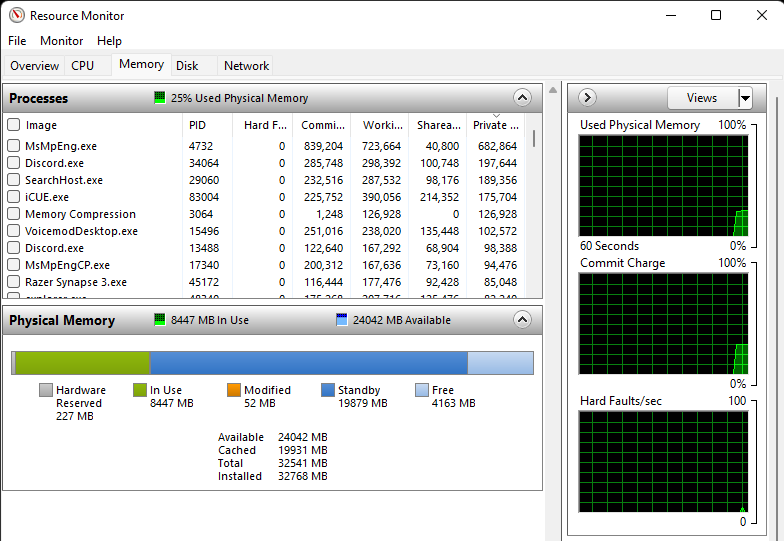
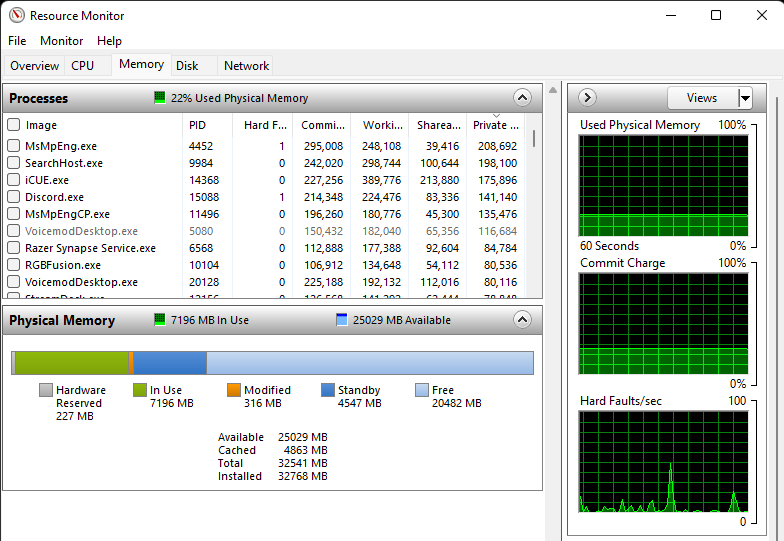
btw the first screenshot is after closing the sim, if i was still in the sim the free memory would be 6mb
Having Standby memory reserved is not normally an issue. Its used as a cache by the OS and is freed up as required. However, this can be freed up using a number of tools. RamMap is one of them.
To me, in my nativity, those two graphs actually indicate that it is not a lack of memory issue.
Instead, maybe something is gobbling up CPU time, resulting in a slow down.
It woudld have been instructive to have seem the Asobo Dev Mode FPS Insert, and show what the various monitored resources were doing.
Maybe the key to solving this, and any future issues, is an option for a more detailed resource use diagnostic, to dive down into the ones that apparently seem to be slowing down.
ie the Coherent one !
Hello, if I put some plane in a parking lot and wait a few minutes without doing anything, when I come back the game has become unplayable, everything jerks like hell, which is completely new since last update.
why not sorted the diagramms for commite memory so that Flightsim..exe ist in first row ? Currently the screenshots tell not much, only that windows use the cache, which is fine.
Last Thur and Fri, Feb 10th & 11th, my sim performed perfectly over my usual 4+ hrs flying. I didn’t use it over the weekend until today and again I have had a near 5 hrs of enjoyable flying, again without any issues. Getting 45 -60 fpm throughout.
(I had been getting degradation from 60 fpm down to 6-10 fpm after an hour’s flying from December up to last week)
I haven’t changed any settings, or changed any hardware, so I’m wondering if there was some remote input?
It’s the first time since Christmas that I have enjoyed using FS2020 in it’s full glory. Has anyone else experienced a marked improvement recently?
I’m delighted with the sim after today but I don’t want to get ahead of myself in case the improvement is only temporary. 
Not what this post is about. Had to just use task manager to shut down a flight with my Kodiak 100 due to degradation of frame rate to slide show after 2 hours. So not just limited to jet aircraft.
** SOLVED FOR ME **
I had the same problem and tried all the tips and tricks listed in this thread without any success.
The only thing that has definitively solved the problem was to change the value of the GLASS COCKPIT REFRESH RATE (it was HIGHT, I put it to MEDIUM). After this modification, I did 6 long haul flights in a row without any problem (crossing fingers).
My config: I5 9600K at 5.1 Ghz, RAM 32 Gb, RTX 3070 ti 8Gb
Hoping this could help !
Cool, glad to hear! 
Before anyone else reading this gets too exited: For me the same thing didn’t fix it sadly. Not even the “restricted by GTblahblahDraw” thingy. I tested it about a month ago.
For me it’s not the case. I have already glass cockpit option set to LOW