There is no such option in 2024, that’s the core of the issue.
Basically am I hearing that we can avoid this issue by using a mouse? I.e. we don’t ever have to enter cursor mode with a mouse? Is that true? Not ideal since I just like to fly from my recliner most of the time but at least its a solution since Microsoft won’t address this bug.
I went ahead and ordered myself a mouse a couple weeks ago and haven’t had this issue happen to me at all since I haven’t had to use cursor mode with my controller.
You’ll also marvel at how much nicer it is to manipulate buttons and switches in the cockpit. You’ll wish you had gotten a mouse sooner.
Thanks. Wireless I assume? Seems like in most living rooms a wired mouse would not have a long enough wire.
Wireless would work better, yes. I have keyboard as well with a USB hub. Keyboard doesn’t usually work when I first launch the game and typically have to unplug it and plug it back in and it’ll work fine.
My keyboard is wired, but I have a bit of a different setup. Our house has an attached apartment that stays empty unless we have guests. The small living room in there is my gaming spot, and have a coffee table and a couch super close to my tv when I’m playing, so it’s not much of a tripping hazard. Wife gives me heck about moving the table and couch so close, but I need to be able to see the information on the avionics, and the waypoints being in magenta on the flight plan aren’t easy to read from 8’ away 
Yeah because the mouse cursor is somehow different from the Xbox controller cursor so unfortunately until they address the issue using a mouse can workaround the issue. I also liked chilling in the chair to play but not much choice until they get it sorted.
Yeah I was never a mouse user until this issue gave me no choice, but I will admit it is easier to combo the controller with a most and keyboard combo, on Xbox it helps avoid a fair few of the bugs using the controller causes. I also replied then read your other message you also use a USB hub nice, but yeah I also have to unplug the keyboard and plug it back in each time for it to start working which is odd, but it’s not a bother compared to the other issues tbh haha
I use a wired one but with a USB hub to give it that bit of extension, you’d be surprised the length of some mouse cables.
Some of the USB hubs also come with some pretty long cables. Pretty cheap on Amazon too.
Although sitting a bit closer to the tv I’m like wow I didn’t know I was able to read the numbers on the screen like this hahaha 
Correct. The game was developed with PC mouse in mind and the developers never accounted for console and cloud users. Ironically they thought about this and solved the problem out of the box with the 2020 Xbox release, but this time they forgot. The Cursor Mode on a controller was originally developed for the sole goal to replace the mouse. It was slow but it worked as intended. In 2024 it doesn’t because the developers probably never thought about players not having a mouse.
So much for Microsoft’s accessibility policy.
I’m on Series S. Started following this thread and you’ve detailed pretty much everything I’ve experienced, including the controller AI cursor issue, which I experienced last night on a JFK-TPA free flight on the inibuilds A320. I’m hopeful they’ll give us the fix we need. On a side note, I noticed you mentioned you experienced the issue on the A321LR as well. Do you have reverse thrust on your A321LR? The EFB show the calibration but the throttle does move in reverse thrust. Just curious. I also use the TCA captain edition.
I mainly use the controller for the thrust levers and reverse thrust has been a non issue for me, but I’ve seen people talk about reverse thrust before there’s definitely a thread on here somewhere about it, I try to use as little peripherals as possible in my head it lowers the risk of the sim ■■■■■■■■ itself haha
Only 26 votes on this bug. The developers will not hurry fixing this unless it gets way more votes. If Xbox players can’t be bothered with the game being unflyable without a mouse then why would the dev team?
I just recently learned there is a “Vote” button at the top. For the longest time I thought “liking/hearting” the original post counted as a vote. I’ve been making sure I now hit the vote button as applicable.
I agree completely. We might need to be active in the chess during the next live stream to get the message across. Game, Beta or not, is unplayable with this bug.
First time poster, long time user of msfs.
I exclusively flew airliners, specifically the LVFR a321 in 2020 and being able to turn off AI pilot in cursor was a godsend.
In 2024 I’ve been flying small aircraft pretty much since release but have now decided to go back to airliners. This cursor mode AI pilot is absolutely ridiculous and not being able to turn it off at all is completely ruining the airliner experience. Literally every time I enter cursor mode, the engines spool up and the plane banks left or right.
This issue needs addressing. I can’t believe that it’s not been fixed already.
I always send questions about the Cursor Mode to the developer streams when the form is up. Both about this issue and the fact that you can’t use the EFB or create flight plans without a mouse. Unfortunately these questions haven’t been featured in either Q&A session yet. I’ll keep trying because I’d like to know the developers’ approach towards mouse-less players.
 There is something seriously wrong with this game. Look at this video I took today.
 Aircraft: Airbus A321LR — Cruise altitude (36,000 ft) — Autopilot ON
As soon as you engage the Cursor Mode, because you want to operate instruments or the FMS, the “AI pilot” messes up. The following happens, as seen on the video:
- The plane starts oscillating slightly left and right, because the “AI pilot” fights for control, even though the aircraft is on the flight path.
- Even though the throttle levers are not moved (they stay in CLB), the throttle is PULLED IDLE immediately (see the engine status screen). So it’s not even the levers that are pulled, it’s some insane game logic that ruins the flight.
- Disengaging Cursor Mode gives back authority to the autopilot and the autothrottle.
Video below. See what happens as soon as I engage Cursor Mode.
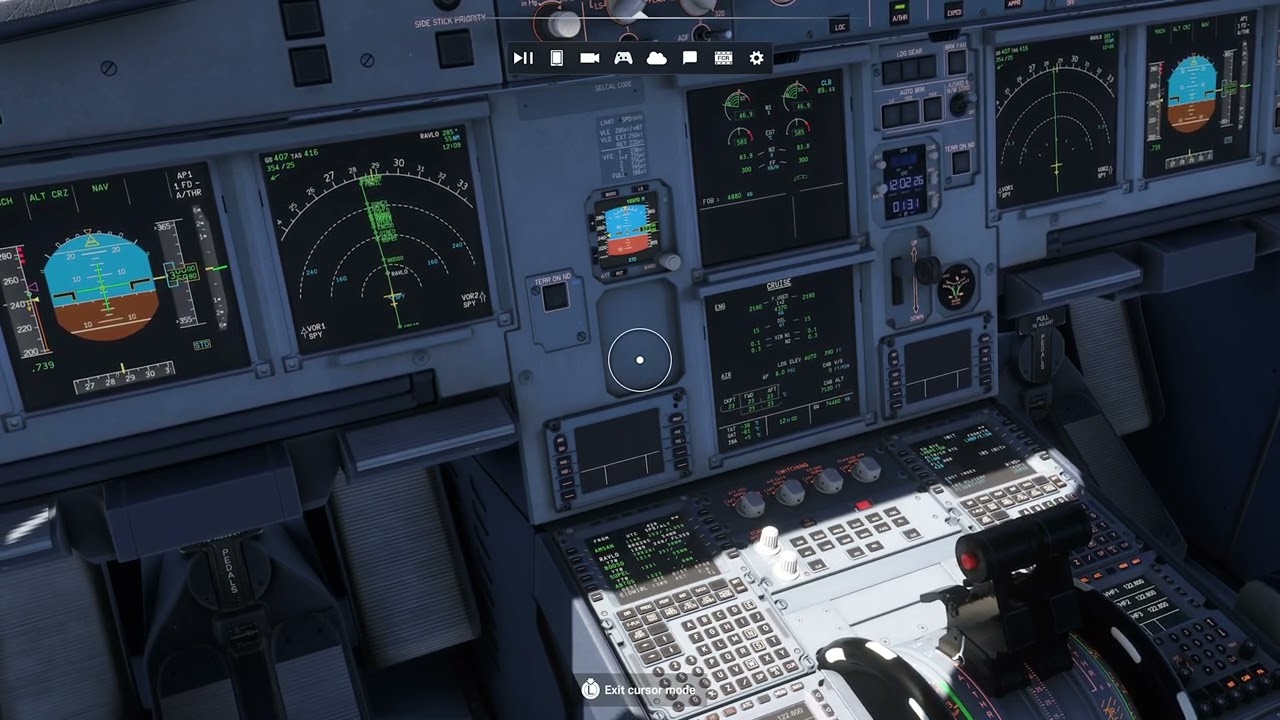
Even worse, on approach the opposite happens (I didn’t made a video but it’s 100% reproduceable): if you engage Cursor Mode while on descend/approach, the “AI pilot” pushes for FULL THROTTLE, immediately destabilizing the approach.
This is beyond comprehensible. It’s devastating that the developers don’t care about this bug, because it makes flying in any realistic manner basically impossible.
xCloud/Gamepad (only)
No change with the release of SU2; use of cursor with AP disengaged causing loss of control of throttle and flaps, making hand flying impractical or impossible.