I started using Air Manager a few months ago and I’m really enjoying the scripting side of it. I’m not a dev but I am learning and figured I’d create some simple things to get better. There are so many great gauges available, I started with some that are easy and not typical.
These are three gauges I created for myself that I find cool and or useful.
-
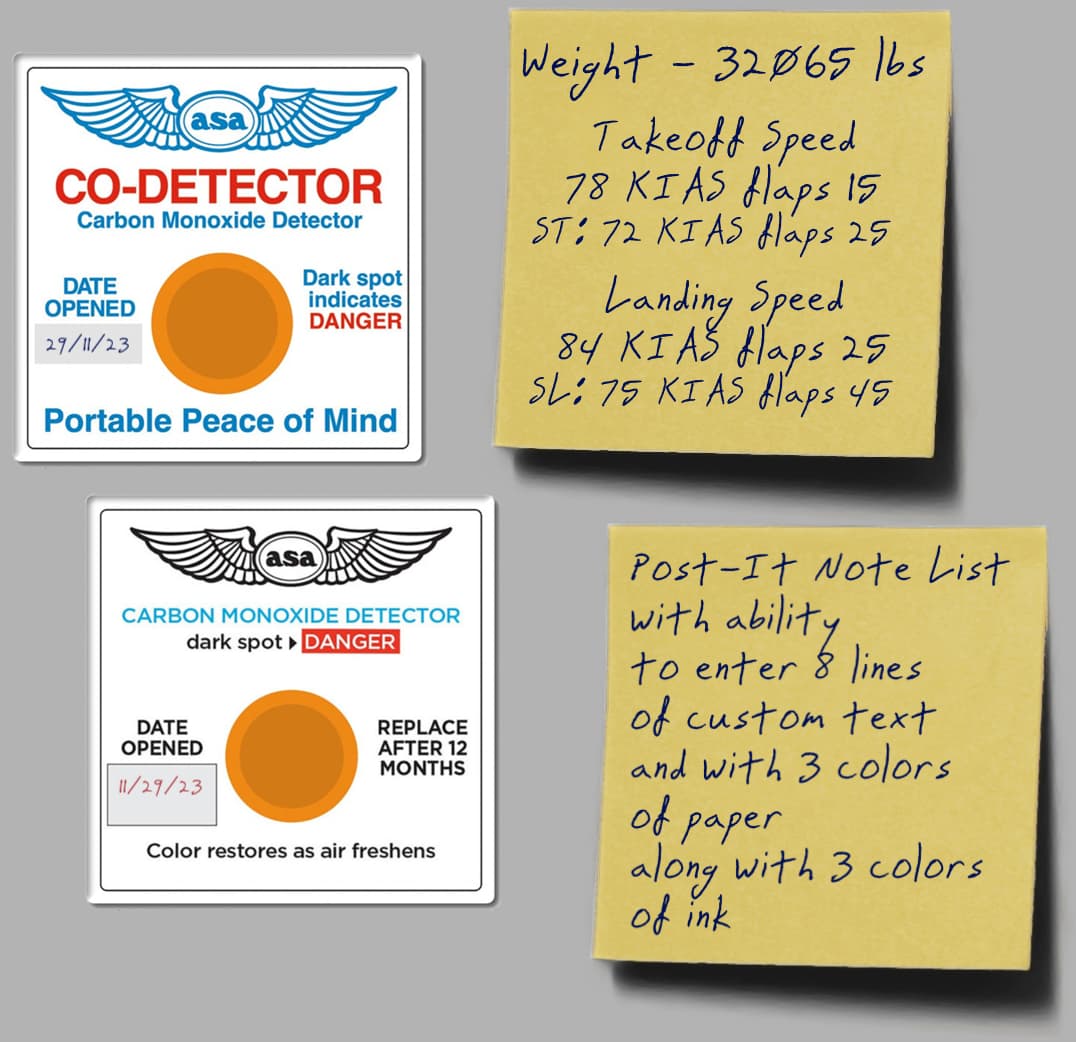
Common CO detector card found in many GA planes. Configuration options include 2 styles, 3 colors of ink, the ability to automatically use today’s date in D/M/YY format or M/D/YY format. Also allows for a custom manual text entry for the date. (2 different options shown in photo)
-
Post-it note for 8 lines of custom user text. Configuration options are picking 3 colors of paper and 3 colors of ink.
-
Post-it note that calculates takeoff and landing speeds based on minimal user input, assuming a linear weight to speed relationship. Configuration requires flap settings for normal takeoff/landing and short field takeoff/landing if selected (optional). Using the POH or other info source, enter the speeds for minimum plane weight and maximum plane weight for each category (i.e. normal TO, normal landing, short TO, short landing). The gauge updates the weight automatically and uses the data entered to figure out the correct (or close) speed with linear interpolation. Ideal for people who fly different planes and need a close approximation reminder that will work for the sim. Other options include 3 colors of paper and 3 colors of ink as well as the ability use use pounds or kgs. NOTE: This will only work if speeds and weight have a linear relationship. Some planes do, some don’t so YMMV.
You can download them here: