Aircraft-specific control profiles

Sure, that would be ideal.

I asked before though: Q: Is this on the feedback snapshot list at all?

We’re still waiting on the 2023 one, maybe it’ll be on there as a new years surprise.
If wishes were fishes…and literally any addon is a vector for a potential CTD (including MS ones), as if we haven’t experienced that by now.

I also don’t see it as a “workaround”.
A workround would typically be a smallish change to the Control Options or Aircraft Select UI to accomplish a bug fix, not a plug-in workflow to add complex missing functionality.

Aircraft Manager, of which this is a part, is an alternative UI/UX addon - simiilar to other alternatives in FMS, Toolbar etc etc. For example, are PMS50 or PMS530 workarounds or alternatives? Is Flow a workaround or an alternative? etc etc.
Semantics matter.

But, lets not get hung up on that.
I get what you mean, and maybe they’re working on it.
We’ll see in time I guess!

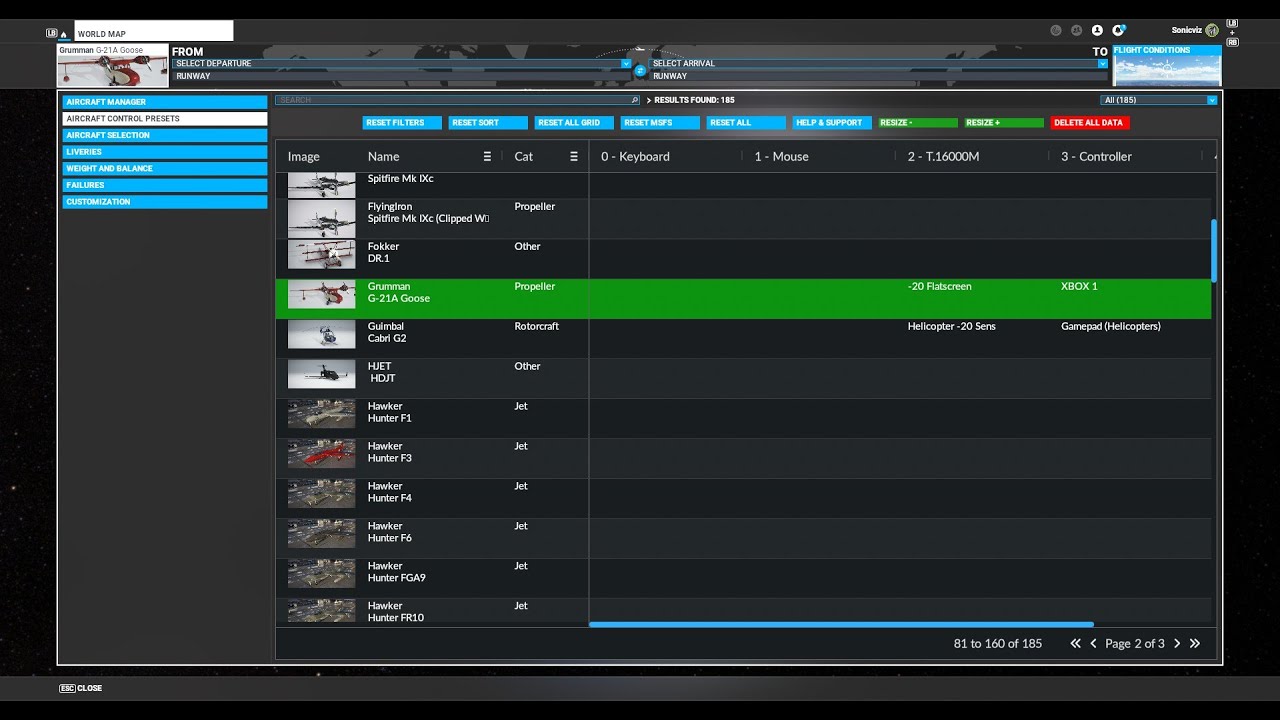
Aircraft Control Presets is now released as an update to Aircraft Manager Pro.

I agree. Like I said I appreciate the effort, and I’m sure many people will use it, or even pay for it. It’s just not something that I’ll add in to my base sim. The current way of selecting control profiles is much less than ideal, but it’s also just a one time annoyance before starting a flight.

Regards.

Sure, that’s why it’s not a standalone addon. It’s not a big deal for many people to manually switch, so it’s not worth releasing as a dedicated product imo.

That said, with the recent chopper releases I find it more annoying to do, as I standardised on simple presets so I didn’t have to switch. I’m stupid, and keep forgetting to!

Each to their own, we all have different first world problem pain thresholds! :rofl:

1 Like

Hahahahaha! Well said.

Each profile saved in profile manager is a group of settings. If you have a better description, please share it.

Each control profile saved could be associated with one or more aircraft.

Yes, for each aircraft you might choose to associate up to half a dozen profiles, but you’d only have to do that once for each aircraft. Once you have done that for an aircraft, if you load an aircraft with no associated set of profiles, you could choose between the current set or a saved default set. Then you could change the settings and save that against the aircraft.

It might be useful to be able to link sets of profiles into groups, but that might be more work to code.

1 Like

Each profile saved in profile manager is a group of settings. If you have a better description, please share it.

Your use of the word profile is what is confusing me, so I’m not sure what you are referring to.

From my perspective, I stick to what MSFS uses to call things to avoid confusion.
However, MSFS uses muiltiple terms which is where the confusion comes in.

Individual groups of settings for a control device in the MSFS control options screen are called presets, which is what MSFS calls them, which is also why they have a Preset Manager, not a Profile Manager. Each device can have many presets. However, MSFS also names individual presets as things like “mouse profile” and “keyboard profile” as well, so that’s where the naming confusion arises.

They should stick to calling them either presets or profiles, not both at once.
As they have a Preset Manager, I’m going to call them presets.

I hope that makes sense. It can be a complex topic so we need to be clear about what we are referring to.

MSFS only has the ability to set device presets for all aircraft at once, within which you switch per device presets manually as needed if you change aircraft that need it. So you could say at any point in time, only a single MSFS aircraft control profile exists (ie: individual presets configured for each attached control device).

A bank of presets set for each attached device is an aircraft control profile, so auto control profile switching refers to switching all device presets for a plane at once when you select an aircraft, and each aircraft can have a customised profile of different presets set per attached control device.

Doing that alone is a tricky enough job.

I don’t see a need for multiple profiles (ie: different sets of control presets) per individual aircraft though, if that’s what you are talking about. I think the group of people who might need that use case would be too small to warrant the effort, which isn’t trivial either.

Updated: Aircraft Manager V1.0.2 now includes Aircraft Control Presets

2 Likes

Good morning,
Isn’t it possible that the material profiles created are automatically assigned when an aircraft is selected.
Currently, if you have a profile for a light aircraft and for a jet, you have to go to the settings to select the right profile.
Or is it not possible that the profile is automatically assigned for the aircraft chosen which would avoid forgetting to select the right profile before a flight.
Good flights.

I assume you mean controller profiles?

Are you on PC? If so, this does it (Aircraft Manager, but the paid Pro version)

I hope we can get some more votes going here. If you are reading this topic and agree that this is something Asobo should implement, make sure to give the post a vote at the top.

Having to manually switch between 4-5 profiles each for joystick, throttle and rudder pedals multiple times per day is such a daunting experience. Atleast give us an option to combine them in one profile.

7 Likes

i just love how DCS has made it with controls assignment and control set per plane. I would like to see it here too.

7 Likes

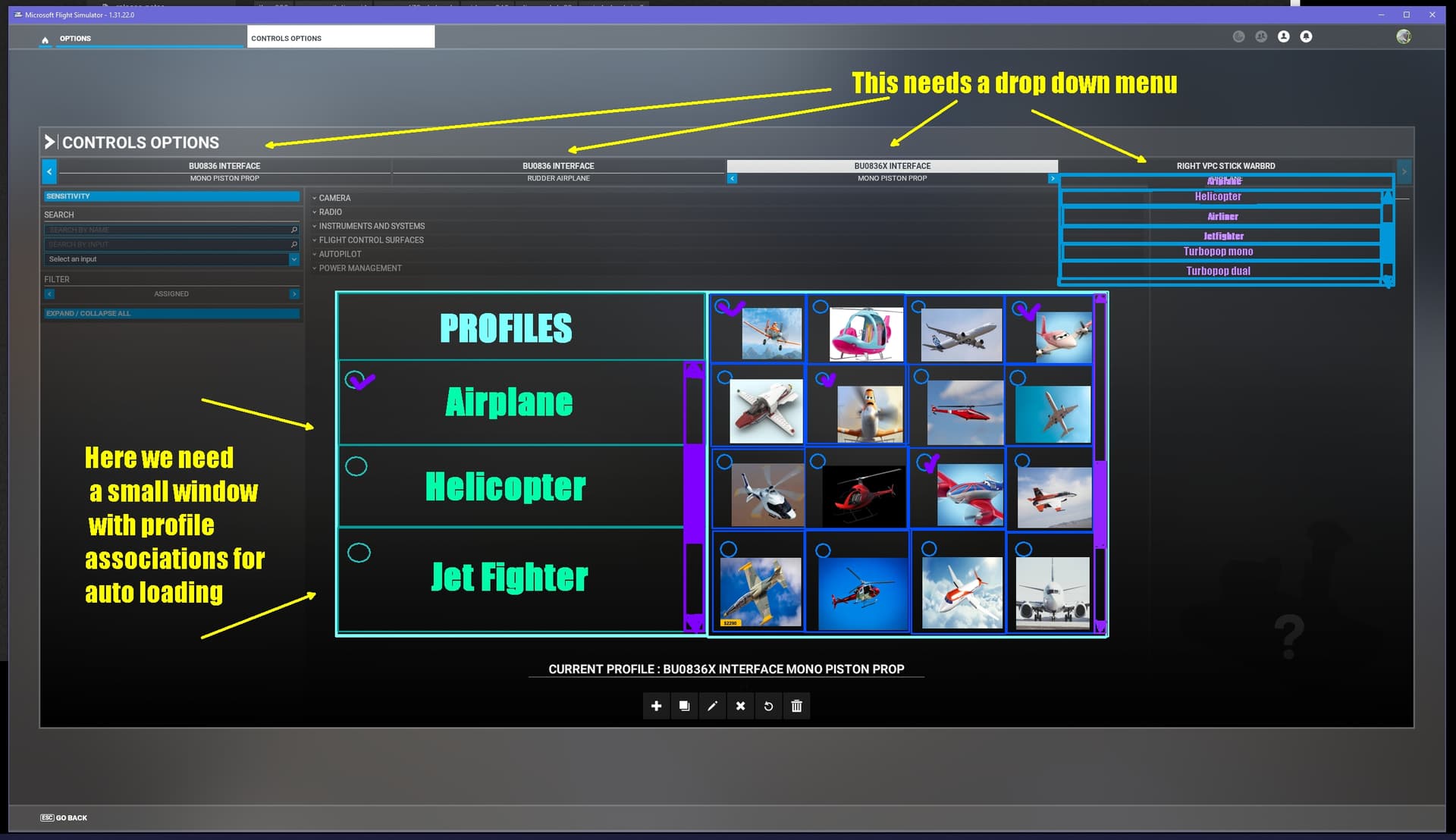
Profile menu needs an option to assign profiles to planes so they are loaded when that plane loads. Like this:

2 Likes

I really like your naming hierarchy to clarify and distinguish between device control presets and aircraft control presets/profiles, respectively.

To keep the device control presets as is makes sense.

To add another layer of aircraft control presets/profiles should be added if deemed technically feasible with reasonable effort. However, if such a top layer is added, it would make sense to make it optional, because it might not suit everyone, e.g. families that share the same pc/console among several people where everyone in the family may have different control scheme preferences for a given plane.

I agree that this is a more complex feature than meets the eye.
I assume that this Aircraft Manager is a 3rd party PC addon and is not available on console?

1 Like

Thanks! Yes, communication about complex issues is much easier if we are clear about what we are talking about and it does start with defining things. That way we’re all on the same page.

A good idea, but technically tricky if the base application has no multi-user account functionality built in.
I’m not sure, but perhaps on Windows that would mean logging out and logging back in under the new user, but I’m not sure how that would work with MSFS. Depends if it’s been installed for all users, or a single user. In any event, the solution there would be for MSFS itself to have separate local multi-user account funtionality each with their own save file in the cloud. Currently that’s not on the radar of anyone I don’t think, is it?

Multiple profiles (group of presets) for each aircraft is also another layer of complexity. Anything is possible to do, but deciding to spend the resources to implement it depends on a few factors.

I agree that this is a more complex feature than meets the eye.

It is, and that becomes more apparent when you start working on it. There’s a few gotcha’s involved with switching a bank of presets at once. I actually just released a small update to display a countdown timer when switching, as it’s not instant and feedback indicated users need to be aware they need to wait a little bit when switching a bank. You can see this yourself when switching a device or preset in the Control Options, it’s not instant. Multiply that by the number of devices people have (it’s a real eye opener how many some people have attached) and it’s actually non-trivial.

Asobo will also be grappling with these issues for any implementation they do, but the advantage they have is they can also optimise the lower level code if needed, which we’re not able to access.

I assume that this Aircraft Manager is a 3rd party PC addon and is not available on console?

It’s available as part of Aircraft Manager: Aircraft Manager for MSFS 2020 - Sonicviz

It’s not available on console as yet because Microsoft has stopped onboarding 3rd party developers (or significantly throttled for now) and my application has been languishing in partnership application limbo since it launched.

If/when that ever gets approved I can submit it for XBox and see how it goes through the approval process. That’s not guaranteed, but won’t know until able to submit. Also note, while it’s technically possible to navigate the grid interface via gamepad, it’s faster with a keyboard/mouse whether on PC or Console.

I don’t know how many console users also have a keyboard/mouse attached as well, there doesn’t appear to be good info though I’m sure Microsoft surely knows from their analytics.

2 Likes

Oh, I didn’t realise that you are a developer working on this topic. I didn’t check the history in this thread until now. But now I understand why you are so structured in your descriptions. It all makes sense now :slightly_smiling_face:

1 Like

This looks interesting. Great work! However, i still feel like this is something Asobo should include natively in the game.

Would you consider having the Control Presets as a standalone utility which can be purchased separate from the Aircraft Manager?

1 Like

I think it should be native to the sim (no offense to the folks who are developing third-party apps). It’s kinda crazy that the aircraft selection is so kludgy and rigid. There should be several presets that should be “sticky” including controls, preferred livery on the thumbnail, preferred loadouts, even configuration sub-options, like wheel pants, skis, floats, liveries that are accessible via checkboxes and/or drop-downs.

Going further, last saved state, oil, fuel, should all have the option to be continuous, native in the sim.

Lastly, aircraft models should be filterable by category/class/type, make/model, developer, favoritable, and/or turn-off able. Meaning if I want to see all my single-engine land GA aircraft, boom there they are, in my favorite liveries and configurations, which encourages me to go fly them, instead of passing them over in the noise because they were alphabetically put between two models I rarely fly, painted in a similar livery that doesn’t catch my eye. Or they use the dev name instead of actual make, so they don’t show up with all the other Cessnas, etc. I often find myself scrolling on by because there are six different configurations for a certain model, and one of a different model is nestled next to those on the same row. Just show me Cessna 172 and give me all the options in a sub-menu.

There needs to be a gatekeeper for the nomenclature, aircraft model names, etc as well.

7 Likes

While I’m on my soapbox, nothing would enhance my personal connection to the sim more than seeing “my” version of an aircraft in my hangar, ready to go preflight.

Conversely, having to make sure I’ve selected the right livery, pop out and change controls, change the weight and balance to suit my person, changing the view to suit my height, etc, all takes me out of the sim. It’s not “my” plane. I feel like an intruder.

By the way, not saying, just saying - I’m tall, not super overweight, kind of a typical middle-age dad-bod build; it doesn’t feel good to have to increase the weight to my weight every time I hop in the plane. Not a huge deal, but a constant reminder I’m not whatever average they expect and for some reason more annoying and off-putting than it needs to be. Make it sticky to my weight or let me enter a default. Boom, easy, done.

If you wanted to get super intricate, you could even enter your personal, default height and make the view adjustment tied in with height and a seat adjustment variable, complete with change in CG arm. Overridable (and with an option to sit on a phone book) and sticky to aircraft, of course. For ultimate realism, you could have a failure mode in which the seat suddenly slides back, especially in older Cessnas. :wink:

4 Likes

I’d agree with this, I don’t fly many aircraft so the sorting aspect is not necessary for me. The control presets is definitely something I’d buy as a standalone though.

No offense taken, and I fully agree, but we’re talking about if wishes were fishes here:

Do we just not do anything because it’s not in the base sim?
It’s a complex application, they can’t do everything at once to please everyone - even with so called obvious functionality - so some of us scratch that itch and deal with it. If that doesn’t scratch your itch, that’'s absolutely fine, just wait until they get around to implementing it. All good.

Respectfully, Aircraft Manager is far more than “sorting”, thanks!
Just need to clear that up, as an engineer I like to have things described accurately.
Even if you don’t fly many aircraft it still has useful features such as tags, notes, filtering, data conversions, and drumroll auto control preset switching.
But sure, whether you see the value in that is up to you.

Doing a surgical integration into the main UI is non-trivial due to the way the multi-layered (under the hood) UI system is designed, and how to deploy certain feature enhancements on top of that is a juggling game involving a bunch of considerations.

As such it’s better to deploy the aircraft management features I developed in Aircraft Manager as one add on (similarly as Location Manager does for the map/location enhancements) rather than as modular single use features. Stability, maintainability, ease of installation, ease of use++ are all key considerations here.

So unfortunately, no, I can’t do that at the moment.

Sales happen sometimes though, keep an eye on it :metal:

Happy flying!