i press any button then go do something else…
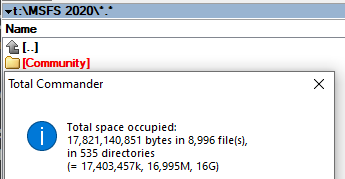
Ok so ive kind of found out why it was taking ages, I was launching from the store rather than the xbox app.
↑
System
Corsair Force MP600pro 1TB M.2 PCIe 4.0 7200mb/s
5:03min
145gb Mods and 37gb Liveries.


Taking forever to load is bad enough, but after this worthless so-called “optional” WU my sim stutters hard every few seconds, even after reinstalling. That’s what I would like to know a fix for, other than having to reinstall windows… again. Getting tired of having to reinstall windows after updates.
What make you think reinstalling the OS will fix things? That’s pretty drastic, and it’s unlikely whatever you did to the sim has also harmed the OS.
Usually 3 min to the option page. About ten addons managed by Addon linker. After last WU I noticed it’s a little faster. Wow! And no problems with my addons. Usually there is something to update. So far so good. Finally.
I agree with you on that … Reinstalling windows…no
I have never had to re-install the sim, not one time, however, I have no addons…none, never have had any and will not add any until this sim is more stable. My community folder is blank.
…
Maybe, just maybe there is a connection between addons and re-installs here ?
Yeah you would think that wouldn’t you? Only problem is I’ve had this happen before with one of these broken updates, so I am speaking from experience using facts rather than assumptions and theoretical rhetoric. The best thing at breaking Microsoft is Microsoft itself, simple as that.
This is a new installation of windows only a couple months old and I only use this PC for MSFS and yet this update completely bricked the sim and reinstalling it made no difference. Exactly the same thing that happened after an earlier beta I was enrolled in. Every time I would opt in and try the beta it would stutter like this, but when I reverted to the previous version it was fine. I posted about it in the forum and it all fell on deaf ears, so I hoped once it hit RC and was released to the public that wouldn’t be an issue anymore. Being hopeful didn’t help as it was still there and after spending hours trying everything imaginable I ended up having to reinstall windows to get it working again.
This is the exact same situation and I fear reinstalling windows is again my only recourse. This is becoming a worrying pattern with Asobo.
You have no problems with the sim so therefore nobody else can either, right? It doesn’t work that way. Addons are irrelevant when uninstalling and reinstalling and trying it vanilla still doesn’t fix anything.
Chiming in and saying you have never had any problems when it’s obvious many others have doesn’t help or add to the discussion in any way. Some people are lucky, others not so much.
Either way, addons shouldn’t play any role in this when reinstalling the sim since there aren’t any addons in the community folder anymore, they are completely taken out of the equation.
Not noticed slower loading times. I have the sim on my C drive and it takes a bit under 3 minutes to load which I don’t mind.
Any addon, much longer loading. Default MSFS loaded eages for me and manytimes it freezes totally. I´m totally frustrated by this game. I´m with MSFS from version 5 up to today and MSFS2020 is by far worst version ever. Up to today no tower view for any airfield. Yes, graphics is nice, but it is not playable. Each update, big problems. ■■■■.
Loading times are unbelievably crazy long for the basic sim without any additional community content!
I wish some near future update would be solely concentrating to improve loading times drastically.
One piece of the solution could be this new DirectStorage feature from MS.
I guess the slowest things during the loading of sim is accessing cloud data from the network, not the speed of to load local drive content to RAM.
Even without mods the sim loading times are increasing exponentialy after each update, as the official content is also released as addons. In two years game will take 20-30 mins to load just with official content. I hope someone in Asobo has made some basic maths to see what we will expect at the end of product´s lifecycle in 10 years if we continue like this.
This loading time issue needs to be fixed before it becomes a serious problem.
It has no sense that game loads the whole globe addons to start. Addons loading should be classified by categories for the loading process (global, country specific and airplanes) and scenery rebuild should be done after selecting the flight and on the fly while you change the country areas, so that you only load the addons which are relevant for the area your plane is currently located.
Cheers
I remember on 18k modems when it took 20 minutes to load one picture. XBSX is still not bad, I have about 50GB of additional content and from ‘press any button’ it takes about 2:20.
While this may not seem a huge issue, it is on several levels.
It sends a message to the player that “we don’t value your time”.
It also sends a message “we don’t know what our load process is doing” (else they would optimize it)
It also serves as a double whammy for people that experience CTDs. What I mean by that, is a CTD would be easier to swallow if the load time was not so extended. Because of that, it sends another message of “we don’t care about your time”.
GTA Online did this for many years – not caring about the load time. Then one day a player came along and analyzed the loading process (reverse engineered it) and determined it was basically a single threaded enumeration of all the other players in the multiplayer session to which the player was being joined.
I can only speculate, but I think there is something similar going on here.
Also the lack of transparency into the loading process is not good – it serves to fuel “your hardware sucks” replies when the load time is brought up in forums.
We also know that the update checking and applying is rolled into the simulator engine and hooks into the load process, which isn’t a great design.
A log would really be helpful here. That would give some transparency and some what of identifying what parts of the load process are running long. I am sure that initializing 3rd party stuff is also a factor.
A log file would identify which 3rd party stuffs are responsible and the questions and pressure can be applied to the right place. Users would have an ability to make intelligent decisions – this mod is great because it gives me X, but is that worth the 18 seconds it adds to the loading process?
A log file would also be very helpful in diagnosing CTDs.
Also, if I were a 3rd party dev, I’d really love to see a logfile implemented because I am sure 3rd party devs are getting quite bogged down with “your mod crashes my sim” tickets, and the time it takes to rule in or out that the mod is even a factor.
My sim can take anywhere from 10-15 mins to load. It got considerably slower when I loaded every single flightplan from AIG lol. But it was still slow before that - I do have a the sim on a spinning HD as well. Man I wish my sim took 3 mins to load.
I did not say that. What I said was that I have never had to re-install and that I have NO addons.
That may or may not be an indication of trouble. I do not know becasue I do not have any addons but there are loads of people that do have trouble and they DO HAVE Addons… Connection ? Maybe, Maybe not…
..
You should read our posts more carefully.
..
Addons are NOT relevant when uninstalling or re-installing ? I agree with you on that part, however, they may be quite relevant when running the sim.
Hello everyone, I’m fed up, Asobo has screwed up again. Previously, it was a CTD with no warning or error message whatsoever. Now the simulator is loading to the home page, I plan the flight and press fly and … the flight does not load, it hangs on the loading screen and nothing happens. After the update, I managed to fly 2 times from Giblartar and Madrid and that’s it, late just getting stuck on the flight start screen. In addition, now I came out hard with the sim, because otherwise I couldn’t and after reloading the simulator all the characteristic points from the last update disappeared.