It’s crazy that Jorg “claims” he uses VR. There is No way he gets into a VR headset. I always thought the fun of the flight Sim would always be there. I fly less and less and I’m starting not to enjoy the game anymore.
3 Likes
Those aren’t MS aircraft are they?
I have to disagree. It may depend what he flies. If he flies largely first party aircraft, they all seem to work fine. I fly exclusively in VR and have few problems. It seems some of the expensive 3rd party aircraft may be the ones with the most significant issues. I have neither a 777 or an A350 that V8Shark mentions above, yet I do fly many different ones. All with no problems, or insignificant ones as far as VR goes.
1 Like
oh dear oh dear. try the carenado PC-12ngx for ex. nothing is fine there
4 Likes
I’ll try to have a look in a few hours when I awaken! I’ve not much interest in those. I think the only turbo props I’ve flown are the 350 and Cessna 208 - both pretty briefly. Both have issues, but not VR issues so far as I remember.
For the hundredth time: nope. H125, Bell 407, Cabri all affected. H125 Airspeed Indicator Shows 0 in Default VR View
2 Likes
Btw, you did take that out of context. I was saying they all work fine in VR. Turns out “fine” is relative and there are some problems, I admit. Many of the aircraft DO have bugs. Most of those bugs may or may not bother some people. As well, I was addressing the conclusion that Jorg was lying when he said he played in VR else he’d see all these problems.
The PC12 has no VR problems that I could find. I did see this right away though 
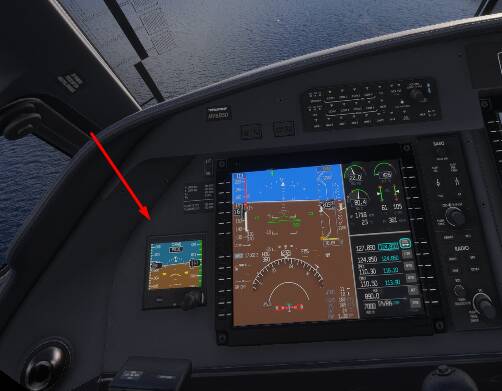
However, I can easily imagine some people not noticing, or at least not caring. A bit like the flashing red RPM in the DA40. I believe Seedy said during a Friday steam it was one of his favorite aircraft. I never understood how anyone could get past that flashing! To each their own. I can only imagine Jorg doesn’t use it, or doesn’t notice flashing red lights either 
Yes, the H125 is the aircraft I mentioned above where I needed to move the camera slightly forward. I double checked to verify it was the one. A problem, certainly, but trivial to fix. I had no idea the Cabri did it until I leaned back to test it just now. I can see it when I do that. I have a tendency to be more comfortable sitting slightly closer and that’s probably why I hadn’t noticed it.
I’m not saying there are NO problems. I’m just saying I fly many aircraft that are first party aircraft that work fine in VR. Again, many do have other significant issues, but I can easily understand someone flying the aircraft in VR and not noticing them - that’s all.
try the parking brake or move the throttle in the PC12.
This might be a different problem, but if I remember correctly, it is not possible to move them with VR controllers
Can’t comment on problems like that. I’ve never used controllers in sim. I use a mouse/keyboard and throttle/joystick.
1 Like
It’s August… most of them are probably on holiday. Both Ini and PMDG have reported the same issue BEFORE SU3 was released and yet, no impact.
In MSFS there are Have and Have Nots. Jorg gets on line and Acts like he doesn’t know what is going on with the game, and what has been done, and what needs to happen. He is not confident about real progress in MSFS and when he speaks about the game I feel less and less optimism.
1 Like
Any time I open up msfs, I end up feeling like I’m working and not having fun. Instead of using the sim, it’s problem finding and frustration with stutters and all the other user unfriendly features.
Still plenty of issues with 2024, I have doubts that it will ever be resolved.
3 Likes
Yes so true
Why can’t MSFS see this happening ? I am grateful for this game but the core of the game is going down the drain . I can remember a good feeling when I played FSX with a lot less.
Still nothing from Asobo or Microsoft after of release of SU3. ( I am going back to 2020 until they sort it out.) The fps and stutters are driving me crazy.
1 Like
I’ve had a lot of issues with this sim in VR, stuttering once again being the most recent one. But for whatever reason the last few flights have been basically flawless in terms of performance and stability.
Ever since I switched to the 581.08 driver and cleared the scenery indexes (as well as all the caches once again) it’s been great. Hope it stays this way. I only fly GA though, that probably helps.
I am completely confused on what exactly the issue is. You say you cannot use the PMDG 777 in VR. Does that mean it crashes when you try to load it in VR? You then say that if you do the workaround, you get stutters. What workaround. I see some people saying its more planes than the 777. I see some people say other planes are fine. I see other people talking about stutters.
But from my reading about 1/3 the way through this whole thread, NO ONE is saying exactly what “I cannot use in VR” means. I assume this post is to try to get commitment from Asobo to fix the issue, and possibly fix the issues that happen when the workaround is done, but for the life of me, I have no idea what it is we are trying to get Asobo to commit to fixing.
I’m not trying to be critical, but be helpful. If you are looking for commitment to fixing an issue, obviously you don’t have to be fully verbose as the original bug report, but you need to be specific enough on what the issue is that needs to be resolved. Everyone is talking like its common knowledge what the issue is, and I am lost. I have to imagine other people would be too that aren’t close to the issue.
1 Like
I think it’s mostly about the new LOD curve having strange effects to cockpit assets in certain aircraft. Like non-working instruments, needles of analog instruments dissapearing/going back to 0 etc. If you’re veiw point is not close enough to them.
And disabling the new LOD curve in dev mode leads to worse fps and needs to be done everytime you start the sim.
They also added a multiplier to the settings of OLOD in VR, where 200 now sets the config file setting to 4.00 instead of 2.00 like before SU3. This probably adds to the confusion and bad fps. It practically feels like they tried to fix VR perfomance but made it worse by trying to mitigate the new LOD curve bugs by increasing the OLOD with a multiplier.
That’s because there are at least three bug reports on this already, plus the original one in the now closed SU3 beta category. This is more about folks wondering why all the actual reports being ignored by Asobo.
It’s even weirder than this. It’s not a straight x2 multiplier, but some strange decimal!
This post explains the problem.
This problem is present with the light markings on the CJ4 which has the opposite effect - from a distance they appear, but are unreadable, and moving closer they disappear. I suppose I will have to learn which lights are which in 2D, and then rely on my (ageing) memory to select the correct one by position.
“Workarounds” are useful for some things, but I now have so many to remember in FS2024 that it is certainly becoming less and less pleasurable. For example, trying to remember which planes have the nose up/down inverted when using FLC, or the inconsistent way the mouse wheel works on the flaps in VR.
I oftentimes wonder if it is really worth the effort.