ATC window undocked makes options disappear

ISSUE DESCRIPTION

Description of the issue: MSFS 2024 ( SU4 ) When I undock the ATC window, the options are not displayed.

FREQUENCY OF ISSUE

How often does this occur for you? every time i try to undock the ATC window with all, career and freeflight mode

REPRODUCTION STEPS

Please list clear steps you took in order to help our test team reproduce the same issue:

  1. start any flight plan in any modality using any plane or helycopter

  2. in sim, open ATC window (option can be shown)

  3. undock the ATC window to put it in a second monitor or simply undock it (it’s the same)

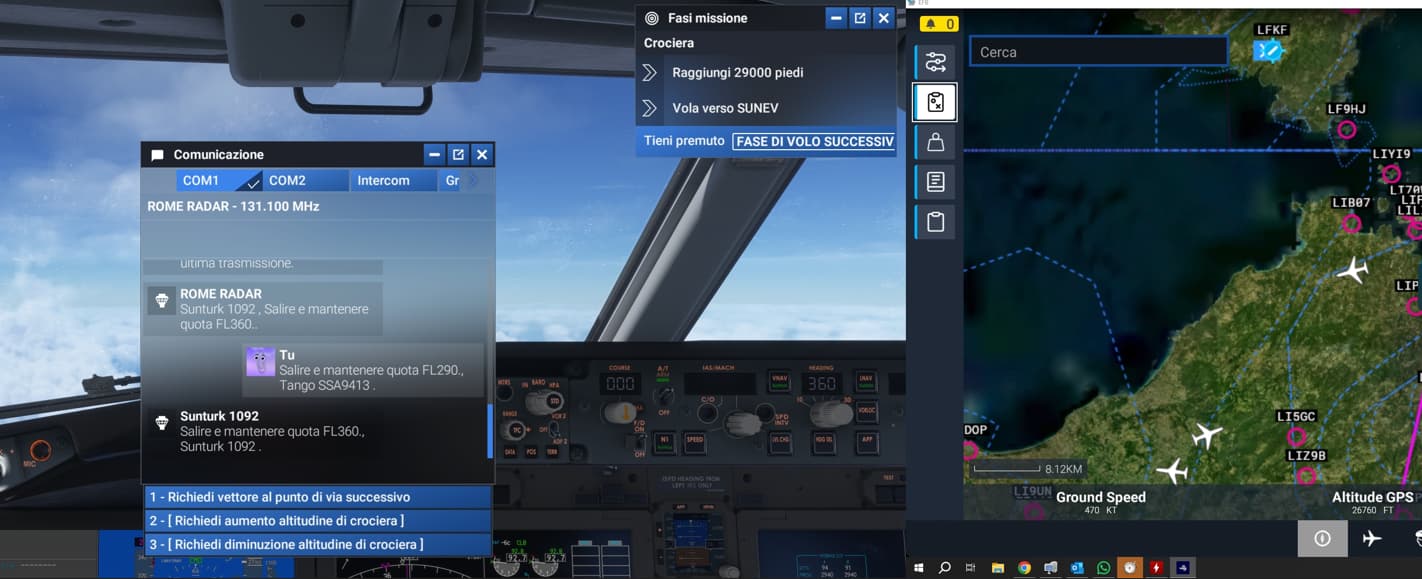
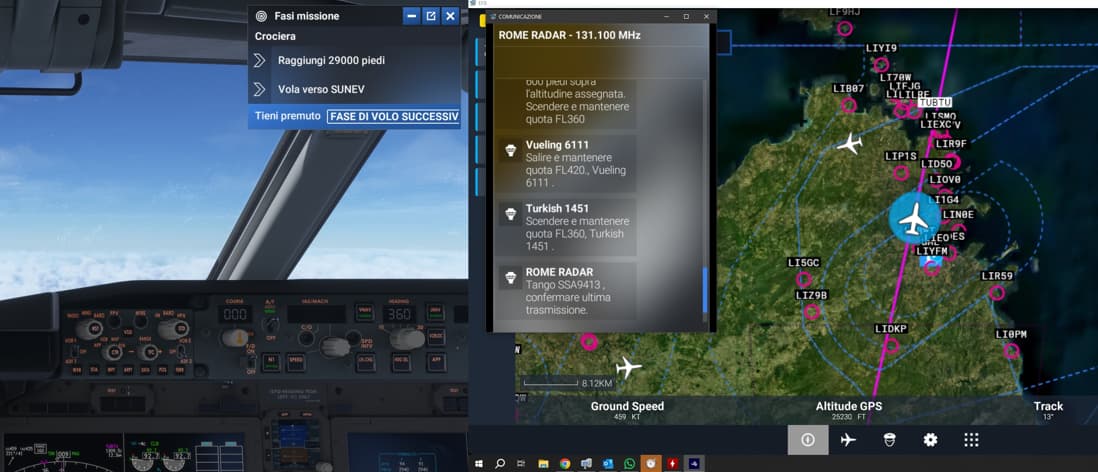
  4. Result: only docked window can show options. Undocked one can’t show options (Screen shoot can show you)

YOUR SETTINGS

What peripherals are you using:

[PC Only] Are you using Developer Mode or have you made any changes to it? no (but it’s the same with it on/off)

[PC Only] What GPU (Graphics Card) do you use? RTX 5070 ti

[PC Only] What other relevant PC specs can you share?

  • i9-14900k
  • 64 GB RAM
  • RTX 5070 ti
  • double monitor: simulator monitor + panels, map etc.. monitor

MEDIA

Docked:

Undocked (Affect all monitors)

Is that the same issue than reported here ?: Popout menus don't size correctly when moved to smaller res monitor

Hello @DementedCorn327 , no it’s not the same because the options can’t be shown in all monitors. With SU2 i had no problems undocking the ATC.
ATC undocked can be placed in monitor 0 or 1, no difference

Same issue here with MS24 Beta 1.6.18.0.

Is your 2nd monitor resolution same than your main one ?, if not, what you are experiencing could be related to that other issue: Popout menus don’t size correctly when moved to smaller res monitor

Hi, my second monitor has a different resolution 1920x1080 - 100% scale compared to my main monitor 2560x1440 - 100% scale.

However, changing the resolution as a “workaround” does not work in my case because the monitor start flashing (also not recommended by vendor).:grimacing:

Regards.

Issue still persists in Beta 4 1.6.22.0 and non Beta versions:

When moving ATC window from one monitor (screen) to another you lose all functions, refer to video.

Note: The only option to move the ATC window to another screen is to first expand it.

This BUG still exists post SU4 release.

This BUG still exists post SU4 release to me too.

This remains an issue that keeps me on FS 2020. Still an issue in 2026!

This is a basic function of the sim. If you like to do IFR, you have no way of selecting a reply to ATC once the communication box is moved to a different monitor.Does anybody even look at these bugs?

Update: subj bug not fixed in SU6.

SU6 here, but on a clean vanilla install after purchasing this during the franchise sale.

I can move the ATC window to a second monitor without losing any options, at least on a ‘nearest airport’ view. (It’s annoying that it only shows 4 entries in spite of having lots of room to show more, but that’s a separate complaint/bug.)

MSFS 2024 1.8.14.0, Microsoft Store edition, RTX 3050 Ti, AMD Ryzen 5 5600H 3.30Ghz, 24GB RAM, Windows 11 25H2.