ATR Flight Plan Import Broken

ISSUE DESCRIPTION

Description of the issue: The means to send flight plans from the default Planner app in the default EFB to the 2024 version of the ATR (AAU4) is unable to properly import a route. Sometimes the issue appears to be when sending from the default EFB to the ATR EFB (example “A”), other times the issue presents when sending from the ATR EFB to the ATR avionics (example “B”).

As I understand it, the expectation is that this import feature will not include SIDs or STARs (though it does in all other aircraft which support flight plan import from the default EFB, including those using WASM like the iniBuilds Airbuses). Even with that stipulation, a bug is still present as the import process is importing at least some of a SID or STAR in some cases, and in other cases it is completely ignoring en route waypoints (the one part of the route it would be expected to import without issue).

FREQUENCY OF ISSUE

How often does this occur for you (Example: Just once, every time on sim load, intermittently)? Every time

REPRODUCTION STEPS

Please list clear steps you took in order to help our test team reproduce the same issue:

Because flight planning is so varied, I’m providing two specific test routes to demonstrate two variations of this issue.

A) Flight Plan Doesn’t Send from ATR EFB to ATR Avionics as Expected:

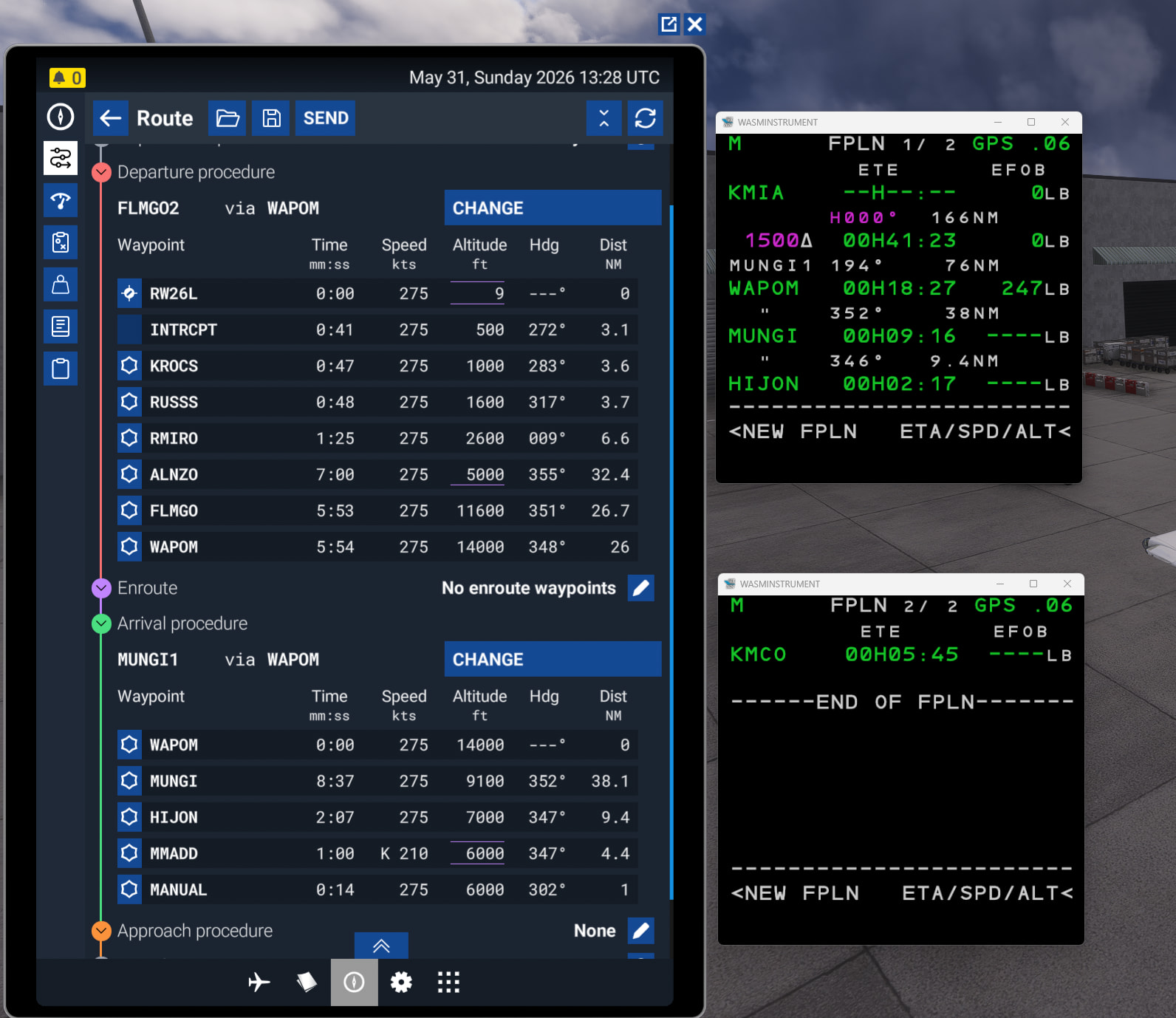
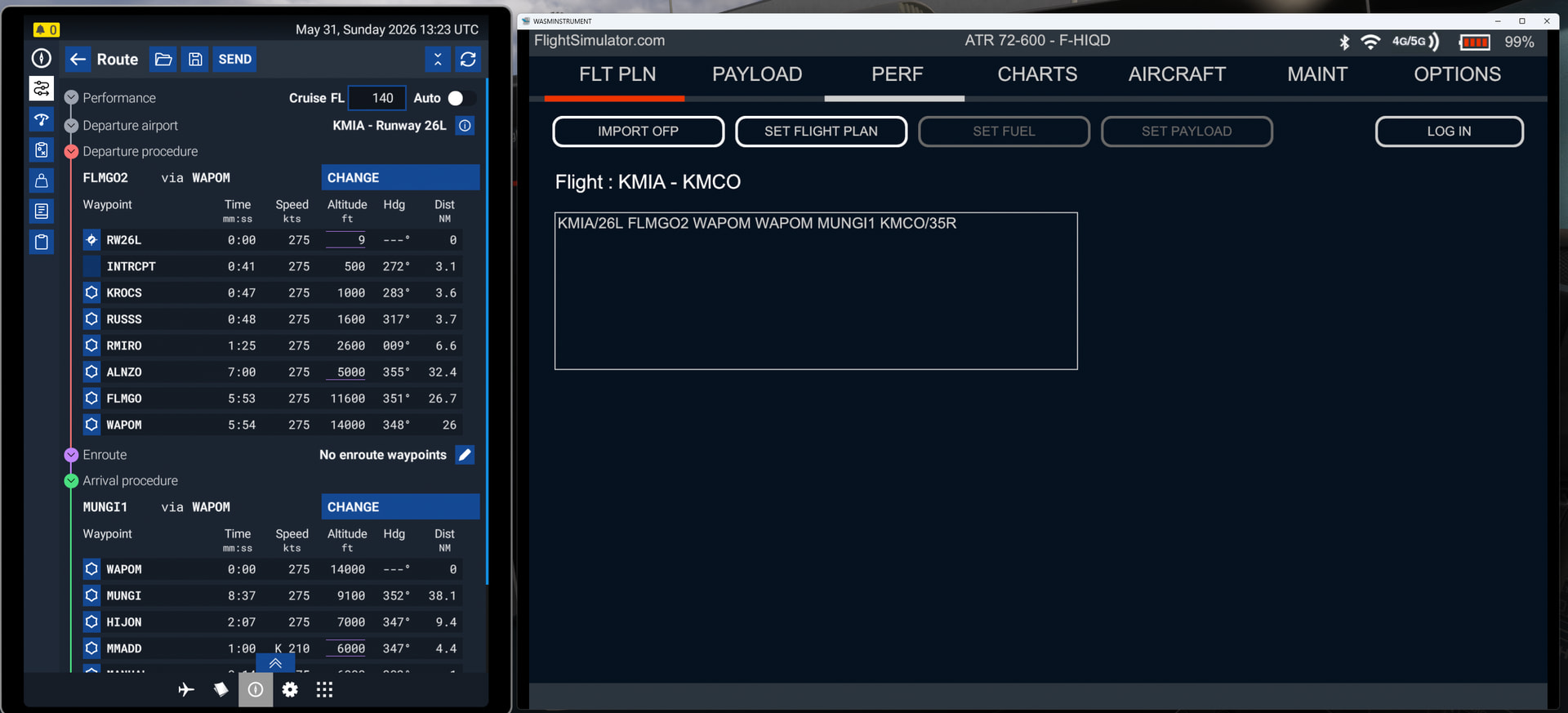
  1. Have a flight plan in the default EFB Planner app (either created there or imported there from Sim Brief) - in this example, the route is KMIA/26L FLMGO2 WAPOM MUNGI1 KMCO/35R

  2. Use the “IMPORT OFP” function on the ATR EFB

  3. Observe that the flight plan showing on the ATR EFB matches what is in the EFB Planner app

  4. Use “SET FLIGHT PLAN” to send to the ATR avionics

  5. Observe that the flight plan in the ATR avionics does not match either the ATR EFB or the EFB Planner app - no SID is selected, and the STAR which is selected is incomplete (missing MADD)

B) Flight Plan Doesn’t Send from default EFB Planner app to ATR EFB as Expected:

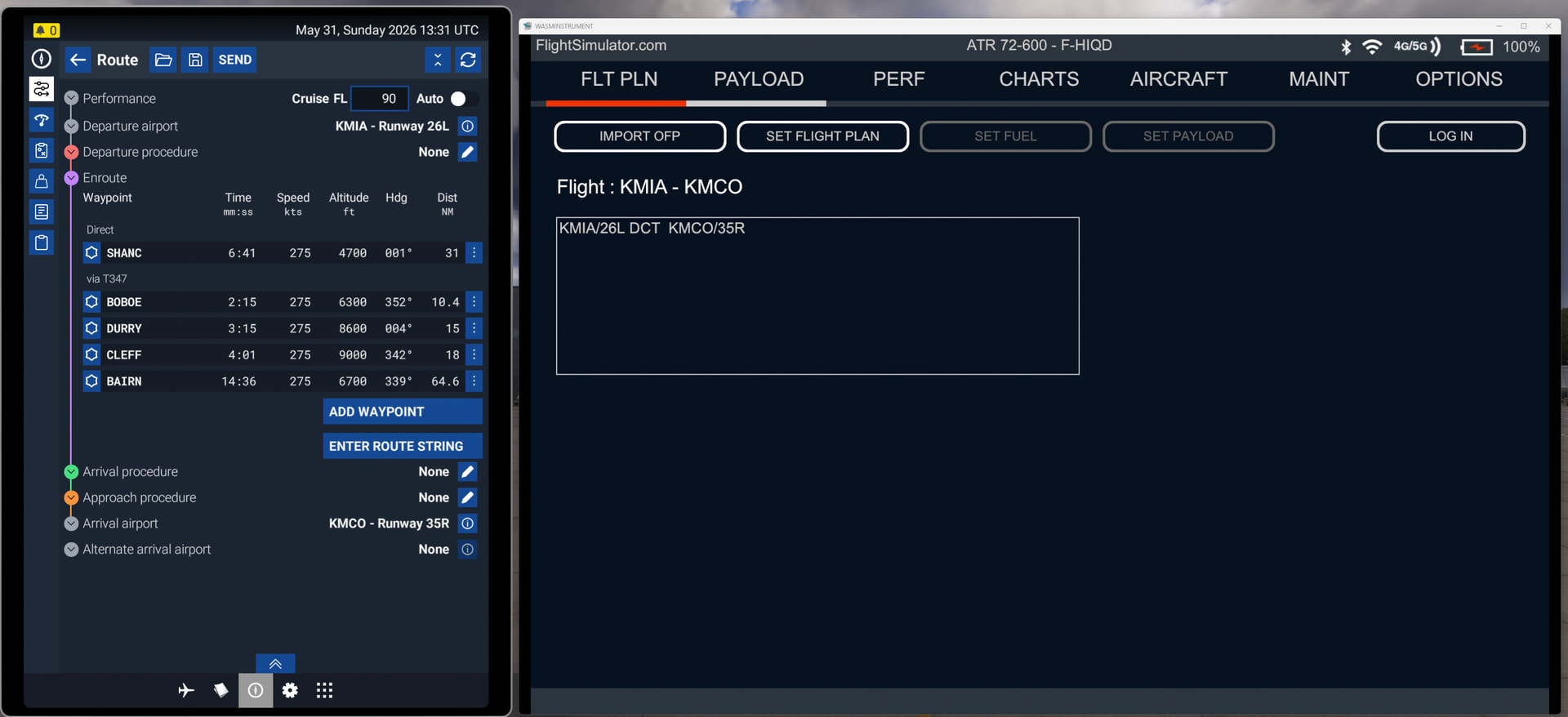
  1. Have a flight plan in the default EFB Planner app (either created there or imported there from Sim Brief) - in this example, the route is KMIA/26L DCT SHANC T347 BAIRN DCT KMCO/35R

  2. Observe that the flight plan in the ATR EFB does not match the EFB Planner app - no en route waypoints are present

YOUR SETTINGS

What peripherals are you using, if relevant: n/a

[PC Only] Are you using Developer Mode or have you made any changes to it? No

[PC Only] What GPU (Graphics Card) do you use? AMD Radeon RX 7900 GRE

[PC Only] What other relevant PC specs can you share? n/a

MEDIA

For Example “A” Above:
For Example “B” Above:
After looking into this, I found out a few things. I used the third flight posted by Zad’ma: KMIA/26L to KMCO/35R. Please also note the workflow he mentioned to me on Discord:

  • Flight was created with Simbrief (KMIA26L DCT SHANC T347 BOBOE/N0285F090 T347 DURRY/N0281F080 T347 BAIRN DCT KMCO35R)
  • It was then imported into the MSFS 2024 EFB Route planner using the Navigraph EFB App
  • And finally, it was imported into the ATR using the fsPlannedRouteGetEfbRoute() (C++/WASM)

The resulting fsRoute structure remains as is. Nothing has been modified. The following debugger output is from the loop that reads the fsEnrouteLeg array. The whole route yields 2 fsEnrouteLeg entries, not more. The first doesn’t contain any useful information:

The second only contains the airway name “T347” as readable/usable data.

I’m not sure what messes up what here, but one thing is clear: what arrives in the ATR is corrupted data as soon as an airway is involved. Building the same route manually with only the waypoints, everything works.

I hope this helps with tracking down what might cause this error.

Recommended workarounds:

a) Export a flightplan file for the ATR from Simbrief, place it in the ATR’s work folder and load it as a route in the FMS.

or b) use the Simbrief import in the ATR’s tablet.

Hans

Hello Hans,

The PlannedRoute API does not expand the airways for you. Given the route you input, I would expect the following in the enrouteLegs array:

  • one leg for W K7 SHANC
  • one leg with via T347 and exit W K7 BAIRN

Indeed, when I debug using the SDK PlannedRoute sample aircraft, this is what I see, and you can see in the SDK sample aircraft that it is not expecting expanded airways to rebuild the route string. From the SDK PlannedRoute WASM API documentation:

via: An eight-character maximum null-terminated string containing the name of the airway via which this leg fix is reached. If used, this leg should be where the airway is exited. The airway legs that connect the previous leg (airway entry) and this leg will be automatically handled by consumers and must not be included in the route.

Hopefully that helps! Happy to answer any other questions if you run into other things that look odd.

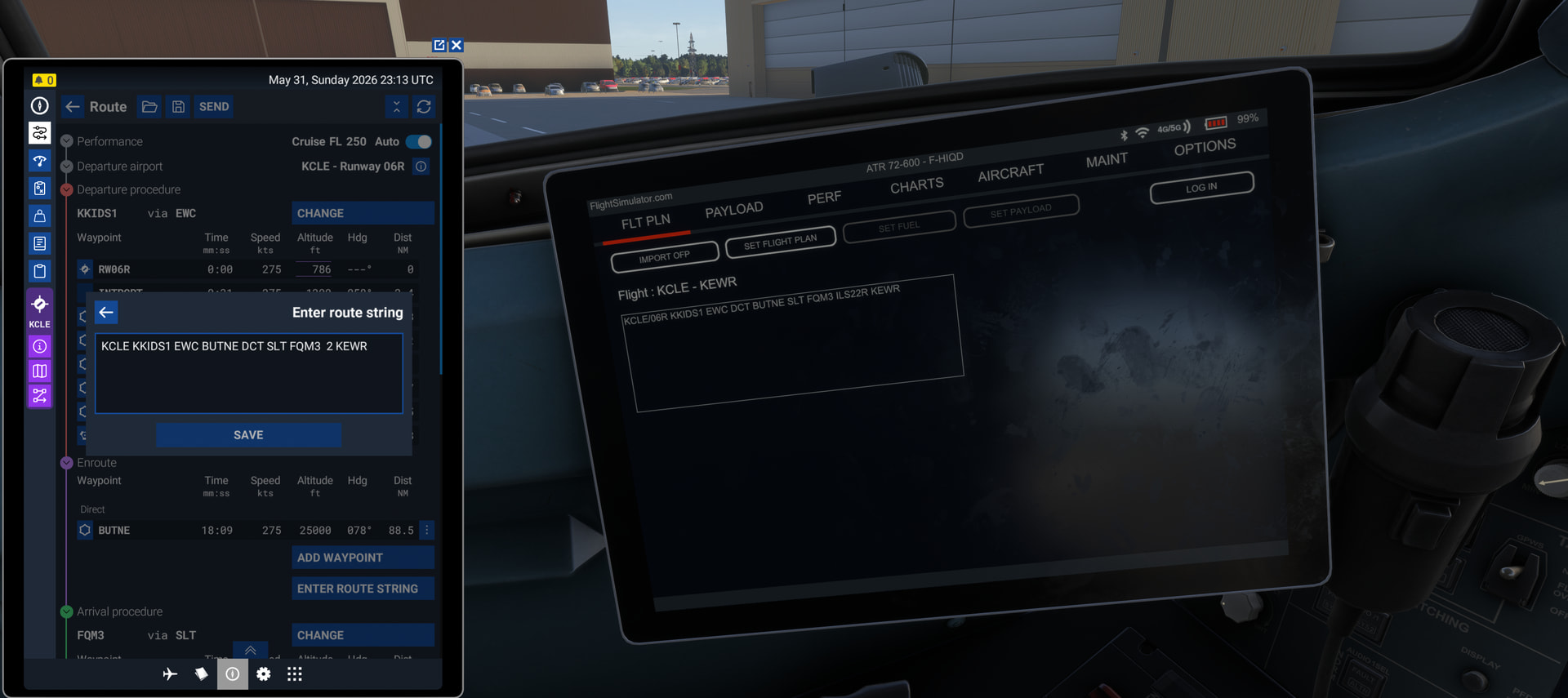
More weird hallucination waypoints - the route was KCLE to KEWR with the FIND ROUTE function in the default EFB Planner, no Sim Brief involved, and no airways involved.

The sim generated the following route:

KCLE KKIDS1 EWC BUTNE DCT SLT FQM3 2 KEWR

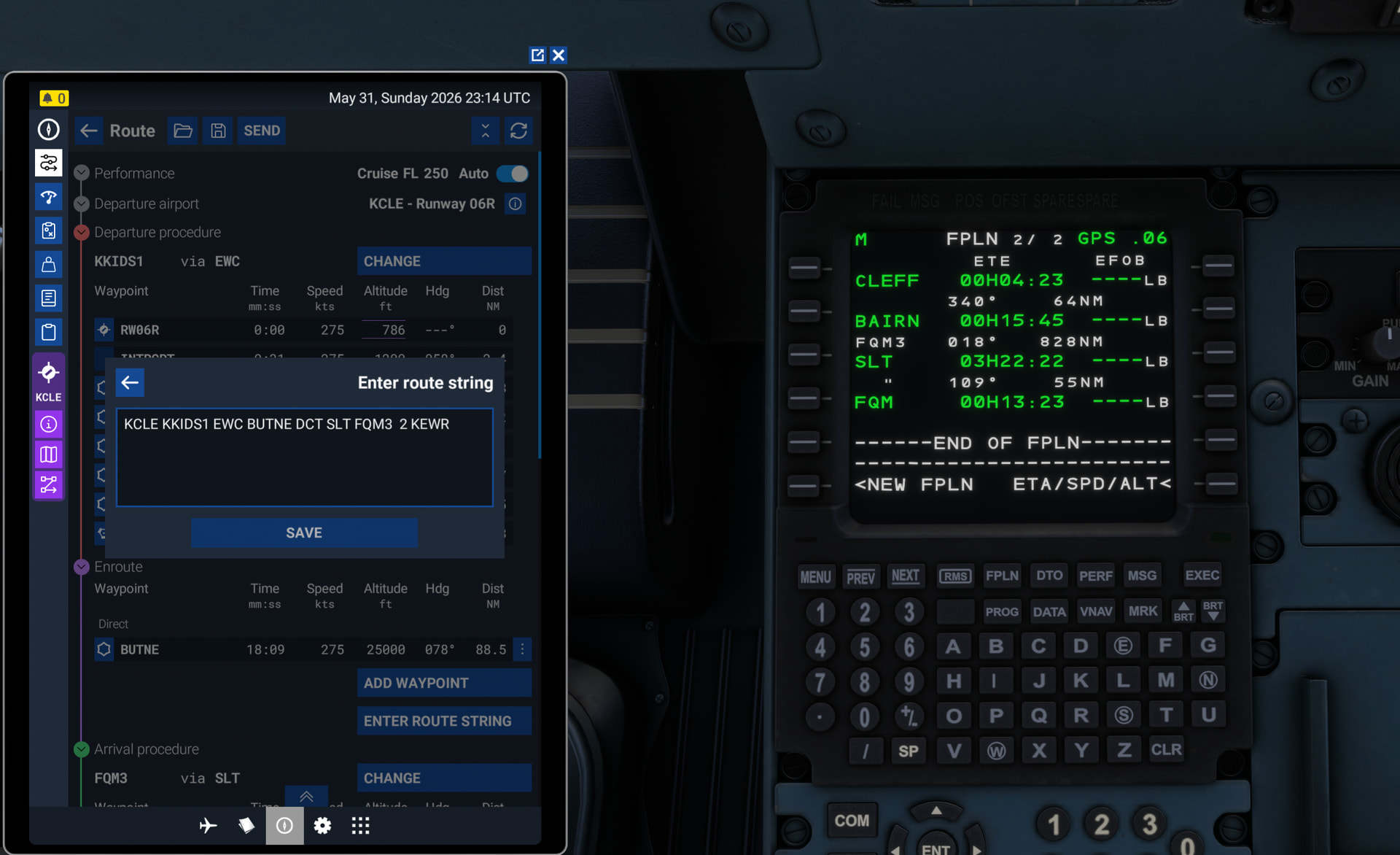
After importing from the EFB Planner to the ATR EFB (where everything looked good) and then sending to the MCDU, the plane has the route:

KCLE DCT BUTNE BOBOE DURRY CLEFF BAIRN SLT.FQM3 KEWR

The legs from BOBOE to BAIRN are all in central Florida, and appear to be leftover from a previous flight, even though this was my first flight in this sim session.

So it seems like another issue is that some part of the process is holding onto old route data from previous sessions.

Hi. No, sadly it doesn’t help. I get one leg entry without anything and one with just the airway name (field “via”). What I don’t get at all, is waypoint names (field “name”). There’s no way to retrieve a list of airways from the nav database if I don’t know where to start and where to stop.

Hans

Hi Zad’ma. That’s what I meant when I told you on Discord about the central european flight that suddenly continued 1500nm away in the Middle East. But that’s how it’s returned by the fsPlannedRouteGetEfbRoute() API call which returns a pointer to the flight plan data. Nothing that I could initialize or overwrite with zeros before the call in order to avoid any old or invalid data.

Hans

In your example with the 1500nm random waypoint did you see it in the Planner app on the EFB as well, on the ATR EFB, or did it also only appear in the MCDU?

That field is not for use for retrieval from the nav database, it’s just if someone named the waypoint something human readable (like for bushtrip POIs).

From the SDK docs:

  • name: A pointer to a null-terminated string representing a human readable name for this leg, if any. This is mostly used to identify user waypoints with POI names.

You would need to use the fixIcao field for this purpose. In all cases, the airway entry is the enroute leg prior to via appearing, and the exit is the one that comes with the via.

I’m not the only member to have this problem! I have done so many clean installs, removed all addons, and this Does the exact same on my XBOX X. once i enter my SB user code and try to import my SB flight plan i get this WASM crash. I have streamed and DL the aircraft but still the same. Run on PC and Xbox and still the same. I can import a MSFS flight plan no problem but if i turn that off and try to import SB this happens - I uninstalled 2024 ATR and reinstall 2020 version that worked from day one but now i get the same error…I’m pulling my hair out..Please Help

To be clear, this bug report is not related to WASM crashes at all - and not about using SimBrief import, either. You may want to open a separate bug report so that issue can be tracked and logged on its own.

I’m going to try the fixICAO field. Let’s see if that leads to anything useful. Thank you.

By the way: I went mostly by the PlannedRouteAircraft sample… and that uses “name” instead of “fixICAO”.

Hans

This is known (and has already been fixed here).

So, it seems that I managed to fix both issues. The airway import and the extra waypoints at the end. The fix will be available in the next update.

Are u able to fix WASM crash of click GPWS on MAINT menu on EFB?

Sorry but i dont see any solution to this problem here. Can you point me to it?

I believe by “here” he meant internally in development, which means it’s something we should see in the next update - hopefully :slight_smile:

Thanks, Hans! I’m wondering what it would take to pass that on to the folks at iniBuilds who I believe may be impacted the same way: [1.6.16.0] iniBuilds Airbus Flight Plans Imported from EFB are Broken

Hi Hans,

If you’re referring to this code here from the sample, it does pull name but throws it away; the ident portion of the fixIcao is the only thing that is used to build the enroute portion of the route string:

for (int i = 0; i < route.numEnrouteLegs; i++) {
	std::string ident = route.enrouteLegs[i].fixIcao.ident;
	std::string via = route.enrouteLegs[i].via;
	std::string name = route.enrouteLegs[i].name;

	if (via.empty()) {
		segments.push_back(via + " " + ident);
	}
	else {
		segments.push_back(ident);
	}
}

Additionally, the fixIcao parameter corresponds exactly to the SimConnect facility API ICAO facility identifier, so you can use the type, region, and ident to get an exact worldwild unique facility. There is no need to disambiguate facilities that have the same ident but are in different region or have different facility types. As an aside, I do see a typo in that sample code there which I’ll fix: the check should be !via.empty().

One last thing, the FreeRoute method is important, as the sim cannot otherwise know when you’re done with the memory for the route struct (and parts thereof) it hands you.

Hope that helps, good sir!

Thank you. I have all that now. Seems to work well. I created a few more flightplans (including rather complex ones) and no more issues with the import have shown so far.

Hans

Do you know if any of these fixes have resolved the issue I’ve run into where the MCDU pulls waypoints from a previous session’s flight plan? That may be trickier as I haven’t found a reliable way to recreate it.